 CoTester 2.0 is LIVE! Your Always-Available AI Teammate for Testing.
- What Is Synthetic Monitoring?
- Why Is Synthetic Monitoring Important?
- How Synthetic Monitoring Works
- Synthetic Monitoring Types
- Metrics to Track in Synthetic Monitoring
- Best Synthetic Monitoring Tools
- Synthetic Monitoring Best Practices
- Simplify Synthetic Monitoring with TestGrid
- Frequently Asked Questions (FAQs)
- What is synthetic monitoring and how does it work?
- How is synthetic monitoring different from real user monitoring (RUM)?
- How can synthetic monitoring help validate SLAs?
- What features should you look for in synthetic monitoring software?
- Is Selenium the best tool for synthetic monitoring?
- How do you use synthetic monitoring for mobile apps on iOS?
You test your apps and websites end-to-end before release to ensure they don’t have any defects. But surveilling your apps in production is equally important. Synthetic monitoring helps you do that. It runs automated checks to assess key user journeys while your app is live.
So, if your checkout flow stops working all of a sudden, the scheduled checks can detect this problem and alert your team before more customers encounter it.
In this blog, we’ll learn in detail what synthetic monitoring is, how to perform it, what metrics to measure, the tools you can use, and some best practices for optimization.
Pair synthetic monitoring with comprehensive test automation using TestGrid. Request a free trial.

TL;DR
- Synthetic monitoring evaluates application reliability, performance, and responsiveness by running repeatable, automated checks
- For synthetic monitoring, you first define the critical user scenarios, select monitoring locations, build the test scripts, execute them, evaluate results against thresholds, and generate reports
- The different synthetic monitoring types can include availability monitoring, synthetic transaction testing, synthetic browser testing, synthetic data testing, API monitoring, web performance monitoring, synthetic load testing, and synthetic network testing
- Some of the top synthetic testing software are TestGrid.io, Dynatrace, Elastic, Datadog, Alertsite, ManageEngine AppsManager, F5 Distributed Cloud, New Relic, and Grafana Cloud
What Is Synthetic Monitoring?
Synthetic monitoring is an application performance monitoring technique that uses scripted simulations of user interactions to evaluate the app’s behavior under predefined conditions. It helps you measure service availability, responsiveness, and transaction reliability, and allows you to assess if your app meets expected performance standards.
App or browser synthetic monitoring generally runs continuously throughout development, pre-production, and production. You can run checks even during low-traffic periods or when no users are accessing your app.
It’s an active monitoring approach. You can also direct checks toward specific endpoints, workflows, or geographic locations based on your monitoring objectives.
Why Is Synthetic Monitoring Important?
Synthetic monitoring helps you detect performance issues before they disrupt user paths and create bad user experiences. Here’s what synthetic web transaction monitoring enables:
- Baselining using historical performance data and competitor benchmarking to identify regressions and opportunities for improvement
- Monitoring complex transactions like login, checkout, and payment flows and verifying that critical journeys work as expected
- Peak traffic and new market preparation by checking performance across different geographic locations before launches or demand surges
- Third-party vendor accountability via tracking service availability and performance against agreed commitments (SLAs)
- Capacity planning and root cause analysis by analyzing performance trends, failure details, and supporting telemetry
- Better user experience and lower bounce rates; synthetic user testing allows you to detect slow-running pages or broken links that affect your users
How Synthetic Monitoring Works
1. Define your monitoring scenario
The first step involves identifying the critical pages, API endpoints, and user journeys that need continuous monitoring. This can include login, checkout, and payment processing pages.
Then you define the success criteria (including expected HTTP status codes, correct response content, transaction completion, and acceptable response times) and thresholds, such as a maximum response time, to trigger alerts when performance falls outside your acceptable limits.
2. Select monitoring locations
Next, you have to configure environments where your test scripts will run. You can use public monitoring locations to assess externally accessible services and private monitoring locations to test your internal apps and restricted endpoints.
Make sure you cover relevant geographic regions, browsers, devices, and network conditions, so you can identify region-specific latency, browser compatibility issues, device-related failures, and network performance problems affecting different users.
3. Create the test scripts
This stage is about building your synthetic testing scripts. You can either create them manually or simulate user actions, like logging in, searching for a product, or completing checkout, record them, and convert them into reusable scripts.
Then configure how you want to execute the script, whether through browser tests, HTTP requests, API calls, or multi-step transactions.
At this point, you also need to prepare the required test data and dedicated credentials, and store passwords and API keys securely to ensure the scripts can run correctly without exposing sensitive information.
3. Execute checks through monitoring agents
After your scripts are built, you can configure a monitoring agent (also called a probe or robot client) to execute them.
This agent basically sends requests or performs browser actions, records the results, and reports them to the monitoring platform.
You can either deploy the agent inside the firewall to check your internal apps and private services, or outside the firewall to assess the availability and performance of public-facing apps from an external user’s point of view.
4. Evaluate the results against thresholds
After your scripts execute, the monitoring platform then compares measured response times, availability, error rates, and transaction completion against your predefined thresholds and success criteria.
In case a check fails, the platform can automatically rerun the test to confirm the failure and reduce false alarms caused by transient network issues.
5. Generate alerts and reports
Most synthetic transaction monitoring tools or platforms can send alerts to the responsible team through channels such as email or Slack when a synthetic check fails. You can also review dashboards and reports to review failures, response time trends, and affected locations.
Also Read: Performance Testing Guide: Types, Process, Tools and Best Practices
Synthetic Monitoring Types
The monitoring types can differ based on your objective, test execution method, app components, and network conditions. These are some of the most important types you should know about.
1. Availability monitoring
In this technique, you leverage synthetic probes to periodically check if your website, app, or endpoint is reachable and responding as expected. Availability monitoring can include HTTP checks for validating status codes and response content, DNS checks to verify domain resolution, and SSL/TLS checks to detect certificate validity or expiration issues.
2. Web performance monitoring
This synthetic performance monitoring mainly uses synthetic browser tests to measure your page load times and rendering behavior under controlled conditions. Single-URL browser monitors are one way to do this, where you focus on individual web pages and track metrics like Time to First Byte (TTFB), First Contentful Paint, and Speed Index to spot slow landing pages and performance degradation.
Also Read: What Is Web Services Testing?
3. Transaction monitoring
Synthetic transaction monitoring allows you to assess multiple steps in a critical user journey and ensure they work together seamlessly. Here you create browser click paths that simulate actions such as logging in, browsing a product, updating the cart, and proceeding to checkout. This method helps you evaluate individual steps and measure the overall transaction duration.
4. API monitoring
API monitoring is about sending requests to check service endpoints, HTTP status codes, response times, and response data. Single request API tests enable you to examine individual endpoints. Multistep API tests link dependent requests (e.g., verifying an authentication token before using it to retrieve order details) to verify that every request is returning the expected response.
5. Browser-based monitoring
Here you run automated tests in a browser environment to simulate user interactions and check how your web app behaves. Your checks can target individual URLs or follow scripted browser click paths to test page rendering, navigation, and critical interactions at scheduled intervals (e.g., every 15 minutes).
Metrics to Track in Synthetic Monitoring
These are some of the most critical metrics you can measure to check if your app can respond within acceptable limits, remain accessible, and complete critical essential user journeys correctly.
| Category | Metric | Description |
|---|---|---|
| Availability and reliability | Uptime or availability | Percentage of monitored time or checks that meet your defined availability criteria |
| Error rate | Proportion of monitored requests or checks that fail | |
| Transaction completion rate | Percentage of synthetic transactions that complete all required steps successfully | |
| MTTR (Mean Time to Repair) | Average time it takes to restore service after an incident | |
| Response and page performance | Response time | Time that elapsed for a monitored request or operation to complete |
| Time to First Byte (TTFB) | Time from navigation or request start until the first response byte arrives | |
| First Paint | Time till the browser first renders a visual change on the page | |
| DOM load | Time from navigation start until DOMContentLoaded fires, after HTML parsing and deferred script execution | |
| Page load time | Time from navigation start to a defined page-load milestone, usually the browser’s load event | |
| Page Complete | Time till a monitoring tool’s defined page-completion conditions are met | |
| Speed Index | How quickly visible page content gets populated during loading | |
| Time to Interactive (TTI) | This is a historical lab metric which estimates when a page becomes reliably responsive to user input | |
| Above-the-fold load time | The time it takes for a browser to fully render or load the first section of a webpage which visitors see | |
| Specific object or element load time | Time it takes an individual object (like an iframe or image) to load or render fully |
Synthetic monitoring metrics show you how your app performs. But your team needs benchmarks to determine whether the results are acceptable.
Teams can use Service Level Agreements (SLAs) and Service Level Objectives (SLOs) to define availability and performance targets and set thresholds for metrics like response time and transaction completion.
Read More: Software Testing Metrics: How to Track the Right Data Without Losing Focus
Best Synthetic Monitoring Tools
Here are some commercial synthetic monitoring solutions available on the market. The table below compares their best features, monitoring capabilities, and supported testing methods.
| Tool | Best For | Monitoring Type | Testing Capabilities | Monitoring Locations | Observability Integration |
|---|---|---|---|---|---|
| Dynatrace | Monitoring HTTP endpoints and browser-based user journeys | Browser, HTTP, network availability | Recorded or manually configured browser journeys, step-level performance, custom simulation scripts | Global public locations and private locations deployed within your own network | Dashboards, notebooks, alerting |
| Elastic | Continuous availability monitoring | Browser, HTTP/S, TCP, ICMP | Real-browser user journeys, scripted browser checks, response-text validation | In-house-managed global locations and customer-managed private locations | Elastic Observability, alerting, metrics, APM traces |
| AlertSite | Multi-step web transactions monitoring | Browser, URL/HTTP, API (REST/SOAP), DNS, TCP | login and checkout validation, page-load timing, per-resource waterfall analysis | Global public nodes and private monitoring nodes inside your network | AppDynamics APM integration, Splunk analytics, Google Analytics, PagerDuty, OpsGenie |
| Datadog | End-to-end monitoring | Browser, API (HTTP, SSL, DNS, WebSocket, TCP, UDP, ICMP, gRPC), network path | Codeless browser test creation, multi-step API request chaining, step-level screenshots | Managed locations; customer-deployed private locations | Native APM and RUM integration |
| ManageEngine AppsManager | Monitoring scripted web transactions and page performance | REST API, URL availability, DNS, ping, TCP/IP ports | Recorded browser interactions, scripted user journeys, response-code validation | Global monitoring locations; custom locations using EUM agents | RUM, alerts and reports, OpManager and Analytics Plus integration |
| F5 Distributed Cloud | Monitoring HTTP(S) endpoint health, DNS configuration, and TLS security | HTTP/S, DNS, TLS | Response-string validation, custom request headers and bodies, endpoint performance checks | Global source regions | Built-in observability dashboards, APIs for Datadog, Splunk, New Relic, PagerDuty |
| Grafana Cloud | Monitoring service-level objectives (SLOs) through scheduled synthetic checks | Browser, HTTP/S, Ping, DNS, TCP, Traceroute | Browser-based E2E user journeys, page-performance measurement, API-based scripted checks | Public probes and private probes | Native Grafana dashboards and alerting |
| New Relic | Proactive monitoring of website and API availability | Ping, simple browser, scripted browser, browser step monitors | Multi-step browser checks, user journeys, API response validation | Public locations in global data centers, plus customer-managed private locations | Alerts, dashboards, and integration with APM data |
Also Read: Best 20 Performance Testing Tools in 2026
Synthetic Monitoring Best Practices
1. Integrate monitoring checks into CI/CD and GitOps
Incorporating synthetic web monitoring checks into your CI/CD pipelines will help you automatically assess your app’s workflows after deployments and catch regressions promptly.
You can manage monitoring scripts and configurations through version control and automated workflows with GitOps. This will improve consistency, give you an auditable change history, and make it easy for you to roll back faulty monitoring configurations.
2. Combine synthetic monitoring with RUM
Real User Monitoring (RUM), a passive monitoring technique, collects performance and interaction data from actual users so you can assess your app’s real-world user experience. Try to combine synthetic user monitoring with RUM. This will enable you to see both how apps perform during predefined tests and how they behave for actual users.
3. Secure synthetic test credentials and data
When you run your synthetic monitoring tests, you must keep dedicated test accounts with limited permissions and store credentials securely in a secrets manager. Don’t embed them in your scripts. And make sure your synthetic data for testing is isolated from the customer data. This can prevent accidental exposure, unauthorized access, or unintended transactions.
4. Check monitoring scripts after app changes
Your app updates can change UI selectors, page flows, API responses, or authentication behavior, and cause your existing tests to fail. Therefore, every time you make any significant code changes, run the affected scripts in a test environment and verify their assertions and dependencies to ensure they are functioning correctly.
Simplify Synthetic Monitoring with TestGrid
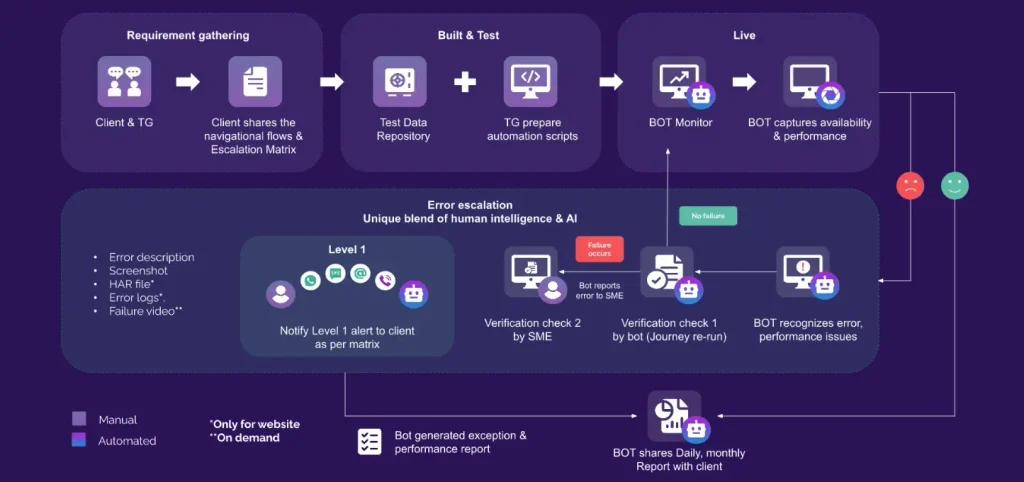
Built by TestGrid, TestGrid ONE is the AI operating system that runs quality engineering. Its synthetic monitoring offers a proactive solution to help you ensure your apps and websites always deliver optimal user experiences.
The platform allows you to build test scripts in code, plain English, or via record and play mode. It then executes your tests on different combinations of real browsers and devices, and across different locations worldwide.
You can monitor the critical user journeys in real time and detect and resolve issues before they impact users, with transactions monitored every 5 minutes across all platforms. And with an intuitive dashboard, you get actionable insights that enable fast decision-making and continuous improvement.
Beyond synthetic monitoring, TestGrid offers a complete testing suite, including support for regression, visual, functional, load, and performance testing. For efficient end-to-end automation, this platform seamlessly integrates with tools like Jenkins, Azure DevOps, CircleCI, Travis CI, Slack, Teams, as well as automation frameworks like Selenium, Cypress, and Appium.
Transform how you monitor digital experiences with TestGrid. Request a free trial.
Frequently Asked Questions (FAQs)
What is synthetic monitoring and how does it work?
Synthetic monitoring is an application monitoring technique that simulates user activity via test scripts to check if the app functions correctly. You run predefined checks against websites, APIs, or critical workflows and analyze the results to find functionality and performance issues.
How is synthetic monitoring different from real user monitoring (RUM)?
Synthetic monitoring uses automated scripts to simulate user actions at scheduled intervals, which helps you detect issues proactively. RUM collects performance data from actual user sessions and shows how real-world devices, browsers, networks, and locations affect user experience.
How can synthetic monitoring help validate SLAs?
Synthetic monitoring lets you run checks to measure service availability, response times, and critical transaction success against the thresholds defined in a Service Level Agreement (SLA). You can leverage historical monitoring results to identify SLA breaches, examine failures, and confirm that service providers meet their obligations.
What features should you look for in synthetic monitoring software?
When you search for synthetic monitoring software, see if it supports browser simulation, API tests, session replay, multistep transaction monitoring, configurable test intervals, and public and private monitoring locations. And prioritize features like customizable alerts, performance dashboards, CI/CD integrations, and connections to APM traces and logs.
Is Selenium the best tool for synthetic monitoring?
Selenium is a browser automation framework, which is useful for scripting synthetic browser journeys. But it doesn’t natively provide a complete monitoring solution with scheduled execution, global monitoring locations, alerting, and performance dashboards.
How do you use synthetic monitoring for mobile apps on iOS?
You can conduct synthetic application monitoring for iOS by configuring scripted tests to run at intervals on real iPhones or supported iOS simulators and then assessing critical workflows and features of your apps. For native iOS apps, use synthetic transactions monitoring tools that explicitly support iOS mobile app testing, since browser-based synthetic monitors alone don’t test native app behavior.


