


Orchestrate Mobile App Test Execution on Real Devices With TestGrid
Deploy your mobile apps before launching it to the world on real Android and iOS devices, validate behavior in live environments, and see exactly how they perform across device models, OS versions, and hardware profiles. Capture performance and stability characteristics that only surface under real-world conditions with TestGrid.


Streamline Mobile App Test Execution for Efficiency
Don’t lose time preparing devices or configuring environments to start testing. Begin execution immediately and shorten the feedback loop between development and validation.
Request Free TrialRemove device setup overhead
With TestGrid, you upload your Android (APK) and iOS (IPA) builds directly and make them available on real devices without manual provisioning, local setup, or device management overhead. Builds are installed automatically on selected devices.
Perform automated tests on real devices
Run existing Appium-based automation across multiple real Android and iOS devices without refactoring test code. Execute tests in parallel, validate behavior across diverse device combinations, and scale execution as your coverage grows.
Validate real user interactions via manual testing
Verify gestures, orientation changes, and sensor-driven behavior that automation may not reliably cover. Interact with apps using native device inputs—taps, swipes, scrolling, rotations, camera access, and biometric authentication—to uncover edge cases.
Observe Live Device Behavior During Test Runs
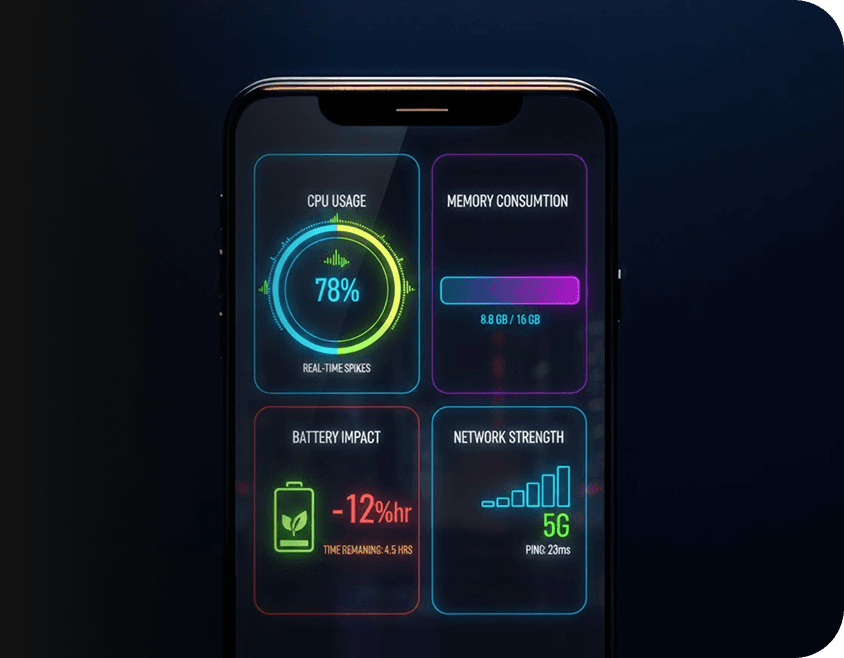
As your mobile app tests execute, TestGrid provides real-time visibility into device vitals, helping you understand not just where failures occur, but why they happen. Monitor CPU usage and memory consumption, battery impact during execution, and network behavior under varying conditions.
MDM-Backed Controls for Enterprise Mobile Testing
TestGrid integrates with Mobile Device Management (MDM) systems to support testing in regulated environments. Provision devices centrally, enforce security policies, manage OS and app update cycles, and govern access through roles and permissions. Minimize environment drift over time.
Request Free Trial
Comprehensively Review Mobile App Test Execution Outcomes
TestGrid aggregates results across devices, OS versions, and builds so you can review execution timelines, identify stability trends, and detect recurring failure patterns. Such visibility supports informed decisions about release readiness and quality risk.
Request Free Trial
Mobile App Testing Execution Is Practical With TestGrid
TestGrid gives you all the tools to run tests without compromising data isolation or security posture.
Control access and maintain execution consistency
Restrict device usage by role or project, manage application versions used during execution, and reserve specific devices to avoid conflicts and ensure predictable test availability.
Leverage private device labs & on-prem infra
Keep all test traffic, device data, and execution inside your internal networks while using the same execution workflows, automation support, and reporting available in the cloud.
Interact with real devices remotely without lag
TestGrid provides optimized screen broadcasting for real devices, enabling low-latency remote interaction even across public networks. Scroll, tap, and navigate apps smoothly.
Frequently Asked Questions
Can you execute mobile tests as part of CI/CD workflows?

Yes. TestGrid supports mobile app test execution directly from your CI/CD pipelines, allowing you to trigger mobile app testing execution automatically on every build, merge, or release event. By integrating mobile app test execution on real devices into your pipelines, you validate functionality, performance, and stability continuously—without manual intervention.
Can you execute mobile tests as part of CI/CD workflows?
Yes. TestGrid supports mobile app test execution directly from your CI/CD pipelines, allowing you to trigger mobile app testing execution automatically on every build, merge, or release event. By integrating mobile app test execution on real devices into your pipelines, you validate functionality, performance, and stability continuously—without manual intervention.
Can you combine manual and automated mobile testing?
Yes. TestGrid enables you to combine manual and automated mobile app test execution on the same real-device infrastructure. You can run scripted mobile app testing execution alongside exploratory and approval testing on real devices, allowing both approaches to complement each other without managing separate environments.
Can you combine manual and automated mobile testing?
Yes. TestGrid enables you to combine manual and automated mobile app test execution on the same real-device infrastructure. You can run scripted mobile app testing execution alongside exploratory and approval testing on real devices, allowing both approaches to complement each other without managing separate environments.
What platforms are supported for mobile execution?
TestGrid supports mobile app test execution on real devices across both Android and iOS platforms. You can run mobile app testing execution on a wide range of real devices covering multiple OS versions, screen sizes, and hardware profiles, ensuring your app behaves consistently across the environments your users rely on.
What platforms are supported for mobile execution?
TestGrid supports mobile app test execution on real devices across both Android and iOS platforms. You can run mobile app testing execution on a wide range of real devices covering multiple OS versions, screen sizes, and hardware profiles, ensuring your app behaves consistently across the environments your users rely on.
Why is real-device testing critical for mobile apps?
Mobile app test execution on real devices is critical because real devices expose hardware behavior, OS-level constraints, performance characteristics, and user interaction patterns that emulators cannot reliably reproduce. Real-device mobile app testing execution helps you uncover issues related to gestures, sensors, performance, and stability before they impact real users.
Why is real-device testing critical for mobile apps?
Mobile app test execution on real devices is critical because real devices expose hardware behavior, OS-level constraints, performance characteristics, and user interaction patterns that emulators cannot reliably reproduce. Real-device mobile app testing execution helps you uncover issues related to gestures, sensors, performance, and stability before they impact real users.