 CoTester 2.0 is LIVE! Your Always-Available AI Teammate for Testing.

- What Is Salesforce UAT Testing?
- Why Is Salesforce UAT Testing Important
- Who Is Responsible for Performing Salesforce UAT?
- Salesforce UAT Testing: Workflow
- Salesforce UAT Testing Tools
- Salesforce UAT Test Case Examples
- Salesforce UAT Testing vs. Functional Testing
- Salesforce UAT Testing Best Practices
- Support Salesforce UAT Testing with TestGrid
- Frequently Asked Questions (FAQs)
Salesforce UAT is critical because even if your release passes functional checks, it can still affect operations across your sales and service teams if it doesn’t support business processes as expected.
Testing Salesforce workflows, interconnected configuration, automation, permissions, data, and integrations with real users can help you identify role-specific access issues, incorrect data flows, and integration failures.
In this blog, we’ll talk about what Salesforce UAT testing is, how it’s performed, who conducts it, and the tools to use.
Support Salesforce UAT with automated workflow validation using TestGrid. Request a free trial.
What Is Salesforce UAT Testing?
Salesforce UAT testing is the final business validation of a Salesforce implementation before production release. It helps you evaluate whether configured features, workflows, automation, and integrations work together to support business processes.
Business stakeholders use realistic scenarios to determine if the solution is ready for operational use and deployment.
When is Salesforce UAT done?
UAT testing Salesforce is generally conducted after system and integration testing when the build is stable enough for business validation, but prior to production release so teams can work on addressing the critical issues before go-live.
Teams may repeat UAT as part of Salesforce release management when significant changes are made after initial validation, like major configuration updates, data migrations, or new integrations.
Also Read: Salesforce Testing Guide: Types, Process & Best Practices
Why Is Salesforce UAT Testing Important
Your Salesforce apps might meet the technical specifications and yet fail to deliver the experience users are expecting. To know if your Salesforce implementation aligns with business needs, assessing the features and workflows with real users is critical.
UAT helps you:
- Verify user-specific behavior by confirming that different personas can access the records, fields, and actions they need
- Test the critical scenarios and high-value, frequently used processes which directly impact business operations
- Identify defects and configuration gaps before they disrupt critical business processes, reducing deployment risk
- Gives business stakeholders evidence to approve, reject, or delay a release and support go/no-go decisions
Who Is Responsible for Performing Salesforce UAT?
1. Business users
These are the primary UAT testers who help you validate Salesforce against real-world business processes. Business users execute UAT scenarios, assess whether workflows can support their day-to-day responsibilities, and give you feedback on usability gaps.
2. QA teams
QA teams mainly support your UAT process by preparing test cases, coordinating the test execution, and managing reported defects. They help your business users navigate test scenarios, document results, and triage issues with admins and developers.
3. Product owners and business analysts
These roles help you connect your Salesforce implementation with business outcomes. Product owners prioritize requirements and evaluate business value. Business analysts convert requirements into processes and acceptance criteria.
Both clarify expectations, review results, and enable you to determine if identified gaps are critical and need to be fixed before deployment.
4. Salesforce admins
Salesforce admins can support you in the UAT process by configuring the test environment, preparing user access and test data, and checking Salesforce configuration. They may also inspect issues, apply fixes, and ensure workflows, permissions, automation, and Salesforce features function as expected.
5. Developers
Developers are mostly responsible for investigating issues or defects and resolving them. They analyze where issues stem from, whether it’s the code, integrations, or other technical components.
6. Security officers
Security officers play a critical role in the UAT, particularly for organizations in regulated industries. They check if your apps and websites meet security, privacy, and compliance requirements.
For that, they review access controls, permissions, data visibility, and security-sensitive workflows, and spot security gaps.
Salesforce UAT Testing: Workflow
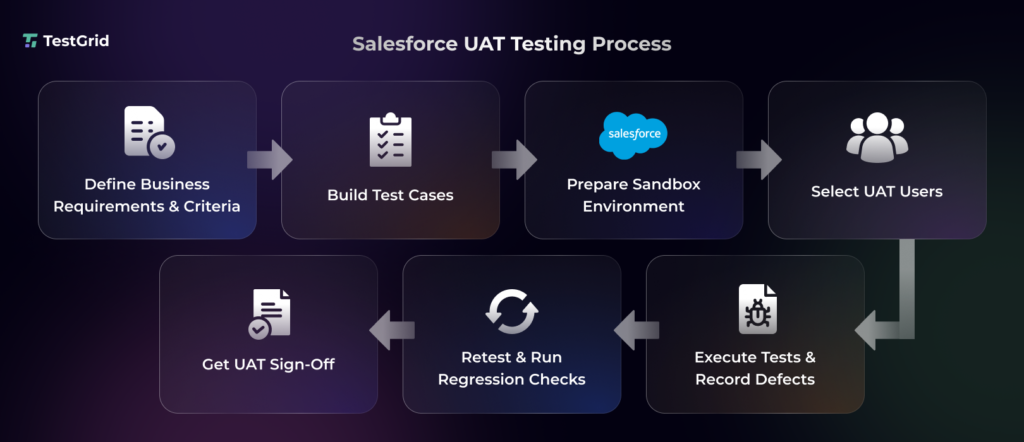
1. Specify your business requirements and acceptance criteria
You have to identify the different business workflows, user stories, and features your Salesforce apps must support. Then you need to convert them into measurable acceptance criteria stating what constitutes a successful outcome.
For example, if a requirement is “Users should be able to reset their Salesforce password”, your acceptance criteria could be “When a user requests a password reset, Salesforce must send a reset link to their registered email within one minute.”
2. Map out the scenarios and test cases
Then analyze how users work with Salesforce and identify scenarios like lead-to-opportunity conversion or case resolution. Now you need to create UAT test cases based on the scenarios with correct preconditions, user roles, test data, steps, and expected results.
Make sure that you cover both successful and relevant negative paths for maximum coverage.
Pro tip: Prepare a UAT checklist to verify that all required UAT scenarios, user roles, test data, and environment prerequisites are covered before you execute tests.
3. Prepare a Salesforce sandbox
Set up a dedicated sandbox that closely reflects the production environment, including the relevant configuration, permissions, integrations, and representative data needed for UAT.
A Partial Copy of salesforce sandbox is an isolated test environment which includes a subset of production data and is suited well for UAT. You can also use Full sandbox for testing under production-like conditions.
You must verify user access and sandbox-specific settings before execution.
4. Select UAT participants and train them
The next step in the Salesforce UAT testing process is to pick representative business users who will use the Salesforce apps. You need to brief them on the UAT scope, scenarios, test environment, expected outcomes, and defect reporting process.
For instance, sales reps can validate lead conversion and opportunity updates. The managers in your team can verify approvals and dashboards.
5. Execute tests and track defects
After the users check the critical workflows and features, record the actual outcomes and compare them to your acceptance criteria. At this point, you must mark the test as passed, failed, or blocked.
In case you encounter failures, log the defect with its steps, expected and actual results, affected workflow, and business impact so your developers have evidence to reproduce and fix it.
6. Retest and run regression tests
Retest the failed scenarios to confirm the defects are resolved. Running regression tests after fixing defects is critical to check if the changes created any new defects or affect your existing Salesforce workflows.
7. Obtain UAT sign-off
Consolidate your UAT results, including test outcomes, unresolved issues, and any accepted limitations. Then ask the stakeholders to review the results.
Lastly, obtain formal approval to move the Salesforce changes toward production. You should document the decision and any outstanding risks for release planning.
Learn More: Salesforce Test Automation Challenges
Salesforce UAT Testing Tools
These are some of the best salesforce UAT testing tools that you can use for assessing whether your Salesforce implementation is ready for business use.
- Centercode: This platform offers you an automated way to run high-impact user tests focusing on your target market. You can engage the right users based on your product and get rich, customer-generated issues and ideas to maximize your product success.
- Applause: Applause provides you with the real human insights you need to make customer-centric decisions about your products. The platform gives you curated user insights, expert recommendations, detailed findings, a results summary, and deep analysis of complex flows.
- Usersnap: This tool integrates AI to turn user feedback into actionable product decisions. Channels ingest and extract valuable insights from all your customer-facing teams. You can collect in-app user feedback and run research with templates from industry experts.
- Testmonitor: This platform makes it easy for your non-technical stakeholders to receive clear updates and feedback with a minimal training curve. Testmonitor helps you record, link, and track requirements from beginning to sign-off. Plus, you can add and manage testers to your projects with an intuitive interface.
- Panaya Foresight: It comes with features like test notifications, seamless collaboration, automated documentation, and easy defect reporting to help you simplify Salesforce UAT. Panaya can mimic actual business processes and accelerate Salesforce testing.
Also Read: 10 Salesforce Testing Tools to Automate with Confidence
Salesforce UAT Test Case Examples
These are some essential test case examples you can use as a reference to design test cases for your own Salesforce workflows.
| Function | Test case description |
| Lead-to-Opportunity conversion | Convert a qualified lead and verify that the correct Account, Contact, and Opportunity records are created and populated |
| Case creation and resolution | Create, assign, update, and close a Case, verifying that the correct status and customer information are maintained |
| User roles and permissions | Log in as different user roles and verify that each can access the records, fields, and actions required for their work |
| Approval workflow | Submit a record for approval and verify that it reaches the correct approver and follows the expected approval path |
| Quote generation | Generate a quote from an Opportunity and verify that products, quantities, pricing, and discounts are accurate |
| Notifications | Mark an opportunity as Closed Won and verify that the assigned sales representative receives the configured notification |
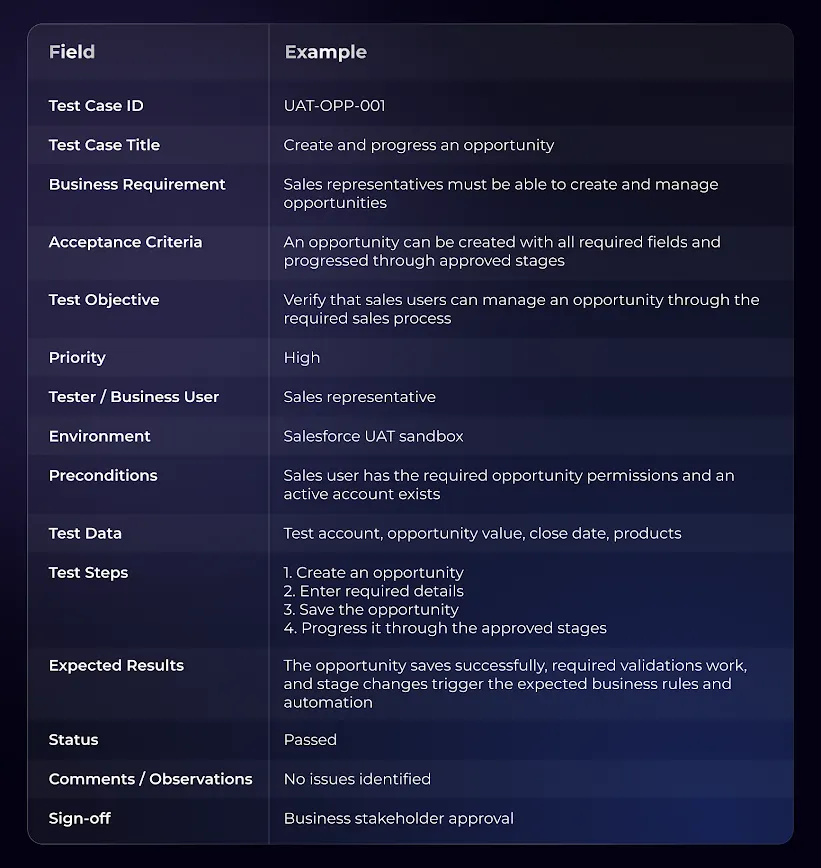
Salesforce UAT testing template
Here is a sample salesforce UAT testing test case template for an important business process function.
Salesforce UAT Testing vs. Functional Testing
The two approaches serve different purposes within the Salesforce testing lifecycle. Understanding the distinction helps teams assign the right validation activities, avoid duplicate coverage, and ensure that both technical and business functions are assessed properly.
| Aspect | Salesforce UAT testing | Salesforce functional testing |
| Goal | Confirm that Salesforce CRM meets business needs and is suitable for user acceptance | Verify that Salesforce features and functionality work according to specified business requirements |
| Focus | End-user validation, business processes, and real-world scenarios | Functional behavior, business rules, and workflows |
| Who performs the test | Business users, stakeholders, SMEs, project managers | QA testers, developers, technical teams |
| What is tested | Critical business workflows and key user journeys | Individual features and functions, such as fields, validation rules, buttons, page layouts |
| When it’s performed | Usually toward the end of the testing cycle, before production release | Can occur throughout development and testing before UAT |
Also Read: Functional Testing: Types, Examples, Techniques, and Best Practices
Salesforce UAT Testing Best Practices
1. Use representative and secure test data
Prepare test data which reflects records, relationships, volumes, and business conditions users encounter in production. However, if you’re using production-derived data, anonymize sensitive information (PII and financial details) and preserve the relationships and data characteristics needed for testing.
| Pro tip You can create a data checklist covering key objects, relationships, edge cases, and sensitive fields. Mask confidential data before you give UAT participants sandbox access. |
2. Validate Salesforce automation and integrations
Testing the automated Salesforce processes and integrations is critical. You must verify that Flows, approvals, triggers, and external-system data exchanges function correctly across connected processes with end-to-end integration testing.
| Pro tip Test both successful and failure paths for every integration. Assess the triggering record, outbound payload, Salesforce update, and error handling to ensure data remains consistent. |
3. Use test management tools to centralize UAT
Test management platforms can help you keep UAT test cases, execution status, evidence, defects, retests, and UAT results in one place. This gives your business users, QA teams, and stakeholders a shared view of progress and improves traceability from business requirements to final release decisions.
| Pro tip Link each UAT test case to its requirement and related defects, and preserve retest results separately so you can trace every failure and resolution efficiently without delaying releases. |
4. Involve business users early
Try to include business users right from UAT planning and scenario development. Their hands-on experience and knowledge of real user journeys will help you ensure test scenarios reflect how Salesforce will be used in production.
| Pro tip Ask users to review proposed scenarios before execution and flag missing workflows, exceptions, or role-specific steps that may not be captured in your functional requirements. |
Support Salesforce UAT Testing with TestGrid
TestGrid is an AI-native software testing platform that helps you generate, execute, and maintain automated test cases for Salesforce applications with CoTester.
You can execute Salesforce test scenarios across real browsers and devices to validate workflows across supported environments.
For Salesforce workflows that extend to mobile experiences, TestGrid also supports testing on real Android and iOS devices, including device interactions and network conditions.
TestGrid supports scriptless, low-code, AI-assisted, and code-based testing, giving QA teams and business-oriented users multiple ways to create and execute repeatable Salesforce tests.
You can use test execution results and diagnostic data from TestGrid to investigate failures and provide evidence for defect review during UAT.
TestGrid integrates testing with development and delivery workflows, including tools such as Jira, Azure DevOps, GitHub, Jenkins, Slack, and Microsoft Teams.
Use TestGrid to automate repeatable Salesforce workflow and regression validation while your business users focus on business acceptance and release sign-off. Request a free trial today.
Frequently Asked Questions (FAQs)
1. Can Salesforce UAT be automated?
Yes. You can partially automate UAT testing Salesforce, particularly for repeatable functional and regression scenarios using automated Apex and Flow tests or automated testing tools. But business user validation and final acceptance generally are activities that need human judgment.
2. What are common challenges in Salesforce UAT testing?
Some challenges you may face during UAT include unclear acceptance criteria, unrealistic or incomplete test data, integration issues, and testers who lack domain expertise. You can overcome them by defining measurable criteria, preparing representative data, testing integrations end-to-end, and involving subject matter experts and skilled business users.
3. How do you test Salesforce mobile workflows during UAT?
You can perform UAT for Salesforce mobile apps and workflows by executing scenarios on supported iOS and Android devices. You need to validate navigation, record creation or updates, permissions, automations, and integrations. If offline functionality is used, verify behavior and sync when connectivity is not available.


