CoTester 2.0 is LIVE! Your Always-Available AI Teammate for Testing.
If your organization works with clients and you have a customer relationship management system in place, there’s a chance you’re already using Salesforce.
The global Salesforce services market size stands at $23.0 billion in 2026. And as of 2025, the platform holds approximately 20% of the market share.
But despite being a mainstream platform used by major enterprises, Salesforce poses certain testing challenges, especially when it comes to test automation. In this blog, we’ll break down the most common Salesforce test automation challenges, why they occur, and the strategies to address them
Simplify Salesforce testing with CoTester. Request a free trial.

TL;DR
- Frequent platform updates, dynamic configurations, and evolving business requirements can create Salesforce testing challenges, especially for test automation
- An effective strategy to tackle Salesforce test automation challenges includes prioritizing high-impact business workflows, maintaining consistent test environments, and automating execution
- Executing tests like manual, automated, regression, integration, end-to-end, smoke, and user acceptance testing can give you comprehensive test coverage
- Integrating automated Salesforce tests into CI/CD pipelines helps you with faster feedback, early defect detection, and more reliable deployments
- Top tools for mitigating Salesforce test automation are CoTester by TestGrid, Testim, QA Wolf, Selenium, Cypress, Playwright, Provar, Gearset, and Autorabit
Why Salesforce Testing Challenges Are Unique
Salesforce testing is harder than testing normal web or mobile apps because not every organization or team uses the Salesforce cloud ecosystem the same way.
Many teams complement the standard features with custom objects, automation, business rules, integrations, and permissions to align with their business operations and goals.
Therefore, testing becomes complex because you have to validate these customizations, plus the regular upgrades and patches that Salesforce releases periodically.
Top Salesforce Test Automation Challenges
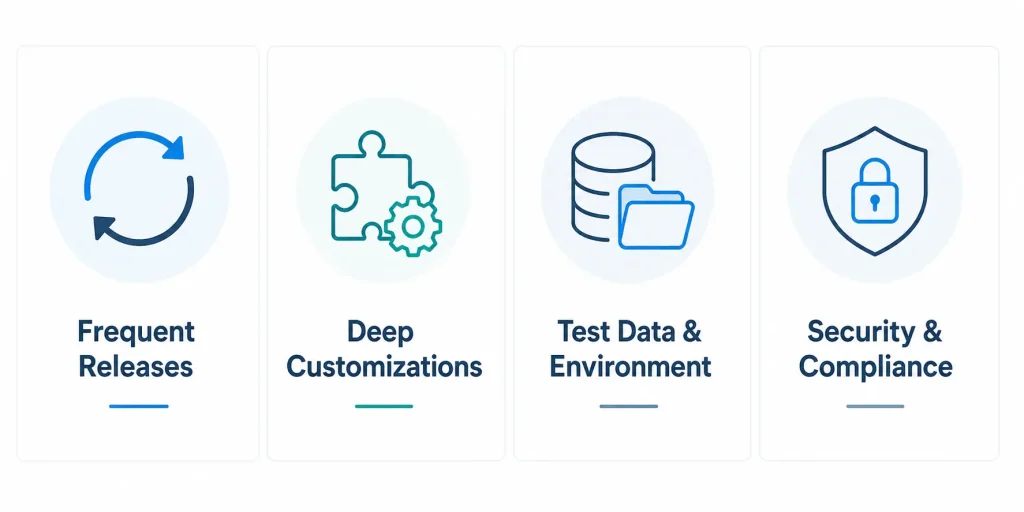
1. Frequent Salesforce releases and seasonal updates
Salesforce delivers three major updates every year, which are Spring, Summer, and Winter. Other than this, it also rolls out periodic maintenance updates and feature enhancements. This can affect your existing workflows, integrations, automations, and user interfaces. And your team may have to repeatedly run tests to ensure business processes work as expected.
Why this happens
Salesforce is a multi-tenant SaaS platform. Meaning every customer runs on the same version of the platform. Upgrades are automatic and mandatory as per Salesforce’s release cadence. So, you can’t really postpone or skip a release even if it impacts your existing features.
Impact
Updates can increase the maintenance effort for automated test suites as UI elements, metadata, or platform behavior evolve. If you don’t properly test the Salesforce releases, it may lead to production defects.
Example
A Salesforce Summer release may change a standard Salesforce Lightning component used in a custom Lead-to-Opportunity workflow. This can cause your regression tests to fail even when there are no code changes.
Solution
- Review Salesforce release notes and test changes in preview sandboxes before every seasonal release
- Prioritize automated regression testing for high-risk business flows
- Update test scripts regularly to match Salesforce changes
2. Deep customizations and dynamic interface elements
This is one of the major Salesforce testing challenges. Teams who use Salesforce generally depend on extensive custom configuration, custom objects, Lightning components, workflows, APIs, and validation rules.
These customizations can make your testing a lot more complex because Salesforce workflows and environments may behave differently for different departments.
Why this happens
Salesforce is inherently a metadata-driven app where your team can customize objects, fields, business rules, page layouts, and automation according to their business requirements without modifying the core app.
Dynamic rendering can change which UI elements are displayed and how they’re presented based on metadata and user context, making UI testing more complex.
Impact
Too many and frequent customizations may lead to fragile automation scripts, cause unexpected app behavior, and make it difficult for you to ensure consistent functionality across different user roles, business processes, and releases.
Example: You add a new validation rule and modify opportunity page layouts. As a result of this, your existing automation scripts fail because mandatory fields or UI elements changed unexpectedly.
Solution
- Document all customizations and update test cases whenever business rules change
- Build resilient automation using stable locators rather than relying on dynamic UI attributes to address these Salesforce test automation challenges
- Review the changes you made and validate affected business processes before deployment
3. Test environment and data integrity challenges
Maintaining reliable Salesforce test environments and realistic test data is hard. Incomplete or outdated data and inconsistent environments can produce unreliable test results and make it tough for you to assess the business processes properly.
Why this happens
This is one of the common Salesforce testing challenges tied to sandbox environments, and it happens because Salesforce has multiple sandbox types with different data and storage capabilities.
Developer sandboxes may contain metadata but little or no production data. Partial copy sandboxes might include only selected records. When your production data changes continuously, sandboxes can get outdated unless you refresh and reseed them regularly.
Also Read: Sandbox Testing: How to Set Up a Sandbox Environment
Impact
Poorly maintained environments and stale test data can lead to inaccurate test outcomes, hide production defects, delay your debugging process, and may force your team to spend more time examining issues that can’t be reproduced consistently.
Example: Your customer service team tests an email escalation workflow in an outdated sandbox. Missing entitlement records and obsolete customer data allowed your tests to pass, but the workflow failed after deployment to the production org.
Solution
- Refresh your sandboxes regularly to keep metadata and business data aligned with production
- Use production-like, masked, and relational test data instead of manually created sample records
- Select the appropriate sandbox type as per your testing scope and data requirements
4. Security, governance, and compliance challenges
Salesforce apps usually store sensitive customer, financial, and business data that’s needed to effectively carry out business operations. However, testing security controls, access permissions, and regulatory requirements without exposing confidential information or violating compliance regulations may be difficult, making this one of the more complex Salesforce testing challenges to manage.
Why this happens
Salesforce has a layered security model with profiles, permission sets, roles, sharing rules, field-level security, and connected apps. When these configurations update, verifying that every user has the correct level of access gets complex. Moreover, external or third-party integrations may create security gaps.
Impact
Security gaps can lead to unauthorized access or improper handling of sensitive data. This can result in data exposure, compliance violations, regulatory penalties, audit failures, and loss of customer trust.
Example: A financial services company deploys a new customer portal. Testing overlooks field-level security, which allows support agents to view confidential financial records that were intended only for loan officers.
Solution
- Check the role-based access, profiles, permission sets, and sharing rules for every user type
- Include security and privacy test cases alongside functional and regression testing
- Apply masked or anonymized production data to protect confidential information in your test environments
Learn More: Salesforce Performance Testing: A Comprehensive Guide
How to Build a Strategy to Overcome Salesforce Test Automation Challenges
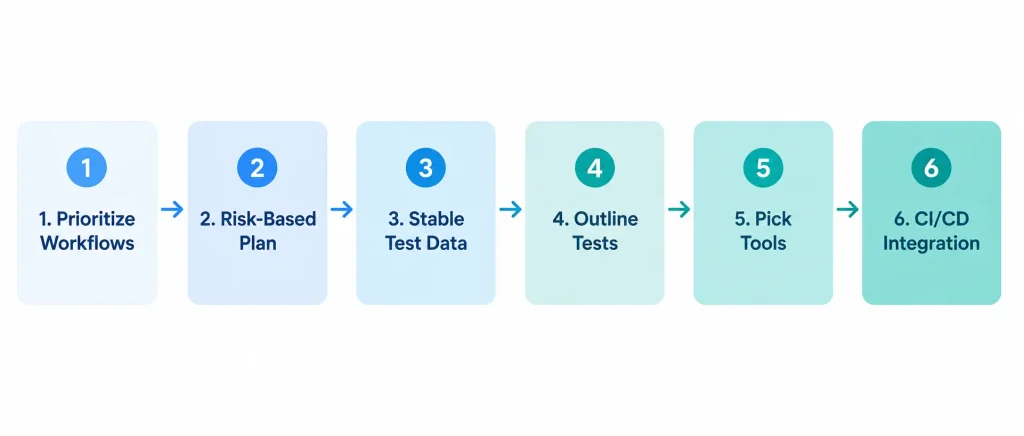
Following a proper strategy will help you address the Salesforce testing challenges we discussed so far.
1. Determine which critical business workflows to test first
You need to first identify which workflows (across Salesforce Sales Cloud, Service Cloud, Marketing Cloud) have the biggest impact on your operations and business. Try to focus testing on the areas that affect your customers, revenue, and compliance.
Some critical scenarios you must prioritize are:
- Lead creation, qualification, and conversion
- User authentication, login, and role-based access
- Account and Contact management
- Order management and fulfillment
- Data import, synchronization, and migration processes
- Reports and dashboards used for decision-making
2. Build a risk-based testing plan
Now that you know which important flows to test, classify them according to business impact, historical defect patterns, integration complexity, and security risk.
You must emphasize areas with flaky tests caused by poor locator stability or frequent Lightning UI changes (e.g., dynamic IDs, changing DOM structures, or Lightning component updates).
Also Read: Why Continuous Testing for Salesforce ERP Is Critical
3. Create stable test data and sandbox environments
Next, prepare test environments and data so you can get consistent results across test runs. At this stage, you should implement a test data management strategy that will help you generate, refresh, mask, and maintain realistic and relevant test data.
Apart from this, verify staging environments and sync sandboxes to detect environment drift (like missing metadata, configuration differences, and outdated reference records) before you start test execution.
4. Outline the tests to run
Decide the tests you want to execute to verify functional correctness, integration reliability, and business process continuity for your Salesforce environments.
These are some of the most critical tests you should include to prevent Salesforce testing challenges.
| Manual testing | Assess the newly developed features, custom business rules, and complex user interactions that need human judgment |
| Regression testing | Confirm that updates to Apex, Flows, metadata, or configurations didn’t affect existing business processes |
| Integration testing | Check data exchange and process synchronization between Salesforce and external systems such as ERP, CRM, payment, or marketing platforms |
| End-to-end testing | Evaluate complete business flows like lead conversion, opportunity management, order processing, case management |
| Smoke testing | Run quick checks after deployments to ensure critical Salesforce features are functioning correctly |
| User acceptance testing | Allow your business users to examine Salesforce configurations, automation, and core features against real-world acceptance criteria before production deployment |
5. Pick out the testing tools
The right test automation tools, unit testing frameworks, API testing frameworks, and test management platforms can help you match the speed of testing with frequent Salesforce releases, evaluate customizations, and spot defects early across Salesforce cloud platforms.
Choosing the right toolset is often the deciding factor in overcoming Salesforce test automation challenges like script maintenance, flaky locators, and slow feedback loops.
- Browser automation frameworks like Selenium, Playwright, and Cypress allow you to automate functional and regression testing for Salesforce web apps
- Salesforce-native automation systems like Provar let you test Salesforce metadata, Lightning components, and business processes
- AI-powered testing tools like CoTester, Testim, and QA Wolf leverage BDD, generative and agentic AI to automatically build and maintain tests and help you reduce script maintenance and flaky tests
- DevOps and release management platforms such as Gearset and AutoRABIT support Salesforce CI/CD, automate metadata deployments, and integrate with version control systems
Learn More: Top 10 Salesforce Testing Tools
6. Integrate test execution into your Agile and CI/CD workflows
Next, you need to build maintainable test suites using Java, JavaScript, TypeScript, Python, or any language you prefer based on the automation framework you chose. And follow design patterns such as the Page Object Model to improve test maintainability and reusability.
Connect with CI/CD tools like Jenkins, CircleCI, GitHub Actions, or Azure DevOps to trigger automated test runs after every build, code commit, or metadata deployment.
CI/CD integration, as well as following the test automation best practices, will help you get faster feedback throughout the software testing lifecycle and fix issues before release.
Overcome Salesforce Testing Challenges With CoTester
CoTester is an enterprise-grade AI testing agent that works alongside your QA and release teams to test frequent Salesforce releases and dynamic UIs continuously, and helps you prevent common Salesforce test automation challenges
You can record Salesforce workflows directly from live browsers, including login through custom domains, form submissions, button clicks, and page navigation. Then you can automatically convert every interaction into test steps and execute the tests across real devices and browser-based test environments.
Apart from this, CoTester lets you upload Salesforce user stories in PDF, Word, or CSV format, or link them from Jira, and then generates structured tests based on them, which you can review and edit from a natural language interface.
The agent even adapts to Salesforce’s dynamic Lightning UI and updates interactions when components shift, load late, or change structure. Plus, you get step-by-step execution history, screenshots, and error context for efficient debugging.
Build scalable and resilient Salesforce test automation with CoTester. Request a trial.
Frequently Asked Questions
Why do Salesforce UI tests fail most often?
The most common reason Salesforce UI tests fail is unstable UI element identification in Lightning Experience. Page structures may change after updates, or components may render dynamically. Tests that depend on fragile selectors instead of stable attributes can lead to test failures, one of the most persistent Salesforce test automation challenges teams face.
How do you overcome the challenge of frequent Salesforce updates during testing?
You can overcome this by regularly reviewing Salesforce release notes, testing critical workflows in preview sandboxes 4 to 6 weeks before production upgrades, and automating regression tests. Integrating these into a CI/CD pipeline helps you quickly identify issues related to Salesforce updates.
Why is CI/CD harder for Salesforce than for traditional apps?
CI/CD for Salesforce is harder because you need to manage both source code and metadata, which often carry complex dependencies across Apex, Flows, Lightning components, objects, and configurations. Your team also has to keep multiple Salesforce environments in sync and validate every deployment through automated testing.
Can Salesforce testing catch data loss or integrity issues during upgrades?
Yes, Salesforce tests can catch data loss and integrity issues during upgrades. They compare record counts, field values, relationships, and business rules before and after upgrades to help you identify data loss, failed migrations, and inconsistent automation.
What is Salesforce deployment testing?
Salesforce deployment testing verifies that a deployment has been applied successfully and that all metadata components, configurations, integrations, and user access function correctly in the target environment. This process helps you catch issues before the changes reach your end users.