CoTester 2.0 is LIVE! Your Always-Available AI Teammate for Testing.
- What Is DevOps Orchestration?
- DevOps Orchestration Workflow
- What Tools You Need for DevOps Orchestration
- How to Choose the Right DevOps Orchestration Tools
- What Is AI-driven DevOps and Multi-Agent Orchestration?
- Benefits of DevOps Orchestration
- DevOps Orchestration Best Practices
- Operationalize DevOps Orchestration for Quality Engineering with TestGrid
- Frequently Asked Questions (FAQs)
What happens when your developers can produce code faster than the rest of your delivery process can absorb it?
That question is becoming increasingly relevant as engineering organizations standardize more of the software delivery environment.
DORA reported in 2025 that 90% of organizations were using an internal developer platform, while 76% had dedicated platform teams.
At the same time, DORA warns that gains in development speed can still be lost to downstream bottlenecks in areas such as testing, security reviews, and deployment.
That’s where DevOps orchestration comes into play. In this guide, you’ll get a clearer understanding of how it works, where it aligns with the modern software delivery, and what to consider when applying it to your own environment.
Bring testing into DevOps orchestration with TestGrid ONE. Request a free trial.
TL;DR
- DevOps orchestration definition: DevOps orchestration is the coordination of automated tasks, tools, and processes across development, testing, infrastructure, deployment, and monitoring to create a connected software delivery workflow
- The DevOps orchestration phases can include code development, CI triggers, test execution, app packaging, deployment, release verification, monitoring, and continuous improvement
- The different categories of tools you need for orchestration in DevOps are source code management, CI/CD integration, infrastructure management, test automation, security scanning, observability, incident management, and communication
- DevOps orchestration helps engineering teams scale delivery, minimize manual coordination, and maintain consistent release practices
- Some of the tools commonly used for orchestration in DevOps include TestGrid for quality engineering, Jenkins, GitHub Actions, and GitLab CI/CD for CI/CD workflows, Terraform and AWS CloudFormation for Infrastructure as Code (IaC), and Kubernetes for container orchestration
What Is DevOps Orchestration?
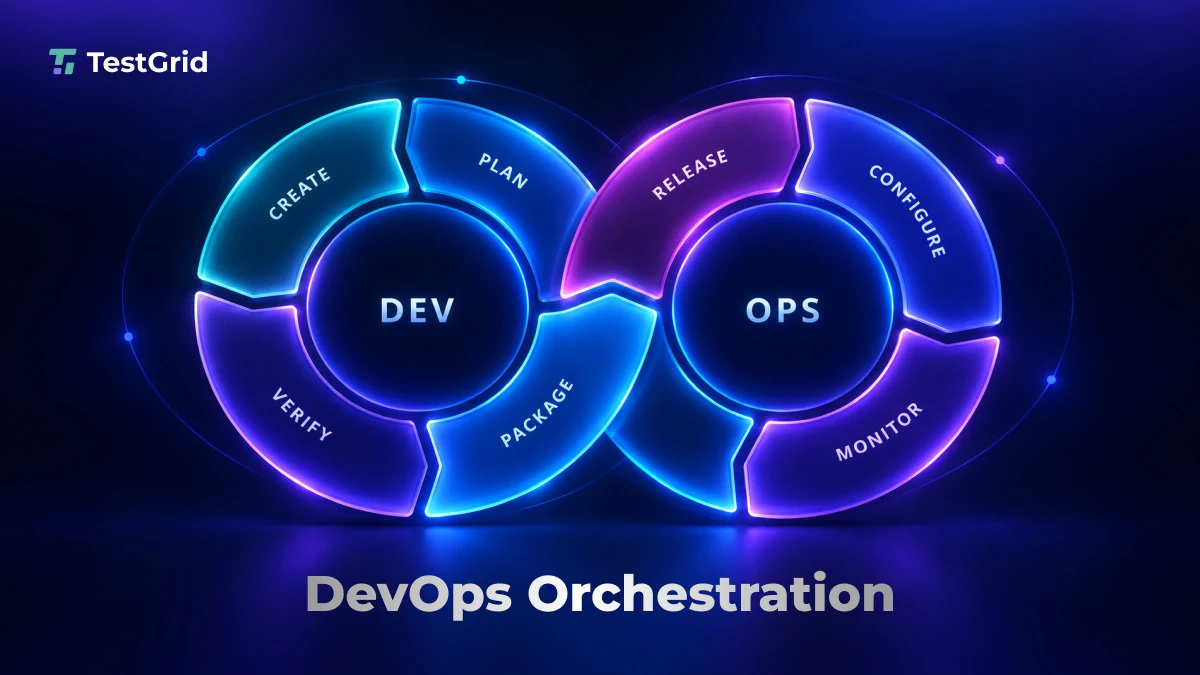
DevOps orchestration is the coordination of automated tasks, tools, and processes across the software development life cycle (SDLC).
It connects activities such as code integration, testing, infrastructure provisioning, deployment, and monitoring into managed workflows that account for dependencies, execution order, conditions, and approval gates.
This form of workflow orchestration helps you coordinate complex DevOps toolchains that span development, infrastructure, testing, security, and operations. DevOps toolchain orchestration can also connect scheduling, approvals, policies, and feedback loops across the tools involved in software delivery.
Orchestration in DevOps is particularly useful when your team relies on multiple platforms that need to exchange information, trigger downstream actions, or meet specific prerequisites before the workflow can continue.
DevOps automation vs. DevOps orchestration
Now that you know what is orchestration in DevOps, there’s a closely related concept known as DevOps automation. However, both solve very different problems in the software delivery cycle.
You must understand the distinction between the two so you can select the right approach when designing your engineering processes.
| Aspect | DevOps automation | DevOps orchestration |
| Primary purpose | Automates individual tasks | Coordinates multiple tasks into a workflow |
| Scope | A specific operation or job | An end-to-end delivery process |
| Task execution | Executes defined instructions | Manages task order, dependencies, and conditions |
| Decision-making ability | Follows configured rules and triggers | Evaluates configured conditions and routes the workflow based on task outcomes |
| Failure handling | Handles errors within an individual task | Can trigger configured retries, notifications, or recovery actions across workflow stages |
| Example | Automatically runs unit tests after a code change | Connects builds, tests, security scans, deployment, and release verification |
DevOps Orchestration Workflow
1. Developers write the code
A DevOps orchestration workflow varies by architecture and delivery model, but a typical workflow may start with your developers writing code to implement new features, fix bugs, or modify the existing app based on defined requirements.
They can work in a local development environment, use version control systems like Git to track changes, and commit their updates to a shared repository. This process gives you a traceable record of changes.
2. Trigger the CI pipeline
Next, a configured event, such as a code push or pull request, triggers your Continuous Integration (CI) pipeline. The CI/CD platform starts the defined workflow and runs the configured build steps, automated checks, and tests according to your pipeline rules.
3. Execute the required tests
Your CI pipeline executes the tests to assess the code changes. Your tests can include unit tests, integration tests, API tests, and end-to-end tests.
These checks help you validate individual components, interactions between services, and critical user workflows. You can also configure your CI pipeline to run tests sequentially or in parallel.
Also Read: 30+ Key Software Testing Types Every QA Needs to Know
4. Package the app
At the packaging stage, the pipeline generates build outputs and packages them into a deployable artifact. This phase might involve compiling source code, resolving dependencies, and creating a JAR file, executable, or container image.
You can then version and store the artifact in an artifact repository or container registry for deployment.
5. Deploy and verify the release
Next, your orchestration workflow deploys the packaged artifact to the target environment (staging or production). And once the deployment happens, you can run automated smoke tests via the pipeline and verify that your app is starting correctly and that the critical functionality works as expected.
In case the verification fails, your workflow can trigger alerts or initiate rollback procedures.
6. Gather feedback and improve
The last stage of a DevOps orchestration workflow is usually about obtaining feedback for improvement. Therefore, post release, you collect app logs, performance metrics, error reports, monitoring alerts, and user feedback.
This allows you to evaluate how the release performs in real-world conditions. Here you usually analyze the results and reports to identify defects, usability issues, or performance gaps.
These findings, in turn, help in future code changes, testing improvements, and workflow adjustments.
What Tools You Need for DevOps Orchestration
The DevOps orchestration ecosystem consists of tools which support different stages of your delivery cycle, including source code management, infrastructure provisioning, testing, security, and production monitoring.
1. Source code management
Git provides distributed version control for tracking code changes and maintaining version history, while platforms like GitHub and GitLab add hosted repositories, collaboration features, and pull request or merge request workflows. GitHub and GitLab can also trigger automated CI/CD workflows when you push changes or open a pull or merge request.
2. CI/CD integration and artifact management
CI/CD pipeline orchestration tools in DevOps, such as Jenkins, GitHub Actions, and CircleCI, automate and coordinate pipeline stages including builds, tests, and continuous deployment.
Artifact management tools such as JFrog Artifactory and Amazon Elastic Container Registry (ECR) store and organize the build outputs or container images used by those workflows.
Learn More: 18 Best CI/CD Tools for DevOps Automation
3. Infrastructure and environment management
These tools allow you to provision computing resources, configure servers, and maintain consistent environments across development, testing, and production. Infrastructure as Code (IaC) enables you to define the infrastructure resources in version-controlled files, which makes it easier for you to reproduce and manage environments.
Terraform and AWS CloudFormation are some of the tools which can provision and manage infrastructure through code.
Also Read: What is Test Infrastructure and Why is it Important?
4. Test automation
Test automation frameworks let you execute predefined tests and assess your app’s functionality, API behavior, and user workflows. These platforms minimize the effort of manual checks for every release.
Selenium, Playwright, and Cypress are some examples of this category. You can integrate them with your CI/CD pipeline to run tests automatically at different stages of the SDLC.
5. Security and vulnerability scanning
Identifying security gaps in your app’s code and third-party dependencies is critical to prevent data breaches and unauthorized access.
Security and vulnerability scanning tools can integrate security checks into your CI/CD pipeline so you can detect risks early and enforce security gates before deployment. Some tools you can leverage are Snyk and OWASP ZAP.
Learn More: Security Testing from Requirements to Release: A Full-Stack Approach
6. Logging and observability
Logging and observability tools allow you to collect and analyze app logs, metrics, and traces and diagnose failures. They give you feedback on pipeline outcomes, deployment, and production performance.
You can use Dynatrace, Prometheus, and Grafana to investigate issues, set alerts, monitor your app’s performance, and visualize system metrics.
7. Incident management and communication
Incident management and communication tools support DevOps orchestration by connecting alerts with response workflows and helping teams record, assign, prioritize, and resolve incidents.
PagerDuty and Jira Service Management support incident-response workflows, while Slack supports communication and notifications across teams.
Also Read: Best Test Management Tools
How to Choose the Right DevOps Orchestration Tools
When you’re assessing DevOps orchestration platforms and orchestration tools in DevOps, these are some of the critical factors to consider:
- Integration capabilities: Check compatibility with your existing CI/CD pipelines, source control systems, testing tools, and cloud platforms
- Infrastructure compatibility: Ensure the tools can support your cloud, on-premises, hybrid, and containerized environments
- Scalability and performance: Assess how well the tools handle growing workloads, concurrent jobs, and complex workflows
- Security and access control: Check that the overall toolchain provides appropriate security controls, such as role-based permissions, secrets management, audit logs, and policy enforcement
- Monitoring and troubleshooting: Make sure the tools you pick support workflow visibility, execution logs, failure alerts, and integration with observability tools
- Cost and licensing: Compare licensing fees, infrastructure costs, usage limits, and operational overhead, and select the tools which fit your budget
- Team expertise: Select tools that match your team’s technical skills; areas to assess include low-code, codeless, and code-based approaches
What Is AI-driven DevOps and Multi-Agent Orchestration?
AI-driven DevOps leverages artificial intelligence for automating tasks across the software delivery lifecycle. These tasks can include code reviews, test generation, failure analysis, deployment risk assessment, and incident investigation.
Conventional automation follows predefined rules, while multi-agent orchestration coordinates multiple specialized AI agents across a workflow.
Depending on the implementation, these agents can analyze context, interact with connected tools, and perform defined actions within their assigned roles, permissions, and guardrails.
For example, during a failed deployment, one agent can analyze logs and traces. Another agent might correlate the failure with recent code changes. And a third agent can recommend remediation.
Multi-agent orchestration in AI DevOps agents can coordinate specialized agents across tasks such as test generation, test execution, failure analysis, and defect triage, helping teams manage these activities within a broader DevOps workflow.
Also Read: AI in DevOps: Use Cases, How It Works, and What’s Next
Benefits of DevOps Orchestration
Orchestration in DevOps can improve how you plan, execute, and manage your releases. These are some of the prominent advantages. You can:
- Coordinate dependent tasks, reduce delays caused by manual handoffs, and make releases faster and more predictable
- Troubleshoot efficiently by making workflow status, task dependencies, and failure points easy to identify
- Manage workloads, run independent tasks in parallel, and coordinate resource allocation based on demand, which can improve scalability and resource utilization
- Minimize operational overhead and repetitive coordination work; this will free your teams’ time so they can focus on high value engineering tasks
- Collaborate across teams, establish shared workflows, enable DevOps toolchain orchestration, and effectively divide responsibilities between development, QA, security, and operations
DevOps Orchestration Best Practices
1. Plan your DevOps workflow clearly
You must define your workflow stages, the expected output of each stage, and the conditions which determine whether the next stage can begin. You also need to map dependencies between tasks and identify independent activities that can run concurrently. This will help you prevent unnecessary execution steps and unclear transitions between stages.
| Pro tip You can design a blueprint of the workflow as a flowchart before you configure it. Mark the dependencies, decision points, and approval stages so your team can identify gaps and unnecessary steps early. |
2. Treat pipelines and configurations as code
Outline your pipeline steps, deployment rules, and infrastructure settings in version-controlled files instead. This practice allows your team to review changes, track configuration history, and reproduce workflows consistently.
| Pro tip Try to store pipeline definitions, such as a Jenkinsfile, in the app repository and implement pull request reviews for pipeline changes. Validate pipeline changes in a branch pipeline or another non-production environment before merging. This way, you can catch configuration errors early and trace or roll back changes more easily if a pipeline fails. |
3. Integrate security and testing early
Detecting and fixing security issues before they get complex can reduce your investigation time, limit expensive failures, and avoid costly rework.
Therefore, incorporate automated security checks throughout the delivery workflow, including early pipeline stages. This is a core DevSecOps practice that helps teams identify risks before deployment.
| Pro tip For example, you can use static application security testing (SAST) to identify code-level vulnerabilities and secret-scanning to detect hardcoded credentials in early pipeline stages. You can then define which security findings should block a code merge or require additional review. |
4. Measure workflow performance and improve continuously
Track metrics such as pipeline execution time, deployment frequency, change failure rate, and failed deployment recovery time to evaluate the effectiveness of your DevOps workflows. And make sure that you observe these trends regularly, spot failure patterns, and prioritize improvements based on their impact.
| Pro tip You can establish a baseline for the important DevOps metrics, review them weekly or after major releases, and compare the results against your baseline to assess improvements in speed and stability. |
Also Read: DevOps Testing Explained: Types, Benefits, and Proven Best Practices
Operationalize DevOps Orchestration for Quality Engineering with TestGrid
TestGrid ONE is TestGrid’s AI operating system that runs quality engineering. It lets you incorporate automated testing into your existing CI/CD pipeline through integrations such as Jenkins, GitHub Actions, GitLab, and Azure DevOps.
You can run existing Selenium, Appium, Playwright, and Cypress suites, or create tests through BDD-based inputs and Record & Play.
You can execute those tests in parallel across real devices and browsers and use reports, logs, screenshots, and session videos to analyze failures.
Moreover, you can send test results and execution context to tools such as Jira, TestRail, and Slack. This helps your team respond to failures and coordinate follow-up work through the engineering tools they already use.
The platform supports private dedicated cloud, on-premises, hybrid, and air-gapped deployment options, helping you align your test infrastructure with your team’s security and operational requirements.
You can also leverage specialized AI agents for activities such as test creation and maintenance, root-cause analysis, bug description, version control, DevSecOps, and infrastructure provisioning across quality engineering workflows.
Request a free trial of TestGrid to explore the platform firsthand.
Frequently Asked Questions (FAQs)
1. What’s the difference between container orchestration and DevOps orchestration?
Container orchestration manages the deployment, scaling, networking, and availability of containerized applications. Tools such as Kubernetes automate how containers are scheduled and managed across infrastructure. DevOps orchestration has a broader scope, coordinating tasks and tools across the software delivery lifecycle.
2. How does cloud orchestration support DevOps?
Cloud orchestration supports DevOps orchestration by automating and coordinating cloud resources, services, and infrastructure so they can be provisioned and managed consistently. Within DevOps, it can help teams create environments, deploy applications, scale resources, and connect infrastructure changes with CI/CD workflows.
3. What is multi-tool orchestration in DevOps?
Multi-tool orchestration in DevOps is the coordination of activities across multiple tools within the delivery workflow. For example, a code change can trigger a CI/CD pipeline, start automated tests, provision infrastructure, run security checks, deploy the application, and send results to monitoring or collaboration tools.
4. What are the challenges of implementing orchestration in DevOps?
Common challenges include integrating tools with different APIs and data formats, managing workflow dependencies, maintaining security and access controls, troubleshooting failures across multiple systems, and keeping orchestration logic updated as the DevOps toolchain changes.