 CoTester 2.0 is LIVE! Your Always-Available AI Teammate for Testing.

- The ServiceNow Upgrade Checklist: How to Prepare
- 1. Create an environment inventory
- 2. Clone and secure the validation environment
- 3. Assign ownership and align the ServiceNow upgrade schedule
- 4. Identify and rank internal dependencies
- 5. Establish a unified ServiceNow upgrade dashboard
- 6. Prepare and validate test data
- 7. Validate access controls and role permissions
- 8. Assess automation coverage
- 9. Validate CI/CD configuration and regression triggers
- 10. Connect requirements and generate tests
- 11. Execute and self-heal AI-generated test cases
- 12. Maintain daily cross-functional stand-ups
- Make Every ServiceNow Upgrade Process Predictable
- Frequently Asked Questions (FAQs)
Every ServiceNow upgrade changes more than it appears to on the surface. Even minor updates have ripple effects, altering the way automation scripts, integrations, and workflows behave. These changes typically include:
- Updated APIs modifying payloads or authentication rules
- Schema changes affecting reference fields, dictionary relationships, or extended tables
- Adjustments in client scripts or DOM structure can break automated locators used by external testing tools like Selenium or CoTester
These shifts, while part of regular ServiceNow improvement cycles, often cause previously stable tests, data flows, and custom logic to fail unexpectedly if preparation is incomplete.
What you need is a structured ServiceNow upgrade checklist, a process-driven approach that ensures every environment, dependency, and automation framework remains consistent and compliant throughout the upgrade cycle.
This blog walks you through everything you need to prepare for your next ServiceNow release schedule.
Accelerate every ServiceNow upgrade with CoTester.
- A ServiceNow upgrade requires structured preparation across environments, integrations, and automation workflows to avoid disruptions during deployment
- A comprehensive ServiceNow upgrade checklist helps teams validate configurations, modules, and test data before moving to the latest version
- Following ServiceNow upgrade best practices ensures consistent testing, access control validation, and seamless workflow continuity across all modules
- The ServiceNow upgrade process should include cloning, dependency mapping, KPI tracking, and continuous monitoring during the upgrade cycle
- Aligning your validation and testing phases with the official ServiceNow release schedule ensures your instance stays compatible with each new version
- Using a unified dashboard and metrics-driven approach provides real-time visibility into upgrade progress, defect density, and test automation health
- Each ServiceNow upgrade is an opportunity to improve performance, strengthen automation coverage, and maintain stability with the latest ServiceNow version
The ServiceNow Upgrade Checklist: How to Prepare
1. Create an environment inventory
Start by taking a complete stock of your current ServiceNow setup. Record the version, plugins, active modules, configurations, and integration points.
Include REST and SOAP APIs, event listeners, inbound and outbound webhooks, and scheduled file-based imports. Record authentication methods for each connection, such as OAuth tokens, certificates, and basic credentials.
This forms your reference baseline and helps identify any non-standard setups that could fail after the ServiceNow upgrade.
| Category | What to Check | Examples |
| Instance version | Current ServiceNow build and patch level | e.g., Washington, DC Patch 2 |
| Active plugins | List installed and active plugins, note those with dependencies | Discovery, HR Service Delivery, CMDB, ATF |
| Custom configurations | UI policies, business rules, ACLs, custom scripts | Note who maintains each customization |
| Integrations | Outbound REST/SOAP APIs, event streams, or data syncs | HR systems, IT asset tools, ticketing interfaces |
| Modules in active use | Identify modules with regular business activity | ITSM, HRSD, CSM, GRC |
| Test automation coverage | Which modules or flows have existing test automation | CoTester, ATF, Selenium |
| Pro Tip: Note expiry dates and renewal requirements of all components. Many tokens reset automatically after platform updates. |
2. Clone and secure the validation environment
Next, clone your production instance into a dedicated sub-production or pre-production environment for controlled testing. This is where all upgrade validation should happen.
After cloning, request verified instance backups through the ServiceNow support portal and capture clone logs for both source and target instances.
These snapshots serve as rollback points, allowing you to restore the system to its pre-upgrade state if upgrade scripts fail or data mismatches occur.
Restore failures often occur due to limited storage or inefficient admin privileges. Before cloning, allocate 20%–25% additional storage capacity to the target instance, and verify that clone administrators have the permissions to complete post-clone tasks.
3. Assign ownership and align the ServiceNow upgrade schedule
Identify a primary owner for each ServiceNow module — ITSM (IT Service Management), HRSD (Human Resources Service Delivery), CSM (Customer Service Management), ITOM (IT Operations Management), and GRC (Governance, Risk, and Compliance).
Each person should oversee workflow validation, review automation results, and approve module-level readiness before the upgrade is promoted to production.
ServiceNow Upgrade Ownership Matrix
| Module | Primary Owner (Business) | QA Owner (Validation) | Automation Coverage (Yes/No) | Key Test Areas | Defects / Risks Logged | Sign-Off Status |
| ITSM | IT Operations Lead | QA Manager – Core ITSM | ✅ | Incident creation, change management, service catalog | 3 Open | ⬜ Pending |
| HRSD | HR Systems Manager | QA Analyst – HR Module | ✅ | Onboarding, case routing, approvals | 0 | ✅ Approved |
| CSM | Customer Experience Lead | QA Specialist – CSM | ❌ | Case escalation, SLAs, email notifications | 2 Open | ⬜ Pending |
| ITOM | Infrastructure Lead | Automation Engineer | ✅ | Discovery, event management, CMDB updates | 1 | ✅ Approved |
| GRC | Compliance Manager | QA Lead – GRC | ❌ | Risk policy assignment, audit workflow | 0 | ⬜ Pending |
Schedule your upgrade window in line with ServiceNow’s official release timeline so your instances stay synchronized with the ServiceNow latest version rollout.
Aim to complete upgrade validation 2-3 weeks before the next feature pack is released, for enough time to stabilize automation.
| Pro Tip: Subscribe to ServiceNow’s Release Notifications or Now Support portal updates. This ensures you receive pre-release information on deprecations, renamed fields, and schema adjustments that might affect your environment. |
4. Identify and rank internal dependencies
Review any UI scripts, business rules, or UI policies that reference ServiceNow’s standard tables or fields. These links are often the first to break when platform updates modify standard module behavior.
For example, a bespoke incident workflow might reference a field that’s being renamed in the next release. Use tools like Upgrade Monitor and Impact Analyzer to automatically detect schema and field changes and export the results for traceability.
Once you’ve mapped all affected components, rank them by business impact. Give priority to those tied to operational workflows, such as incident resolution, HR case handling, or customer service requests. Assign clear ownership for testing and validation.
5. Establish a unified ServiceNow upgrade dashboard
Set up a shared dashboard in ServiceNow, Power BI, or another workspace integrated with your instance to consolidate upgrade visibility across QA, platform, and release teams. It should include widgets for:
- Defect density by module
- Upgrade task completion
- Test execution progress
- Pending validations
Work with your ServiceNow administrator or reporting team to identify the datasets you want to track. Your dashboard should also include tables that display test pass/fail trends and real-time automation coverage.
| Pro Tip: Refresh the dashboard daily during the active upgrade cycle. This ensures all stakeholders are always viewing up-to-date results. |
Define Success Metrics and KPIs
Once your ServiceNow upgrade dashboard is active, establish clear KPIs to measure progress and stability across automation, QA, and release management.
| KPI Category | Metric | Success Threshold | Purpose |
| Regression Stability | Regression failure rate | < 2% | Confirms automation and workflows remain stable after the upgrade |
| Automation Health | Automated test pass rate | ≥ 95% for critical workflows | Ensures regression suites remain valid |
| Defect Leakage | Post-upgrade production defects | < 1% | Measures QA effectiveness |
| Clone Accuracy | Environment parity | ≥ 98% | Ensures cloned setup mirrors production |
| Audit Readiness | Traceable test evidence | 100% | Ensures compliance and documentation completeness |
6. Prepare and validate test data
Sanitize test data for every active ServiceNow module. Wherever possible, use anonymized production snapshots or cloned instances in which sensitive fields, such as names, emails, and IDs, are replaced with synthetic values while keeping record volumes and relationships intact.
For example, Jane Smith (HR Case) becomes User A, and John.Doe@example.com (Incident) becomes user_001@example.test. This ensures your test environment mirrors production behavior without exposing personally identifiable information.
7. Validate access controls and role permissions
ServiceNow upgrades often introduce new permission models or restructure existing ones, which can block automated jobs or scripts. Therefore, it’s necessary to review both out-of-the-box and custom roles for inheritance consistency.
Maintain a role-mapping matrix that documents access inheritance and privilege scope across teams. That way, after the upgrade, you can quickly confirm if new modules or APIs require explicit permission updates.
Sample ServiceNow Role-Mapping Matrix
| Role Name | Type | Primary Access Areas | Key Privileges / Notes | Upgrade Check |
| admin | OOB | All modules | Full CRUD, system properties, security admin | Verify new elevated permissions introduced |
| itil | OOB | Incident, Change, Problem | Create/read/update tasks | Confirm task table access remains unchanged |
| hr_basic | OOB | HR Service Delivery | View employee cases | Validate against new HR case tables |
| cust_support_agent | Custom | CSM Cases, Portal | Read/write customer cases, limited config access | Ensure continued access to CSM APIs |
| automation_bot | Custom | CI/CD Jobs, Test Data | Run background scripts, trigger test execution | Confirm script includes + API scopes post-upgrade |
| qa_tester | Custom | Test Management 2.0 | Execute and update test records | Re-map if new test tables are added |
| Pro Tip: Review MID Server configurations, encryption keys, and Script Includes to ensure scope references remain consistent post-upgrade. Validate outbound network endpoints to confirm certificates and trusted connections are still valid. Review ACL inheritance and GlideAjax calls, as both can break if APIs or table scopes change during upgrades. |
8. Assess automation coverage
Map all active automated suites to their corresponding ServiceNow modules, such as Incident Management, HR Case Routing, and Change Management. This will help you understand which areas are already automated and where manual testing will still be required.
For example, you might find that regression packs heavily test ITSM workflows but overlook HR or CSM integrations that depend on the same platform tables. Close these gaps by extending automation to high-impact areas, updating outdated scripts, and tagging test suites by module and priority.
9. Validate CI/CD configuration and regression triggers
Verify that test configurations point to the cloned environment, not production.
Update environment variables, login credentials, and data references across all pipelines. Many false failures stem from scripts that will target production instances after cloning, creating false defect reports and unnecessary rework.
Use environment-based variable management in your CI/CD pipeline. When ServiceNow instances change, your automation framework will automatically switch context.
| Pro Tip: Establish quantitative pass/fail thresholds, such as a 95% pass rate for critical workflows, to determine readiness for functional testing or business sign-off. |
10. Connect requirements and generate tests
Link an AI agent for software testing, such as CoTester, to your requirements system, typically Jira or a ServiceNow stories module.
Upload user stories, test cases, or workflow descriptions. CoTester’s AI-driven authoring engine automatically converts these inputs into executable test scripts, reducing manual authoring effort by up to 80%.
11. Execute and self-heal AI-generated test cases
Run the generated test cases on real browsers and devices. ServiceNow UI behavior often differs between configurations, especially across Workspaces and Next Experience portals.
CoTester captures execution logs, screenshots, and live feedback, allowing teams to validate test coverage, UI behavior, and visual consistency in real time.
Pro Tip: During execution, CoTester’s AgentRx self-healing engine continuously monitors the ServiceNow UI.
After an upgrade, when it detects changes—such as updated field IDs, altered layouts, or workflow shifts—it automatically adapts locators and logic paths, adjusting the test sequence in real time to maintain stability.
In addition, you can add a human validation checkpoint after each complete AI regression run.
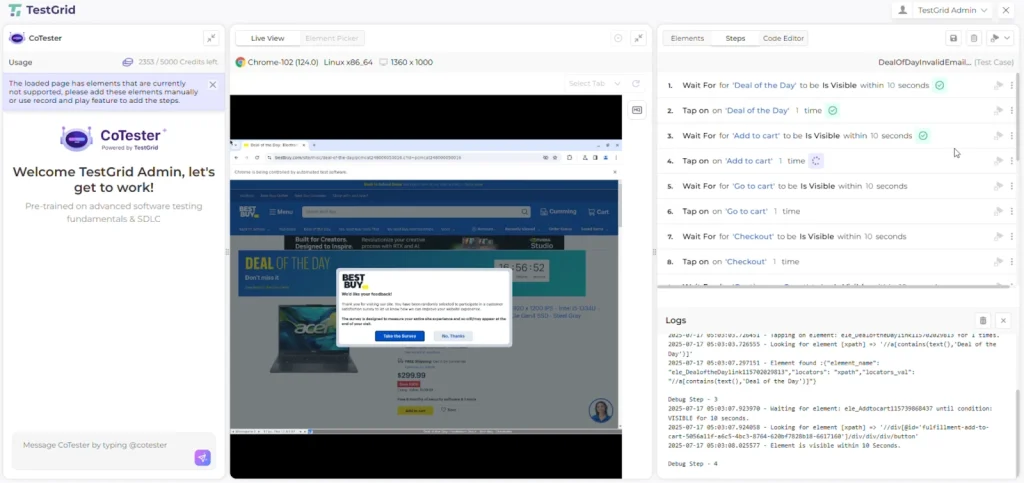
QA leads can review CoTester’s execution logs and screenshots for high-impact workflows, such as incident creation, approvals, and service requests, to verify that AI-generated results remain aligned with business logic and process expectations.
12. Maintain daily cross-functional stand-ups
During the upgrade window, hold brief stand-ups daily or twice daily, depending on schedule complexity. Focus on pass rates, blocker resolution, and next steps. Avoid lengthy discussions at this step, as the objective is to maintain alignment and momentum.
Limit meetings to 15 minutes with a shared live dashboard open. Visual data reduces verbal reporting and keeps attention on measurable outcomes.
In addition, create a dedicated “Release Room” channel in Teams or Slack that includes QA, developers, platform admins, and business owners. Keep all real-time communication on the channel during the upgrade, then archive it as your official post-upgrade reference log.
Make Every ServiceNow Upgrade Process Predictable
Treat every upgrade as a repeatable process – one that begins with structured readiness, continues through AI-led validation, and ends with measurable quality outcomes.
Over time, you’ll have a system that evolves without disruption and a testing practice that keeps up with your enterprise growth.
With the proper preparation, testing, and validation discipline, each release becomes an opportunity to improve platform reliability rather than a cycle of rework.
If your goal is to make ServiceNow upgrades faster, steadier, and easier to maintain, CoTester can help. It generates test cases directly from your user stories, validates workflows in real browsers, and automatically heals broken tests when the UI changes.
Book a CoTester demo for ServiceNow.
Frequently Asked Questions (FAQs)
1. How early should upgrade preparation start before a ServiceNow release?
Begin preparation at least four to six weeks before your scheduled upgrade window. This allows time to clone environments, map dependencies, validate data, and align test automation. Large enterprises with multiple ServiceNow instances should begin coordination even earlier to align integrations and access provisioning across teams.
2. What should I do if my automated tests fail after the upgrade?
First, isolate failures caused by UI or schema changes. If CoTester is in use, review its self-healing log to see which tests were repaired automatically. Failures that persist after self-healing typically indicate deeper workflow or data issues and should be validated manually in the cloned environment before release.
3. How can I minimize downtime during a ServiceNow upgrade?
Run upgrades in staggered environments. Clone, test, and deploy sequentially instead of upgrading all instances at once. Validate essential workflows in pre-production before allowing production upgrades to begin. This phased approach reduces rollback risk and helps maintain service continuity.
4. How can I make test evidence audit-ready?
Store test execution reports, screenshots, and CoTester logs in a central repository with version tags that match your ServiceNow release (for example, Vancouver_Upgrade_Run_1). This creates traceability for compliance teams and simplifies future audits.


