 CoTester 2.0 is LIVE! Your Always-Available AI Teammate for Testing.
- What are Black Friday and Cyber Monday?
- What Can You Expect from Black Friday and Cyber Monday?
- What Can Go Wrong Without Proper Black Friday Ecommerce Testing?
- 5 Must-Run Black Friday and Cyber Monday Website Testing Methods
- Black Friday Site Readiness Checklist
- Pre-Black Friday SDLC Best Practices to Reduce Risk
- Prepare Your Ecommerce Site for Black Friday and Cyber Monday with TestGrid
- Frequently Asked Questions (FAQs)
- How does testing scalability help during the Black Friday rush?
- How can real-time performance monitoring tools help during Cyber Monday?
- When should you start site testing for Black Friday and Cyber Monday?
- What metrics should I track during Black Friday e-Commerce testing?
- How to prepare for Black Friday e-Commerce?
- What are the common e-Commerce site issues on Cyber Monday?
- What is the best tool for load testing Black Friday traffic?
The busiest season in the eCommerce calendar is just around the corner.
Black Friday and Cyber Monday mark the start of Christmas shopping. Millions of shoppers eagerly wait for an entire year to seek the best discounts and deals.
So, if you’re an eCommerce store owner, it’s time to step up your site testing strategy.
A structured black Friday e-commerce testing approach ensures your site stays stable during peak shopping hours.
Even minor page delays, glitches in navigation, or overlapping buttons can cost you customers and lead to a tarnished brand image.

This blog talks about how you can plan an effective Black Friday e-Commerce testing strategy, which tests you should focus on, and some practical Black Friday eCommerce tips to optimize testing.
For end-to-end app and website testing, sign up for a free trial with TestGrid.
TL;DR
- Black Friday and Cyber Monday are two major shopping events that take place right after Thanksgiving.
- Black Friday eCommerce testing helps prevent crashes, checkout failures, and security risks during heavy traffic.
- The most important tests for Black Friday eCommerce readiness include load testing, spike testing, soak testing, isolation testing, and stress testing.
- Key performance metrics to track include site speed, uptime, latency, and cart abandonment.
- Critical workflows to test include login, search, checkout, payment, and order confirmation.
What are Black Friday and Cyber Monday?
Black Friday and Cyber Monday are the largest shopping days in the United States.
Black Friday is the Friday that falls after Thanksgiving Day. Retailers sell products online and in-store at huge discounts and offer attractive deals.
Cyber Monday comes right after Black Friday. It’s an online shopping event that mainly offers exclusive discounts, free shipping, and flash sales on products.
Teams often underestimate how much Cyber Monday website testing is required to keep checkout and payment flows stable.
Also Read: What is Retail App Testing?
What Can You Expect from Black Friday and Cyber Monday?
In 2024, Black Friday and Cyber Monday together attracted 197 million shoppers, surpassing the projected 183.4 million.
As the big season approaches, here’s what you should be prepared for:
1. Massive traffic spikes: If your website or app usually receives dozens of daily customer visits, on Black Friday and Cyber Monday, the numbers tend to multiply as customers hunt for deals. You can expect hundreds or even thousands of visits.
2. Surge in multiple payment method requests: Customers expect flexibility in choosing the payment option that’s most convenient for them or the one that offers rewards. Different methods include debit and credit cards, PayPal, and Buy Now, Pay Later (BNPL).
You might encounter a large number of customers switching between different payment methods when placing orders.
3. Customer expectations: Your customers wait a whole year for this lucrative season. They expect the best user experience, including fast-loading pages, smooth navigation, and personalized and real-time recommendations that help them find the best offers almost instantly. So, even a small glitch in your app or site can push your customers away.
4. Access from multiple devices: Customers visit your app or site from multiple devices, such as mobiles, desktops, and tablets. And each of these devices has different OS versions, browser engines, and screen sizes.
Plus, you should also be ready to handle a mix of network conditions, such as 3G, 4G, 5G, and Wi-Fi, that customers use to connect to your app.
What Can Go Wrong Without Proper Black Friday Ecommerce Testing?
Most of these issues arise simply because teams skip critical ecommerce testing steps during peak-season preparation.
1. Site slowdowns and crashes: When a large number of users log into your app at the same time, it can overwhelm your server, databases, or third-party services and cause downtime, or in the worst case, a crash.
Unresponsive pages might frustrate your customers, which can directly result in lost sales and revenue. Therefore, proper testing, such as load and stress tests, is critical to check how apps work under load.
2. Inventory and pricing mismatch: If you don’t thoroughly test inventory updates, pricing rules, and promo engines in real-time, your customers might encounter issues like incorrect promo codes or items appearing available when they’re actually out of stock.
Plus, out-of-sync product data can cause wrong discounts, inaccurate stock information, and duplicate orders, which in turn can damage brand trust.
3. Broken checkout or payment failures: Rigorously testing checkout and payment workflows is extremely critical because thousands of customers place orders at the same time and via multiple payment options (credit/debit cards, PayPal, Apple Pay).
Payment gateway timeouts, failed transactions, or delays and errors in processing orders might lead to card abandonment. And this directly impacts your revenue.
4. Compromised security and compliance: With the exponential increase in transactions during Black Friday and Cyber Monday, your app becomes a prime target for cyberattacks.
Without robust security testing and compliance with data protection regulations, hackers might infiltrate your network via third-party services and steal your customers’ names, addresses, and financial information.
5 Must-Run Black Friday and Cyber Monday Website Testing Methods
We have created a list of the top 5 ecommerce testing methods you must run before you put your Black Friday and Cyber Monday eCommerce ideas into action.
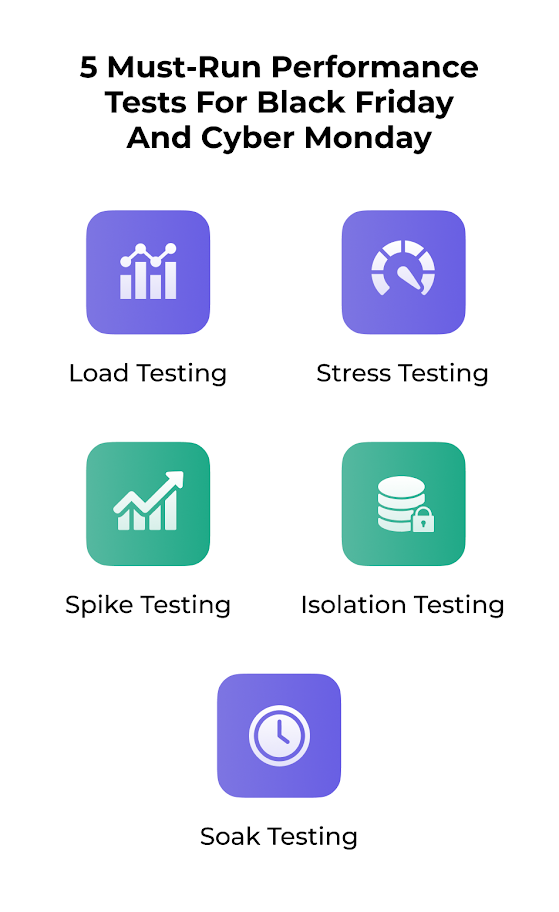
1. Load Testing
Your app must be able to handle a high number of concurrent user logins during peak shopping hours without crashing or slowing down. And load testing for Black Friday helps you check that. You simulate traffic patterns to identify slow database queries and high server latency.
If you skip load testing for Black Friday, your servers will choke the moment traffic spikes hit.
Pro tip for implementation: View past Black Friday and Cyber Monday records to make an estimate of the maximum traffic load you can expect. Try reproducing this load using automated tools like K6 or JMeter, and monitor performance indicators such as server response time, page loading time, and throughput.
Also Read: Performance Testing vs Load Testing: Key Differences and Best Practices
2. Stress Testing
Stress testing helps you check the maximum amount of traffic that your app or site can handle. In load testing, we assess the app under expected load, but in stress testing, we try to push the system beyond its limits to test how it responds under unexpected traffic levels.
Most outages during sales events come from skipped peak traffic testing in e-commerce scenarios.
Pro tip for implementation: Start with your average peak load and then slowly increase the load beyond the predicted traffic level until the performance drops. Check the stress capacity for different infrastructure elements, including databases and servers. Track error rates and recovery speed to identify the gaps.
Know More: Ultimate Guide to Performance Testing in 2025
3. Spike Testing
Sudden traffic surges are pretty common during flash sales or viral campaigns. This is where robust e-commerce site performance testing helps you catch bottlenecks before customers feel them. In spike testing, you simulate abrupt user spikes to see if your server can take the load without causing a crash or latency issues.
Most long-duration failures only surface through proper e-commerce site performance testing.
Pro tip for implementation: When you’re running a spike test, use short, high-frequency load surges. Observe response time, error rates, and queue length. You can increase server capacity, caching mechanisms, or load balancers to tackle spikes.
4. Isolation Testing
Isolation testing helps you separately test the different components or modules, such as user authentication, checkout, or add to cart, and then add load to check if your app functions as intended. This is important because a single unit might affect downstream processes and cause the entire system to fail.
Pro tip for implementation: When testing one unit individually, use mock objects or stubs to simulate dependent modules. Pick one critical workflow (e.g., login) that receives the most user requests. Try automating to speed up the testing process using frameworks like Pytest, JUnit, or NUnit.
Also Read: Top 20 Performance Testing Tools in 2025
5. Soak Testing
Many eCommerce sites start posting offers in the days or weeks leading up to Black Friday and Cyber Monday, which can lead to traffic surges during this time. Soak testing examines how your app performs under this sustained load over an extended period.
This helps you identify memory leaks, database connection issues, and performance gaps that may not appear in short tests.
Pro tip for implementation: Run soak tests with realistic user behavior and monitor the memory, database, and CPU usage throughout the testing duration. Check the resource exhaustion early so you can optimize code or infrastructure to ensure your app stays stable.
Learn More: Endurance Testing: Know The Process, Types, Benefits, and Tools
Before the biggest days of the season arrive, these e-commerce site performance testing tips will help ensure your app runs smoothly.
Black Friday Site Readiness Checklist
Here are some points you must check out when you’re planning your Black Friday eCommerce strategy.
1. Take a closer look at your login journey
Test your login workflow under peak loads, including social and multi-factor authentication logins. Check for timeout errors, session handling issues, and broken redirects on multiple devices and browsers.
2. Verify your checkout process
Check your entire checkout process from cart to payment gateway to order confirmation. Also validate discount/promo codes, duplicate transactions, and shipping options.
3. Run regression tests after every update
Every time you update a code or plugin, run automated regression tests on the most critical paths, such as login, search, add to cart, and checkout, to verify they work properly without breaking existing features.
4. Test your product catalog manually
Check your product listings, images, and stock status after bulk upload or add discount codes to make sure category filters, sort, and search function correctly, even when traffic increases. Also perform price change validation e-Commerce testing to ensure customers see accurate pricing.
5. Review promotional workflows before launch
Check your Black Friday and Cyber Monday deals, discounts, and promo workflows on different devices and browsers to detect unexpected issues like expired offers or broken links.
Don’t skip exploratory testing of holiday promotions workflows, especially where promo logic interacts with cart rules.
6. Validate user acceptance scenarios
User flow testing for sales events like Black Friday and Cyber Monday with real users is critical to ensure you meet business requirements before release. Run UAT tests to check workflows like browsing, adding to cart, and payment processing to make sure everything works as your customers expect.
7. Confirm security controls remain active
Rushed deployments before Black Friday might leave security loopholes that can be exploited by attackers. Therefore, run security tests, including penetration tests and fuzz tests, to validate payment data encryption and authentication flows. Also, ensure firewalls and SSL are activated.
8. Test discount and promo code rules
Discount code testing is essential during Black Friday and Cyber Monday because customers switch between offers, stack coupons, and redeem flash-sale deals rapidly.
If promo logic isn’t tested thoroughly, it can result in incorrect pricing, invalid discounts, or coupons applying to the wrong products.
Make sure to test single-use vs multi-use coupons, stacking limits, category/brand exclusions, “Buy X Get Y” rules, auto-applied cart discounts, and pricing rounding accuracy.
Make sure your team includes discount code testing for Cyber Monday cases because shoppers stack multiple coupons aggressively during these hours.
9. Stabilize cart and checkout behavior under peak load
The cart and checkout test cases that Black Friday shoppers trigger are some of the highest-risk workflows. Test changing payment methods mid-checkout, cart updates during payment processing, guest vs. logged-in checkout, cart expiry on slow networks, and partial wallet + card split payments.
Monitor payment gateway timeouts and ensure retry flows function correctly to prevent checkout abandonment during peak volume.
Also read: Test Cases for Ecommerce Platforms
10. Control inventory behavior during low-stock surges
Race condition testing e-Commerce peak scenarios helps ensure inventory and orders remain consistent when multiple customers compete for limited stock. Validate whether inventory locks at the cart or checkout stage, how the system handles payment success but stock failure, whether inventory is released after failed payment, and real-time quantity updates across sessions.
Pre-Black Friday SDLC Best Practices to Reduce Risk
To avoid last-minute failures and instability during peak shopping hours, follow a structured release plan that reduces untested changes and ensures the system remains predictable during Black Friday and Cyber Monday.
These steps align with core SDLC best practices that Black Friday teams rely on to reduce deployment risk.
| Timeline | Action |
|---|---|
| 6–8 weeks before the event | Freeze core logic related to checkout, pricing, promotions, and inventory. |
| 4 weeks before | Complete performance testing and device/browser coverage for all critical flows. |
| 2 weeks before | Only allow critical bug fixes that address user-impacting issues. |
| Final week | Make UI or content changes only; do not deploy backend, API, or infrastructure updates. |
| Day-of | Keep rollback steps, load monitoring dashboards, and incident response playbooks on standby. |
Prepare Your Ecommerce Site for Black Friday and Cyber Monday with TestGrid
To gear up your eCommerce app or site for the biggest sales events of the year, you must implement a robust holiday e-commerce QA strategy.
And for this, you need a testing platform that gives you access to thousands of real devices, browsers, and OS, and lets you execute end-to-end tests at scale.
Don’t worry, because TestGrid has got you covered.
TestGrid is an AI-powered test automation platform that allows you to create, execute, analyze, and maintain tests all in one unified platform.
With the codeless automation feature, you can create tests covering complex user journeys within minutes without the need for coding. You can run the tests on real Android and iOS devices, as well as across multiple browsers, including Firefox, Chrome, Safari, and Opera.
TestGrid allows you to execute a range of tests, such as functional testing, regression testing, performance testing, visual testing, and security testing, which helps you verify different critical functionalities, features, and performance of your app.
You can easily integrate TestGrid with your CI/CD tools like Jenkins and CircleCI, automation frameworks like Selenium, Appium, or Cypress, as well as with tools like Jira and Slack for a seamless testing experience.
No matter how optimized your site seems, holiday e-commerce QA gives you the confidence that it will survive peak seasonal demand.
To start testing your eCommerce site right away, start your free trial with TestGrid today.
Frequently Asked Questions (FAQs)
How does testing scalability help during the Black Friday rush?
Scalability testing helps you assess how your app functions when traffic and transactions increase suddenly. You replicate peak loads to detect delays or errors in server and API responses.
How can real-time performance monitoring tools help during Cyber Monday?
Real-time monitoring tools track your site’s speed, server health, and data flows continuously and help you detect problems such as slow pages, glitches, and failed checkouts instantly. You can respond to issues faster and ensure uninterrupted shopping experiences.
When should you start site testing for Black Friday and Cyber Monday?
You must start testing at least 6-8 weeks before the season so that you have enough time to plan your tests, execute them, detect issues or bugs, resolve them, and ensure maximum coverage of critical user scenarios.
What metrics should I track during Black Friday e-Commerce testing?
The metrics you must track are website uptime for site availability, server response time to measure backend efficiency, error rate for failure frequency, average order value (AOV) to calculate purchase amount, latency for response delay, and CPU usage for processing load.
How to prepare for Black Friday e-Commerce?
Start your test planning early. Set clear revenue goals and make an estimate of stock and traffic. Next, test your site’s speed, login and checkout flows, payment options, and device responsiveness. Finally, check inventory, plan shipping, and prepare for returns.
What are the common e-Commerce site issues on Cyber Monday?
Some common issues you might encounter on Cyber Monday are site slowdowns or outages because of high traffic, payment gateway failures due to concurrent checkouts, API integration errors causing inventory mismatch, and security threats.
What is the best tool for load testing Black Friday traffic?
Top tools for load testing Black Friday traffic include TestGrid, Apache JMeter, NeoLoad, K6, Gatling, WebLoad, and BlazeMeter.


