CoTester 2.0 is LIVE! Your Always-Available AI Teammate for Testing.

- What Is IoT?
- IoT Architecture and Key Technologies
- Real-World Applications of IoT
- What Is IoT Testing?
- Types of IoT Device Testing
- Strategic Benefits of Effective IoT Testing
- How to Conduct IoT Testing: A Step-by-Step Framework
- IoT Testing Challenges and How to Solve Them
- Top IoT Testing Tools in 2026
- Simplify IoT Testing With TestGrid
- Frequently Asked Questions (FAQs)
Testing a mobile app is one thing. But testing a system that depends on sensors, networks, hardware, and real-time data? That’s a different ball game entirely.
This is what IoT testing looks like in practice. It goes beyond validating whether a feature works and checks whether a device collects and transmits accurate data, whether the backend processes it corectly, and whether the user interface reflects all of that in real time.
And the only challenge only grows with scale. Statista reports there will be 39.6 billion IoT connections worldwide by 2033. This isn’t surprising, as the technology has quietly embedded itself into everyday life, one interaction at a time.
Plus, with over 99% of IoT attacks exploiting known vulnerabilities and each smart home facing 10+ attacks daily, it’s safe to assume that testing can’t be an afterthought.
In this guide, we’ll walk you through how IoT works, what makes testing it unique, and the strategies you can use to do it well. Let’s start from the ground up.

TL;DR
- IoT testing checks whether data moves correctly from device to cloud to UI without loss, delay, or corruption.
- Most failures happen at integration points, not within individual components.
- Testing in stable lab conditions is useless if you don’t simulate real-world network instability and latency.
- End-to-end workflows matter more than isolated test cases.
- Scale changes everything — systems that work with 10 devices often break at 1,000.
- Device, OS, and firmware fragmentation will break assumptions unless explicitly tested.
- Security vulnerabilities are common and must be tested continuously, not once.
- Firmware updates are high-risk and need validation under failure conditions (interruptions, rollbacks).
- If the data is inaccurate or out of sync, the entire system is unreliable.
- Automation is required to maintain consistency across devices, environments, and releases.
What Is IoT?
IoT refers to a network of physical devices or “things” embedded with sensors, software, and connectivity. These “smart objects” or “smart devices” can collect, process, and respond to data without direct human intervention.
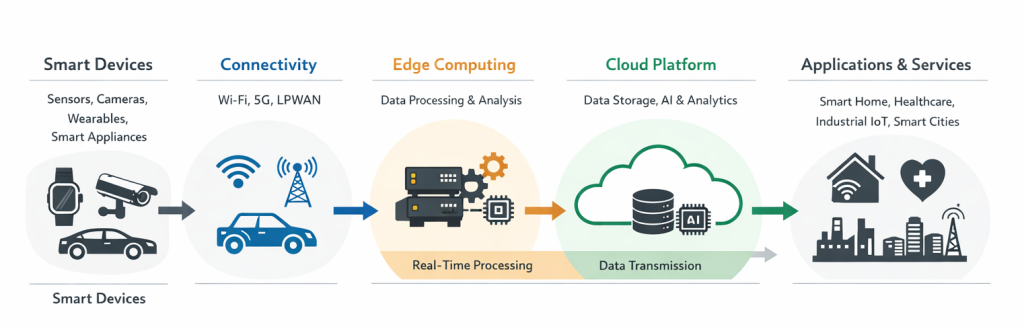
Some examples of IoT devices include RFID-enabled clothing, smart rings, complex industrial equipment, and soil-monitoring sensors.
IoT Architecture and Key Technologies
Let’s break down the building blocks of the IoT ecosystem in detail:
1. Cloud computing
Vast amounts of data generated by IoT devices are stored, processed, and analyzed in the cloud. Cloud computing platforms provide the infrastructure and tools needed for this job, as well as for building and deploying IoT applications.
2. Big data analytics
Finally, most IoT systems offer analytics, whether it’s a dashboard showing trends or an AI model triggering predictions.
Certain advanced analytics tools, including Machine Learning (ML) algorithms, data visualization techniques, and predictive analytics models, come into play for extracting insights and identifying patterns.
3. User Interface (UI)
This is what the users will interact with. Naturally, the interface needs to reflect what’s happening in the IoT device and give them control when needed. Sync accuracy, command latency, and cross-platform consistency are some of the elements in UI testing.
4. Sensors and actuators
This is where everything starts. Sensors capture data from the real world, such as temperature, light, motion, pressure, humidity, and so on. On the other hand, actuators cause physical changes in the environment, such as opening or closing a valve or turning on a motor.
5. Connectivity technologies
IoT devices need to be connected to the Internet to transmit data from sensors and actuators to the cloud. Several connectivity technologies are used in IoT, including Bluetooth, cellular, LoRaWAN, Zigbee, and WiFi.
6. Security and privacy protocols
As IoT deployments become more widespread, IoT security and privacy become increasingly important. Technologies such as access controls, encryption, and intrusion detection systems protect IoT devices and the data they generate from cyber threats.
Also Read: What’s Powering the Next Generation of Test Automation
Real-World Applications of IoT
Here’s a quick list of all the common IoT devices in use in different domains:
1. Smart ATMs
These are ATMs that use biometric sensors for authentication, like palm-vein scanning, instead of traditional PINs.
Such systems can connect to central systems in real time to detect fraud, monitor machine health, and push firmware updates without needing on-site visits. They can also send alerts to the bank when cash levels are low or hardware malfunctions.
2. Smart homes
Think security cameras, thermostats, and smart fans. Everything’s connected, and users expect to control it all from their phones or with a simple voice command. These systems often rely on mesh networks, third-party integrations, and real-time status updates.
3. Smart irrigation
IoT sensors determine weather conditions and soil moisture, which helps in getting the appropriate amount of water that the soil needs.
For instance, sprinkler systems equipped with smart sensors can delay watering during rain or adjust irrigation based on real-time moisture levels. This helps farming facilities conserve water and improve crop health.
4. Connected vehicles
Cars aren’t just cars anymore, or even two-wheelers, for that matter. They’re rolling networks.
Many now transmit data on location, driver behavior, speed, maintenance needs, and external conditions, like road hazards or traffic conditions. Latency, sensor fusion accuracy, and OTA (over-the-air) update validation are key.
5. Disaster monitoring
IoT plays a big role in early warning systems for wildfires, floods, air pollution, and earthquakes. Sensors feed real-time data into centralized platforms that can trigger alerts and dispatch emergency services. There’s zero tolerance for failure here.
6. Biometric and security systems
IoT powers face recognition door locks, smart badges, and fingerprint scanners. Data is collected, processed locally or in the cloud, and matched against authentication systems. Checking for access control logic, encryption protocols, and edge-case scenarios like spoof attempts or failed scans is vital.
7. Healthcare and Industrial IoT (IIoT)
Hospitals use wearables and remote sensors to track patients and alert staff in real time. On the other hand, factories deploy IoT to monitor equipment health and streamline production. These are often mission-critical systems. They involve compliance standards, legacy system integration, and edge processing.
What Is IoT Testing?
It refers to the process of evaluating the functionality, performance, reliability, and security of interconnected IoT devices, networks, and apps. IoT testing ensures these systems operate as intended, communicate effectively, and maintain data integrity and security at all times.
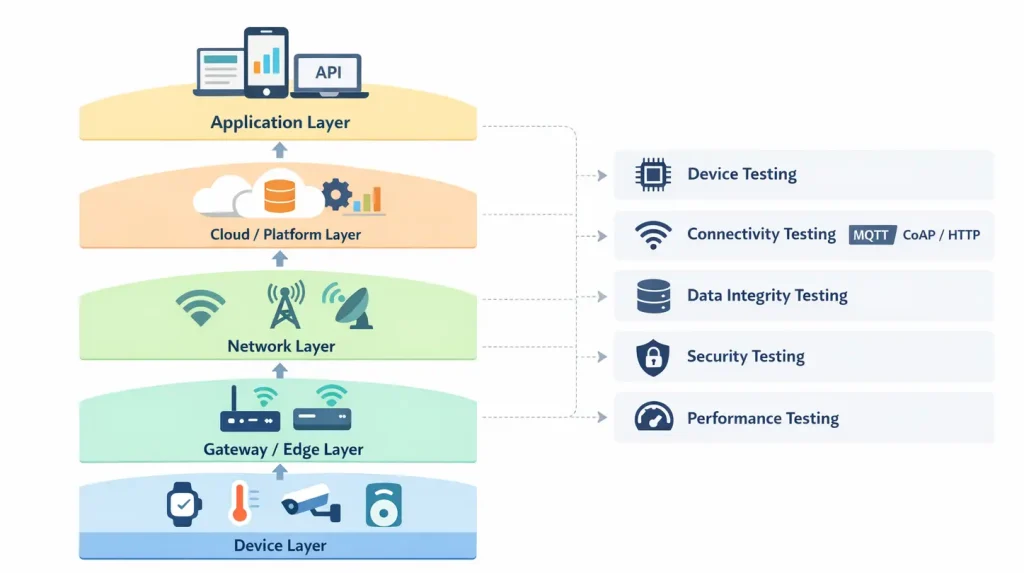
IoT device testing helps you check whether the:
- Sensors collect accurate data
- Devices send it where it needs to go
- Logic processes it correctly
- The user interface reflects what’s really happening
Types of IoT Device Testing
You might already have experience testing APIs, UIs, or mobile apps. But IoT adds layers of complexity that traditional testing strategies don’t always cover, like real-time event handling, hardware-software integration, and power and memory constraints.
That’s why the IoT testing process spans several types, each focused on a specific angle of system quality:
1. Security testing
Security is a major concern in IoT. The devices operate in unsecured environments, almost always transmit sensitive data, and have limited hardware resources to defend themselves.
Security testing involves ensuring IoT devices and data are protected from spoofing, intrusion, and tampering. You’ll test for:
- Firmware update security
- Authentication and access control
- Vulnerability to replay, injection, or Denial-of-Service (DoS) attacks
2. Usability testing
Is the system easy to use and understand? Even with great hardware and code, a confusing interface or inconsistent behavior can make the whole IoT system feel unreliable. Usability testing helps you minimize friction points that might frustrate or confuse users. This covers:
- Clear status indicators
- Logical workflows, for example, setup, pairing, and error recovery
- Intuitive controls across platforms, such as apps, dashboards, and voice
3. Pilot or Field Testing
Lab-testing IoT devices is great. But the real test is how “things” perform when they’re in someone’s house, car, or facility.
Field testing helps uncover issues that only show up in context, like user habits, signal interference, or environmental abuse. It’s low-scale and manual but incredibly valuable before wide rollout.
4. Performance testing
In IoT, performance isn’t just about speed. It’s about predictability under real-world conditions.
How does the system handle load, latency, and data throughput?
Can it keep up with data from 1,000 IoT devices at once? What happens if the number doubles? How does it perform when the network is flaky?
Performance testing enables you to simulate load, test for memory usage, and measure response times under both normal and peak conditions.
5. Compatibility testing
With IoT, you’re rarely targeting one device. You’re dealing with a mix of operating systems (Android, iOS, embedded Linux), app versions, device manufacturers and firmware builds, and cloud service configurations.
Compatibility testing equips you to validate interactions across all these variables, ensuring consistent performance regardless of the setup. For web-based interfaces and dashboards, cross-browser testing online helps verify a seamless user experience across different browsers and devices, especially when updates are rolled out to only part of the ecosystem.
6. Regulatory and compliance testing
This is a must, especially if you work in the healthcare, automotive, or energy sectors. Your devices must comply with specific regulations like GDPR, HIPAA, FDA, and FCC. IoT application testing here ensures:
- Data privacy is enforced
- Device behavior is safe and predictable
- Required documentation and audit trails exist
7. Connectivity testing
In IoT, communication is everything. Devices rely on stable connections to send and receive data, often across multiple networks, like WiFi, Bluetooth, or cellular. Connectivity testing focuses on how reliably these connections hold up under real-world conditions.
This includes validating reconnections, handling network drops, and ensuring data continues to flow even when connectivity is inconsistent.
8. Firmware testing
Firmware forms the foundation of how IoT devices function.
This type of testing helps you ensure that device-level logic runs correctly, updates are applied without failure, and no new issues get introduced especially during over-the-air (OTA) updates, where a failed rollout can leave devices unusable or out of sync with the rest of the system.
9. Data integrity testing
IoT systems are only as reliable as the data they generate, transmit, and manage.
Data integrity testing focuses on ensuring that information collected by devices remains accurate, consistent, and unchanged as it moves through the system, from sensor to cloud to user interface. Even small inconsistencies can result in incorrect insights or actions.
Strategic Benefits of Effective IoT Testing
Let’s take a look at a few long-term benefits IoT testing can bring to the table:
1. Fewer field failures
Every device failure in an IoT ecosystem has a ripple effect — support calls, reputational damage, and even safety concerns.
IoT testing helps prevent these issues by simulating real-world usage, edge cases, and environmental conditions before the devices go live. The actual benefit? You have fewer fires to put out and fewer escalations to manage.
2. Shift-left confidence
By shifting testing left into development, you avoid last-minute scrambles and significantly reduce the cost of resolving bugs.
With strong QA automation and test coverage in place, your team works with confidence, knowing critical problems can be found and fixed while there’s still some time to pivot. Integrate unit and integration tests directly into your CI/CD pipeline to catch issues on every commit.
3. Resilience in the real world
Things go wrong — that’s a given in any software deployment. The same is the case with IoT. The question is how gracefully your system can recover.
Robust IoT testing helps build resilience by simulating unpredictable events, such as duplicated data, dropped connections, power failures, and hardware glitches. Testing in real-world conditions makes your product more durable and adaptive.
4. Reliable data, smarter decisions
IoT devices exist largely to collect and transmit data. But if that data is flawed, every downstream system, alert, and insight becomes unreliable. IoT testing ensures your sensors, triggers, and communication layers always provide accurate, consistent inputs.
5. Faster iteration, stronger releases
With automated IoT testing in place, your team can release updates with speed and confidence. Whether it’s a feature rollout, a firmware patch, or a security fix, quickly validate changes without compromising stability. This tight feedback loop encourages continuous improvement.
How to Conduct IoT Testing: A Step-by-Step Framework
Before you start, map out a few critical workflows you care about—device setup, data syncing, alert triggering, and firmware updates. These give you something concrete to test against. Without them, it’s easy to fall into random checks that don’t reflect real usage.
Once you’re done with that, take the following steps:
1. Validate device behavior
Start at the edge. Before you test the system as a whole, make sure each component behaves as expected on its own.
Feed sensors controlled inputs and see what comes back. If it’s a temperature sensor, check whether that value holds up across repeated readings and small variations. Do the same with actuators. Trigger actions and observe how consistently they respond.
Then move into firmware. Run through edge cases, interrupt normal flows, and see how the device behaves when something unexpected happens. This is also a good time to keep an eye on power usage, especially if the device relies on battery cycles.
2. Verify data flow across the system
Once devices are stable, track the journey of data.
Pick a single event and trace it end to end, from the device, through the network, into your backend, and finally into the UI. Don’t just check whether it shows up. Look at when it shows up, how it’s processed, and whether anything changes along the way.
Compare what the device sends with what the backend logs and what the UI displays. If there’s a delay, measure it. If there’s a mismatch, track where it starts. Sometimes the issue isn’t in transmission but in how data gets transformed or aggregated downstream.
3. Test under real-world conditions
IoT systems operate in environments that are far from predictable. Networks drop, latency fluctuates, and devices disconnect without warning.
Throttle the network. Introduce latency. Drop connections mid-sync. Let the device go offline and bring it back. Run the same workflows you defined earlier, but under unstable conditions.
Try interrupting critical moments – during data transmission, during a firmware update, or right when an alert is triggered. See how the system reacts. Does it retry? Does it recover cleanly? Or does it end up in an inconsistent state?
You’ll start noticing patterns here. Some failures are obvious, others are subtle—like delayed updates, duplicate events, or silent data loss.
To test this effectively, use TestGrid to simulate network conditions such as weak signals, latency spikes, and offline states, while running tests across real devices without relying on physical lab setups.
4. Automate repeatable scenarios
Once you’ve run these workflows a few times and know what “normal” looks like, start automating them.
Take the flows you’ve already tested – setup, sync, alerts – and turn them into repeatable test runs. The idea is to run the same scenarios across different devices, OS versions, and environments without having to manually recreate them every time.
As you automate, keep an eye on consistency. If the same test behaves differently across environments, that’s usually a signal worth investigating, not ignoring.
For example, TestGrid allows you to record and replay complete IoT workflows across mobile apps, dashboards, and APIs, making it easier to run the same scenarios across multiple devices and environments.
IoT Testing Challenges and How to Solve Them
Here’s a breakdown of common hurdles in IoT application testing and how you can work around them:
1. Complex hardware-software integration
An IoT environment comprises a tangled web of chips, boards, sensors, communication protocols, cloud services, and user-facing apps. A single misalignment between hardware and software can break critical functionality.
| Best practice: Use gray-box testing. It gives you visibility into how the system behaves internally without requiring you to instrument the hardware fully. |
2. Real-time data and event simulation
IoT behavior hinges on timing. Sensors trigger actions in milliseconds, and reproducing these time-sensitive conditions in a test environment is far from trivial.
| Best practice: Create pilot environments with real-time data feeds or simulators. Automate test scripts to inject data at different intervals, simulate thresholds, and validate event responses. It’s not just about “if,” it’s about “when.” |
3. Power management and battery life
Battery performance extends beyond determining how long an IoT device runs. It affects everything, from data accuracy to connectivity.
For instance, if the device uses too much power, either because of demanding features or because it doesn’t efficiently manage its sleep/wake cycles, it will cause real problems once deployed.
| Best practice: Use power profilers to test power consumption under different workloads, network conditions, and duty cycles. Automate regression tests to flag power-related regressions across firmware updates. |
4. Network instability and variability
IoT devices operate under unpredictable network conditions, including dropped signals, latency spikes, and bandwidth throttling. Most traditional test setups aren’t built to reflect this reality.
| Best practice: Implement network virtualization tools to mimic low bandwidth, high latency, or unstable connections. Inject disruptions into your automated testing to see how IoT the system handles loss, delay, and reconnection scenarios. |
5. Device and OS fragmentation
In IoT, you invariably work with a mix of operating systems, firmware versions, and hardware generations. Keeping them all in sync is hard but not impossible.
| Best practice: Use a cloud-based device lab or remote hardware grid to test compatibility across devices. Prioritize coverage based on real usage data and automate wherever possible to avoid duplicating effort. |
6. Firmware updates in the field
Delivering updates over the air (OTA) can be risky. A single failure, like a corrupted update, a dropped connection during the process, a faulty rollback, or a broken transfer, can potentially make the devices unstable or leave them vulnerable to security issues.
| Best practice: Deploy staged rollouts with health checks and rollback options. Test update paths from every supported firmware version and simulate update interruptions to validate fail-safe recovery. |
Top IoT Testing Tools in 2026
If you strip away the hype, IoT testing in 2026 is less about “one tool to rule them all” and more about stacking the right tools across layers – device, network, cloud, and security. We’ve identified a lean stack for you.
| Tool | Layer | What it is | What you actually use it for | Where it shines |
| TestGrid | User experience & device interaction | AI-powered end-to-end testing platform for real devices, apps, and APIs | Validate full user workflows (UI → API → device → response) under real-world conditions | Real device testing, network simulation, end-user journeys |
| IoTIFY | Device simulation | IoT simulation platform for virtual devices and communication flows | Simulate devices, generate traffic, and test system behavior without physical hardware | Early-stage testing, scale simulation, device–cloud interaction |
| Apache JMeter | Protocol & performance | Open-source load testing tool operating at protocol level | Simulate high traffic across APIs and messaging systems to test performance under load | Load testing, latency, throughput, backend stress scenarios |
| Datadog | Observability & monitoring | Full-stack monitoring platform for applications and infrastructure | Track metrics, logs, and traces to detect issues and debug systems in real time | Production monitoring, debugging distributed systems, regression detection |
| OWASP ZAP | Security testing | Open-source proxy-based penetration testing tool | Intercept and scan traffic to identify vulnerabilities in APIs and web apps | Vulnerability detection, fuzzing, API security testing |
1. TestGrid (User experience and device interaction layer)
TestGrid is an AI-powered end-to-end testing platform that executes user workflows across real devices, mobile apps, web interfaces, and APIs.
You can use it to validate how users interact with IoT systems by recording and replaying UI actions and device-triggered events across different devices, OS versions, and network conditions.
It supports functional, performance, and visual testing in a single setup, allowing you to verify full workflows, from user input to device response, under real-world conditions like latency, weak signals, and connectivity drops.
Key features
- Test app–device interactions under 2G/3G/4G, unstable Wi-Fi, high latency, and offline scenarios to surface real-world failures early
- Record and replay complete IoT user journeys (UI actions + API/device signals) across real mobile and web devices to validate end-to-end behavior
- Access screenshots, video recordings, logs, network traces, and performance metrics in a single view to trace failures and analyze system behavior
2. IoTIFY (Device simulation layer)

IoTIFY is an IoT simulation platform that lets you create and run virtual devices, gateways, and communication flows without relying on physical hardware.
With it, you can simulate device behavior over protocols like MQTT and HTTP, generate traffic, and test how your system handles scale, device management, and data exchange.
It also supports OTA updates, device/user management, and real-time dashboards, which means you can validate end-to-end device interactions, including cloud integration and secure communication before deploying real devices.
3. Apache JMeter (Protocol and performance layer)
Apache JMeter is an open-source load testing tool that operates at the protocol level to test performance and behavior under concurrent traffic.
You can use it to mimic large volumes of requests across APIs, messaging systems, and network services, and measure how your system performs under stress.
It’s compatible with multiple protocols (HTTP, REST, TCP, etc.), multi-threaded execution, and extensibility via plugins, making it suitable for validating throughput, latency, and system stability in IoT backends.
4. Datadog (Observability and monitoring layer)

Datadog is a full-stack observability platform used to monitor applications, infrastructure, and pipelines in real time. You can track system metrics, detect performance issues (like bottlenecks or traffic spikes), and identify regressions across deployments.
It consolidates logs, traces, and metrics into a single system, allowing you to continuously evaluate system health and debug issues across distributed IoT architectures without switching tools.
5. OWASP ZAP (Security testing layer)

OWASP ZAP is an open-source penetration testing tool that intercepts and analyzes web and API traffic to identify security vulnerabilities.
Leverage it as a proxy between client and server to scan requests, run active and passive vulnerability checks, fuzz inputs, and crawl application endpoints.
OWASP ZAP helps detect common issues like XSS, SQL injection, and authentication flaws by inspecting and manipulating request/response flows during testing.
Simplify IoT Testing With TestGrid
You’ve seen how complex and layered IoT testing can get by now. The good news is you can completely automate this process with TestGrid, an end-to-end testing platform.
Whether you’re testing smart meters, fitness trackers, or payment devices, you can run fully automated test scenarios and eliminate up to 90–100% of manual effort in testing.
TestGrid allows you to queue up automated test cases, schedule overnight runs, and reuse tests across cycles and hardware variants. That means your team can spend less time re-running tests and more time improving them.
In addition, IoT ecosystems rarely look the same for two users. Different devices. Different firmware. Different environments. With TestGrid, you can perform IoT testing across a wide range of OS versions, hardware types, and devices, helping you catch issues early in the cycle.
Instead of stitching together tools, you can:
- Run end-to-end test scenarios across devices, OS versions, and environments
- Simulate network conditions like latency spikes, weak signals, and offline states
- Execute tests in parallel to speed up feedback cycles
- Debug faster with logs, recordings, and system-level insights in one place
As your IoT system grows, this kind of setup becomes less of an advantage and more of a requirement. If you’re looking to make your testing faster, more consistent, and easier to scale, this is the direction to move in.
Request a free trial with TestGrid today!
Frequently Asked Questions (FAQs)
1. How do I handle versioning for devices, apps, and test cases in IoT?
Versioning is critical in IoT due to firmware updates, mobile app changes, and evolving test logic. A test automation platform that supports test case versioning and configuration mapping (like TestOS) helps ensure your tests stay aligned with what’s in production.
2. How early should I start testing in the IoT development lifecycle?
Ideally, as early as possible. Adopting a shift-left strategy lets you start testing APIs, device logic, and connectivity flows before the hardware is finalized. This reduces downstream rework and helps teams catch systemic issues before they reach production.
3. Is codeless test automation reliable for complex IoT workflows?
Absolutely, when the platform is built for it. Tools like TestGrid use smart record-and-playback systems that work even for multi-step hardware actions, CI/CD pipelines, and mobile app interactions. The key is using a system that understands IoT behavior, not just traditional UI testing.
4. How is IoT testing different from traditional software testing?
IoT testing involves both hardware and software components interacting in real time, often under unpredictable conditions like network instability or sensor failure. Unlike traditional apps, IoT systems must be tested across device types, connectivity scenarios, and edge behaviors, not just UI or logic.