CoTester 2.0 is LIVE! Your Always-Available AI Teammate for Testing.
- What Is Test Automation Architecture?
- Why Is Test Automation Architecture Important?
- How Does a Generic Test Automation Architecture Look?
- Different Test Automation Framework Types
- What You Need to Build Effective Test Automation
- Design and Implement Test Automation Architecture
- How Is AI Enhancing Test Automation?
- Build Scalable Test Automation with TestGrid
- Frequently Asked Questions
- What is test automation architecture in software testing?
- What are the common challenges in maintaining test automation architecture?
- What are some best practices of test automation architecture?
- What security considerations should be addressed in test automation architecture?
- What should a test automation framework architecture diagram include?
- What does a Playwright test automation architecture look like?
A test suite can look perfectly manageable at 50 tests and become painful at 500. Shared data starts colliding, environments drift, execution slows down, reporting gets noisy, and one UI change can ripple through dozens of scripts.
This guide to test automation architecture shows you how to prevent that sprawl.
You’ll see how the core layers connect, where frameworks, data, infrastructure, reporting, and CI/CD fit, and how to design an automation setup that can grow without becoming a maintenance project of its own.
Put your test automation architecture into practice. Request a free trial with TestGrid.

TL;DR
- Test automation architecture defines how automation tools, frameworks, test scripts, data, and infrastructure are structured to support automated software testing
- The different functional layers of a testing architecture include the test generation, test definition, test execution, and test adaptation layers
- The frameworks you can apply to create automated tests are data-driven, keyword-driven, and hybrid test frameworks
- Test scenarios, test scripts, test data management, test environment, and test reporting are some of the most critical components of test automation architecture
- To implement test automation, assess your app or software system, decide the tests to perform, select automation tools, prepare test data and environment, and integrate tests into the CI/CD pipeline
What Is Test Automation Architecture?
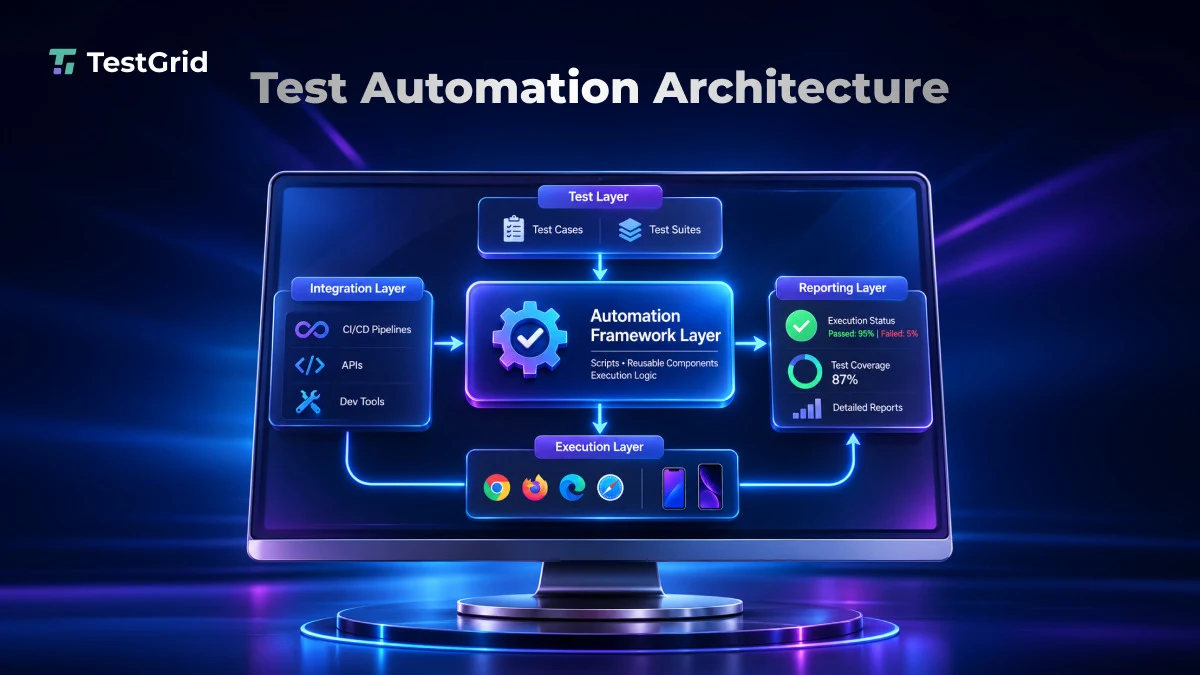
Test automation architecture (TAA) is a structural blueprint that defines how different components of an automated testing system are organized, connected, and managed.
It also states the relationships between test scripts, reusable libraries, application interfaces, test data, configurations, and execution infrastructure.
The architecture defines how these different components will exchange information and handle dependencies throughout the testing process.
TAA helps you understand how to build the automation setup, run tests, enable continuous feedback, and accommodate changes as your test requirements evolve.
Also Read: Guide to Software Test Automation
Why Is Test Automation Architecture Important?
Your test automation can be hard to manage when new features, upgrades, and test requirements keep getting added frequently. Therefore, a well-planned architecture gives you a systematic way to handle these changes and keep automation aligned with your business goals.
A software test automation architecture can help you:
- Establish common conventions for test development, execution, and documentation across QA teams
- Simplify onboarding and help new team members understand the automation setup, component responsibilities, and existing workflows
- Efficiently distribute testing workloads across available infrastructure and avoid unnecessary resource consumption
- Improve defect traceability by creating clearer links between requirements, test cases, execution results, and reported defects
- Align all teams around a common automation architecture, which includes properly defined standards, components, and testing processes
- Reduce the cumulative effort and expense of maintaining fragmented automation setups
How Does a Generic Test Automation Architecture Look?
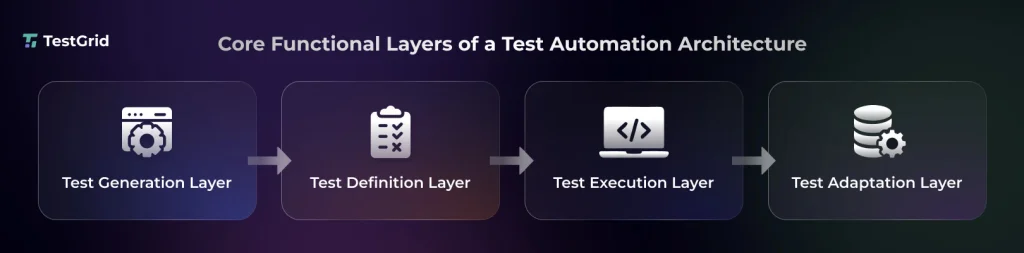
1. Test generation layer
This layer is mainly responsible for creating test cases based on requirements, specifications, and user stories.
Your testers identify the scenarios that need to be validated, along with the relevant inputs and expected outcomes. Then they create the test cases based on the scenarios.
2. Test definition layer
This layer is about converting and organizing your test cases into executable test suites. Here you generally specify the test steps, procedures, test data, and expected results.
Your testers might also use data-driven or keyword-driven approaches to structure test cases and separate test steps from app-specific interactions, so they can reuse the same test structure for different scenarios and reduce script duplication.
3. Test execution layer
The execution layer involves testers running the test cases to assess the app. Here, you use test execution tools to execute test scripts, manage test sequences, and compare your actual results with the expected outcomes.
This layer may also include tasks like test setup and cleanup, recording execution logs, and generating reports for failure investigation.
4. Test adaptation layer
This layer contains the components and code that help your automated test scripts interact with different parts of the app. It converts test actions into app interactions through interfaces like GUIs, APIs, and databases.
The purpose of this layer is to enable you to adjust tests when the app components or configurations change and reduce the need to rewrite existing test scripts.
Learn More: Test Automation Strategy: Steps, Best Practices & Template
Different Test Automation Framework Types
These are the most critical test automation framework architecture types:
1. Data-driven test framework
The data-driven framework lets you separate your test data from test scripts and execution steps, and allows you to run the same test script with multiple sets of input values. This means you don’t need to create separate scripts for every input combination.
Your test data and expected results are stored in external sources, such as CSV files, Excel spreadsheets, or databases.
2. Keyword-driven test framework
For creating scripts using this framework type, you use predefined keywords that represent test actions like Login, Click, EnterText, and Verify. Each of these keywords is mapped to a function that performs the corresponding action during test execution.
Your testers can combine these keywords to define test cases without writing the underlying automation code for each step.
3. Hybrid test automation framework
The hybrid test automation framework architecture basically merges multiple approaches like data-driven and keyword-driven testing, along with reusable components and libraries.
You can leverage the predefined keywords to perform test actions and external data sources to run scripts with different inputs. Building tests with this approach can help you improve test reusability, flexibility, and maintainability.
What You Need to Build Effective Test Automation
1. Test scenarios
Test scenarios are descriptions of your app’s workflows, functionalities, or conditions that you need to assess with automated testing. They allow you to outline the sequence of actions a user or system should perform to achieve a particular outcome.
For example, an e-commerce test scenario may include product selection, adding items to the cart, and completing checkout.
2. Test scripts
Test scripts are the executable instructions that an automation tool must perform to validate a particular feature or function of your app. These instructions can include navigating app pages, entering data, clicking elements, and verifying expected results.
Your testers write scripts in programming or scripting languages (Java, Python, Ruby, JavaScript, C#) to translate test procedures into commands that interact with your app.
3. Test data management
Test data management is about organizing, storing, and provisioning the data you require to execute your tests. This process helps you ensure that your tests have appropriate input data to validate different scenarios, including valid inputs, invalid entries, and boundary conditions.
Other than this, test data management also involves data isolation, masking, and cleanup so you have secure and reliable data for testing.
4. Test execution environment
Your test environment is the hardware and software infrastructure where you run your automated tests.
Here you configure different operating systems, browsers, mobile devices, servers, network configurations, and databases, and test your app across these platforms, browsers, and device configurations.
5. Reporting
After execution, your automation tool automatically collects and turns your execution results into reports, which can include details like passed and failed test cases, execution time, error messages, logs, and screenshots.
These reports enable your QA team to identify defects, investigate test failures, track test coverage, and assess the overall quality of your app.
Design and Implement Test Automation Architecture

1. Assess your SUT and the testing requirements
First, understand your app’s architecture, technology stack, dependencies, and critical functionalities. After that, identify the functional and non-functional requirements you have to test.
In this stage, you must consider factors such as app complexity, integration points, technical constraints, and the test coverage you’re targeting before you select an automation approach.
2. Specify the tests to perform
Next, state the testing levels and the types you want to execute. Distribute the test coverage across unit, integration, API, and end-to-end testing based on your app’s requirements and risks.
Your tests should cover the individual components and service interactions, as well as complete user journeys. This helps you verify the different workflows and modules of your app independently and after it has been integrated.
3. Pick the right test automation framework
This is one of the most critical phases of your test automation process. Here, you have to select the test automation framework that will provide the libraries, tools, reusable functions, and execution mechanisms you need to develop, organize, and execute automated tests.
The right framework can help you standardize test development, reduce repetitive coding, and simplify maintenance.
Here are some of the top automation frameworks used by QA teams across industries:
- Selenium WebDriver: This lets you automate tests for web apps across multiple browsers and operating systems and supports test generation in many programming languages like Java, Python, C#, and Ruby.
- Playwright: This framework is suitable for testing web apps across Chromium, Firefox, and WebKit. Its built-in auto-waiting, browser context isolation, and parallel execution help you simplify test development and optimize execution.
- Appium: Appium enables you to build automation test scripts for native, hybrid, and mobile web apps on Android and iOS. It has a common WebDriver-based interface, which makes it useful for cross-platform mobile testing.
- Cypress: You can use Cypress for front-end web app testing, particularly when you’re working with JavaScript and TypeScript apps. It has built-in assertions, automatic waiting, network stubbing, and interactive debugging. This helps you improve test creation and troubleshooting.
4. Establish design patterns
Design patterns are reusable ways to organize code, reduce repeated code, and make updates easier. Page object model (POM) is a design pattern that you can apply in test automation to represent each app page as a separate class.
Each class stores the page’s UI element locators and interaction methods. So, when your app’s interface changes, you can update the relevant page class without modifying multiple test scripts.
Also Read: Test Case Design Techniques in Software Testing
5. Plan your test environment and data
After you build your test scripts, you need to configure the environments and data resources for test execution. Set up environment settings, dependencies, and access credentials, and decide if you want to use dedicated, shared, or temporary environments.
Also, develop mechanisms to generate, isolate, and refresh test data. This will allow you to avoid environment conflicts, data contamination, and inconsistent results, particularly when you run multiple tests in parallel.
6. Integrate execution into CI/CD
For automated test execution, you have to integrate your automation scripts into your CI/CD pipeline. This will run tests automatically at appropriate stages of your software development cycle.
You can configure pipeline triggers that will execute relevant test suites whenever your developers commit code, merge changes, or prepare releases.
At this point, you should also set quality gates based on test results so that your testers can spot critical failures before changes move to subsequent deployment stages.
How Is AI Enhancing Test Automation?
Traditional automation test architecture depends on predefined test scripts, manually configured test data, and fixed execution sequences. This process might work fine for apps with stable interfaces.
But automation can increase your maintenance effort if your app’s interfaces, requirements, and dependencies change frequently.
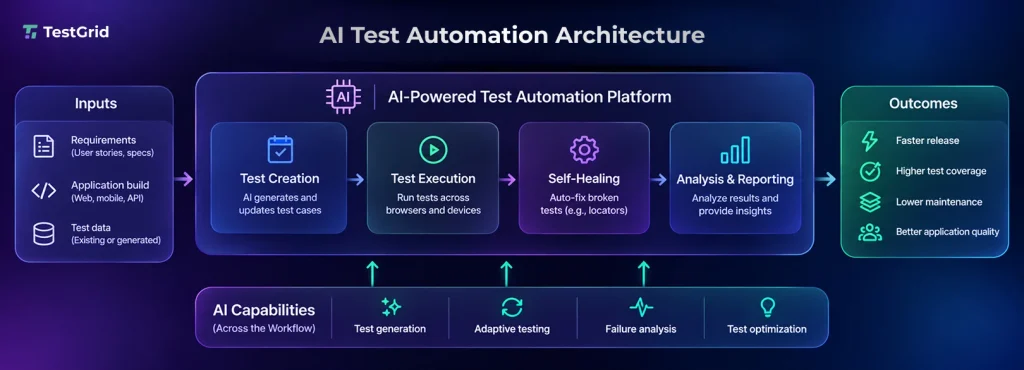
AI test automation leverages techniques such as machine learning, natural language processing, computer vision, and predictive analytics to interpret app behavior, generate tests, identify changes, and optimize execution.
Here’s a typical AI test automation architecture diagram:
AI-powered test automation
Automation tools integrated with AI and machine learning can automatically generate test cases and executable scripts from requirements, suggest test data and edge cases, and analyze failures using logs and stack traces.
This, in turn, minimizes your manual effort and improves coverage and failure investigation.
Self-healing automation
Self-healing automation applies AI to detect locator failures, evaluate updated DOM structures and element attributes, identify alternative locators, validate replacements, and record changes for future test runs.
This enables you to adapt your tests to your UI and code changes without manual script updates. Here’s how a typical self-healing test automation architecture /diagram might look:
Adaptive testing
Executing entire test suites after every change can significantly exhaust your time and resources. With adaptive testing, you can prioritize relevant test cases based on code changes, historical results, defect patterns, and test coverage.
AI can dynamically select and optimize regression tests, update predictions with new execution data, and help you spot defects early.
Build Scalable Test Automation with TestGrid
For robust test automation, you need a testing platform and execution infrastructure that can support different test environments, manage test assets, handle growing execution workloads, and give you actionable feedback across the development cycle.
Built by TestGrid, TestGrid ONE is the AI operating system that runs quality engineering. This end-to-end AI-native test automation solution offers features like test authoring, automated execution, test management, and real-device infrastructure.
Here’s how TestGrid supports the different components of your test automation architecture:
- Flexible test creation and framework support: With TestGrid, you can build tests in both script-based and codeless modes. You can even execute your existing automation suites built with Selenium, Playwright, Appium, and Cypress
- Centralized test management: You get capabilities to organize your test cases by app, release, module, or requirement, as well as reuse test assets, review execution history, and connect test results to defects
- Scalable execution across real devices and browsers: TestGrid gives you access to multiple real Android and iOS devices and browsers like Chrome, Safari, Firefox, and Opera; you can run your tests in parallel across these combinations and speed up execution
- CI/CD integration and reporting: You can integrate with CI/CD tools like Jenkins, GitHub Actions, GitLab, CircleCI, and Azure DevOps and trigger tests on code commits; and for every execution, you get detailed results along with logs, screenshots, videos, and crash reports
TestGrid offers QA teams the flexibility to use dedicated, private-cloud, hybrid, or on-premises deployment options based on their infrastructure and security requirements.
Streamline test automation with TestGrid. Request a free trial.
Frequently Asked Questions
What is test automation architecture in software testing?
Test automation architecture is the structural blueprint for your automated testing system. It defines how test scripts, reusable libraries, test data, configurations, application interfaces, execution infrastructure, and reporting components are organized and how they interact throughout test creation, execution, and maintenance.
What are the common challenges in maintaining test automation architecture?
Common challenges include growing script maintenance, fragmented frameworks, changing application interfaces, inconsistent test data, environment dependencies, duplicated code, and difficulty scaling execution. Clear architectural boundaries, reusable components, defined conventions, and appropriate design patterns can make these changes easier to manage.
What are some best practices of test automation architecture?
Start by assessing your application, technology stack, dependencies, and testing requirements. Define the tests you need, select a suitable automation framework, establish reusable design patterns, prepare test environments and data, and integrate automated execution into your CI/CD pipeline.
What security considerations should be addressed in test automation architecture?
Your architecture should account for how test data, credentials, and execution environments are handled. Plan mechanisms for isolating, masking, refreshing, and cleaning test data, and configure environment dependencies and access credentials carefully so automated tests can execute consistently without exposing sensitive information.
What should a test automation framework architecture diagram include?
A test automation framework architecture diagram should show the main components involved in creating and executing tests, such as test scenarios, scripts, reusable libraries, test data, execution environments, reporting, and CI/CD connections. It should also clearly show the dependencies and information flow between those components.
What does a Playwright test automation architecture look like?
A Playwright test automation architecture typically places Playwright within the test definition and execution parts of the broader architecture. Your setup can include test files, reusable page or component objects, test data, configuration, browser contexts, reporting, and CI/CD execution across Chromium, Firefox, and WebKit.