CoTester 2.0 is LIVE! Your Always-Available AI Teammate for Testing.
- What Is Audio Video Testing?
- What Does Audio Video Testing Include
- Types of Audio Video Testing
- How to Perform Audio Video Testing
- Metrics and Quality Attributes to Track
- Why Audio and Video Testing on Real Devices Is Essential
- Test Your App’s Audio and Video on Real Devices with TestGrid
- Frequently Asked Questions (FAQs)
Audio and video features are critical to how users experience your product. A video streaming platform or voice-enabled service can lose customers if the audio cuts out, voices are unclear, video freezes, or playback takes too long to start.
According to Conviva’s 2025 State of Digital Experience Report, poor video-streaming experiences cause more than 20% of customers not to return within seven days.
That’s exactly why thoroughly inspecting the media quality of apps is important. Audio-video testing can help you validate digital experiences so you can spot issues before it affects user experience.
In this blog, we’ll learn about audio video testing, its types, process, best practices, and the metrics to track.
Validate the quality of audio and video in apps and websites with TestGrid. Request a free trial.
TL;DR
- Audio-video testing assesses how reliably an app captures, processes, transmits, and plays back audio and video
- The testing should cover functional, quality, compatibility, and performance validation
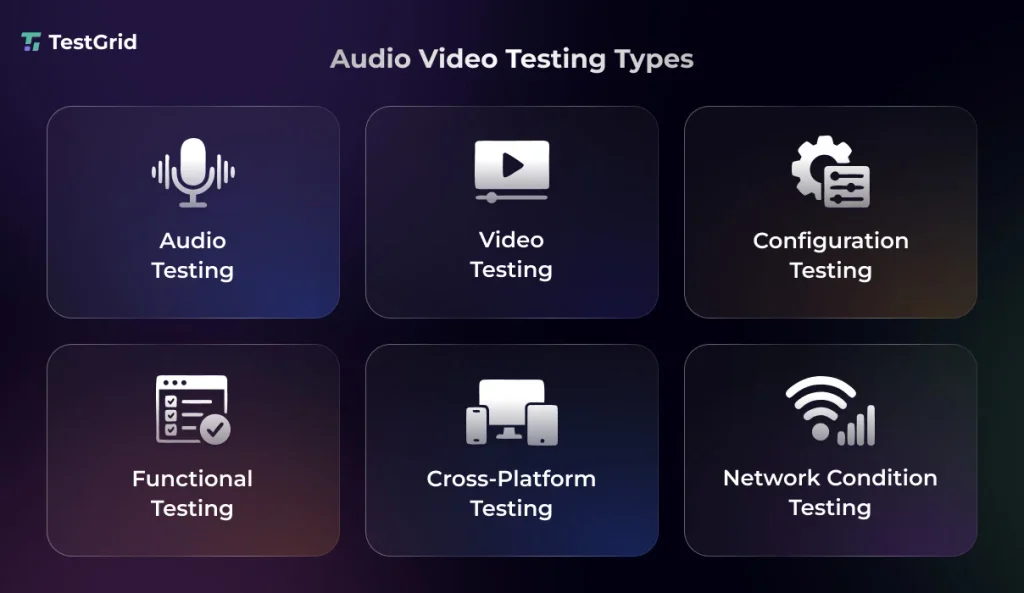
- The types of audio video testing include audio, video, configuration, functional, cross-platform, and network condition testing
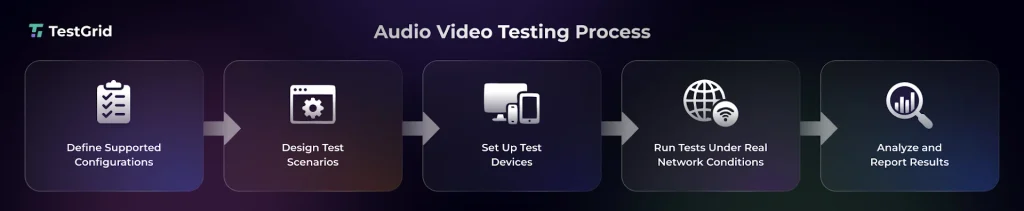
- To conduct audio-video testing, define the supported media formats, containers, codecs, and configurations; build test scenarios; set up the test environment; validate synchronization under realistic conditions; and analyze and report the results
- Some metrics and quality measures you can use to assess audio-video performance include bitrate, latency, packet loss, VMAF, and MOS
What Is Audio Video Testing?
Audio video testing is the process of assessing an app’s audio and video functionality, quality, synchronization, and playback performance across different devices, browsers, formats, and network conditions.
It helps you verify that media plays correctly, maintains acceptable quality, and delivers a consistent viewing and listening experience to users.
Audio video testing is especially important for streaming services, video conferencing tools, smart assistants, and applications that deliver DRM-protected content. Common examples include Zoom, Microsoft Teams, Google Meet, Alexa, Siri, and Google Assistant.
Also Read: Audio Testing: How to Automate Functional Testing for Media Applications
What Does Audio Video Testing Include
1. Functional validation
This involves verifying that the audio and video features of your app function as intended. You assess the media loading and playback, play/pause, seek, rewind, volume and mute controls, fullscreen, captions, quality settings, and interruption recovery.
You also check how the app handles unsupported or corrupted media, formats, codecs, and playback states across the supported devices and browsers.
2. Quality validation
In quality validation, you assess whether the audio and video meet defined quality requirements, thresholds, or baselines. For audio quality, you check for clarity, distortion, noise, and delay while also monitoring network-related factors such as jitter where relevant.
For video quality, you examine video resolution, frame rate, frame drops, visual artifacts, buffering, and freezes.
3. Compatibility validation
The audio and video functions and content of your apps should work properly across different devices, operating systems, browsers, and screen sizes that real users interact with. Therefore, to ensure compatibility, you should check the platform-specific differences in decoding, rendering, playback controls, and synchronization.
Learn More: What is Cross-Browser Compatibility Testing?
4. Performance validation
This helps you ensure that audio and video are delivered consistently under varying workloads and network conditions. To test audio-video performance, testers normally measure the startup time, stalls, frame drops, latency, and bitrate behavior, as well as monitor resource usage such as CPU, memory, and GPU during playback.
Also Read: Performance Testing Guide: Types, Process, Tools and Best Practices
Types of Audio Video Testing
1. Audio testing
Audio testing allows you to assess how your apps capture, process, transmit, and render sound. Depending on the application, you may test voice intelligibility, codec behavior, echo cancellation, noise suppression, automatic gain control, microphone and speaker input/output, and channel configuration.
2. Video testing
Video testing involves evaluating your app’s ability to decode, render, deliver, and, where applicable, encode video content.
This test involves examining compression behavior, visual artifacts, color accuracy, resolution changes, frame-rate consistency, freeze patterns, and video delay.
Learn More: Visual Testing: A Complete Guide
3. Configuration testing
This testing checks the media behavior across different combinations of formats, resolutions, frame rates, audio channels, and streaming profiles. Configuration testing helps you ensure your app can correctly render supported media configurations and has appropriate fallback behavior.
4. Workflow testing
Workflow testing validates end-to-end audio-video user journeys such as joining or leaving a call, starting or ending a recording, switching between participants, sending or receiving media streams, and starting or stopping screen sharing.
5. Cross-device and cross-platform testing
If your apps support mobile phones, tablets, desktops, smart TVs, operating systems, browsers, and device models, then you need to ensure that the audio and video content plays properly across all these platforms. This testing helps you detect differences in media rendering, device audio and video capabilities, and orientation handling.
Learn More: Cross-Platform Testing: Strategies, Tools, and Best Practices
6. Network condition testing
Here, you design test scenarios that simulate bandwidth throttling, latency, packet loss, jitter, congestion, and complete disconnections, so you can verify the audio video quality under network volatility. The goal is to observe how your app’s media delivery adapts when network conditions change.
How to Perform Audio Video Testing
1. Define supported configurations
The first step of your testing process is to map out the media configurations your app must support. This will help you prevent any compatibility gaps and give you a clear test matrix for your audio and video test files.
The table below shows common media formats, containers, and codecs that applications with audio and video capabilities may need to support.
| Format | Explanation |
|---|---|
| MP3 | Widely supported lossy audio coding format based on MPEG-1/2 Audio Layer III |
| MP4 | Multimedia container that can carry video codecs such as H.264, H.265/HEVC, or AV1 and audio codecs such as AAC |
| AAC | A lossy audio codec used for high-quality compressed audio, particularly in MP4 |
| WAV | Audio container format, commonly containing uncompressed PCM audio |
| OGG | Open container format that can contain codecs like Vorbis or Opus |
| Opus | Low-latency audio codec for speech, music, and interactive apps |
| FLAC | Lossless audio codec that preserves the original audio data and reduces file size |
| MOV | Apple’s QuickTime container format that’s capable of storing multiple audio and video codecs |
| AVI | Microsoft’s container format for storing audio and video streams |
| WMV | Family of Microsoft video codecs commonly stored in ASF-based Windows Media files |
| FLV | Container format that was originally designed for Flash-based web video delivery |
| MKV | Matroska container format which supports multiple audio, video, subtitle, and metadata streams |
| WebM | open web-focused container format using VP8/VP9/AV1 video and Opus/Vorbis audio |
| AVCHD | High-definition video recording format that commonly uses H.264/AVC video with audio codecs such as AC-3 |
2. Create test scenarios
After you know the audio and video formats your app should support, you need to design the test scenarios covering on-demand, live, and two-way communication, different content types (audio-only, video-only, audio-video, live streams, recorded content, and interactive media), seeking, interruptions, track switching, and screen sharing.
You should also include network changes, device contexts, and recovery paths in test scenarios. Plus, specify expected outcomes and measurable pass or fail criteria for each scenario.
3. Set up test devices
Next, for testing audio and video, you have to configure the devices where you’ll be assessing the audio and video of your app.
Set up a representative device matrix that includes mobile devices, desktops, smart TVs, and OTT devices and platforms such as Chromecast, Fire TV Stick, Apple TV, and Roku.
You can use a real device cloud alongside locally managed physical devices to broaden coverage.
Testing on actual hardware is important because media rendering, audio output, and platform behavior can vary depending on the device.
4. Simulate real-world network conditions
Run your tests under realistic network scenarios like Wi-Fi, cellular networks, and variable bandwidth conditions, including transitions between network types.
During audio video lab testing, simulate controlled impairments such as latency, bandwidth throttling, and brief disconnections, and then observe stream continuity, recovery behavior, and synchronization when network speed fluctuates during playback or live sessions.
Also Read: Network Performance Testing for QA and SRE
5. Analyze and report results
Correlate media quality metrics, evaluate results, identify degradation patterns, and investigate their likely causes using logs, recordings, and execution data.
You should also compare results of audio and video quality testing against defined thresholds or baseline runs, then report failures with timestamps, metric values, logs, and recordings.
Metrics and Quality Attributes to Track
You can monitor these metrics and quality measures to analyze the media delivery, playback stability, and audio and video quality of your apps.
| Category | Metric or Attribute | Description |
|---|---|---|
| Network and streaming | Bitrate | Amount of audio or video data transmitted per second (usually measured in bits per second) |
| Buffer time | Time it takes to load and store media data for uninterrupted playback | |
| Jitter | Variation in packet arrival times that can cause uneven audio or video playback | |
| Packet loss | Percentage of transmitted packets that fail to reach their destination (leading to video or audio interruptions) | |
| Latency | Delay between media transmission and reception (high latency can affect responsiveness) | |
| Video quality | Blockiness | Visible block-shaped artifacts, commonly caused by compression at insufficient bitrates |
| Blurriness | Loss of image sharpness or fine detail | |
| Colorfulness | Perceived intensity or vividness of colors in the video | |
| VMAF (Video Multi-Method Assessment Fusion): That is Netflix’s official expansion of the acronym. (GitHub) | Compares a processed video against a reference to estimate perceived quality Full-reference perceptual video quality metric that compares a processed video with a reference video to estimate perceived quality | |
| PSNR (Peak Signal-to-Noise Ratio) | Measures pixel-level signal fidelity between a processed video and its reference | |
| Audio quality | MOS (Mean Opinion Score) | Score representing perceived audio or speech quality, traditionally derived from subjective listener ratings and also estimated by some objective quality models |
| POLQA (Perceptual Objective Listening Quality Assessment) | Objective model for predicting listening quality of speech by comparing reference and degraded signals |
Why Audio and Video Testing on Real Devices Is Essential
Audio and video behavior can vary depending on device hardware, OS behavior, audio drivers, and connected peripherals, which is why testing on real device environments is critical.
Your device testing scenarios should ideally include incoming-call and notification interruptions, Bluetooth connections, built-in microphone behavior, wired headsets, devices with external speakers, buffering under real playback conditions, and audio-video synchronization.
These tests can help you uncover issues that emulators or simulated environments may not accurately reproduce.
Also Read: Audio Testing for Chatbots
Test Your App’s Audio and Video on Real Devices with TestGrid
TestGrid is an AI-native end-to-end software testing platform that helps you automate audio and video testing workflows across real devices and browsers and integrate test execution into CI/CD pipelines with TestGrid Audio Testing Platform.
Here are some of TestGrid’s best Audio and Video testing features:
- Test Audio In and Audio Out on remotely hosted real devices, including voice commands, voicemail configuration, and media playback
- Get cloud-based access to physical Zebra handheld and wearable devices to validate application and audio behavior on real hardware
- Run your audio video tests in parallel, queue testing when matching devices are already occupied, and execute larger workloads faster with Quantum Grid
- Speed up test execution with TestGrid’s scriptless Single and Multiple Runs; distribute test cases across real devices for faster results or broader device coverage
- Reduce test maintenance when UI elements or application workflows change with adaptive AI auto-healing
Deliver exceptional media experiences across devices and browsers with TestGrid. Request a free trial.
Frequently Asked Questions (FAQs)
What is the difference between audio video testing and multimedia testing?
Audio/video testing specifically focuses on assessing the audio and video capture, processing, transmission, playback, quality, and synchronization. Multimedia testing is much broader and may also cover images, animations, graphics, text overlays, subtitles, and interactions between these media elements.
Can audio video testing be automated?
Yes. Many repeatable audio and video checks can be automated, including functional validation, media playback, recording workflows, cross-device execution, and network-condition testing.
What are some best practices of audio video testing?
Some of the best practices which you can follow when testing the audio and video features of your apps include testing on real devices, covering all supported media formats, measuring relevant quality metrics, and comparing results against defined baselines or thresholds.
How do you test audio and video accessibility?
You can test audio and video accessibility by validating captions, transcripts, and audio descriptions and by checking whether media-player controls are accessible by keyboard and assistive technologies. Also, assess the contrast and labeling of player controls, volume controls, playback-speed controls, focus behavior, and screen-reader compatibility.