 CoTester 2.0 is LIVE! Your Always-Available AI Teammate for Testing.

- What Is a User Experience Lab?
- Why Do Enterprises Need a User Experience Lab for Continuous UX Diagnosis?
- Flexible Deployment of Your User Experience Lab
- How Test Data Feeds the User Experience Lab
- Measuring and Diagnosing Experience Quality in TestGrid’s UX Testing Lab
- Operationalize Enterprise-Grade Experience Assurance
- Frequently Asked Questions (FAQs)
The velocity of release cycles often exceeds the capacity of most enterprises to validate user experience under real-world conditions.
Continuous integration and automated testing pipelines confirm build stability. Yet as production traffic increases, live environments surface latency, transaction delays, and session drops that pre-release tests fail to capture.
Data appears across metrics, including CPU utilization spikes, memory pressure, API response times, and bandwidth constraints. But without proper contextual correlation, it remains fragmented and inconclusive.
These blind spots reflect a structural limitation: testing efforts can’t fully replicate the diversity of devices, operating systems, and network conditions that users actually encounter in production.
To bridge the gap, enterprises need a dedicated user experience lab, a data-driven environment that emulates real-world variables and continuously links metrics, logs, and events to prevent performance regressions before every release.

In this blog, we explore how a UX testing lab functions, what dimensions it monitors, and how platforms such as TestGrid operationalize it within modern CI/CD pipelines.
- A user experience lab establishes a diagnostic environment that mirrors real operating conditions
- By correlating telemetry across devices, networks, and APIs, teams uncover where and why performance drifts emerge
- Functional and non-functional insights merge into a single analytical view that accelerates triage and resolution
- Context replaces noise as data from every build connects to measurable experience outcomes
- Experience assurance becomes continuous, data-driven, and integral to every release cycle
What Is a User Experience Lab?
A user experience lab is a diagnostic tool that unifies testing, analytics, and visualization to measure app performance under tremendous load from a user’s perspective. It maps outcomes across functional, load, and network signals, linking parameters such as device model, OS version, and API latency to identify where and why experience quality degrades.
Why Do Enterprises Need a User Experience Lab for Continuous UX Diagnosis?
Here are three critical reasons:
1. To assure quality across devices and operating systems before release
Even when test automation covers all major workflows, subtle variations in user experience across devices and operating systems can still emerge.
A user experience lab enforces standardized pre-release validation policies by simulating controlled workloads and monitoring key indicators, such as app start time, transaction success rate, and frame render stability.
These observations confirm each build meets baseline experience thresholds before deployment.
2. To regain visibility into failures that automation overlooks
Automation ensures that app functions behave as intended, but it doesn’t gauge how efficiently they execute in real environments. Minor configuration mismatches, resource contention, and client-side rendering delays often remain undetected until after release.
A user experience lab links test signals across builds, telemetry sources, and environments, revealing when performance drift begins and how it evolves.
3. To isolate the real cause behind performance degradation
When app responsiveness drops, the issue may stem from multiple layers: network congestion, API bottlenecks, memory leaks, or unoptimized rendering paths.
Conventional test suites identify the symptom; a UX testing lab identifies the source. It consolidates functional, network, and system metrics in a single diagnostic view.
This allows you to trace degradations to their source—whether in code, configuration, or infrastructure—and address them before they cascade into user-facing incidents.
Flexible Deployment of Your User Experience Lab
Once the testing logic for a UX testing lab is outlined, the next step is deployment. The operational model determines how easily testing integrates with CI/CD pipelines, security frameworks, and cross-regional teams.

Depending on scale, compliance, and integration requirements, a user experience lab adapts to three deployment modes:
1. On-premise
This setup enables you to build and operate your own test infrastructure entirely within your environment, using your own devices, browsers, and networks. It provides complete data sovereignty, VPN isolation, and MDM integration.
2. Cloud-based
The cloud deployment enables instant access to thousands of real devices and browsers, integrates natively with CI/CD pipelines, and supports geographically distributed QA teams. It delivers on-demand expansion without the overhead of local hardware or setup.
3. Hybrid
The hybrid configuration combines on-premise control with cloud flexibility. Sensitive data and VPN-restricted tests remain local, while high-capacity system or load testing executes in the cloud. Both environments connect through a shared analytics and reporting layer.
How Test Data Feeds the User Experience Lab
Every test execution contributes to the lab’s data foundation. The user experience testing lab aggregates functional and non-functional results to create a complete picture of performance, stability, and reliability across builds. Here’s what that looks like in practice:
Functional testing
It establishes whether key workflows, interfaces, and integrations operate as designed before performance analysis begins. Login, search, and checkout paths confirm the stability of the user journey, while page-level runs detect rendering delays and layout inconsistencies.
On the other hand, click-path and workflow tests record transition speed across multi-step processes to pinpoint where latency originates.
Backend and API testing track service response intervals, payload sizes, and dependency health, establishing the baseline non-functional assessments upon which subsequent assessments are built.
Non-function testing
This form of testing evaluates how the app performs under varying load, network, and device conditions, not just whether it functions.
For example, load testing simulates concurrent user activity to quantify throughput and stability thresholds. Network throttling simulates 3G, 4G, 5G, and Wi-Fi conditions to assess responsiveness across multiple bandwidth levels.
Similarly, latency testing calculates delays in UI transitions, API calls, and animations, while mobile performance testing captures rendering time and energy consumption across real devices.
Measuring and Diagnosing Experience Quality in TestGrid’s UX Testing Lab
Enterprises need to accelerate how they triage and resolve experience-related issues. However, most QA and DevOps teams are buried under large volumes of test data and operational noise, making it difficult to identify, prioritize, and fix the root cause of performance problems.
A user experience lab transforms this noise into structure. It acts as an analytical system that detects, localizes, and explains performance drift across environments.
TestGrid’s UX testing lab extends the framework even further, combining KPI monitoring, multi-dimensional correlation, and AI-assisted analysis into a cohesive insight engine. Let’s find out how the process unfolds:
1. KPI monitoring and outlier detection
Every release generates measurable KPIs. Some are binary, such as pass/fail, while others are threshold-based, such as app cold/warm start time or page transition latency.
But unlike traditional testing setups that isolate functional and non-functional results, TestGrid’s UX testing lab continuously connects data across five diagnostic dimensions:
- Application: version, frame stability, data throughput
- Device: model, OS version, CPU, memory, bandwidth
- Test Case: configuration and execution stage
- API: endpoint, vendor, response latency
- Network: traffic logs, signal strength

When a KPI breaches its defined threshold, the lab combines these data streams with AI-assisted analysis and interactive dashboards to localize the issue and estimate its operational impact.
2. Multi-dimensional correlation
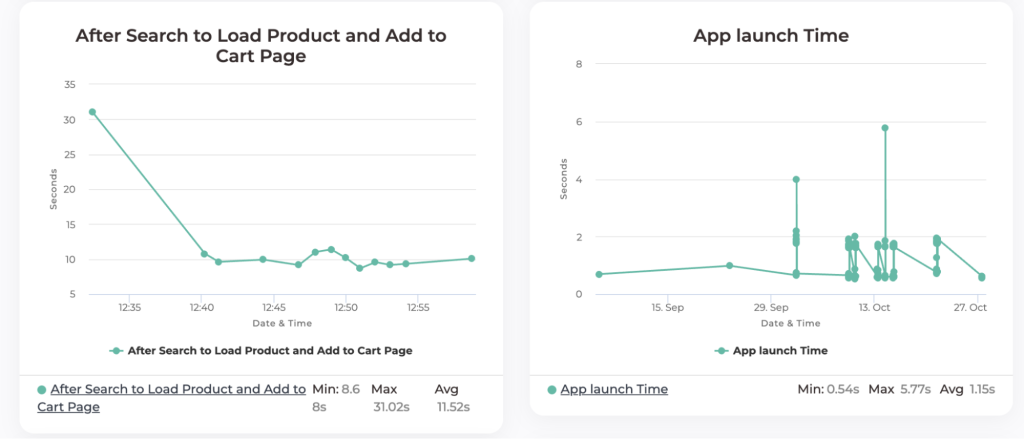
Suppose page load time exceeds a set threshold, the lab automatically cross-references telemetry across versions and environments to answer a structured set of questions and isolate the cause:
- Has this page load varied between app versions?
- Has it varied across OS versions, especially after a recent OS update?
- Is there a spike or excessive use of device resources at this time (CPU, memory, or data throughput)?
- Is there a spike or excessive response time in any API calls?
- Is there a particular API blocking the UI, causing the page to load slowly or not at all?
- Are there any network issues at this time?
3. Root cause localization and AI insights
Once the affected domain is identified, the UX testing lab’s AI engine analyzes execution traces and dependency graphs to pinpoint the root cause.
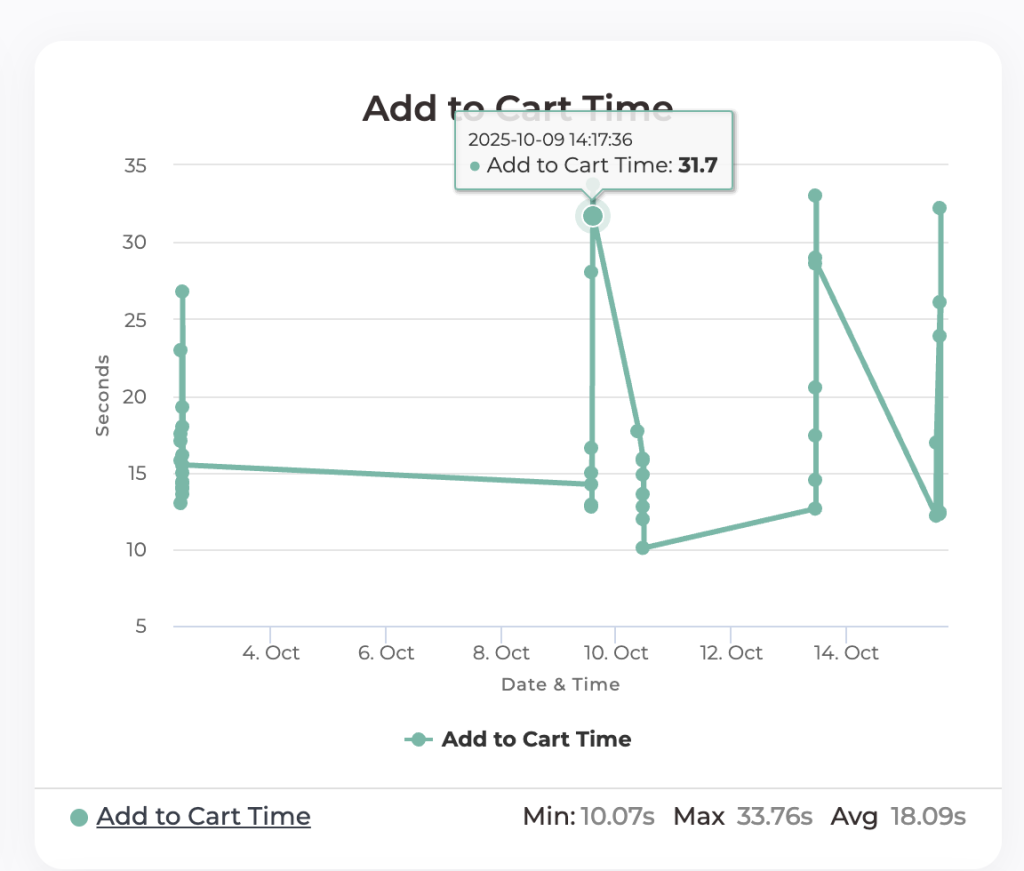
For example, in the graph below, the lab tracks Add to Cart Time for a single app and OS version across multiple runs. Variations and outliers, such as the spike on October 9, signal where performance degradation originates and how it evolves across builds.
The lab then helps answer key analytical questions such as:
- What factors contributed to the 31-second Add to Cart Time?
- What corrective actions can reduce this latency?
- How long has the issue persisted, and in which build was it introduced?
Here, the AI layer interprets execution data and surfaces actionable insights before triage begins. It identifies unstable automation scripts, detects gaps in test coverage, and recommends additional scenarios based on historical app behavior and previous test inputs.
For instance, if the search API (https://abc.com/search) shows latency increasing from 400 ms to 4 seconds in the latest build, the lab runs targeted probes to determine whether the delay stems from server overload or a CDN redirect to a different point of presence (PoP).
4. Waterfall and trend visualization
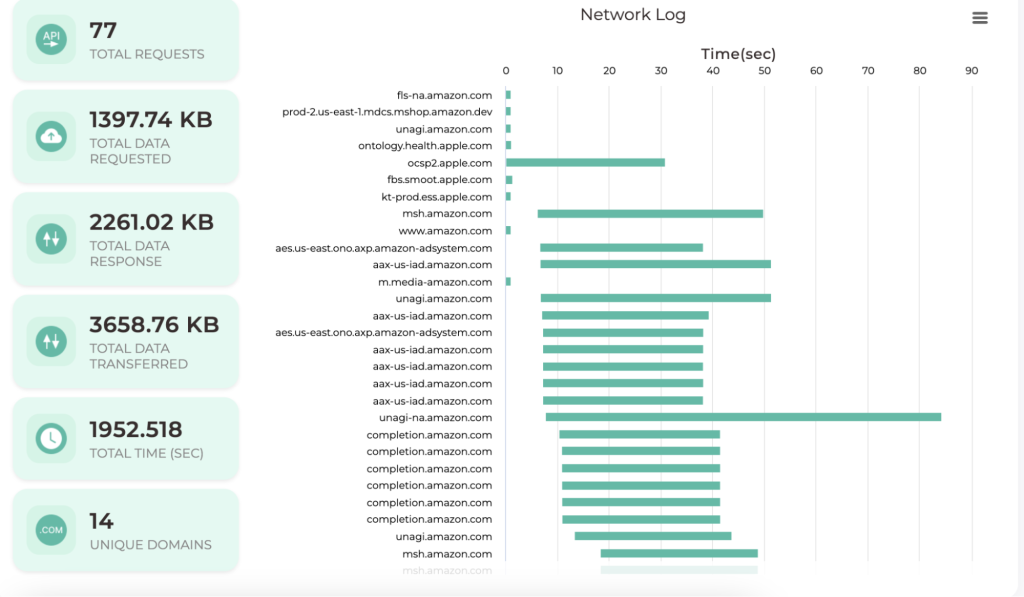
For ongoing analysis, the user experience lab provides a waterfall view that visualizes every event in a test session, including page loads, API calls, frame renders, and responses, in chronological order.
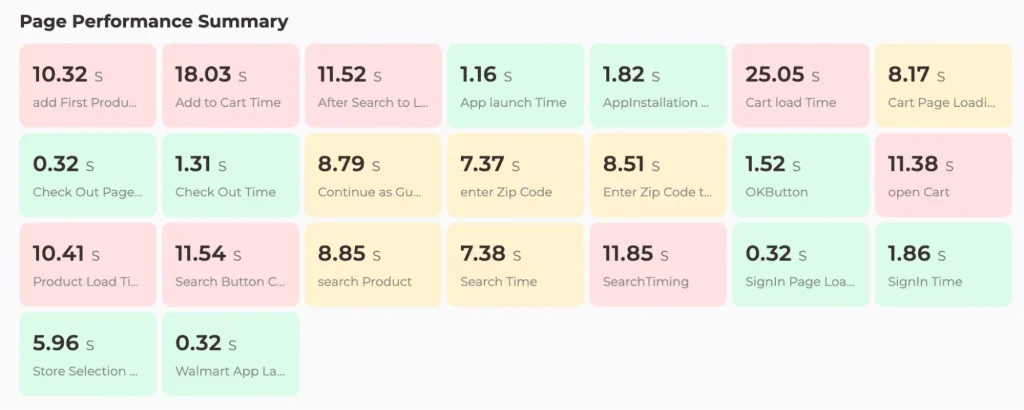
Complementing this is the trend view, which tracks long-term patterns in CPU usage, memory utilization, and script stability. With it, you can:
- Identify which KPIs have drifted most over time
- Compare historical builds to pinpoint when regressions began
- Determine which optimizations produced measurable improvements
TestGrid’s integrated interface also supports interactive querying of test histories directly, enabling you to ask questions like:
- “Which test had the most failures this week?”
- “Which fix would improve load time most visibly?”
- “When did the ‘add to cart’ latency first appear, and under which build?”
These diagnostic tools turn static test data into a living intelligence layer, helping you understand what happened, why it happened, and how to fix it before the next release.
Operationalize Enterprise-Grade Experience Assurance
User experience quality cannot remain a post-release discovery. It must be measured, governed, and improved within the same system that delivers the product.
TestGrid’s UX testing lab provides enterprises with a clear, repeatable way to observe how every change affects performance, reliability, and user trust. Each release becomes evidence of operational maturity, where experience is not assumed but proven through data.
Book a demo to see how you can design your UX testing lab with TestGrid.
Frequently Asked Questions (FAQs)
1. How does integrating UX testing labs with CI/CD pipelines improve release quality?
Integrating a UX testing lab with CI/CD pipelines embeds experience validation directly into the build process. Each new commit or release candidate automatically triggers functional, non-functional, and performance tests on real devices and networks.
2. What’s the difference between a user experience lab and a usability testing lab?
A user experience lab measures the technical performance of apps under real device, network, and workload conditions. A usability testing lab, in contrast, evaluates human interaction and behavior, how intuitive or efficient an interface feels to end users.
3. Can enterprises customize the UX testing lab’s diagnostic scope?
Yes. The diagnostic depth depends on organizational maturity and data policies. Teams can define thresholds, test cases, and monitored KPIs per project, region, or release type.
4. What’s the ideal first step to establish a UX testing lab?
Start by mapping your current testing signals: device coverage, network variability, and KPI tracking gaps. Then, pilot a UX testing lab for one high-traffic application, integrating it with CI/CD to validate performance drift across builds. This creates a repeatable framework before rollout.


