


Test on an Android Emulator Online, No Setup or Download Required
Check how your Android app behaves across screen sizes, OS versions, and device configurations while avoiding the overhead of a local emulator setup. TestGrid gives you browser-based access to Android emulators for functional, usability, compatibility, and regression testing.
Request Free Trial


Android Emulator for App Testing
Manual, Automated, or No Code
TestGrid offers you all the testing approaches that fit your workflow, existing framework, and level of automation:
Manual testing
Interact directly with your app to inspect navigation, UI behavior, responsiveness, and common user flows across different Android configurations.
Automated testing
Execute your existing Appium tests and other supported automation workflows across multiple virtual devices to expand coverage.
No-code testing
Create repeatable automated checks to test Android emulator workflows with no scripting required. Record interactions and convert them into test flows for faster authoring and frequent updates.
Level Up Testing with
Our Scalable Online Android Emulator
Gain quick access to multiple Android environments for various configurations with TestGrid.
Check device and browser compatibility
Reproduce configurations modeled on devices from Samsung, Google Pixel, OnePlus, Vivo, Motorola, and other online emulator Android environments. Test web experiences across browsers including Chrome, Firefox, and Samsung Internet.
Simulate geolocation-based app behavior
Use Android emulator online to evaluate location-dependent features across different regions. Review mapping integrations, localized content, and other app behavior that changes based on geographic input.
Emulator vs Real Device Testing
Your choice should depend on the type of feedback you need and the stage of development you’re testing.
| Features | Emulator | Real Device |
|---|---|---|
| Speed | Quick to provision, switch, and repeat across configurations | Access may depend on available devices and device allocation |
| Cost | Cost-effective for broad development and regression coverage | Requires physical device infrastructure or cloud device access |
| Accuracy | Strong for software behavior, UI checks, debugging, and OS coverage | More accurate for hardware, sensors, device-specific behavior, and final validation |
| Setup ease | Browser-based access reduces local setup and maintenance | Physical labs require device management; cloud access reduces that overhead |
For scenarios that require hardware-level validation or device-specific accuracy, learn more about real device testing.
Accelerate Test Runs with TestGrid
Execute tests across multiple Android environments in parallel. Cover more combinations within the same test cycle, shorten regression feedback, and investigate failures without waiting for each configuration to finish one after another. An Android emulator online is particularly useful when you need repeatable parallel coverage across versions.
Request Free Trial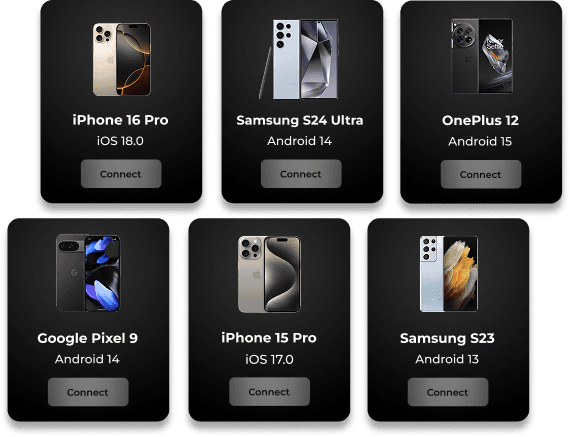
When Are Android Emulators Enough?
Emulators are a practical choice when hardware-specific behavior isn’t central to the result – for instance:
Early development for fast functional feedback
UI and layout testing across screen sizes
Regression testing after application changes
Testing across multiple Android versions for compatibility
Running tests in parallel to reduce execution time
KPI-Driven Performance Testing
Functional correctness tells you whether a workflow completes. Performance data helps you understand what the app consumes while it operates. With TestGrid, you can examine CPU consumption, memory usage, and battery impact during Android testing. Prioritize areas that may need further investigation before release.
Leverage Visual Test Reports
See what happened during a test without relying on a pass-or-fail result alone. TestGrid reporting helps you review test outcomes, identify failures, and analyze behavioral trends through accessible dashboards. Get more context when diagnosing a problem with logs, screenshots, and session recordings.
Appium Meets Codeless Flexibility on TestGrid
Find the balance between simplicity and control for your testing process.
Run existing Appium tests on TestGrid’s cloud-based real Android devices; no additional testing infrastructure to maintain.
Create automated tests for your Android apps without coding – ideal for quick iterations.
Report defects directly to Jira or Slack, and connect TestGrid with your CI/CD workflows.
Why Choose TestGrid to Test Your Android App Online?
We’re committed to helping you build high-performing Android apps; here’s why developers and testers prefer TestGrid:
Real-device validation when needed
Start with emulators for development and regression, then continue on TestGrid’s real-device cloud for hardware-specific behavior, sensors, and device-level accuracy.
Flexible deployment options
Run TestGrid in the cloud, on-premise, or through private and hybrid environments based on your security, infrastructure, and access requirements.
Broader testing in one platform
Bring Android, web, automation, performance, visual, and other testing workflows into TestGrid, reducing dependence on separate tools across your testing stack.
Frequently Asked Questions (FAQs)
What are Android emulators?

Android emulators are software programs that reproduce an Android device’s software environment on a computer or cloud platform. They work well for development, debugging, UI checks, and OS coverage, although hardware-specific validation still requires real devices.
What are Android emulators?
Android emulators are software programs that reproduce an Android device’s software environment on a computer or cloud platform. They work well for development, debugging, UI checks, and OS coverage, although hardware-specific validation still requires real devices.
What are the benefits of using an Android emulator for testing?
An android emulator online lets you check an app across Android versions and configurations without maintaining corresponding physical devices. This makes emulators useful for early debugging, regression testing, UI validation, and parallel coverage when you need repeatable software-level feedback across several environments.
What are the benefits of using an Android emulator for testing?
An android emulator online lets you check an app across Android versions and configurations without maintaining corresponding physical devices. This makes emulators useful for early debugging, regression testing, UI validation, and parallel coverage when you need repeatable software-level feedback across several environments.
How does TestGrid’s Android emulator help improve app performance?
TestGrid provides metrics such as CPU consumption, memory usage, and battery impact while you test your Android application. You can use this information to identify resource-heavy behavior, compare performance between configurations, and investigate areas that may need optimization before broader release validation.
How does TestGrid’s Android emulator help improve app performance?
TestGrid provides metrics such as CPU consumption, memory usage, and battery impact while you test your Android application. You can use this information to identify resource-heavy behavior, compare performance between configurations, and investigate areas that may need optimization before broader release validation.
What’s the difference between a phone emulator and a real device?
A phone emulator recreates an Android device’s software environment virtually, while a real device includes the actual hardware, sensors, and manufacturer-specific behavior. Emulators are useful for broad software testing, while real devices provide more accurate results for hardware-dependent and device-specific scenarios.
What’s the difference between a phone emulator and a real device?
A phone emulator recreates an Android device’s software environment virtually, while a real device includes the actual hardware, sensors, and manufacturer-specific behavior. Emulators are useful for broad software testing, while real devices provide more accurate results for hardware-dependent and device-specific scenarios.
Can I test mobile apps across different Android versions?
Yes. TestGrid enables you to check your application across multiple Android versions and configurations. This helps you identify compatibility problems that may appear only on certain OS releases, compare behavior between versions, and expand regression coverage while avoiding a separate local environment for every version.
Can I test mobile apps across different Android versions?
Yes. TestGrid enables you to check your application across multiple Android versions and configurations. This helps you identify compatibility problems that may appear only on certain OS releases, compare behavior between versions, and expand regression coverage while avoiding a separate local environment for every version.
How can I test an Android emulator online with TestGrid?
Sign up for TestGrid, upload your Android application, choose the Android environment you need, and start testing through your browser. You can interact with the application manually or use supported automation workflows. You don’t need to download or maintain a separate emulator installation on your local machine.
How can I test an Android emulator online with TestGrid?
Sign up for TestGrid, upload your Android application, choose the Android environment you need, and start testing through your browser. You can interact with the application manually or use supported automation workflows. You don’t need to download or maintain a separate emulator installation on your local machine.
Is there a free option for testing Android apps online?
Yes, TestGrid offers a free trial that lets you start evaluating its Android testing capabilities before committing to a paid plan. You can use the trial to explore the workflow, check relevant Android configurations, and determine whether the available testing options fit your application and team requirements.
Is there a free option for testing Android apps online?
Yes, TestGrid offers a free trial that lets you start evaluating its Android testing capabilities before committing to a paid plan. You can use the trial to explore the workflow, check relevant Android configurations, and determine whether the available testing options fit your application and team requirements.
Why choose an online emulator instead of downloading software locally?
A cloud-hosted emulator reduces the installation, configuration, and maintenance work associated with managing multiple local Android environments. You can access different configurations through your browser, switch between them more easily, and give distributed team members access while avoiding duplicate emulator setups across workstations.
Why choose an online emulator instead of downloading software locally?
A cloud-hosted emulator reduces the installation, configuration, and maintenance work associated with managing multiple local Android environments. You can access different configurations through your browser, switch between them more easily, and give distributed team members access while avoiding duplicate emulator setups across workstations.
Android emulator online vs real devices: Which is better for testing?
An Android emulator online works well for development, debugging, regression, UI checks, and broad Android-version coverage. Real devices provide more accurate feedback for hardware-specific and device-dependent behavior. Using both gives you efficient emulator coverage first and physical-device validation where the scenario requires it.
Android emulator online vs real devices: Which is better for testing?
An Android emulator online works well for development, debugging, regression, UI checks, and broad Android-version coverage. Real devices provide more accurate feedback for hardware-specific and device-dependent behavior. Using both gives you efficient emulator coverage first and physical-device validation where the scenario requires it.