 CoTester 2.0 is LIVE! Your Always-Available AI Teammate for Testing.

Testing ServiceNow applications can be deceptively complex. Every instance is uniquely customized, and integrations extend across IT Service Management (ITSM), HR, and customer-facing processes, which makes ServiceNow test automation a lot more challenging than it first appears.
The platform changes frequently with each release, and the locators are updated for the same elements on every page load.
For QA teams, this creates a persistent challenge: keeping tests stable and relevant while ServiceNow’s setup, data models, and APIs keep evolving underneath. In this scenario, traditional frameworks for ServiceNow automation testing often struggle to keep up.
ServiceNow applications run on a metadata-driven architecture where most functional components, such as interfaces, workflows, and logic, are defined as configuration data rather than static code.
However, many elements, including Script Includes, UI Policies, and custom widgets, still rely on executable scripts. At runtime, the platform interprets this combined configuration and code to render UIs, apply business rules, and orchestrate process flows.

Even minor adjustments in modules like Incident, Change, or custom apps can alter UI structure or client behavior without directly modifying the underlying codebase.
Therefore, what ServiceNow automation testing needs to be effective is a structured approach — one that aligns test design with service journeys, manages data and environments carefully, and integrates seamlessly into continuous delivery pipelines.
This guide shows you exactly how to do that. In the following sections, you’ll learn how to build a reliable ServiceNow test automation strategy along with precise steps to plan, execute, and maintain scalable ServiceNow test suites.
Start ServiceNow testing with CoTester by TestGrid
- ServiceNow automation testing is complex because every instance is uniquely configured and frequently updated
- Customizations across ITSM, HR, and customer workflows make automation fragile and environment-dependent
- The platform’s metadata-driven architecture causes UI and logic to change even without code modifications
- Stable ServiceNow test automation requires aligning test design with real service journeys and controlled environment management
- Hybrid UI and API testing frameworks integrated with CI/CD pipelines ensure continuous validation
- Data synchronization across Dev, QA, and UAT is critical for reproducible, trustworthy test results
- Ongoing optimization, cleanup, and test-to-change mapping keep automation aligned with platform evolution
What Is ServiceNow Test Automation?
ServiceNow test automation refers to the use of scripted or AI-powered tools to validate the functionality of workflows, forms, business rules, and integrations across the ServiceNow platform. As part of broader ServiceNow testing, it ensures that all modules and customizations perform reliably across environments.
Its primary goal is to confirm that an instance continues to work as expected after changes, such as upgrades, patches, or new deployments.
Tests are defined with clear steps, executed automatically in cloned or sub-production environments, and the results are tracked through CI/CD tools like Jira.
Types of ServiceNow automation testing
- UI tests: Validate form behaviors, conditional visibility, client scripts, and workflow transitions
- API tests: Confirm that REST and SOAP endpoints perform intended operations, exchange correct payloads, and maintain data integrity
- Regression tests: Automate multi-step processes that involve different modules or connected systems like SAP and Active Directory
Core Components of a Robust ServiceNow Testing Strategy
| Component | Purpose | Key Focus Area |
|---|---|---|
| Test planning and prioritization | Identify and organize critical workflows for validation based on business impact | Map high-value workflows, such as Incident, Change, and Request Management, to prioritize test cases |
| Environment and data management | Ensure consistent configuration and reproducible results across environments | Maintain synchronized instances and stable seeded data across Dev, QA, and UAT |
| Automation framework and CI/CD integration | Combine UI and API testing within continuous delivery workflows | Integrate hybrid automation into Jenkins, Azure DevOps, or GitHub pipelines for continuous validation |
| Reporting and traceability | Track performance, coverage, and trends across releases | Link test outcomes to requirements and visualize progress through centralized dashboards |
Also Read: Best 10 ServiceNow Testing Tools in 2025
Step-by-Step Guide to Testing ServiceNow Applications
1. Define test objectives and scope
The first step in any ServiceNow test automation initiative is clarity of purpose. Identify the workflows that deliver measurable business outcomes or involve cross-functional integrations.
For example, in HR case management, you might focus on multiple downstream actions, such as account creation, hardware provisioning, and access configuration. Once these processes are mapped, outline validation goals that align with them.
That could include:
- Ensuring workflow state transitions comply with SLA or business rule logic
- Confirming that onboarding requests automatically create associated IT and Facilities tasks
- Verifying that role-based approval rules correctly route cases to the appropriate department
Link such goals to their corresponding Change Request (CR) or story ID for traceability. This mapping ensures that test coverage evolves in sync with configuration changes.
2. Select the right automation framework
The framework you choose determines how efficiently your tests adapt to ServiceNow’s dynamic structure.
Its built-in Automated Test Framework (ATF) should be your default starting point. It enables in-platform testing for UI and server-side logic, allowing you to validate core workflows without external dependencies.
ATF covers standard regression and form validations natively, while external or AI-driven tools like CoTester extend beyond its scope, especially for cross-module workflows, complex integrations, and adaptive self-healing ServiceNow automation testing.
Let’s review the decision criteria with examples:
- Execution fidelity: If your ServiceNow tests need to validate UI behavior, API responses, and database updates in a single flow, choose a hybrid test framework that combines browser automation with REST API testing, for example, Automated Test Framework (ATF) paired with REST Assured
- Reusability: When the same actions (like login, data setup, or cleanup) appear across multiple workflows, pick a framework that supports modular or keyword-driven test design, allowing you to reuse those steps in different test suites
- Execution strategy: For UI validation and Access Control List (ACL) testing, you’ll need real-browser execution to catch layout or permission issues; for regression or performance cycles, switch to headless testing to improve speed and resource efficiency
Integrate your framework with GitHub Actions, GitLab CI, or Jenkins pipelines to execute each test suite programmatically through REST APIs or command-line triggers.
3. Configure and synchronize test environments
Consistency across test environments is essential for reproducible results. ServiceNow’s configuration-driven model means that two instances can behave differently even when running the same release. A field, rule, or plugin present in one may not exist in another.
Here are pre-flight checks to automate before any run:
- Validate that key ACLs and role assignments exist for the test users
- Verify plugins and update set versions to align for dev, QA, and User Acceptance Testing (UAT) teams
- Confirm the presence of critical reference data tables, such as departments, assignment groups, and catalog items
- Ensure that test data (seeded through import sets or API scripts) is isolated and refreshed between runs to prevent contamination
In HR Service Delivery (HRSD) testing, mismatched department records or inactive roles can cause workflow failures that have nothing to do with app logic. These issues often trace back to inconsistent environment configurations rather than test defects.
4. Automate critical workflows across the UI and API
Once environments are stable, shift your focus to end-to-end workflow validation. Each automation should test both interface behavior and API integrity. Let’s take the Knowledge Management module as an example:
- Verify that published articles inherit correct ACLs and are accessible by authorized roles only
- Validate the article lifecycle by creating a draft, submitting it for approval, and confirming that a reviewer can approve it through the UI
- Execute API requests as different user roles:
- As a user without view permissions, expect a 403 Forbidden response
- As an authorized user, expect a 200 OK response
In addition, capture logs, screenshots, and API traces from each run. Store them under a standardized folder structure (e.g., /results/{test_run_id}/). Tag all artifacts with PR ID or Change Request number to link test results to configuration changes.
5. Integrate tests with CI/CD pipelines
To maintain speed and accuracy, embed your ServiceNow automation testing suite within your continuous integration and delivery process. Each configuration update, script change, or new module deployment should automatically trigger targeted validations.
If you use ServiceNow’s native DevOps module, you can also link ATF or external test suites directly to Now Platform pipeline stages.
This allows automated validations to trigger from GitHub, Jenkins, or Azure DevOps events, maintaining traceability between change requests, builds, and test executions.
Here’s how you can do that:
- Execute linting, security scans, and automated code quality checks before deploying the scoped app to a dedicated test instance or sandbox testing snapshot
- Export structured reports (JUnit XML or JSON) to your reporting endpoint and block merges when critical validations fail
- Apply change-to-test mapping to execute only the impacted test cases based on modified scripts, tables, or flows
- Configure the CI pipeline to initiate when a developer opens or updates a Pull Request for a scoped app change
- Publish structured test results to your reporting endpoint and block merges when critical validations fail
6. Analyze, optimize, and maintain test suites
Your ServiceNow automation testing efforts are only effective if you approach them as a continuous process. Therefore, after each test cycle, analyze results to identify patterns that indicate instability or configuration drift.
Here are a few metrics to collect and act on:
- Flakiness rate per test and per suite (flag tests that fail intermittently above a set threshold, for example, 3%)
- Test coverage of prioritized workflows and integration points
- Mean time to repair a broken test after a valid failure
Failures caused by UI element changes, renamed fields, or shifting data dependencies should be handled through systematic locator and dependency management, not reactive one-off fixes.
Standardize locator strategies around stable, meaningful attributes rather than brittle absolute paths, and ensure all test data is consistent and reproducible.
With AgentRx, CoTester’s AI-powered self-healing engine, this process becomes significantly more resilient. AgentRx automatically detects even major UI changes, including layout restructuring and full interface redesigns, and updates test logic in real time during execution.
This reduces manual maintenance effort and keeps your test suite stable, reliable, and ready to scale. After each major platform upgrade, review your coverage reports to retire outdated tests and introduce new cases aligned with the latest functionality.
Insight: Organizations using ServiceNow achieved a 264% ROI with a six-month payback period, driven by faster application delivery and reduced maintenance overhead. — Forrester
Also Read: ServiceNow Upgrade Checklist
How to Use CoTester for ServiceNow Testing: Key Steps
CoTester is a software testing AI agent that operates seamlessly within ServiceNow environments, making ServiceNow test automation faster, more stable, and adaptive to every platform update.
Think of CoTester as your always-available teammate for testing ServiceNow modules end-to-end. It can automatically generate test cases from existing ServiceNow workflows and run regression suites every time a new version or update is deployed.
By integrating directly into CI/CD pipelines, CoTester keeps quality checks continuous across all environments. Let’s take a look at how to get started with it for ServiceNow test automation:
1. Open CoTester inside TestGrid. In the Live View browser, paste your ServiceNow environment URL and sign in normally.

Note: CT interacts directly with the ServiceNow web interface. There is no backend integration, API setup, or OAuth needed.
2. Next, describe your test scenario or reference a requirement/user story. CoTester will begin the test creation process.

3. CoTester automatically breaks your scenario into logical parts. Your scenario is divided and generated in parts that you can review and continue through one at a time. Each part corresponds to a section of the workflow you see on the screen.

4. On the right-hand panel, CoTester automatically generates the executable test steps based on what it observed in the UI. You’ll see steps similar to what’s shown in the screenshot—no manual locator selection or scripting needed.
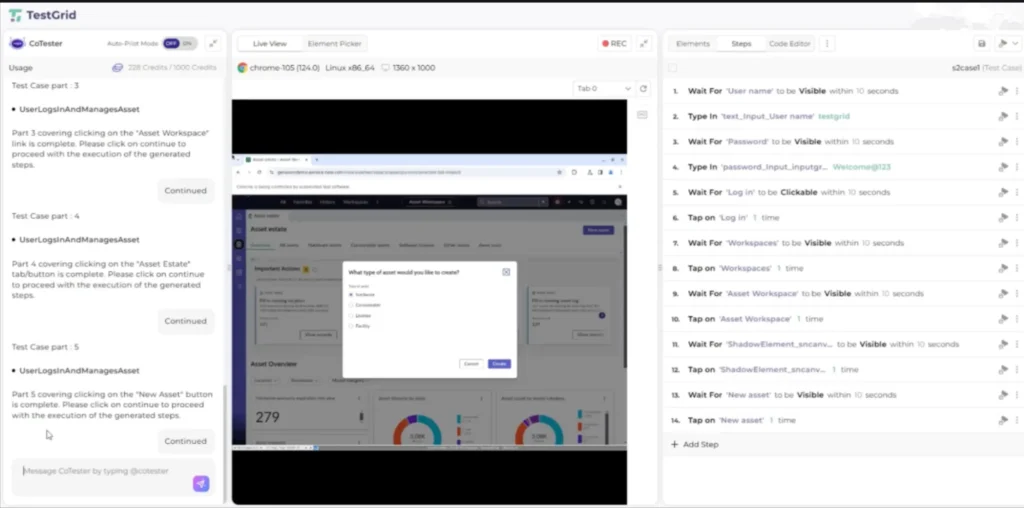
5. Execute the test directly. CoTester will replay the user actions exactly as generated.
6. When UI elements shift due to ServiceNow updates or layout changes, AgentRx automatically self-heals locators during execution, reducing maintenance.
Transform ServiceNow Automation Testing With CoTester by TestGrid
One thing’s for sure: whether you’re working with ITSM, HRSD, Customer Service Management (CSM), IT Operations Management (ITOM), Governance, Risk, and Compliance (GRC), or heavily customized applications, CoTester simplifies ServiceNow automation testing by reducing maintenance overhead and boosting test coverage.
It identifies and logs bugs, captures execution artifacts, and provides feedback after each run, giving instant visibility into what passed, failed, or changed after an upgrade.
Of course, at the core of CoTester is AgentRx, its self-healing engine that detects UI and layout changes during execution, even major structural redesigns, and updates test steps automatically to keep automation stable.
By combining context awareness, adaptive learning, and deep integration with ServiceNow workflows, CoTester replaces brittle scripting with intelligent, evolving ServiceNow test automation that keeps pace with every release.
Book a free CoTester demo today.
Frequently Asked Questions (FAQs)
How should you approach ServiceNow upgrade testing automation?
Each ServiceNow upgrade can modify platform logic, UI layouts, and API contracts. To handle this effectively, maintain version-aware test repositories, automate regression validation across cloned instances, and use AI agents like CoTester to detect test script changes automatically.
How do you manage test data consistency across ServiceNow environments?
ServiceNow automation relies heavily on data-driven workflows. The best approach is to seed and synchronize data sets across development, QA, and UAT environments using API-based provisioning. It preserves data integrity across environments and enables accurate validation.
Can ServiceNow automation extend to custom applications or scoped apps?
Yes. ServiceNow’s metadata-driven model supports scoped applications, and automated tests can validate custom forms, scripts, and integrations just like native modules. Automated workflows can also be configured to trigger within scoped contexts.
What are the best practices for maintaining ServiceNow automation tests long-term?
Link automated tests directly to requirement changes and release notes to maintain alignment with configuration updates. Implement periodic cleanup cycles that decommission obsolete tests and log retirements for auditability.


