CoTester 2.0 is LIVE! Your Always-Available AI Teammate for Testing.
Booking failures in travel apps are a lot more common than you realize. Research shows that around $117 billion in airline revenue was at risk in 2025 because of card declines and checkout friction.
It’s frustrating when you select a destination, fill in all the details, and the page crashes the moment you’re about to make the payment. If your users face this, they likely won’t stay around to troubleshoot the issue. They will start looking for alternative options or move on to a competitor’s app.
To ensure these technical issues don’t cost you potential customers, you need to test your app’s booking flow thoroughly. How will you do it? We’ll discuss that in detail in this blog.
Start testing your travel apps on real devices and browsers with TestGrid. Request a free trial.
TL;DR
- Travel booking flows are fragile. Small issues can break the entire journey and lead to lost conversions
- Critical stages in the booking workflow include search, selection, checkout, or confirmation; every step needs validation
- Device switches, browser inconsistencies, rendering differences, and payment failures can increase the risk of abandonment
- For end-to-end testing, you need to build test scenarios that replicate real user journeys, test on real devices, check for session continuity, and automate critical booking flows
- Critical tests for the booking workflow include integration, regression, usability, compatibility, security, and UI testing
What Does a Travel Booking Workflow Include?
A travel booking flow usually has many interconnected layers like user sessions, third-party APIs, pricing engines, and notification systems. And all these work together in real-time to give users accurate search results, pricing, and personalized offers.
Your user might follow a linear path and complete the booking in one go from search to checkout. Or, they might move back and forth to compare options or revisit the session later. Either way, your app should maintain state and handle the transitions smoothly.
Critical Booking Workflow Stages and How You Should Test Them
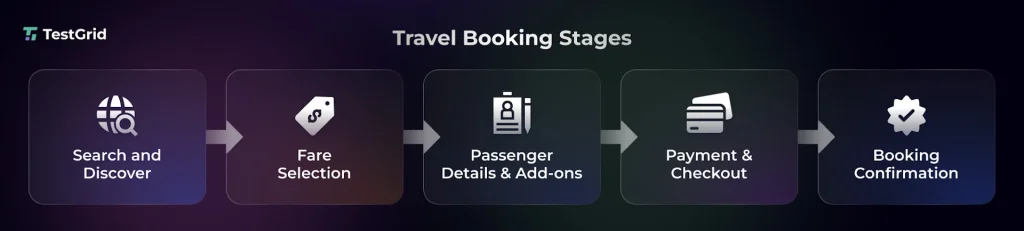
1. Search and discovery
Your user’s booking journey starts in this stage. They enter destinations, select travel dates, and explore options like flights, hotels, and packages. Based on the user’s searches, filters, availability, and pricing, the system fetches information in real time. Here, response speed dictates conversions.
| Testing focus You should check your app’s search inputs, filters, and autosuggestions across browsers and devices. Also, look at the APIs to assess latency and handling of no result scenarios. Since users from different locations can search, you should ensure location-based results, currency, and personalization. |
2. Fare selection
The next stage is about browsing and comparing fees, viewing refund options, and selecting what fits best. Your app should dynamically update pricing information and rules according to inventory and user choices.
| Testing focus Check the dynamic pricing updates, fare rules, and availability consistency across sessions, as well as your app’s UI components such as fare breakdowns, tooltips, and comparison views. Run integration tests for backend pricing engines and inventory systems to avoid mismatches. |
3. Adding passenger details and add-ons
After finalizing the options, your users enter traveler information, which usually includes their name, age, and contact details. At the same time, they also add data related to baggage, seat, and insurance. Your app should ideally verify the inputs, calculate pricing, and prepare the booking for checkout.
| Testing focus Examine the input fields with boundary, format, and negative test cases to see how your app responds. Cross-device UI testing will help you verify the form behavior, autofill, and keyboard interactions. |
Also Read: Usability Testing: Definition, Types, Process, Cost, Tools & Benefits
4. Payment and checkout
This is probably one of the most critical stages in your booking workflow because it’s here that your users review their booking and enter payment details. The app then connects to payment gateways to complete the transaction.
| Testing focus Thoroughly test the payment gateway integrations and check success, failure, and timeout scenarios. Security testing is important to ensure PCI compliance, data encryption, and tokenization of sensitive data. |
5. Booking confirmation
After your user makes the payment, the system confirms their booking and generates a PNR, ticket, or reservation ID. In this stage, users expect immediate and detailed information about their booking details, itinerary, and next steps. Your app’s backend should finalize the transaction, sync with providers, and show notifications like email or SMS confirmations.
| Testing focus PNR/booking ID generation flow is critical here so ensure consistency across UI, email, and backend systems. Do end-to-end testing for identifying how your app handles failure scenarios like transaction errors, duplicate bookings, or retries. |
Why Do You Need to Test Your Travel App on Devices and Browsers?
The online travel booking industry is massive, and it’s only growing. The global market size is expected to hit $1,438.4 billion by 2034 from $622.6 billion in 2025. In a competitive space like this, you cannot compromise on quality and user experience.
These are some of the major reasons why testing booking workflows is absolutely essential.
1. Users switch devices mid journey
Your users might browse destinations from their mobile devices, compare options on a tablet, and confirm a booking on a desktop. Your app should maintain consistent experiences across these touchpoints; otherwise, you risk user drop-offs at every switch.
Cross-device testing helps you ensure that your users can move effortlessly between screens without losing data or breaking a session.
2. Browser inconsistencies
A booking flow might work right on Chrome, but cause errors when accessed via Safari or Firefox. Different browsers interpret CSS, JavaScript, and rendering rules differently, and this can affect date pickers, dropdowns, or payment forms.
Cross-browser testing across the major browsers that users typically use helps you catch inconsistencies like UI glitches or script failures that can block bookings.
3. Rendering differences
Complex components like seat maps, fare grids, and calendars may load differently across devices and screen sizes. For e.g. a layout that looks clean on a desktop may look cramped with overlapping elements and misaligned sections on smaller screens.
In travel apps, visuals are one of the most critical aspects, and rendering issues can confuse users. With cross-platform testing, you can make sure UI elements are responsive and readable across screens.
4. Payment failures
Checkout flows may fail on certain browsers because of stricter privacy settings, blocked third-party cookies, or unsupported scripts. Also, issues like autofill glitches or keyboard overlays on mobile devices can interrupt the flow. Testing helps you spot these edge cases so your users can complete transactions without hiccups.
5. High abandonment risk
Travel booking flows are generally long and multi-step. A slow loading page, unclear CTA, or payment failure can upset your users. And since most users frequently compare options, problems like these will increase the chance of abandonment. Therefore, you need to identify these friction points and ensure the app guides users to finish their bookings smoothly.
6. Global audience
If your travel app serves global audiences, then you should expect traffic from a diverse mix of devices, operating systems, and network connectivity. You need to know all the combinations that your users potentially interact with and test across this spectrum to ensure flows stay stable and function reliably regardless of devices or geography.
Also Read: Geolocation Testing for Global Success: Test from Anywhere
How Should You Approach Travel Booking Testing
1. Create test scenarios that resemble real user journeys
The first step is to understand how your users actually book trips and move from search to confirmation. For designing accurate tests, you should simulate end-to-end user journeys with scenarios like browsing across multiple pages, switching devices, payment retries, or price changes mid-flow.
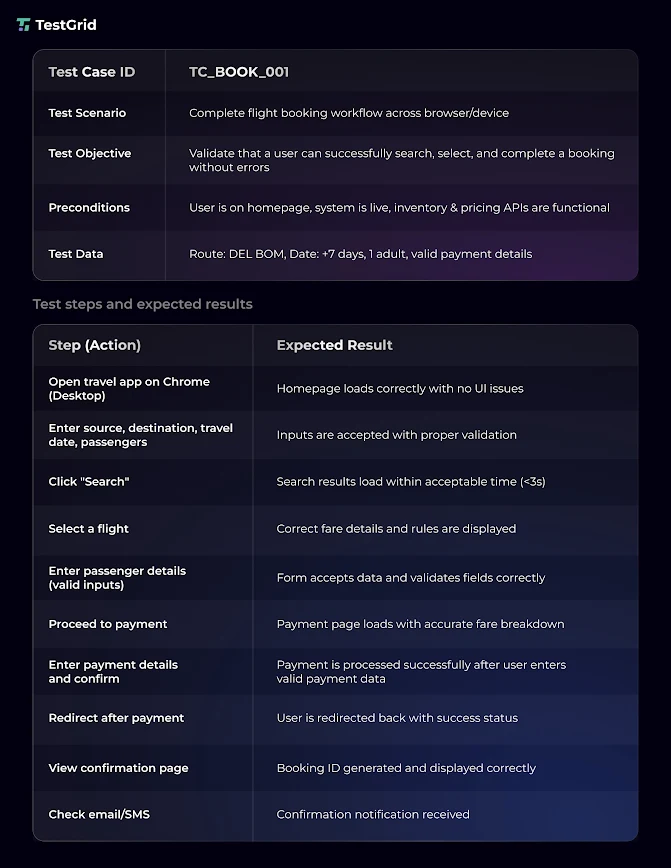
Here’s an example of a test case.
2. Use device or browser matrices based on user analytics
When configuring your test environment for cross-device and browser testing, assess user analytics data using tools like Google Analytics or Mixpanel and build a device browser matrix consisting of the different Android or iOS versions, desktops, laptops, tablets, screen sizes, and the latest browser versions.
Make sure you prioritize device combinations as per traffic share, conversion rates, and known failure points. This will help you test the high-impact user paths.
3. Automate critical booking flows
Travel apps update their features, pricing, offers, listings, and integrations quite frequently. And manually testing all these updates isn’t scalable.
You can use automated testing frameworks to create tests for critical scenarios like payments, cancellations, retries, discounts, and refund processing. Then integrate the tool with your CI/CD pipeline to trigger tests after every change.
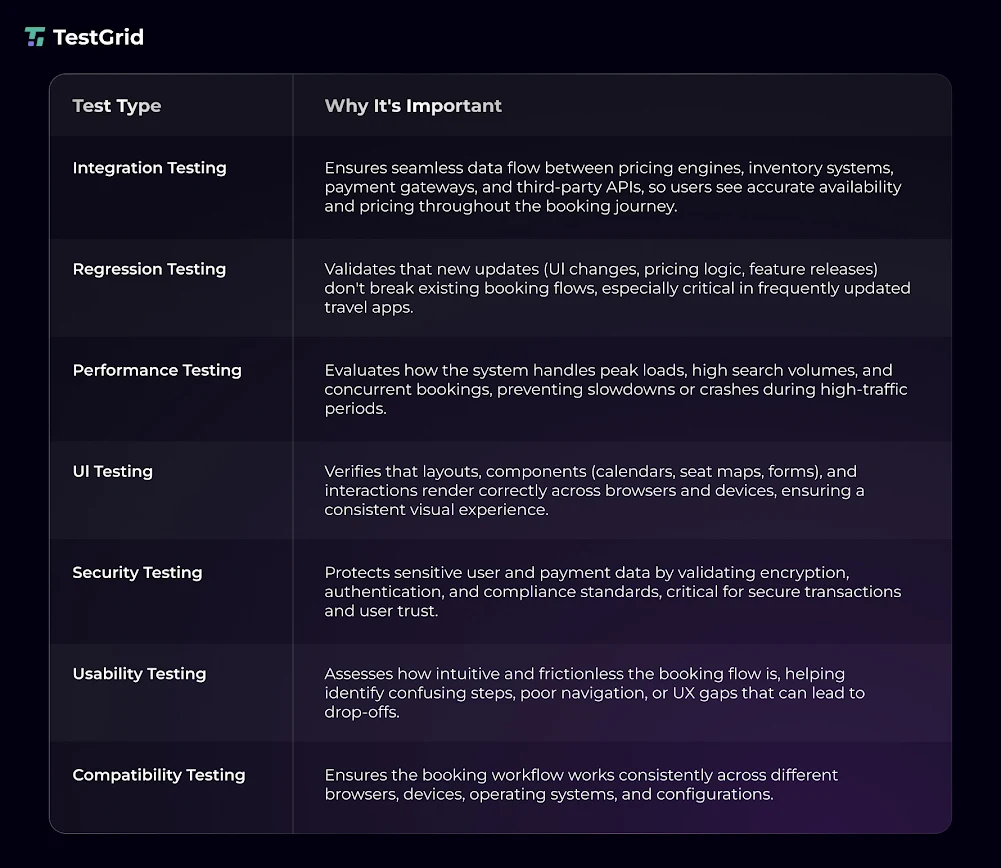
Important tests you need for checking travel app booking workflows
4. Test on real devices
Simulators and emulators are fine for early-stage testing. But they cannot fully replicate production conditions like device performance, network variability, or browser inconsistencies. For that, you will need actual devices.
Real device testing helps you find issues like touch unresponsiveness, keyboard overlays, and native browser limitations.
5. Validate session continuity
One important thing you need to check before release is if your app can preserve state across sessions, tabs, and devices using mechanisms like cookies, tokens, or user accounts. Even in situations like session timeouts or re-logins, your app should be able to restore previously entered details.
Deliver Seamless Booking Experiences with TestGrid
For accurate travel app testing, you need platforms that allow you to simulate real user actions, offer robust device testing capabilities, and help you validate performance so you can provide error-free booking experiences every single time.
TestGrid is an AI-powered testing platform that lets you handle massive user loads, perfect every pixel on a smartphone, and catch UI issues before they reach users.
Here’s a glimpse of what TestGrid offers you:
- Run automated tests across major browsers your users access including Safari, Chrome, Firefox, Opera, and Samsung Internet
- Check how your app works on Android and iOS devices with real device testing
- Replicate real usage conditions like GPS simulation, biometric login, gesture automation, camera input, and orientation shifts
- Check how your app handles sudden traffic surges or concurrent checkouts with performance testing
- Ensure flawless UI and UX across all screen sizes and resolutions with visual testing
Make every booking flow feel effortless and fast with TestGrid. Request a free trial today.
Frequently Asked Questions (FAQs)
1. What are the most common booking flow failures across devices?
Some common failures that come from inconsistencies in devices include broken layouts, non-functional buttons, form submission errors, or slow performance under high traffic. Other than this, problems like payment crashes, booking errors, or session sync issues are frequent in travel booking workflows.
2. How do you test booking flows for real-time price fluctuations?
Since travel apps rely on dynamic pricing, fares can change every few seconds. So, for testing this, you need to simulate scenarios where prices update between search and checkout, and check if your app gives users clear messages, shows accurate recalculations, and ensures there are no silent pricing changes during the booking process.
3. How should QA teams handle third-party dependency failures in booking workflows?
Usually, travel apps connect with third-party services like payment aggregators, airline APIs, and notification systems. Your QA team should use mocks or stubs to simulate failures, delays, or inconsistent responses to check the app’s fallback mechanisms, error handling, and system resilience.