 CoTester 2.0 is LIVE! Your Always-Available AI Teammate for Testing.
- What Is Component Testing in Software Testing?
- How Should You Conduct Software Component Testing?: Know the Process
- When Exactly Should You Perform Component Testing?
- Component Testing Example
- The Software Component Testing Techniques to Know About
- What Are the Different Component Testing Types?
- Component Testing vs Integration Testing vs System Testing
- Tools and Frameworks for Component Testing
- Wrapping Up
- Frequently Asked Questions (FAQs)
A software failure can stem from a single module, service, or UI element. And even one defect can spread across dependent components and lead to failures in multiple features.
Now the problem is, since apps today are interconnected, finding the root cause of the failure and troubleshooting can be a lot tougher.
That’s why component testing is important. In this blog, we’ll learn what it is, how it works, the techniques and tools you need, and the best practices for implementing it effectively.
Catch component issues early with AI-powered testing using TestGrid. Request a free trial.
TL;DR
- Component testing is the process of testing individual software components independently to identify defects before integration
- Component testing is generally done after developing a component, before integration testing, after component modification, and before system testing
- The different types of component testing are unit, integration, regression, functional, system, and interface testing
- The component testing techniques are black-box testing, write-box testing, boundary value analysis, and negative testing
- Component testing helps you improve defect localization, test edge cases and boundary conditions, and increase test stability
What Is Component Testing in Software Testing?
Component testing is an approach of software testing where you check the particular components of your software application, like a module, service, API endpoint, or user interface element, individually, and ensure it meets the functional requirements and satisfies the design specifications.
You analyze the component’s performance, usability, input handling, and expected outcomes under controlled conditions.
How Should You Conduct Software Component Testing?: Know the Process
1. Identify the component and assess the requirements
Component testing typically starts with identifying the specific component that you need to validate. These components could be a login form, search bar, shopping cart, payment module, user registration form, or API service.
You need to define the component’s expected behavior, inputs, outputs, interfaces, constraints, and external dependencies for establishing the testing scope.
2. Use mocks and stubs
Many components depend on external dependencies, such as databases, APIs, authentication services, or third-party integrations, which may not be available or practical to use during testing.
So, you need to replace these dependencies with a mock or a stub to isolate the component under test. This will help you simulate expected responses, create controlled test scenarios, and verify the component’s behavior without relying on the actual services.
In cases where the calling component is unavailable, you can use a driver to simulate it and execute the component you’re testing.
3. Build focused test cases
Next, you have to design the test cases. Create scenarios for evaluating a specific aspect of the component, such as expected functionality, boundary conditions, error handling, and negative inputs.
Try to keep your test cases small and independent because they’re easier to automate, support shift-left testing, and enable feedback faster on issues.
4. Prepare the test data
After building the test cases, you have to prepare the test data which is required to execute the test cases under different conditions. This data should include realistic datasets that cover valid inputs, invalid inputs, boundary values, missing fields, and edge cases.
High-quality test data is important to ensure consistent and repeatable test execution and improve defect detection.
5. Automate execution
Automation helps you execute component tests faster, speed up feedback, and detect regressions promptly. You can use a test automation framework to create scripts and integrate testing into a CI/CD pipeline to run tests automatically on every code commit or build.
6. Analyze results, measure test coverage, and fix issues
After test execution, compare the actual outcomes against the expected results defined by the test oracle to identify failed tests and potential defects. Log the defects so your developers can investigate the root cause and resolve them.
At this stage, you should also assess how thoroughly the component’s functionality, code paths, and requirements have been tested, then measure the test coverage, and note if there are any test gaps.
Lastly, once the defects are resolved, retest to ensure that the issues didn’t cause new bugs or failures.
When Exactly Should You Perform Component Testing?
You can conduct component testing at different critical phases of your software development lifecycle.
- After developing a component: This helps you verify whether the component functions correctly before being combined with other parts of the app
- Before integration testing begins: This is done to ensure each component has been independently tested
- Whenever a component is modified: You confirm existing functionality is unaffected after bug fixes, refactoring, or feature enhancements
- Before system-level validation: This can help you ensure individual components are stable and ready for end-to-end testing
Component Testing Example
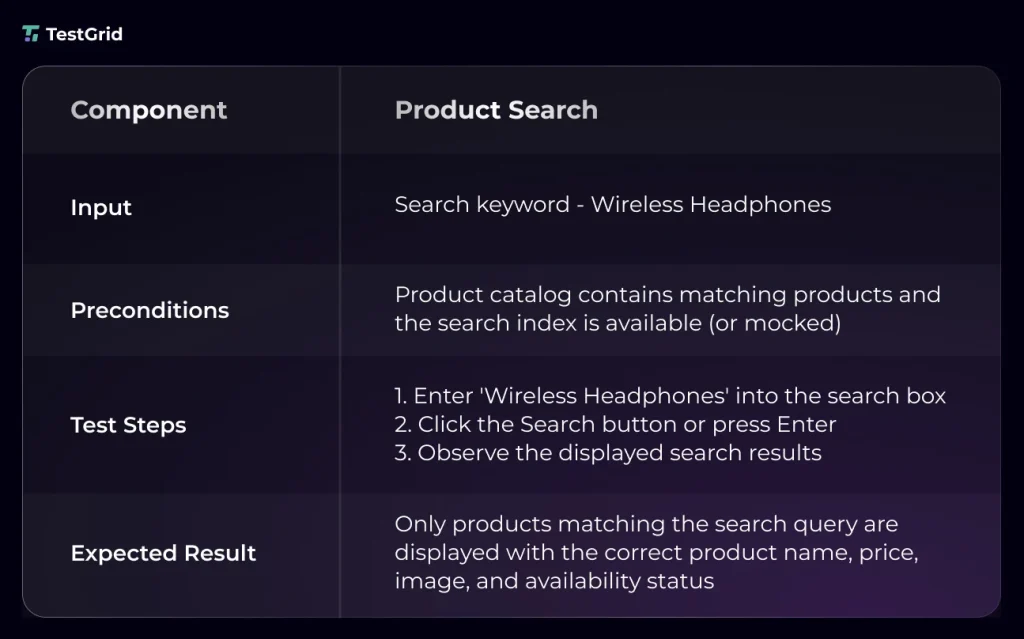
The objective of your component testing in software testing will depend on the type of app that you’re testing. For an e-commerce app, for instance, you might need to assess the search component, shopping cart, checkout component, and payment component.
And for a banking app, the login component and user profile modules are critical and need thorough testing. Here’s an example test case for component-level testing:
The Software Component Testing Techniques to Know About
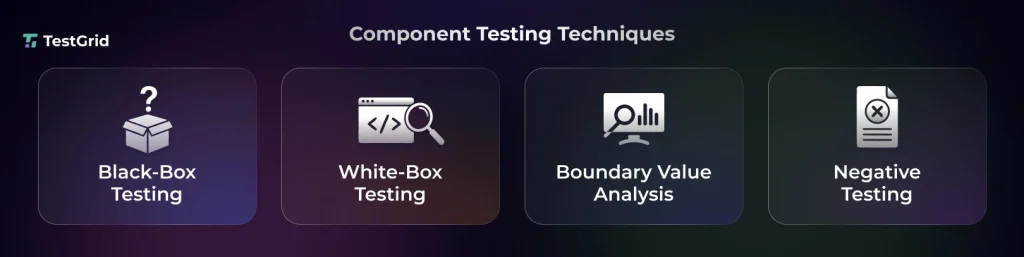
1. Black box testing
Black-box testing helps you assess a specific component based primarily on its input/output behavior. Here, you don’t need knowledge of its internal code, architecture, or implementation.
You just check whether the component produces the expected outputs for given inputs by comparing its behavior against functional requirements and specifications. This test can be effective in verifying user-facing functionality, input validation, and error handling.
2. White box testing
In white-box testing, the tester has access to the source code; therefore, they evaluate a component by examining its internal code, logic, control flow, and implementation.
This enables them to verify business rules, conditions, decision branches, error scenarios, code coverage, execution paths, loops, and data flow.
3. Boundary value analysis
Boundary value analysis is basically a black-box test technique which emphasizes examining a component’s behavior at the boundaries of valid and invalid input ranges, where defects are likely to occur more.
This technique targets values at the minimum and maximum limits, along with values immediately inside and outside those boundaries, to identify issues like off-by-one errors, incorrect comparison operators, and improper input validation.
Example: Enter 255 characters in the username field (maximum allowed)
Also Read: Boundary Value Testing: Definition, Importance, and Process
4. Negative testing
Negative testing allows you to check how a component responds to invalid, unexpected, or malformed inputs and abnormal user actions. You ensure that the component can reject invalid data accurately, handle exceptions correctly, and display appropriate error messages.
For example, if a user enters an incorrect password, the login component should display an appropriate error message, like “Invalid username or password.”
What Are the Different Component Testing Types?

1. Unit testing
Unit testing allows you to test the individual modules of an app like individual functions, methods, or classes, in complete isolation.
This is done to ensure that the smallest units of code behave as intended before they become part of a larger component. Automating unit tests helps you execute them quickly and detect and fix bugs early in your development cycle.
2. Integration testing
Integration testing enables you to verify that multiple components of your app work together correctly. To do that, testers assess interactions, interfaces, and data flow between each component and identify issues, like API failures, data inconsistencies, or interface mismatches.
3. System testing
System testing evaluates a complete, fully integrated app and checks if it meets both functional and non-functional requirements.
Here, you test the entire system, including all integrated modules, external interfaces, and workflows, to confirm it functions correctly from your end user’s perspective before you release.
4. Regression testing
Every time you make code changes, bug fixes, or feature updates, regression testing is critical to ensure these modifications didn’t affect any component of your app.
This testing is generally automated via CI/CD pipelines, which helps you get quick feedback after every code change and automatically re-execute the relevant test cases.
5. Functional testing
Functional testing is performed to check if every component does its intended functions and meets the specified business and functional requirements.
You validate inputs, outputs, user interactions, and expected behavior without examining the internal code and confirm the component is ready for integration with the rest of your app.
6. Interface testing
In Interface testing, you mainly focus on verifying the communication between your app components, APIs, web services, databases, and frontend to backend.
This helps you ensure that the data is transmitted and processed properly without loss or errors between these interaction points.
With this test, you can identify interface mismatches (e.g., incompatible data formats, incorrect API requests or responses, missing parameters) before they cause communication failures.
Component Testing vs Integration Testing vs System Testing
Component, integration, and system testing may often be used together, but they evaluate different aspects of an app at different stages of development.
| Aspect | Component Testing | Integration Testing | System Testing |
| Main focus | Internal functionality, business rules, inputs, outputs, and component behavior | Interactions, data exchange, API communication, interface compatibility, and dependency handling | Full business workflows, overall system behavior, performance, security, and usability |
| Test scope | A single component, module, service, or UI component | Multiple interconnected components or modules | The entire app, including all integrated components and external interfaces |
| Defects found | Validation issues, incorrect outputs, exception handling failures, and UI component defects | API contract mismatches, data transfer errors, authentication issues, interface incompatibilities, and communication failures | Broken business workflows, configuration issues, performance gaps, security vulnerabilities, and environment-related defects |
| When it’s performed | After unit testing and before integration testing | After individual components are done checking through component testing | After integration testing is complete and before user acceptance testing (UAT) or production release |
| Test environment | Controlled environment with mocked or stubbed dependencies | Integrated test environment with interconnected components and shared dependencies | Production-like or staging environment that closely mirrors real-world deployment |
| Execution speed | Fast because only a single component is tested | Moderate, as you execute multiple interacting components together | Slower because you evaluate the complete app along with its workflows and functions |
| Example | A login component to verify input validation, error messages, and button behavior independently | Assessing if the login component correctly authenticates users through the authentication service and database | Testing the full user journey from logging in and browsing products to placing an order and receiving a confirmation |
Tools and Frameworks for Component Testing
When you pick the right tool, it can make your component testing a lot faster and produce reliable results. This is a list of the best frameworks and testing platforms to streamline your testing process.
| TestGrid | TestGrid is an AI-powered end-to-end test automation platform which helps you perform web, mobile, desktop, and API testing. It enables your team to automate the testing of individual app components across real browsers and devices, integrate tests into CI/CD pipelines, and execute them at scale with minimal maintenance through self-healing automation. |
| JUnit | This is an open-source testing framework for the Java Virtual Machine (JVM) that provides annotations, assertions, and test runners for creating repeatable automated tests. You can leverage JUnit to validate backend components in isolation by combining it with mocking frameworks such as Mockito. |
| NUnit | NUnit is an open-source testing framework for .NET languages. It provides attributes, assertions, fixtures, and test runners for creating automated tests. You use it to verify the behavior of individual .NET components. |
| PyTest | It’s a Python testing framework which lets you write scalable and maintainable automated tests. Its fixture system, parameterization, and plugin ecosystem are beneficial for component-level testing. |
| Jest | Jest is a JavaScript testing framework which offers assertions, mocking, snapshot testing, and code coverage out of the box. You can use it with UI libraries such as React to verify the components of your app, rendering, and interactions in isolation. |
| Cypress | Cypress is a test automation tool, which helps you mount UI components independently, simulate user interactions, inspect app state, and assess component behavior within a real browser environment before you integrate them into the complete app. |
| Playwright | Playwright is a testing framework that has native support for component testing in React, Vue, and other modern frameworks. It allows you to render components in isolation, interact with them using real browser engines, and check their functionality, appearance, and behavior under realistic usage conditions. |
| Selenium | Selenium is an open-source browser automation framework that can help you examine the individual web components by automating browser interactions, verify component behavior, and test UI functionality in real browser environments via Selenium WebDriver. |
| Appium | Appium is an automation testing framework for native, hybrid, and mobile web apps. You can use it to test the individual mobile UI components, such as forms, buttons, and navigation elements, by automating user interactions on real devices and emulators. |
| React Testing Library | This is a lightweight library which you can use for testing React components by interacting with them just like your users do. It enables you to execute tests based on accessible elements and user interactions, and verify component rendering, state changes, and behavior. |
Also Read: Reviewed 12 Software Testing Tools in 2026
Wrapping Up
Since release cycles are getting shorter, teams are now not just automating the process of component testing. They’re integrating AI tools to help them automatically generate test cases faster from requirements, adapt to UI changes, assist with debugging, and reduce the effort required to maintain test suites.
TestGrid is one such platform which supports this shift by incorporating planning, authoring, execution, device infrastructure, reporting, and collaboration into a single testing ecosystem.
The platform can help your QA team build tests faster in natural language or via record and play, automate execution by connecting with major CI/CD tools, and verify if UI components render and behave consistently across different browsers and devices.
You can also perform visual validation to detect layout shifts, styling inconsistencies, and UI regressions in individual components. TestGrid captures screenshots, logs, and execution details that help quickly isolate failures and resolve them before release.
Improve visibility, simplify test operations, and deliver high-quality apps with TestGrid. Request a free trial.
Frequently Asked Questions (FAQs)
1. What is the difference between component testing and unit testing?
Unit testing helps you verify the smallest testable units of code, such as functions, methods, or classes, in isolation. Component testing evaluates an entire software component, which may have multiple units working together, to ensure it functions correctly as an independent module before integration with other components.
2. What challenges can you encounter in component testing in software testing?
Some of the challenges that you may encounter when component testing include managing external dependencies, creating realistic test data, maintaining mocks and stubs, achieving adequate test coverage, handling asynchronous operations, and keeping automated tests up to date as components change.
3. What are the best practices for effective software component testing?
The best practices which can help you optimize component-level testing are building focused test cases, making tests independent of each other, testing both positive and negative scenarios, using realistic test data, updating and refactoring tests as code evolves, and encouraging cross-functional collaboration for more comprehensive testing.
4. What metrics should teams track for component testing?
Your team should track metrics like test coverage, test pass/fail rate, defect density, defect leakage, test execution time, automation rate, and mean time to detect (MTTD) or mean time to resolve (MTTR) defects. These metrics will help you evaluate test effectiveness, identify quality gaps, and improve the overall reliability of component testing.


