 CoTester 2.0 is LIVE! Your Always-Available AI Teammate for Testing.
- What Is AI Unit Testing in Software Testing?
- When exactly is AI Unit Testing done in the SDLC?
- Why are Teams Turning to AI Unit Testing?
- How is traditional automated testing different from AI testing?
- How AI Unit Test Generation Works
- AI Unit Test Generation for Java and C#
- How Can You Adopt AI Unit Testing
- What Are the Limitations and Risks of AI-Generated Unit Tests?
- Operationalize AI-Driven Unit Testing with CoTester
- Frequently Asked Questions (FAQs)
Even a single unchecked function or code path can disrupt your entire release.
You ship a feature, the build passes, but the moment it reaches production, an edge causes a failure. The problem here is the growing gap between how fast code is written and how thoroughly it’s tested.
Missed defects and edge cases often occur because you try to keep up with fast release cycles, but traditional unit testing just can’t match the pace of expanding code bases, complex dependencies, and frequent iterations.
This is exactly why you need AI for unit testing.
This blog covers the advantages of AI unit testing, how it’s different from traditional automated testing, how to generate tests for specific programming languages, and the process of implementing it in your CI/CD workflow.
Optimize AI-driven unit testing across your development lifecycle with CoTester. Request a free trial.
TL;DR
- AI unit testing is the use of AI models to automatically generate, refine, and maintain unit tests
- AI unit testing moves beyond traditional automation by intelligently generating edge cases, mocks, and assertions rather than relying on rigid test scripts
- Testing happens typically in the early phases of the software development lifecycle, where AI helps in feature creation, code review, and pull request validation
- For unit test generation, AI systems understand source code, generate relevant test cases, execute them, and provide feedback
- AI models can even help generate framework-aligned unit tests for languages like Java, Python, and C#
- Advantages of early AI unit testing include faster test creation, better edge-case coverage, smarter regression handling, and continuous maintenance
What Is AI Unit Testing in Software Testing?
AI unit testing is a method where you use generative AI models and intelligent agents who assist you in creating, executing, maintaining, and improving unit tests. So, rather than writing every assertion and test case manually, your developers take the help of AI to analyze source code and create relevant test scenarios automatically.
But here, when we talk about AI, we mean large language models and agent-based systems that are trained to understand code structure, syntax, and common testing patterns. This is quite different from the earlier machine learning approaches that depended on statistical models or historical defect data.
Generative AI works with your source code and prompts directly and designs new test cases dynamically.
When exactly is AI Unit Testing done in the SDLC?
AI unit testing usually takes place early in your software development cycle. That’s where AI helps you with tasks like feature creation, AI code review, pull request validation, and regression checks.
When you integrate it with your CI/CD pipelines, you can easily ensure that new changes are checked continuously through the automatically generated tests.
There could be three main reasons why unit testing needs AI in 2026:
- Codebases are growing much faster than teams are
- Your release cycles are now shorter, which leaves very little time for manual test writing
- Developer productivity is under constant pressure; this demands faster coding without sacrificing quality
AI-driven test generation allows you to reduce repetitive effort and increase coverage without slowing down your delivery.
Why are Teams Turning to AI Unit Testing?
Early AI unit testing gives you measurable operational advantages and helps you improve testing quality, velocity, and long-term maintainability.
- Faster test creation: Writing your tests manually can take almost as much time as writing the feature itself; AI helps you generate tests in seconds from functions, inputs, and dependencies
- Higher edge-case coverage: You may only focus on the happy paths, but AI also looks at boundary conditions, unusual inputs, and failure paths
- Reduced boilerplate: AI can generate mocks, fixtures, and test scaffolding automatically, which helps your engineers spend less time on repetitive setup code
- Continuous test maintenance: Your unit testing AI tools or systems can update dependent tests automatically when method signatures or dependencies change
- Smarter regression handling: AI allows you to prioritize execution on modified areas or historically fragile components
- Improved developer productivity: AI agents can even help your dev team focus on feature logic rather than repetitive testing tasks
How is traditional automated testing different from AI testing?
You might already know that traditional automated testing depends mostly on human-written test cases. And you can execute these via automation frameworks. AI-powered generation actually incorporates intelligence into the creation and maintenance of those tests.
| Aspect | Traditional Automated Testing | AI Unit Testing |
|---|---|---|
| Test creation | Tests written manually by developers | Tests generated automatically from source code |
| Maintenance | Updated manually when code changes | Can auto-update and repair tests after code modifications |
| Edge cases | Limited to what developers anticipate | Explores additional edge scenarios, which help improve coverage |
| Workflow | Code first; tests written manually | Code analyzed; tests generated and refined |
| Speed | Slower for large codebases | Rapid generation across files or projects |
How AI Unit Test Generation Works
AI unit test generation follows a structured lifecycle, understanding which will help you effectively use the AI tools.
1. Code Understanding
Your AI system needs to analyze the source code before it starts generating tests.
For this, it scans your source files and assesses input parameters, return types, and control flow. Many systems also use statistical analysis to map logic paths and dependencies.
This step is important because it helps AI identify how functions behave, what input to expect, and what execution branches exist.
2. Test Case Generation
Now that the AI system has enough context, it starts creating test scenarios. And for this, it looks at different execution paths, input combinations, and conditional branches within the function.
Your AI system then designs test cases that can verify expected outputs, error conditions, and boundary values.
AI doesn’t just randomly generate these tests. It aligns them with your project’s testing framework and coding patterns
3. Execution and Feedback Loop
AI unit testing software doesn’t just stop at writing tests.
AI models help you compile and execute generated tests. Also, in case your tests fail because of syntax issues, missing dependencies, or incorrect assumptions, the system can even attempt automated fixes.
When your tests execute, the AI system collects feedback like failures, unexpected outputs, or missing assertions and improves tests.
Some tools measure coverage after execution and regenerate additional tests to increase coverage targets.
Also Read: What is AI Testing?
4. AI as a Unit Test Agent
Many modern systems today work as a unit test AI agent and not just a simple suggestion engine.
Your developers can now easily build tests from simple prompts, and even ask AI systems to design tests for a specific class or for recently modified code.
Also, these systems are context-aware, which means they can focus on different scopes such as a single method, an entire class, a file, or even just the changes inside a pull request.
Learn More: Inside Agentic AI: How Machines Learn to Perceive, Reason, and Act
AI Unit Test Generation for Java and C#
1. AI Unit Test Generation in Java
You’ll notice that Java ecosystems normally have patterns like layered architectures, annotations, and dependency injection. So to generate tests for Java, your AI tool needs to first recognize these patterns within the codebase.
It analyzes annotations like @Repository or @RestController to understand the role of the class.
Then it inspects constructor signatures and injected dependencies to identify what needs to be mocked, and using common testing tools like Mockito, it automatically creates those mocks and generates relevant tests.
The workflow AI unit test generation Java includes:
- Generating tests for a class
- Running them via Maven or Gradle
- Detect failures and adjust the mocks accordingly
- Repeat this process till your tests become stable
Also Read: JUnit Testing Framework: Master Java Unit Testing
2. AI Unit Test Generation in C#
Now, for the .NET ecosystem, AI unit test generation C# systems depend on strong IDE integration and solution awareness. AI usually reads the .csproj files to recognize target frameworks and testing libraries such as xUnit, NUnit, or MSTest that are in use.
Then from there, AI examines ASP.NET Core dependency injection patterns, identifies interfaces used for inversion of control, and generates substitute or mock objects using libraries like Moq. It then instantiates the class under test and builds relevant test cases.
The workflow for AI unit test generation for C# is:
- Select class or current changes
- Generate the tests
- Build and run them automatically
- Review the structured summary of pass/fail results and coverage
- Iterate if necessary
3. Other Language-Specific Techniques
Apart from Java and C#, if you want to configure your AI model to different languages, you can use these techniques:
- Framework-aware prompting: You can guide the AI to use specific tools, such as JUnit 5 with Mockito or xUnit with FluentAssertions, so that the generated tests follow the expected framework patterns
- Assertion style control: Instruct the AI to favor state-based assertions rather than verifying only method calls, which helps you avoid overly fragile tests
- Async handling: Make sure your system can recognize async patterns, like async def in Python or Task methods in C#, and generate tests that properly await or manage event loops
- Deterministic isolation: Your AI system should control non-deterministic values like timestamps via injected providers or validate them with safe ranges to prevent flaky tests
How Can You Adopt AI Unit Testing
1. Outline your test scope: First, before you start generating tests, set a clear scope, such as a single class, file, or git diff set. This will help you reduce uncertainty, limit false positives, and target critical changes for faster feedback. You can use git diff to focus your testing effort on modified code paths and speed up iteration.
2. Generate the initial baseline tests: Now, you create an automated baseline test suite that covers the happy paths, edge cases, and framework conventions. Baseline gives you a reproducible starting point for validation, helps you detect regressions, and provides scaffolding for more targeted tests later.
Also Read: AI in Software Testing – What It Is & How to Get Started
3. Run your tests and validate failures: After you generate tests, execute them immediately to uncover failures. You must verify if failures reflect real bugs, outdated expectations, or environment misconfigurations. For that, investigate failed assertions promptly to separate regressions from generation artifacts, update tests as needed, and ensure your test suite remains reliable.
4. Intentionally break logic to validate test quality: You can introduce small, controlled faults to check if tests can actually detect regressions. This fault injection helps you confirm test sensitivity, reveal weak assertions, and ensure generated tests fail when logic changes so that they validate behavior rather than just execute code.
If your tests continue passing after intentional breakage, they likely lack meaningful assertions or over-reliance on mocks.
5. Integrate with CI/CD: Integrate your AI systems with CI/CD pipelines by connecting with tools like Jenkins, Azure DevOps, or GitHub Actions so that tests run automatically on pull requests and merges. This enables continuous quality checks across environments and allows you to spot regressions early.
6. Monitor coverage and stability regularly: Make sure you continuously track code coverage, pass/fail trends, and flakiness metrics. You can use thresholds and alerts to trigger additional generation or human review when test coverage drops or instability rises.
What Are the Limitations and Risks of AI-Generated Unit Tests?
Sure, AI can drastically improve testing speed and coverage, but it can also have some risks that your team must manage carefully.
- Overspecified assertions can create fragile tests that are tightly coupled to implementation details
- Excessive mocking may create interaction-heavy tests that fail frequently in case your internal design shifts
- A very limited business context can result in tests that are technically correct but strategically incomplete
- Your tests can lead to false confidence if they mask missing behavioral scenarios
- Flaky test generation may arise when your AI system doesn’t handle asynchronous behavior or external dependencies properly
- Non-deterministic AI systems may produce slightly different outputs across runs
- When code is analyzed by cloud-based systems, it can lead to data sensitivity and privacy concerns, which must be effectively addressed
You must maintain a human review loop, work in short iteration cycles, provide explicit prompting instructions, validate coverage metrics, and enforce CI-based execution for mitigating these risks.
Also, you should carefully assess AI unit testing online tools to ensure compliance with organizational governance requirements.
Operationalize AI-Driven Unit Testing with CoTester
Generating unit tests with AI is only one part. You also need governance, execution control, CI integration, and traceability across your development lifecycle.
This is where CoTester fits.
This AI software testing agent by TestGrid enables you to generate, refine, execute, and maintain AI-assisted test cases within a controlled engineering workflow.
Here’s how that works in practice.
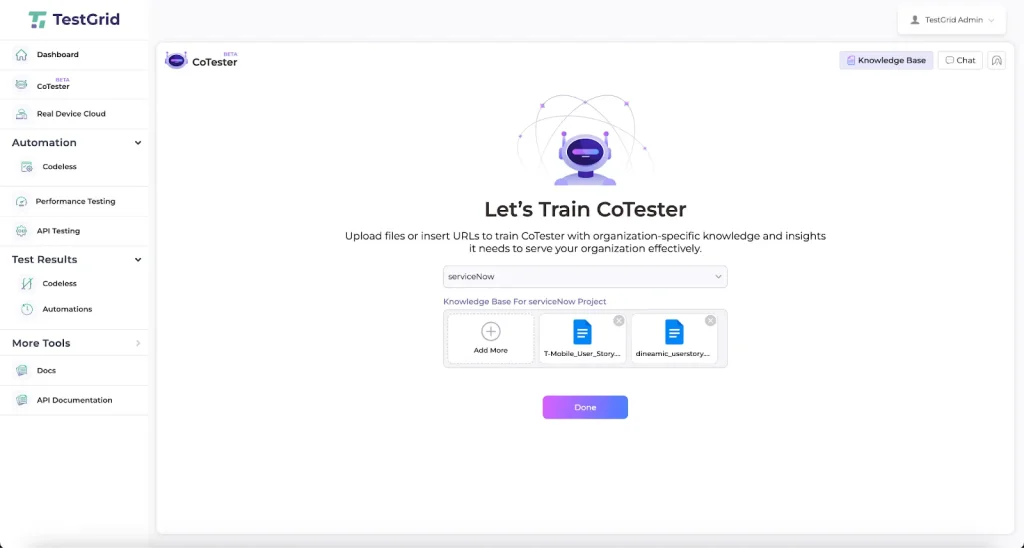
1. Generate Tests from Real Development Inputs: You can upload user stories, change tickets, technical specifications, or link Jira items directly into CoTester. The platform analyzes intent, acceptance criteria, and workflow definitions to generate structured test cases aligned with expected behavior.
For engineering teams, this means test logic starts from defined requirements rather than ad hoc prompts.
2. Review and Refine Before Execution: AI-generated tests are never executed blindly.
You can review test steps, refine assertions, adjust mocks, and define validation checkpoints before execution begins. If you need deterministic behavior, you can modify expected outputs, constrain test data, or tighten assertion rules.
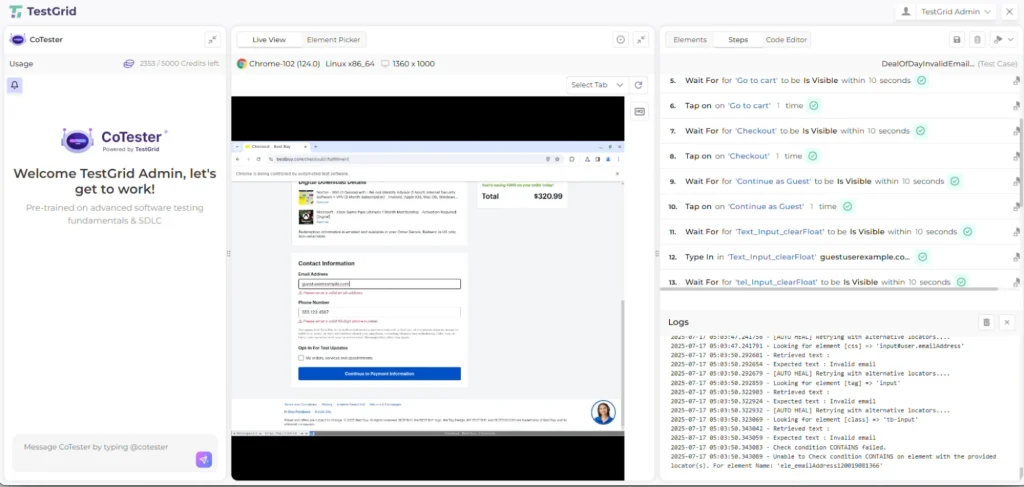
This human review loop ensures generated tests reflect real engineering standards rather than generic patterns.
3. Execute within CI/CD pipelines: CoTester integrates into CI workflows, allowing you to trigger test runs:
- After commits
- On pull requests
- During nightly regression cycles
- Before release gates
Generated tests run automatically within your pipeline, and execution logs, failure traces, and validation outputs are captured for analysis. You can move from experimental AI suggestions to continuous validation tied directly to your deployment cadence.
4. Maintain Tests as Code Evolves: One of the biggest risks with AI-generated tests is long-term maintenance.
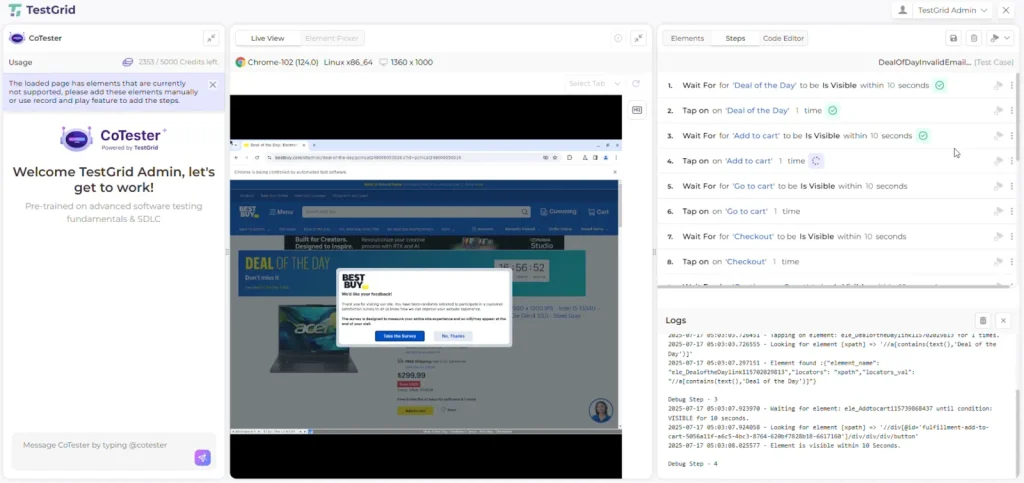
CoTester addresses this by adapting tests when application structures or UI elements change. During execution, its AgentRx layer detects structural shifts and updates locator logic in real time. This reduces brittle failures caused by layout or element changes.
5. Preserve Traceability Across the SDLC: Every generated test remains linked to its originating requirement or change request.
This gives you:
- Story-to-test mapping
- Execution history across releases
- Defect traceability
- Audit-ready reporting
If you operate in regulated domains, this linkage helps you validate that each change has corresponding test coverage.
Once you validate behavior at a unit level, you can extend those approved tests into broader automation flows without rebuilding logic from scratch.
If your goal is to scale AI unit testing while keeping governance, traceability, and CI alignment intact, CoTester provides that structured environment.
Request a free trial today.
Frequently Asked Questions (FAQs)
Can AI-generated unit tests replace manual test creation entirely?
AI-generated unit tests can reduce manual effort, but they shouldn’t fully replace human review. AI unit testing software is effective at generating baseline coverage, edge cases, and framework-aligned scaffolding. However, business intent, domain rules, and strategic validation decisions still require engineering oversight.
How can you implement TDD using AI for unit testing?
Start with prompting the AI unit test generation system to create tests for an intended method or feature specification. Execute those tests to confirm failure, implement the minimum logic required to pass them, and then refine assertions where needed. A unit test AI agent can also regenerate or extend tests as requirements evolve.
How do you test AI agents or LLM-based systems?
Testing AI agents needs validating contracts and behavior boundaries rather than exact string matches. You should define structured output schemas, enforce JSON or typed response formats, and assert compliance with those schemas in unit tests. For LLM-based components, test prompt-response contracts, fallback logic, retry handling, rate limiting, and safety guardrails.
What are the top AI unit testing tools in 2026?
The top AI unit testing tools in 2026 include CoTester, Diffblue Cover, CodiumAI, GitHub Copilot, and Amazon CodeWhisperer. Diffblue Cover specializes in AI unit test generation Java for JUnit-based enterprise systems. CodiumAI provides IDE-centric AI-generated unit tests with developer review workflows. GitHub Copilot and Amazon CodeWhisperer assist with inline test scaffolding across multiple languages. CoTester leads by delivering governed AI unit testing with CI integration and traceable test lifecycle management.
What should you look for in an AI unit testing tool?
Look for an AI unit testing software solution that supports AI unit test generation across major languages like Java, C#, and Python, aligns with frameworks such as JUnit, xUnit, NUnit, and pytest, and generates meaningful assertions rather than brittle mock-heavy tests. It should integrate with CI/CD pipelines, provide coverage visibility, adapt when code changes, and support secure deployment.


