CoTester 2.0 is LIVE! Your Always-Available AI Teammate for Testing.
- What Is Ecommerce Software Development?
- Types of Ecommerce Software
- Ecommerce Software Development Process
- Features Every eCommerce Platform Needs
- Testing an eCommerce Application Before Launch
- Deployment and Maintenance of Ecommerce Software
- Security and Compliance Considerations in Ecommerce Software Development
- Technologies Used in Ecommerce Software Development
- Cost Factors in Ecommerce Software Development
- How to Pick the Right Partner for Ecommerce Software Development
- Frequently Asked Questions
- What is the difference between a monolithic and a headless eCommerce architecture?
- How do you create realistic test data for eCommerce mobile app development?
- What metrics should you track after eCommerce software development is done?
- What is a staging environment, and why should eCommerce software be tested there?
The global eCommerce software market stood at $11.25 billion in 2025. This number is expected to reach $44.32 billion by 2034, which reflects a growing reliance on digital commerce platforms across industries.
These platforms are one of the primary channels through which businesses sell products, engage with customers, and generate revenue. But building an online store can be tough.
Every architectural decision, integration, and engineering choice influences how customers discover products, complete purchases, and interact with your brand.
In this blog, we’ll talk in detail about how you can plan, build, test, secure, and scale eCommerce software efficiently.
Validate your eCommerce apps end-to-end with AI-powered testing using TestGrid. Request a free trial.
TL;DR
- Ecommerce software development refers to creating the frontend, backend, and supporting systems needed to run an online business
- The different types of eCommerce software are open-source, SaaS, enterprise commerce, and headless commerce platforms
- Some critical features to include for software development for eCommerce are product catalog, search and discovery, shopping cart, checkout, payment, and logistics
- Ecommerce software development includes planning the critical flows, designing the frontend, building the backend, creating databases, and configuring APIs and integrations
- For testing eCommerce apps, prepare a test strategy, run critical tests, automate where possible, and validate business rules
- Successful eCommerce software development depends on secure deployment, continuous maintenance, strong security practices, and careful cost planning
What Is Ecommerce Software Development?
Ecommerce software development is the engineering process of designing, building, integrating, deploying, and maintaining apps that enable businesses to sell products or services online.
The development generally involves implementing the app architecture, defining data models, creating service interfaces, integrating third-party commerce services, and establishing mechanisms for scalability and fault tolerance.
You may build custom platforms from scratch, extend existing commerce solutions, or adopt composable architectures that combine specialized services through APIs.
Types of Ecommerce Software
1. SaaS eCommerce platforms
SaaS, or Software as a Service eCommerce platforms offer users a fully managed environment for building, hosting, and operating online stores.
Here, the vendor normally handles infrastructure, security updates, software maintenance, scalability, and feature releases.
This helps you focus on storefront customization, product management, and sales operations. Shopify and BigCommerce are examples of SaaS platforms.
Also Read: What is SaaS Testing? Types, Challenges, and Best Practices
2. Open-source platforms
This type of eCommerce platform gives eCommerce software developers access to the app’s source code so that they can customize features, business rules, integrations, and user experiences as per their needs.
These platforms provide more flexibility; however, you may need to manage hosting, security, updates, and maintenance too. Magento and WooCommerce (built on WordPress) are some popular open-source eCommerce platforms.
3. Enterprise commerce platforms
Enterprise commerce platforms are mainly designed for large organizations that need high scalability, advanced customization, and support for complex commerce operations across multiple brands, regions, and sales channels.
These platforms usually have capabilities like AI-driven personalization, omnichannel commerce, B2B and B2C workflows, and enterprise integrations built in. Salesforce Commerce Cloud is a leading name in this category.
4. Headless commerce
Headless commerce separates the frontend presentation layer from the backend commerce engine which enables the two to communicate through APIs.
This architecture allows you to build custom storefronts for web, mobile, and other digital channels while using APIs to connect to backend services like product catalogs, orders, inventory, and checkout services.
This gives you more flexibility to update the frontend without affecting the backend.
Learn More: 70 Test Cases for eCommerce Website [Free Checklist]
Ecommerce Software Development Process
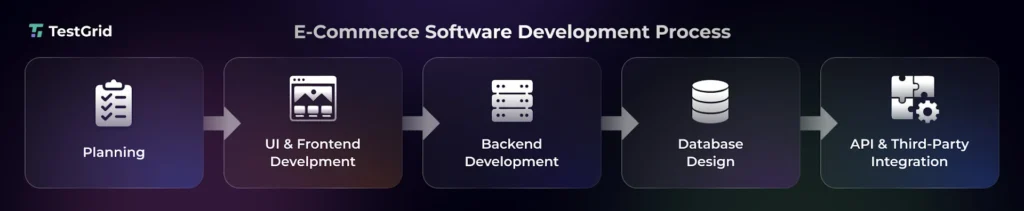
1. Planning
This is the first stage of your eCommerce software development process where you define all the technical and business requirements.
Your development, testing, and business teams identify the target audience, sales channels (web, mobile, marketplaces), product types, payment and shipping workflows, integrations, backend services, and scalability needs.
At this step, you need to outline the modules your software will have, like user login, authentication, shopping cart, checkout, payment processing, order confirmation, and customer accounts.
This phase is mainly about designing the blueprint for system architecture, technology stack, integration requirements, and development process.
2. UI and frontend development
Then you need to design the frontend of the software. Developers convert wireframes and UI designs into interactive web pages using frameworks such as React.js, Vue.js, or Angular.
They build reusable components, connect them to your backend APIs, implement responsive layouts, optimize page loading, and manage app state to ensure user interactions are consistent across different devices.
Your frontend would ideally include:
- The storefront interface, including the homepage, navigation menus, product categories, and promotional banners
- Search, filtering, sorting, product listing pages (PLPs), and product detail pages (PDPs)
- Shopping cart and checkout workflows with coupon support, shipping options, payment forms, and order confirmation screens
- Customer account features like registration, login, profile management, order history, wishlists, and order tracking
- Customer engagement features such as reviews, ratings, AI chatbots, notifications, and personalized product recommendations
3. Backend development
Next in eCommerce software development, you build the server-side infrastructure which processes your user’s requests, executes business rules, manages data, and communicates with the frontend.
For that, your engineers will first need to select a backend framework such as Node.js, Django, Laravel, or Ruby on Rails.
Then they have to design the app architecture, create APIs, integrate databases and third-party services, and secure your software with authentication and authorization protocols like OAuth and JWT.
Some of the critical backend components are:
- Databases: These store product catalogs, inventory, customer information, transactions, and order history
- API: It’s used for connecting the frontend with backend services and third-party apps
- Authentication and authorization: This helps you manage user identities, roles, and access permissions
- Payment gateway integrations: With this, you process online payments, refunds, subscriptions, and offer support for multiple payment methods
- Shipping, tax, and inventory integrations: This is needed for order fulfillment, tax calculations, stock management, and delivery tracking
- Security, caching, logging, and monitoring: It lets you protect sensitive data, improve performance, and ensure system reliability
4. Database design
The next stage of eCommerce software development is to design how your eCommerce data will be structured, stored, and retrieved efficiently.
Your developers need to first identify data models for products, customers, orders, inventory, payments, and reviews, and then establish relationships, indexes, and constraints to maintain data integrity and optimize query performance.
Based on your software requirements, they implement relational databases such as PostgreSQL or MySQL, or a NoSQL database like MongoDB, and configure the backup, replication, and recovery mechanisms.
5. APIs and integrations
APIs and integrations allow your eCommerce platform to exchange data with external systems and services.
You need to build secure REST or GraphQL APIs for frontend communication, then integrate payment gateways, shipping providers, tax services, CRM, ERP, inventory systems, and marketing tools.
Lastly, you have to implement authentication, request validation, error handling, rate limiting, and webhook support so that data syncs in real-time and reliably across all connected apps.
Learn More: eCommerce Testing: Ensuring Seamless Online Shopping Experiences
Features Every eCommerce Platform Needs
1. Product catalog
The product catalog stores and organizes product information, including titles, descriptions, SKUs, pricing, images, categories, inventory status, and product variants.
It enables your users to efficiently discover products, filter, search, and synchronize inventory. The product catalog is the central data source for the storefront and backend systems.
2. Search, navigation, and discovery
These features help your users locate products quickly through keyword search, category hierarchies, filters, sorting, autocomplete, and recommendation engines.
Search and discovery features depend on indexing and search algorithms to improve product discoverability and enhance the overall shopping experience.
Also Read: 100+ Test Cases for Search Functionality (Checklist & Examples)
3. Shopping cart
The shopping cart temporarily stores products that your customers select for purchase and maintains details such as quantities, pricing, discounts, taxes, and shipping estimates.
This eCommerce software solution development feature should support cart updates, persistent sessions across devices, seamless transition to checkout, and recalculating totals based on user actions.
4. Secure checkout
The checkout feature collects customer, shipping, and payment information needed to process payments and confirm orders.
Checkout should protect sensitive data through encryption, payment methods, tax and shipping calculations, order validation, and compliance with standards such as PCI DSS to reduce fraud and ensure safe transactions.
5. Payment processing
The payment processing feature allows you to securely authorize, capture, and settle online transactions by integrating with payment gateways and processors.
Ecommerce platforms integrate with payment service providers like Stripe, PayPal, Razorpay, and Square to support capabilities like multiple payment methods, fraud detection, transaction validation, refunds, and recurring billing when required.
Also Read: What Is Payment Gateway Testing?
6. Shipping and logistics
This feature integrates with carriers such as FedEx, UPS, and DHL to automate shipping rate calculations, label generation, shipment tracking, and delivery updates after your customer places an order. These integrations help you streamline post-purchase operations and provide your customers with real-time visibility into order status.
7. Inventory and order management
Inventory and order management allows you to track your stock availability, reserve inventory during purchases, and manage the order lifecycle from placement to fulfillment. It also syncs inventory across sales channels, updates stock levels in real time, and helps you avoid overselling, stockouts, and fulfillment delays.
8. Customer account management
Account management enables your users to register, authenticate, and manage their profiles, addresses, payment preferences, and order history. Here you can also include features like wishlists, saved carts, returns, subscriptions, and personalized recommendations.
9. Analytics
The analytics feature gives you insights into customer behavior, sales performance, and conversion metrics by tracking user interactions across the eCommerce platform. Tools such as GA4 measure traffic and purchasing patterns, and OpenAI and Dialogflow can power AI-driven customer insights, conversational analytics, and intent analysis.
Testing an eCommerce Application Before Launch
After you’ve built the core functional flows and the eCommerce application development process is complete, next you need to perform testing and quality assurance to verify that every component works correctly to deliver a seamless shopping experience.
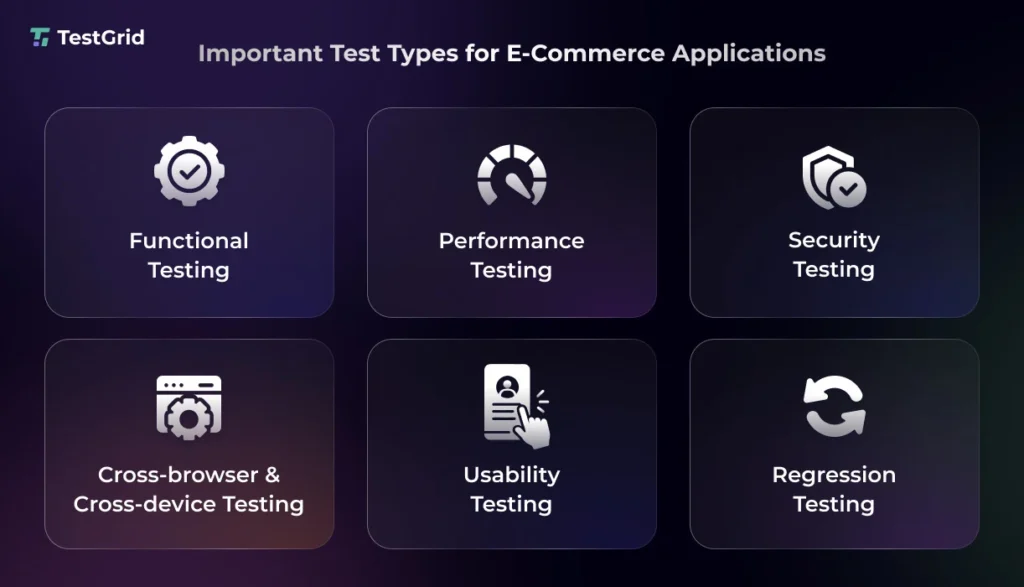
1. Create the test strategy
Based on the workflows your eCommerce app has, define the test scope. Identify the:
- High-risk user journeys like user registration, product search, cart updates, checkout, payment authorization, refunds, and order confirmation
- Test levels (unit, integration, system, and UAT)
- Supported browsers, devices, and operating systems
- Entry and exit criteria
Also Read: Test Strategy Document: Types, Components, and Template
2. Decide what to automate and what to assess manually
Automate the test scenarios that are stable, repetitive, and executed frequently across builds. These tests will run continuously in the CI/CD pipeline and help you detect regressions early after every code change.
Automate testing for:
- Regression, compatibility, smoke, sanity, and cross-platform tests
- Authentication, authorization, session management, API security
- Database validation and data integrity checks
- Performance, load, stress, and scalability testing
- Admin portal workflows (product, inventory, pricing, and order management)
Your manual testing should specifically focus on the areas that need human judgement, exploratory analysis, or visual verification. These tests enable you to spot usability and accessibility issues.
- User interface consistency and visual design validation
- User experience evaluation for product discovery and checkout flows
- Accessibility testing (keyboard navigation, screen readers, color contrast, and overall usability)
- Verification of promotional campaigns, seasonal offers, and marketing banners
TestGrid, an AI-powered end-to-end software testing platform, offers you support for both manual and automated testing.
You can create codeless tests, integrate with automation frameworks like Selenium, Appium, or Cypress to create automated tests, and perform exploratory tests from a single interface.
TestGrid also seamlessly connects with CI/CD tools like Jenkins, GitHub Actions, Azure DevOps, and CircleCI to facilitate automated testing.
3. Perform the critical tests
a. Functional and end-to-end testing
Functional and E2E tests help you verify complete shopping journeys, from product discovery to order confirmation. You should create tests to assess core functions like pricing updates, inventory availability, coupon application, tax calculations, shipping selection, payment authorization, and order creation.
Also Read: Functional Testing: Types, Examples, Techniques, and Best Practices
b. Performance testing
Performance testing allows you to measure how your eCommerce app behaves under expected and peak traffic conditions.
Here, you evaluate page response times, API latency, database performance, concurrent user handling, checkout throughput, and system stability to detect performance issues before high-demand events like flash sales or seasonal campaigns.
c. Security testing
Security testing is done to check that customer accounts, payment data, and business information are protected against unauthorized access.
You must include tests for authentication, authorization, session management, input validation, API security, encryption, and defenses against attacks such as SQL injection and cross-site scripting (XSS).
d. Cross-browser and cross-device testing
Since your customer will be using the app from different browsers and devices, this testing helps you ensure the app works efficiently across different browsers, operating systems, screen resolutions, and device models.
It assesses if layouts, navigation, product pages, checkout flows, and interactive elements behave correctly regardless of the user’s platform.
Also Read: Why Real Device Testing Clouds are Essential for Today’s Enterprises
e. Usability testing
Usability testing examines how easily your customers can browse products, compare options, complete purchases, and manage their accounts without confusion.
This test helps you understand the friction points in navigation, search, filtering, checkout, and form interactions that could lead to cart abandonment.
f. Regression testing
When your developers add new features, make code changes, or fix bugs, regression testing is essential to check if these changes affected any existing functionalities of your app. Here, you retest critical areas to ensure the app remains stable after every release.
TestGrid allows teams to run functional, end-to-end, API, cross-browser, mobile, and performance tests across real devices and browsers for production-like validation.
You can execute tests in parallel to reduce the testing time and detect critical bugs with the help of rich test insights, and use screenshots, logs, videos, and execution reports for faster root cause analysis.
4. Validate data integrity and business rules
Confirm that inventory reservations, order statuses, customer records, invoices, refunds, and shipment updates sync correctly after every transaction. You need to make sure that the data remains consistent as it moves across your app and its integrated systems.
You also should evaluate business rules such as minimum order values, product purchase limits, tax exemptions, discount eligibility, regional pricing, and return policy enforcement before deployment.
5. Perform final release validation
The final release validation is done to see how the app performs in production-like environments. An important part of this stage is performing the user acceptance testing, where representative end users or business stakeholders use the app and check if the features, configurations, integrations, and user journeys work properly.
Here, TestGrid can help you compare execution trends across builds, review consolidated release reports, verify environment-specific configurations, and ensure that no critical regressions remain unresolved before you give the final go-live approval.
Deployment and Maintenance of Ecommerce Software
After eCommerce software development and testing, you deploy the app to the production environment through a controlled release process. But before deployment, verify if:
- The production infrastructure matches the validated staging environment
- Database migrations are tested
- Environment variables are configured correctly
- All third-party integrations (payment gateways, shipping providers, email services, and analytics) are operational
Make sure your deployment plan also includes backup and rollback procedures so you can restore the previous stable version in case issues happen.
Read More: What Is Deployment Testing? Types, Process, and Best Practices
Your work isn’t done after deployment. Your eCommerce app needs continuous maintenance to stay secure, compatible, and performant as customer traffic, business requirements, and third-party services evolve.
These maintenance best practices can help you keep your app stable and secure after release:
- Monitor app logs and production errors continuously
- Regularly apply security patches and framework updates
- Optimize database queries and indexes when data volumes grow
- Regularly back up the app data and test disaster recovery procedures
- Review the performance metrics and scale infrastructure during peak shopping periods
Also Read: How to Prepare Your Ecommerce Site for Black Friday
Security and Compliance Considerations in Ecommerce Software Development
eCommerce apps process confidential customer information like names, addresses, payment details, login credentials, and purchase history, which makes them vulnerable to unauthorized access, data breaches, and financial fraud.
During e commerce applications software development, these are some of the key security considerations you must make:
- Use HTTPS with SSL/TLS to encrypt all client-server communication
- Implement secure authentication and authorization with OAuth and JWT
- Hash passwords with bcrypt or scrypt rather than storing plaintext credentials
- Implement input validation, parameterized queries, and output encoding to prevent SQL Injection and XSS
- Comply with PCI-DSS, GDPR, and CCPA for payment security and data privacy
Other than this, whenever possible, use a PCI DSS-compliant payment gateway to process payment transactions. Also, conduct vulnerability assessments, security audits, logging, and continuous monitoring to identify emerging threats.
Learn More: What Is Mobile App Security Testing and How to Perform It
Technologies Used in Ecommerce Software Development
The table below outlines the core technologies commonly used across different layers of the software development process of eCommerce.
| Technology Layer | Examples | Purpose |
|---|---|---|
| Frontend | React, Angular, Vue.js | Builds responsive storefronts, product pages, shopping carts, and checkout interfaces |
| Backend | Node.js, Django, Laravel, Ruby on Rails | Implements business rules, user authentication, product management, and REST/GraphQL APIs |
| Databases | PostgreSQL, MySQL, MongoDB | Stores and manages customer accounts, product catalogs, inventory, orders, and transaction records |
| Payment gateways | Stripe, PayPal, Razorpay, Square | Processes online payments, refunds, and transaction authorization securely |
| Cloud and hosting | AWS Lambda, Microsoft Azure, Google Cloud | Hosts the app, databases, storage, and networking infrastructure |
| Search and caching | Elasticsearch, Redis | Delivers fast product search, autocomplete, filtering, and low-latency data retrieval |
| Content delivery network | Cloudflare, Akamai | Cache and deliver content from edge locations to improve performance, availability, and DDoS protection |
| CI/CD and DevOps | GitHub Actions, GitLab CI/CD, Jenkins, Docker, Kubernetes | Automates code builds, testing, deployments, and infrastructure management |
Cost Factors in Ecommerce Software Development
The costs which you incur when developing an eCommerce software will depend on:
- The app’s technical complexity, architecture, and operational requirements
- Headless or microservices-based architectures
- Product catalogues, pages, and menus
- Multi-vendor support and integrations with ERP, CRM, payment gateways, tax engines, and logistics providers
- Multi-currency and multilingual capabilities
- Infrastructure choices such as cloud hosting, CDN services, database scaling, storage, and backup
For eCommerce platform development, you should also account for costs associated with UI/UX design, API development, quality assurance, security implementation, compliance requirements, deployment pipelines, production monitoring, and ongoing maintenance.
How to Pick the Right Partner for Ecommerce Software Development
The first thing you must do before you choose eCommerce software development services is assess your team’s technical expertise and your delivery requirements.
Look for an eCommerce development software team that has experience designing eCommerce apps similar to your business model (B2B, B2C, D2C, or marketplace) and expertise in modern architectures, cloud platforms, APIs, and third-party integrations.
Go through their portfolios and case studies to review their past industry experience. Then go through their development methodology, code quality standards, security practices, and approach to scalability and maintainability.
Lastly, finalize a development service that offers transparent communication, clear project governance, and post-launch support.
Developing your software is one part. Testing it is another critical aspect to consider. For that, you need a platform that lets you automate repetitive testing, validate end-to-end workflows, verify cross-browser compatibility, detect regressions early, and scale execution.
TestGrid supports robust quality engineering across web, mobile, API, and enterprise eCommerce apps. Request a free trial of the platform to see it in action.
Frequently Asked Questions
What is the difference between a monolithic and a headless eCommerce architecture?
Monolithic architectures connect the storefront, business rules, and backend into a single app. Headless architectures, in contrast, separate the frontend from the backend through APIs, which enables independent development, greater customization, and omnichannel experiences across web, mobile, and other digital touchpoints.
How do you create realistic test data for eCommerce mobile app development?
You can create datasets that resemble real shopping scenarios by including diverse customer profiles, product catalogs, inventory levels, pricing rules, taxes, shipping options, and order histories. However, use anonymized production data or synthetic data generation to protect sensitive information.
What metrics should you track after eCommerce software development is done?
You need to track both business and technical KPIs after eCommerce software solutions development. This can include conversion rate, cart abandonment rate, average order value, customer retention, return rate, application uptime, page load time, API response times, and payment success rates.
What is a staging environment, and why should eCommerce software be tested there?
A staging environment is basically an environment that resembles production. It replicates the live infrastructure, configurations, and integrations. Testing here helps you detect deployment, configuration, and environment-specific issues before release and reduces the risk of unexpected failures in the live production environment.