 CoTester 2.0 is LIVE! Your Always-Available AI Teammate for Testing.
- What Is Accessibility Testing in Software Testing?
- Why Is Accessibility Testing Essential
- Types of Disabilities That You Need to Test For
- Digital Accessibility Testing Standards and Legal Compliance
- Which Accessibility Testing Methods Should You Know About?
- How Would You Perform Accessibility Testing?
- The Important Accessibility Testing Metrics to Track
- Common Accessibility Issues and How You Can Fix Them
- Start Accessibility Testing with TestGrid
- Frequently Asked Questions (FAQs)
- 1. What is web accessibility testing?
- 2. How is accessibility testing different from usability testing for accessibility?
- 3. What are the different levels of WCAG conformance?
- 4. How often should accessibility testing be performed?
- 5. What are some of the best practices to follow for accessibility testing in software testing?
- 6. Which industries benefit the most from accessibility user testing?
- 7. What are universal design practices?
- 8. What are the examples of accessibility testing?
A significant portion of your online audience has some kind of physical, sensory, and cognitive impairments.
Users with mobility issues may have difficulty moving a mouse and prefer keystrokes for navigation. Users who have dyslexia may find it hard to process information in inconsistent UI designs. Users with photosensitivity might get seizures from flashing components.
So, when you’re developing apps or websites, these are some important factors you must consider. Accessibility testing helps you detect these gaps and create a more inclusive UX.
In this blog, you’ll learn what accessibility testing is, the standards that guide it, testing methods, and how to implement it effectively.
Improve accessibility testing and uncover WCAG violations with TestGrid. Request a trial.
TL;DR
- Accessibility testing helps you identify barriers that may prevent users with disabilities from interacting with digital content
- Some of the prominent legal standards and acts for accessibility are WCAG, ADA, EAA, Section 508, DDA, Equality Act 2010, RPwD Act, and EN 301 549
- Some common accessibility issues you need to check for include insufficient color contrast, missing alt text, missing captions for videos, and inaccessible keyboard controls
- The primary accessibility testing methods are manual, automated, and hybrid testing
- To effectively perform accessibility testing, outline the scope and the standards you need to comply with, run automated scans, validate critical flows, and test on real devices and browsers
What Is Accessibility Testing in Software Testing?
Accessibility testing is the process of assessing digital products like websites, web and mobile apps, and electronic documents and confirming they can be easily accessed and used by individuals who have visual, hearing, motor, speech, and learning disabilities.
Why Is Accessibility Testing Essential
Here are a few startling statistics that show why accessibility testing deserves a place at the top of your QA goals:
- Audioeye study shows that out of the 418,177 pages scanned for accessibility compliance, 47% of pages fail at least half of the testable criteria (WCAG 2.2 Level AA)
- WebAIM’s accessibility evaluation of the home pages for the top 1,000,000 websites identified 56,114,377 distinct accessibility errors, with an average of 56.1 errors per page
- The American Foundation for the Blind researched 317 participants who shop online and reported that 89 (28.1%) of them face frequent barriers
These numbers are proof enough that making online experiences accessible is not just a product enhancement. It’s a necessity for reaching and retaining users.
Accessibility testing is critical because it allows you to:
- Expand your audience by reducing obstacles that may prevent potential users from engaging with your products and services
- Improve your content discoverability and SEO performance through practices that help search engines interpret and index information better
- Reduce the risks of costly remediation efforts, legal disputes, and product rollbacks
- Commit to inclusivity and user-centered design, and strengthen your brand’s reputation
Types of Disabilities That You Need to Test For
The table below shows the common disability categories, the challenges they may introduce, and the key areas you should validate during testing.
| Type of disability | What it affects | What to validate |
|---|---|---|
| Visual disability | Reading content, perceiving images, navigating interfaces, distinguishing colors | Screen reader compatibility, alternative text, color contrast, text resizing, zoom support, semantic structure |
| Motor disability | Using a mouse, touch gestures, precise movements, prolonged interactions | Keyboard accessibility, focus management, touch target sizes, gesture alternatives, time limits |
| Auditory disability | Accessing audio-based information and media content | Captions, transcripts, visual notifications, accessibility of audio and video content |
| Speech disability | Voice-based interactions and communication features | Alternatives to voice input, accessible communication workflows, support for non-verbal interactions |
| Cognitive disability | Understanding content, following instructions, completing tasks, retaining information | Clear language, consistent navigation, form guidance, error messages, predictable interactions |
Digital Accessibility Testing Standards and Legal Compliance
Accessibility software testing follows guidelines established by international standards, technical specifications, and legal regulations.
This helps teams identify accessibility problems, ensure that the digital experiences are inclusive, adhere to legal obligations, and fulfil social responsibility. These are some of the most important accessibility compliance standards that you need to know about:
- Section 508: This is a U.S. federal accessibility law that requires government agencies to make all their information and communication technology (e.g., websites, software, documents, and digital services) accessible to users with disabilities
- EN 301 549: This standard basically lays out the accessibility requirements and guides you on how to design mobile apps, websites, physical hardware, and digital documents
- Public Sector Bodies Accessibility Regulations 2018: It mandates conformance with the latest version of WCAG at Level AA and requires your organization to publish an accessibility statement which discloses accessibility status, the known issues, and the contact information where users can report accessibility barriers
- Accessible Rich Internet Applications (ARIA): This is an accessibility specification that defines roles, states, and properties to help you improve the accessibility of dynamic web content and custom user interface components
The legal acts in different countries
1. Accessibility for Ontarians with Disabilities Act (AODA) | Canada
It’s a Canadian law made for Ontarians that is aimed at making digital content, websites, and online services fully accessible and barrier-free. The goal of this act is to make Ontario more inclusive by requiring organizations to incorporate accessibility in their workplaces and services.
2. Rights of Persons with Disabilities Act (RPwD Act) | India
This is an Indian law that’s aimed at upholding the dignity of people with disabilities and preventing discrimination. This includes making accessibility an important consideration for websites and apps that serve the public.
3. Americans with Disabilities Act (ADA) | USA
It’s mainly designed to prohibit discrimination against individuals with disabilities in everyday life, including access to digital services. This act helps you ensure equality in areas like employment, state and local government services, public accommodations, transportation, and telecommunications.
4. Disability Discrimination Act (DDA) | Australia
This law is made to protect people with disabilities from discrimination, harassment, and unfair treatment in various areas like employment, education, and digital services. This act also gives you a legal framework for addressing disability discrimination complaints through the Australian Human Rights Commission.
5. Equality Act 2010 | UK
The act protects people from discrimination based on factors such as age, disability, gender, and race. This requires your organization to make reasonable adjustments so that people with diverse abilities can access your services.
6. European Accessibility Act (EAA) | EU
This EU directive sets minimum accessibility requirements for different everyday products and services, which can include e-commerce platforms, banking services, mobile apps, and consumer technologies.
WCAG principles – POUR
The Web Content Accessibility Guidelines (WCAG) are technical standards developed by the World Wide Web Consortium (W3C), and they help you make digital content accessible and inclusive for all, including those with disabilities.
The WCAG is mainly based on four foundational principles (POUR) – perceivable, operable, understandable, and robust. Let’s look at what these actually are.
| WCAG principle | Guidelines covered | Description |
|---|---|---|
| Perceivable | 1.1, 1.2, 1.3, 1.4 (text alternatives, time-based media, adaptable, distinguishable) | Information on your UI should be presented in a way which users can perceive, like mentioning text alternatives for non-text content or maintaining sufficient color contrast |
| Operable | 2.1, 2.2, 2.3, 2.4, 2.5 (keyboard accessible, enough time, seizures and physical reactions, navigable, input modalities) | Your users should be able to interact with all the elements on the interface. This can include easy keyboard navigation or giving adequate time for completing tasks |
| Understandable | 3.1, 3.2, 3.3 (readable, predictable, input assistance) | Content and interface should be easy to comprehend. The principle states using clear language, consistent navigation patterns, and helpful error identification |
| Robust | 4.1 (compatible) | Your content should work on different browsers, devices, and assistive technologies like screen readers |
Also Read: Usability Testing: Definition, Types, Process, Cost, Tools & Benefits
Which Accessibility Testing Methods Should You Know About?
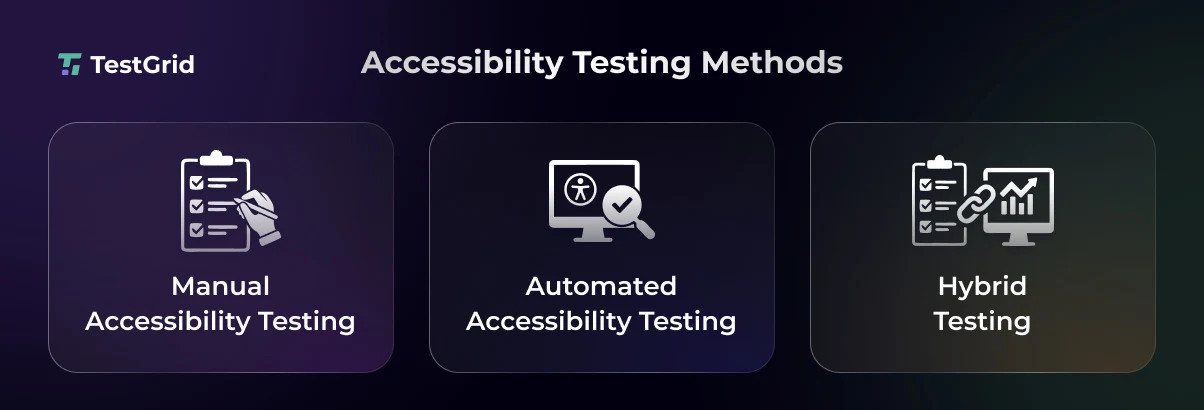
1. Manual accessibility testing
Manual testing is an essential part of accessibility software testing because WCAG success criteria require human judgment.
Here, your testers evaluate your app or website by interacting with it in the same way as users with disabilities usually do. Here, you check the keyboard-only navigation, screen reader usability, focus management, and the overall user experience.
Manual assessment can be particularly useful for mobile accessibility testing, as you can efficiently catch gestures and touch interaction gaps that are often missed by automated tests.
Also Read: Exploratory Testing: Definition, Process, Benefits, Best Practices, and Examples
2. Automated accessibility testing
Automated accessibility testing is about leveraging specialized testing tools to scan websites and apps to find accessibility issues.
These tools can help you spot problems like missing alternative text, insufficient color contrast, improper heading structures, unlabeled form fields, and WCAG violations, so you can fix them before release.
Automated testing can be beneficial if you own large-scale apps that release updates frequently and hence need continuous testing for validating accessibility compliance and functionality.
Learn More: Top 32 Automation Testing Tools of 2026
3. Hybrid testing
This is a combination of manual evaluation and automated scanning. It gives you a more comprehensive assessment of your accessibility posture.
You can run automated checks throughout your development cycle and detect issues like missing form labels, incomplete ARIA attributes, and improper semantic HTML usage.
And you can conduct targeted manual reviews to assess reading order, content clarity, and assistive technology compatibility before releases.
How Would You Perform Accessibility Testing?
These steps will help you understand how to perform accessibility testing, systematically identify gaps, and prioritize improvements.
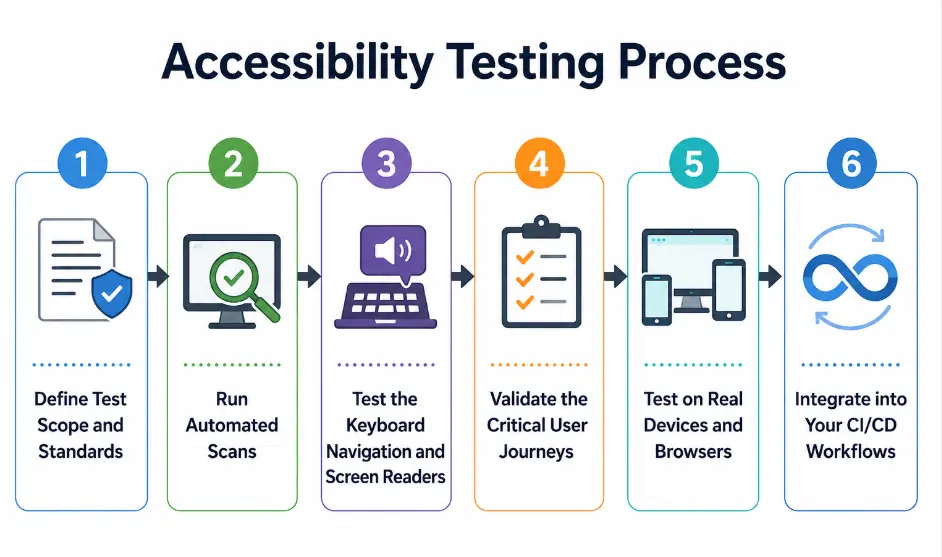
1. Define scope and standards
Firstly, you need to establish what you want to test and which accessibility requirements you’re using as benchmarks.
Determine the accessibility standards that are applicable for your organization, such as WCAG 2.1 or WCAG 2.2. Also, make sure to include regional regulations like ADA, Section 508, EAA, or AODA.
Next, you need to outline the scope because this will help you focus more on the critical user journeys. Generally, your testing scope should include:
- Key user paths such as registration, login, checkout, and form submissions
- Interactive components, including menus, dialogs, and custom widgets
- Digital documents such as PDFs, spreadsheets, ebooks, and presentations
- Supported browsers (Chrome, Edge, Firefox, Safari), devices (mobile, desktop, tablet), and operating systems (Android, iOS, macOS, Windows)
2. Run automated scans
After you have determined your software testing requirements, you must now run automated scans across your app or website.
Automated testing tools allow you to examine large volumes of content and identify accessibility issues that may violate WCAG requirements.
Your automated checks should ideally cover color contrast analysis, form field verification, ARIA role validation, link and button scans, and WCAG compliance audits.
Also Read: Top 20 Benefits of Automation Testing
3. Test keyboard navigation and screen readers
Many of your users depend on screen readers and keyboards to access the content of your app, which is why it’s important to check if all elements and information are usable without a mouse.
So, in this step, your testers should navigate through pages via keyboard inputs to verify that all functionality and the interactive elements can be reached and operated in a logical sequence.
For screen readers, you need to assess how content, controls, notifications, and page structure are announced to your users.
Some important areas that you must inspect here are:
- Logical tab order across pages
- Visibility and consistency of focus indicators
- Navigation using headings, landmarks, and page regions
- Accessibility of custom-built interactive components
4. Validate the critical user flows
Your accessibility tests should cover entire user journeys and not just the individual components or elements on the user interface.
A feature may be accessible, but your user may get stuck when moving through multi-step processes like making a purchase or booking an appointment.
Here are some of the critical workflows you can cover:
- User registration and account creation
- Authentication, login, and password recovery
- Search and filtering workflows
- Shopping cart and checkout journeys
- Payment and transaction workflows
You need to make sure that the instructions, confirmations, session transitions, and task completion states are usable and accessible throughout the complete user flow.
Learn More: How to Write Test Scenarios
5. Test on real devices and browsers
Users generally rely on different variations of devices and browsers; therefore, you need to check if the assistive technologies are compatible with them.
You can make a device and browser matrix consisting of the operating systems, device models, and browser versions that are used the most.
After that, assess assistive technologies such as VoiceOver on iOS and macOS, TalkBack on Android, and NVDA or JAWS on Windows to find compatibility issues.
Also Read: Cross-Platform Testing: Strategies, Tools, and Best Practices
6. Integrate into your CI/CD workflows
Incorporating your accessibility software testing tools with the CI/CD pipeline will allow you to run continuous accessibility checks during code commits, pull requests, builds, or deployment stages. This way, you can detect and address the accessibility gaps early.
Other than this, CI/CD integration also enables automated regression tests and provides your developers with faster feedback on issues caused by UI changes, component updates, design revisions, or third-party integrations.
The Important Accessibility Testing Metrics to Track
Now that you’ve gone through the stepwise accessibility testing tutorial, these are some crucial indicators you can monitor to gauge if your accessibility initiatives are actually delivering results.
| Accessibility metric | Description |
|---|---|
| Accessibility Score | This is the overall accessibility health score generated from automated scans and audits |
| Error Density | The number of accessibility issues per page, screen, component, or feature |
| WCAG Finding Density | Number of WCAG violations relative to page size or content volume |
| Mean Time to Remediate (MTTR) | The average time you take to resolve an accessibility issue after you’ve identified it |
| User-Reported Accessibility Issues | These are the number of accessibility barriers that your users report after release |
Learn More: Best 17 Accessibility Testing Tools
Common Accessibility Issues and How You Can Fix Them
Most accessibility issues come from design and development decisions. And these can make it hard for your users to perceive, navigate, or interact with your digital content. You should be aware of the common accessibility barriers and the practical steps to resolve them so that your users can have a seamless experience across all platforms they access.
| Issue | WCAG Reference | Impact | Fix |
|---|---|---|---|
| Missing image alt text | 1.1.1 (non-text content) | Your screen reader users can’t understand the purpose or content of the images | Give your users meaningful alt text for informative images and use empty alt attributes for decorative images |
| Form fields without labels | 1.3.1 (info and relationships), 3.3.2 (labels or instructions) | Screen reader users may not know what information they should enter | Associate every form field on your UI with a visible and programmatically linked label |
| Insufficient color contrast | 1.4.3 contrast (minimum) | Your users who have low vision or color vision deficiencies may struggle to read the content | You should ensure that the text and interactive elements meet WCAG contrast ratio requirements (e.g., 4.5:1 for normal text) |
| Incorrect heading structure | 1.3.1 (info and relationships) | Users might find it tough to understand page organization and navigate the content efficiently | Your developers should apply headings in a logical hierarchy (H1–H6) without skipping levels |
| Missing captions for videos | 1.2.2 Captions (prerecorded) | People who are deaf or hard of hearing cannot access your audio content | Provide synchronized captions for all your prerecorded video content that contains speech |
| Auto-playing content | 2.2.2 (pause, stop, hide) | Your users may get distracted or have difficulty interacting with content | Allow users to automatically pause, stop, or control moving or updating content |
Start Accessibility Testing with TestGrid
TestGrid’s Automated Accessibility capabilities help teams run manual and automated accessibility scans across websites and web apps, accurately identifying compliance issues. As an AI-powered end-to-end Testing Platform, TestGrid enables teams to streamline accessibility testing while supporting broader testing needs.
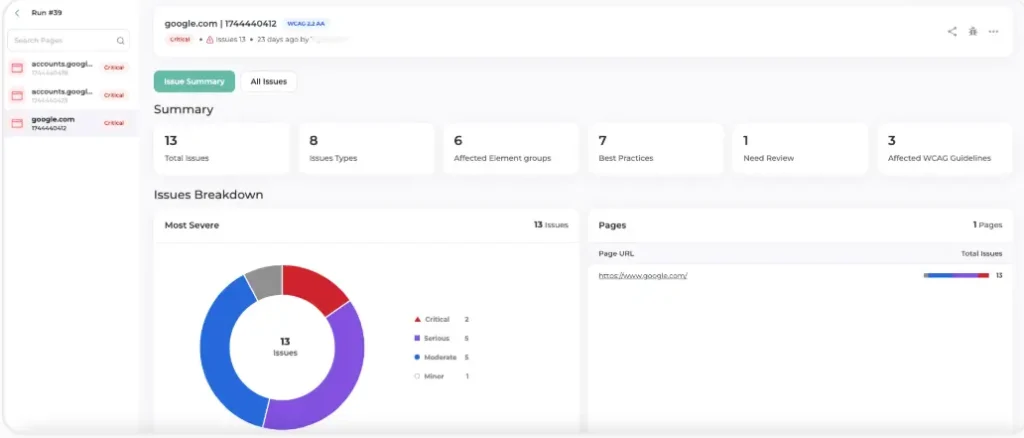
The platform’s accessibility testing feature is built around WCAG 2.2 Level A and AA, and it lets you capture metrics for every page you test and maps them to WCAG guidelines.
Plus, its scalable real device cloud helps you assess accessibility across multiple combinations of real devices and browsers, and under actual usage conditions.
Here are some capabilities that TestGrid offers you:
- Catch missing alt attributes on images and icons, text with insufficient contrast, and dynamic elements that lack clear focus indicators
- Run automated accessibility tests and look for things like tab navigation that doesn’t work properly, missing labels or buttons, and random layout changes
- Simulate real network scenarios like 50 Mbps, mobile hotspots, and airport Wi-Fi, and check page load times and rendering delays
- Automatically authenticate ARIA roles and relationships, and ensure your screen reader users have a seamless experience
- Get robust reporting including issues that are flagged by severity level (critical, moderate, minor), contextual insights (what it affects and where), WCAG guideline references, and relevant HTML snippets
Integrate with your favorite testing tools, detect visual regressions, and prevent production issues with TestGrid. Request a free trial.
Frequently Asked Questions (FAQs)
1. What is web accessibility testing?
Web accessibility testing is focused on validating websites and browser-based apps where you check whether web content, page layouts, navigation elements, and interactive features can be operated effectively by all users, including those with physical, sensory, or cognitive limitations.
2. How is accessibility testing different from usability testing for accessibility?
Accessibility testing helps you check if people with disabilities can access and interact with your digital products (apps and websites) using assistive technologies and alternative interaction methods. Usability testing for accessibility is about evaluating how easily and efficiently those users can complete tasks, understand content, and navigate the interface.
3. What are the different levels of WCAG conformance?
There are mainly three levels of WCAG conformance, which are Level A, Level AA, and Level AAA. Level A covers the minimum accessibility requirements, Level AA addresses the most common accessibility barriers and is generally the standard most businesses target, and Level AAA represents the highest level of accessibility support.
4. How often should accessibility testing be performed?
Accessibility testing is not a one-time activity. You need to perform it throughout your development lifecycle. However, you must definitely run tests during design updates, feature development, content changes, major releases, and before periodic accessibility audits.
5. What are some of the best practices to follow for accessibility testing in software testing?
The best practices that you can apply to enhance the accessibility of your product are including accessibility requirements right in the design phase, combining manual and automated tests, proposing testing features based on user impact, standardizing accessibility design patterns, and conducting regular accessibility reviews after production.
6. Which industries benefit the most from accessibility user testing?
Since accessibility impacts user access, compliance, and customer experience, user accessibility testing is applicable for digital products across various industries, including healthcare, banking and financial services, government, education, e-commerce, telecommunications, travel, and public-sector organizations.
7. What are universal design practices?
Universal design is an approach for creating products, environments, and services in a way that can be used by the widest possible range of people without requiring specialized adaptations. It encourages your team to consider diverse needs from the outset so that they can design more flexible and inclusive experiences.
8. What are the examples of accessibility testing?
Some accessibility testing examples include verifying if users are able to complete a form submission, access multimedia content, navigate a menu, or interact with custom UI components without any friction.


