 CoTester 2.0 is LIVE! Your Always-Available AI Teammate for Testing.
- What is SRS (Software Requirements Specification)?
- Who Needs a Software Requirements Specification?
- What is the Use of Writing an SRS Documentation?
- How to Write an SRS Document: Step-by-Step Guide
- IEEE 830 Standard for Writing an SRS Document
- SRS Writing Best Practices You Shouldn’t Overlook
- Turn Your SRS Requirements into End-to-End Tests with TestGrid
- Frequently Asked Questions (FAQs)
- What does SRS stand for?
- How to write SRS documents?
- What is the difference between SRS and PRD?
- What should a software requirements specification template include?
- Why is SRS software engineering important?
- What is a requirements traceability matrix (RTM) in relation to software requirements specification?
You might have a brilliant product idea on paper, but the path to turning that idea into working software or an app can be complicated. Misunderstood requirements or undefined expectations can cause release delays or even a failed project.
What you need is a solid plan, and a software requirements specification helps you create one.
A study shows that projects with clear requirements before development are up to 97% more likely to succeed.
This statistic signals how critical structured requirements are for software development. Now, let’s learn the process to write them. In this blog, we’ll talk about what SRS is, the steps to design it, and some pro tips to get it right the first time.
Accelerate your testing workflows and verify complex user scenarios with TestGrid. Request a free trial.
TL;DR
- An SRS is a comprehensive document that defines a software system’s functional requirements, performance standards, design constraints, and system expectations to guide development and testing.
- SRS is typically used by developers, QA engineers, product managers, project managers, and external vendors to ensure a shared understanding of what needs to be built and delivered.
- A software requirements specification helps you convert vague product ideas into detailed requirements, make them traceable, and create a shared understanding of the product, while reducing ambiguity and minimizing risks during development.
- The steps to write a systems requirements specification include creating an outline, defining the product’s purpose, listing functional and non-functional requirements, setting timelines and milestones, and seeking final approval from stakeholders.
- To ensure your SRS document is robust, include specification by example, add visual aids, use version control tools to track updates, incorporate acceptance criteria, and keep the document up to date through continuous reviews.
What is SRS (Software Requirements Specification)?
A software requirements specification (SRS) is a document that describes what a software system is supposed to do. It outlines the product’s core purpose, features, functional and non-functional requirements, system constraints, dependencies, and interactions with external systems, as well as how users will engage with it.
Think of an SRS as a blueprint for the software. It provides developers, QA teams, business analysts, product managers, and other stakeholders with a structured reference for building and testing the system while aligning with business goals.
Also Read: Guide to Software Test Automation: Frameworks and Best Practices
Who Needs a Software Requirements Specification?
A Software Requirements Specification (SRS) is not just a document for developers; it acts as a shared reference point for everyone involved in building and delivering the product. Since it clearly defines what needs to be built, how it should behave, and under what constraints, it becomes useful across multiple roles in the software development process.
1. For Product managers and business stakeholders: The SRS works as a shared source of truth about the product for product managers and business stakeholders. The document basically mentions what you need to build, why, and how, along with the expected outcomes. This helps your product team prioritize features as per user needs, manage scope, and ensure your final product meets business goals.
2. For Software developers and system architects: Developers and systems architects use the SRS as a technical reference point, which allows them to understand what the software should do, the expected functionality, constraints, and requirements. This way, they can build features with much fewer assumptions and misunderstandings.
3. For QA engineers and testing teams: Testing teams check if your software is working as specified in the requirements. Since SRS outlines all the functional and non-functional requirements of the product, testers can refer to it and then design relevant test cases, verify features, and make sure testing covers every component so nothing malfunctions in production.
4. For Project managers and delivery teams: Project and delivery teams mainly take help of the SRS to plan product timelines, allocate resources, track progress, and maintain a clear roadmap of what to deliver and when. That way, you can easily manage dependencies and keep your project on schedule.
5. For External vendors or outsourcing teams: Because external vendors are not involved in the early discussions of development, SRS works more like a detailed guide for them, helping them grasp requirements, functional expectations, testing needs, and constraints.
Overall, an SRS ensures that every stakeholder from planning to delivery is aligned on a single source of truth, reducing miscommunication and improving development efficiency.
What is the Use of Writing an SRS Documentation?
Everyone involved in your software development process needs a clear direction because otherwise, you’ll end up with rework and unexpected delays.
SRS makes this possible by laying out the requirements in a structured way and ensuring they’re met.
1. Turn vague product ideas into structured requirements: Product ideas generally start as a broad concept, like “the app needs a faster checkout process.” But this doesn’t help your developers because what they need are properly defined requirements. So, an SRS allows you to convert scattered product ideas into structured specs.
E.g., the system shall support single-page guest checkout that loads in 2 seconds.
2. Create a shared understanding across cross-functional teams: With the help of an SRS, you can make sure that everyone in the software development process is on the same page.
Your developers, designers, testers, and business stakeholders all refer to a unified set of documented requirements, which actually reduces misunderstandings because every team member has a consistent view of what needs to be built.
3. Make your requirements traceable throughout development: Usually, in any SRS, a requirement is assigned to a unique ID, which helps you trace it throughout development, testing, and final delivery.
Say there’s a requirement REQ-01: User login. You can link this to your design documents, code modules, and specific test cases, which in turn allows you to track implementation and verification.
4. Reduce rework in the later stages of development: When you define the software or app requirements before the development process starts, your developers and testers work on the same documented specifications from day one, and as a result, there’s less ambiguity in design decisions and fewer feature rework in the later phases of the Software Development Life Cycle.
How to Write an SRS Document: Step-by-Step Guide
Writing a Software Requirements Specification (SRS) document requires a structured approach so that all requirements are clearly captured, and nothing important is missed during development and testing.
1. Design an Outline or Use a Ready-Made SRS Template
You have two options to write your SRS. You can either do it manually or select a predefined template.
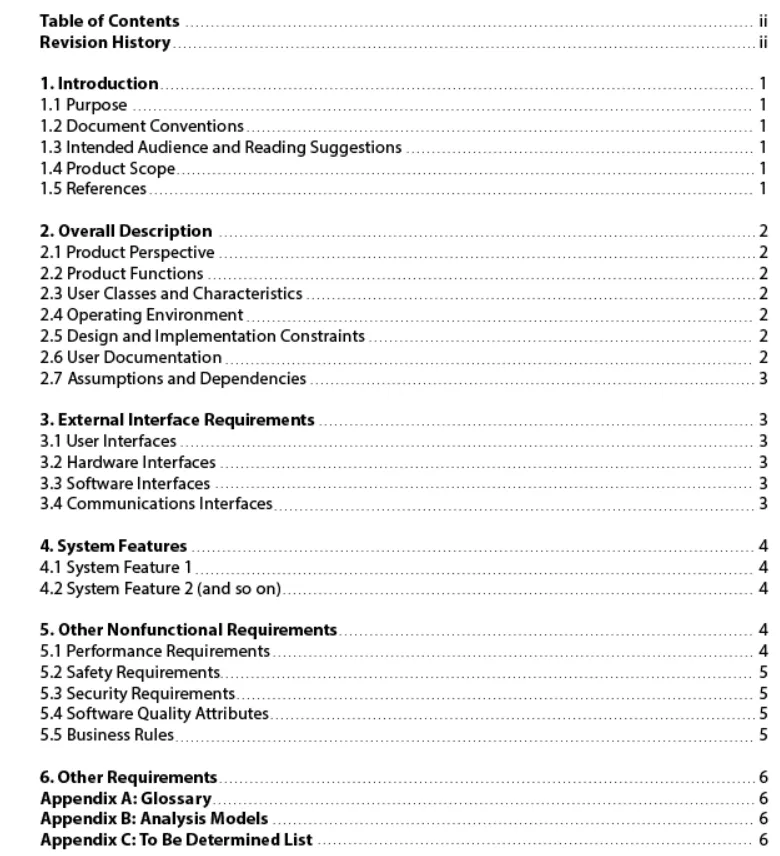
These templates divide the SRS document into sections like introduction, system description, functional and non-functional requirements, and appendices. This exact structure is very important because it helps you ensure that nothing critical gets overlooked.
Different roles focus on different sections of this doc. Your product managers look into the product scope, dev teams use the functional requirements, and QA engineers create tests based on the requirements.
Here’s a format of the software requirements specification document outline.
2. Define Your Product’s Purpose and Scope
This step is extremely critical because the product’s main purpose decides what the system requirements will be.
A purpose defines the core objective of the software or app, the problem it solves, the value it delivers to users, and how it supports key business objectives
You can split this section into three parts: product scope, the intended audience, and the definitions and acronyms you’ll be using for writing the software requirement document.
a. Product scope
Every app is built to solve a specific problem. You should explain explicitly what your product is trying to solve. For that, start by answering these questions:
- What problems are users currently facing?
- How is the product improving user experiences?
- How is our product better than the competitors’?
These quick questions will help you better frame the requirements.
b. Intended audience
Now, next, you need to identify who’s going to use the SRS and how they should use it. Typically, the audience can include project managers, developers, QA engineers, and other business stakeholders like sales and marketing teams.
Also, ensure that you define each target audience.
E.g., software developers are responsible for implementing the system based on the functional and non-functional requirements defined in this document.
c. Acronyms and definitions
There are a lot of different technical terms, abbreviations, and acronyms that the SRS includes, which everyone in your team may not be able to understand. That’s why you have to make a separate section to avoid this confusion by explaining these terms.
Say if your software requirement specification doc frequently mentions terms like API, SSO, SLA, or MFA, define these in the section so that members can quickly consult it if they’re unsure about a term.
3. Describe What You’re Building
You have to give the SRS readers a complete view of the product, its users, functions, and assumptions. You should also explain if this is a new product or an addition to an existing one, or if it’s going to be integrated with another product.
Apart from this, outline the user needs and the primary and secondary users.
Finally, document all the assumptions and dependencies, like the third-party APIs, existing infrastructure, or reusable software modules that your product will be relying on.
Learn More: What is Test Infrastructure and Why is it Important?
4. Detail the Functional and Non-Functional Requirements
Here comes the core of your document. This is the section where you list your product or app’s function, how to measure its performance, and the components or external systems it would interact with.
Let us organize this section into three points for ease of understanding.
a. Functional requirements
Functional requirements cover the specific features and functions of your app. It explains how your app must respond to a user input. It’s very important to be precise about writing these requirements because your developers will use them to build the features, and testers to verify them.
Suppose you’re designing an e-commerce app. Here’s how you can write the SRS model requirements:
- FR-01: The system shall allow users to register using email and password
- FR-02: The system shall display available products with pricing and stock information
- FR-03: The system shall allow users to add products to the shopping cart and proceed to checkout
b. Non-functional requirements
Non-functional requirements are all about your app’s performance, security, usability, and accessibility constraints on which the user experience will depend.
This is what it should include:
| Requirement Type | Description |
|---|---|
| Performance requirements | The system should load product pages within 2 seconds under normal traffic conditions. |
| Security requirements | The system should implement multi-factor authentication for admin users. |
| Usability requirements | The interface should follow responsive design principles so it works on mobile, tablet, and desktop. |
| Scalability requirements | The platform should handle up to 50,000 active users without significant performance degradation. |
c. External and interface requirements
Since most apps or software systems today communicate with other services, systems, or hardware components, you need to mention those as well.
Cover the different types of interfaces, such as:
- User interfaces – web-based dashboards, mobile-friendly layouts
- Software interfaces – payment gateways, external email services
- API interfaces – REST APIs, OAuth tokens
- Hardware interfaces – barcode scanners, IoT devices
5. Set Timelines, Milestones, and Deliverables
Timelines allow you to track delivery dates, resource usage, monitor progress, and ensure there are no delays in releases. Assign clear deadlines for checkpoints such as requirement approval, design completion, development phases, and testing cycles.
6. Review, Validate, and Finalize Your Software Specification Document
After you complete drafting the software requirements specification, circulate the doc among stakeholders for feedback and validation. This is the stage where you rectify any missing details, conflicting requirements, or unclear statements.
One thing you must note is that an SRS is a living document, which means you will need to update it as and when users’ needs and requirements evolve.
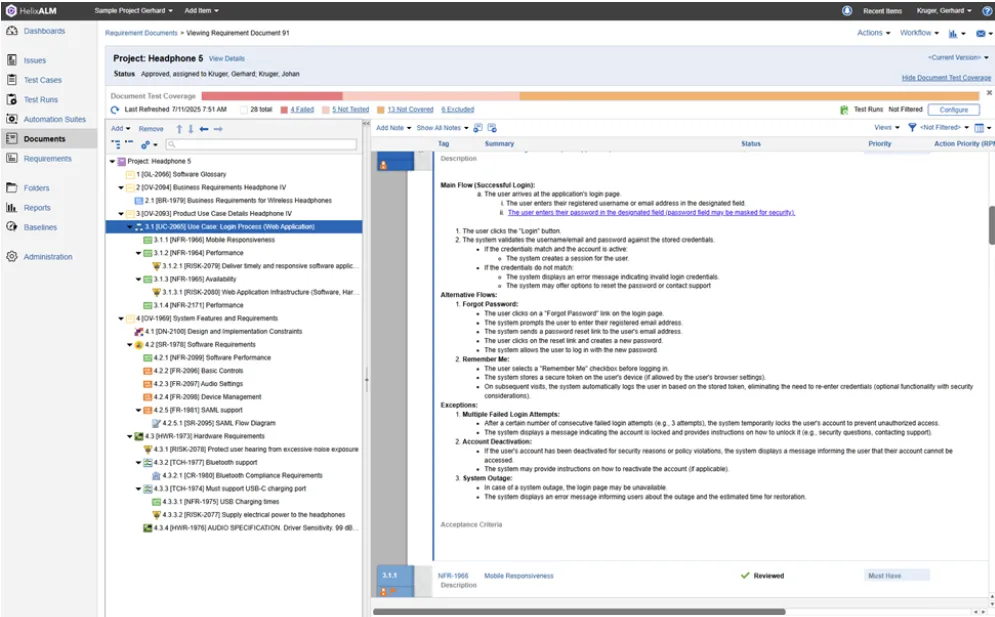
Software requirement specification document example
This software requirements specification example illustrates the structure of a typical SRS document.
IEEE 830 Standard for Writing an SRS Document
IEEE 830, formally called Recommended Practice for Software Requirements Specifications, is actually a recommended practice that gives you guidelines about what an SRS is, what a good SRS must have, and how you can write it.
The standard also includes a sample outline that you can adapt for your own software requirements documentation.
Generally, this is the recommended way to create your SRS as per the IEEE standard:
- Introduction
- General description of the software product
- Specific requirements (detailed)
- Additional information, such as appendices and an index, if necessary
Hope this detailed stepwise plan helped you understand what software documentation is.
SRS Writing Best Practices You Shouldn’t Overlook
1. Incorporate Specification by Example (SBE): SBE helps you illustrate app behavior with the help of realistic scenarios or examples. This allows your dev, QA, and business teams to perceive the requirements in the same way because everyone can see exactly how your app should function in production conditions.
| Pro tip: You should always try to frame your requirements like ‘If a user enters an invalid password three times, the account should lock for 15 minutes.’ Concrete examples like this will enable you to easily test and validate requirements later. |
Also Read: User Stories in Testing: Convert Requirements to Test Cases
2. Include visual aids where possible: Diagrams, flowcharts, wireframes, or system architecture visuals can be, at times, a lot easier to interpret than long paragraphs of requirements. E.g., a workflow diagram showing how your user moves through a checkout process or how different system components interact.
| Pro tip: Make straightforward flowcharts or sequence diagrams depicting complex workflows, integrations, and system interactions to explain processes like a user adding a product to cart, checking out, and receiving order confirmation. |
3. Take help of version control and collaboration tools: As your app evolves, you’ll have to update, expand, or clarify the requirements. And this is exactly why you need version control and collaboration tools, because they help your team track changes, maintain different versions of the doc, and collaborate without overriding others’ work.
| Pro tip: Store your SRS in tools that support version history so you can document every requirement change over time. It’ll help you review past decisions and trace updates. |
4. Add acceptance criteria to your software requirements specification: Acceptance criteria basically include all the conditions that are to be met for a requirement to be considered complete. You should state what success looks like, which will enable your developers to know what to implement and QA engineers to identify what needs testing.
| Pro tip: Keep your acceptance criteria precise and straightforward. For a particular requirement, it should ideally look something like ‘If a user requests a password reset, the system must send a reset link to the registered email and allow the user to create a new password using that link within 10 minutes.’ |
Turn Your SRS Requirements into End-to-End Tests with TestGrid
You have planned and written all the requirements for your application. Your developers followed the requirements and built the features. Now it’s time to validate them through robust testing.
TestGrid is an AI-powered testing platform that lets you automatically turn your product requirements into structured tests. You can verify complex user scenarios across browsers, devices, and environments, and ensure that your app behaves exactly as specified in the SRS.
Here’s a quick snapshot of what the platform helps you do:
- Integrate with CI/CD tools like Jenkins, Azure DevOps, and CircleCI to run tests as part of your build and deployment pipelines
- Write your test cases in English and paste them into the TestGrid AI portal to design executable test flows
- Execute your tests across combinations of real devices and browser environments defined in your software requirements specification
- Cover every workflow and feature of your app via functional, performance, security, and usability tests
- Leverage cloud-based or on-premises testing, whichever suits your infrastructure and testing needs.
Know more about how TestGrid can support your requirement validation and testing workflows. Request a free trial today.
Frequently Asked Questions (FAQs)
What does SRS stand for?
SRS stands for Software Requirements Specification. It’s a document that states a software system’s purpose, features, functional requirements, and constraints before development starts.
How to write SRS documents?
First, define your product or app’s purpose, scope, and intended audience in the software engineering requirements document. Then write in detail all the functional and non-functional requirements of the app, and its interfaces, integrations, and constraints. Lastly, review the document, make sure it aligns with business goals, and obtain stakeholder approval.
What is the difference between SRS and PRD?
A product requirements document (PRD) highlights a product’s vision, business goals, and user needs. An SRS converts those ideas into structured technical requirements, which are necessary for the development and testing of the product.
What should a software requirements specification template include?
Usually, an SRS template has sections like introduction, product scope, intended audience, system overview, functional requirements, non-functional requirements, and interface requirements. Some templates also include assumptions, dependencies, and acceptance criteria so that requirements are testable.
Why is SRS software engineering important?
A software requirements specification translates business goals and user needs into a detailed requirements document, which guides design decisions, test planning, and ensures that the product aligns with the intended expectations.
What is a requirements traceability matrix (RTM) in relation to software requirements specification?
A Requirements Traceability Matrix (RTM) is a document that links the requirements defined in the software development requirements document to their corresponding test cases and development artifacts. It helps you track whether every requirement has been implemented and properly tested throughout the development lifecycle.


