CoTester 2.0 is LIVE! Your Always-Available AI Teammate for Testing.

- What are Test Artifacts in Software Testing?
- What Do We Actually Consider as Test Artifacts?
- What are the Different Test Artifacts at Different Stages in The Testing Lifecycle?
- Reasons Why You Should Maintain Test Artifacts
- Best Test Artifact Practices You Shouldn’t Overlook
- Which Tools Help You Better Manage Test Artifacts?
- Connect Requirements, Tests, and Execution with CoTester
- Frequently Asked Questions (FAQs)
Say your users report that they can’t complete a checkout flow. What will your next plan of action be? To reproduce the issue and analyze what went wrong, right?
Now, to reproduce this issue, you’ll need to check the original test case, look at the test data used, and review the execution logs, which are test artifacts that capture step-level outcomes, environment data, and system behavior during test runs.
Without these test artifacts, you’ll have to rely on guesswork, which will only delay resolution. In this blog, we’ll see how you can prepare and manage test artifacts in a structured way that’ll help you reproduce bugs faster, improve traceability, and streamline quality assurance.
Turn your scattered test artifacts into a connected, traceable system with CoTester. Request a free trial.
TL;DR
- Test artifacts are structured documents and outputs generated during testing to plan, execute, track, and validate app quality
- The different types of test artifacts are test strategy, test plan, test scenario, test case, requirements traceability matrix, and defect and test reports
- Organized test artifacts help you structure the testing process, enhance cross-functional collaboration, and make debugging easier
- Some best practices you should note for efficient test artifact management include keeping artifacts simple, maintaining a central repo, standardizing templates, and leveraging automation
- Test management, CI/CD automation, and AI-powered tools will help you efficiently create, update, and track test artifacts across your testing lifecycle
What are Test Artifacts in Software Testing?
Test artifacts are structured outputs created during testing that capture how requirements are validated, how tests are executed, and what results are observed.
These artifacts are shared with the testing team and clients to communicate test progress, coverage, and quality status throughout the lifecycle.
Properly organizing test artifacts is very crucial because they serve as evidence of the data, techniques, and processes your testing involves, which is essential for compliance and audit requirements.
Also Read: Software Development Life Cycle (SDLC): Phases, Models, Process, and Benefits
What Do We Actually Consider as Test Artifacts?
1. Test strategy: A test strategy is typically defined by QA leadership or engineering leads and outlines how testing will be approached across the system.
It defines scope, test levels, risk areas, tooling decisions, and quality criteria that guide all downstream testing activities, such as the incremental phases involved, client communication processes, and how you’ll ensure quality across the project.
2. Test plan: Many people often confuse test plans with test strategies. But the test strategy, as we talked about, is a detailed outline of the whole project.
A test plan, instead, translates the strategy into execution details, including scope, timelines, environments, resources, and entry and exit criteria. You jot down what you need to test, when testing should happen, and the resources you’ll need.
Learn more: Test Strategy vs Test Plan: Differences and Importance
3. Test data: This is basically the inputs you use to create and execute your tests. Test data should ideally reflect real-world scenarios like user details, transactions, and edge case values such as unexpected and boundary inputs.
Why test data should be realistic is that it helps you test apps under production-like conditions and uncover issues that might not show with repetitive inputs.
4. Test scenario: A test scenario defines a high-level user or system flow that needs validation, without specifying step-by-step execution.
It’s like a description of what you want to validate in your app. For e.g., a test scenario could be “verify that a user can successfully place an order using a valid payment method.” You don’t go into the stepwise details here. You just capture the overall flow you want to test.
5. Test case: A test case defines deterministic steps, inputs, and expected outcomes required to validate a specific scenario. You break every test scenario down into actionable steps, define exactly what to do, what inputs testers will use for the test case, and what outcome you expect.
6. Traceability matrix: A traceability matrix maps requirements to test cases, execution status, and defects, ensuring complete coverage and enabling impact analysis. This helps you ensure that every requirement is tested. Also, QA teams use this matrix to track coverage, spot testing gaps, and confirm that all functionalities are properly verified.
7. Defect report: This is basically a document where you note all the bugs that you identified during testing. A defect report captures failure context, including steps, environment details, logs, and evidence required to reproduce and resolve issues.
8. Test report: Probably one of the most critical test artifacts, a test report aggregates execution results, coverage metrics, defect trends, and risk areas to provide a clear view of product quality.
This is like a summary of how your testing went and gives your stakeholders a clean snapshot of the app’s quality.
What are the Different Test Artifacts at Different Stages in The Testing Lifecycle?
1. Requirement Analysis
Testing artifacts evolve continuously across the lifecycle, with updates driven by requirement changes, code commits, and execution results.
Requirements documents, such as user stories, BRDs, and FRDs, act as source inputs for test artifacts. Test artifacts are derived from these inputs to validate expected system behavior. Requirements documents have:
- Functional and non-functional requirements
- Business rules and workflows
- Acceptance criteria
- System constraints and dependencies
Another critical test artifact in this phase is a requirement traceability matrix that’s maintained in a table format and comprises requirement IDs, mapped test case IDs, test execution status, and defect IDs.
2. Test Planning
Next, we come to the stage where we prepare artifacts like test strategy, test plan, resources needed for testing, and the risks associated.
Your test strategy should talk about the main objective and scope of testing, types of tests you’ll need to cover (functional, security, performance), test levels like unit, integration, or system tests, tools you’ll be using, and the entry/exit criteria.
A test plan is more granular and includes test schedules, timelines, deliverables, test environment details, and features to be tested.
3. Test Design
Test cases, test scenarios, and test data are the main artifacts in the test design stage.
A test case should ideally have:
- Test case ID and description
- Preconditions
- Detailed execution steps
- Expected results
- Postconditions
- Priority and severity
Learn More: Test Case Template: Free Examples & Formats for QA Teams
Test scenarios should have proper scenario IDs, the requirement or user story associated, business impact, and all the linked test cases.
Your test data is extremely critical because the accuracy of the results depends on it. Therefore, include the input values (valid, invalid, boundary cases), data source details like manual, synthetic, and production-like, and data constraints and dependencies.
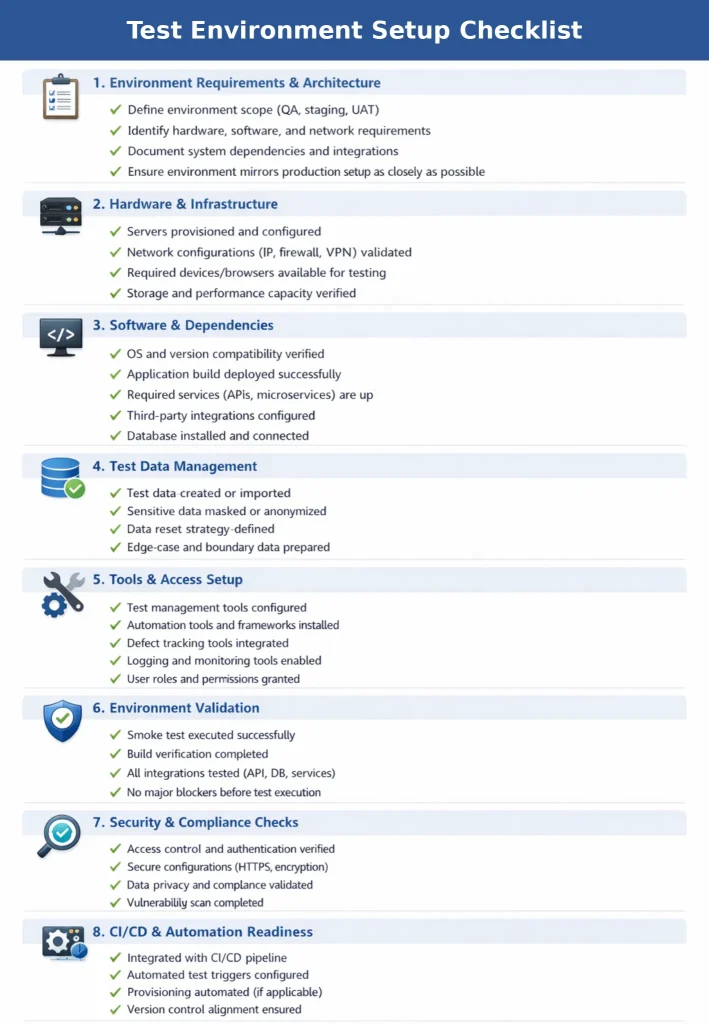
4. Environment Setup
Environment configuration is a test artifact that defines infrastructure, dependencies, and data required for consistent and repeatable test execution. The doc lists all the setup and config details like:
- OS versions and configurations
- Third-party integrations and services
- Hardware and software specifications
- App build details and deployment steps
- Network configurations and dependencies
Also Read: Guide to Configuration Testing: Process, Types, and Best Practices
Want a pro tip? Make a comprehensive setup checklist for quick validation to confirm everything is on track before testing starts.
Here’s an example of the checklist:
5. Test Execution
After the test execution, you gather the test logs, prepare the execution reports, and defect reports.
Test logs generally have execution steps performed, system responses, timestamps of each test, error messages, and stack traces.
Test reports give a consolidated view of the execution and cover test summary, how many test cases passed, failed, and were skipped, and the important metrics.
Then, finally, you prepare a defect report with details about the defect description, expected vs actual result, steps to reproduce, and defect severity.
Check out here how a defect report looks.
Reasons Why You Should Maintain Test Artifacts
1. Helps you keep the testing process structured: When you maintain artifacts in testing properly, your team gets a structured view of the entire testing lifecycle, from planning and execution to reporting. That way, they can keep track of the test data, logs, and documents involved in different stages of testing.
2. Makes collaboration smoother between teams: Test artifacts function as a shared reference point for the members who are a part of your testing process, like testers, developers, product managers, and other business stakeholders. When you document the expectations, test coverage, and defects in a clear way, it keeps your team aligned, improves cross-functional collaboration, and minimizes back and forth.
3. Acts as proof when stakeholders ask questions: Since your test artifacts already include what you tested, how it was tested, and whether it matched the expectations, it works as an audit trail, giving your stakeholders a full picture of the coverage, issues, risk handling, and release readiness during compliance reviews.
4. Aids in easier debugging and issue tracking: Testing artifacts have all the records of test cases, data, bugs, and execution results, which help your developers reproduce the issues and nail down the root causes. This, in turn, speeds up issue tracking and resolution.
5. Provides a reference for future projects: Test artifacts can be a valuable knowledge reference for your future work.
Your team can actually reuse the past test cases, plans, SRS, and reports to design similar features like login or checkout flow, identify recurring edge cases, and allocate resources based on past performance.
Best Test Artifact Practices You Shouldn’t Overlook
1. Keep your artifacts simple and usable: Overly detailed and complicated artifacts can be hard to understand and reuse. Keep it straightforward and include just the information your team will need to quickly interpret and act on it.
| Pro tip Aim for ‘minimum effective detail’. What this means is, say you’re writing a test case for a login feature. Just include clear steps for verification, the expected output (successful login) and necessary test data (valid user credentials). |
2. Maintain a central repository: It’s a good idea to store all your test artifacts in a central repository because this will help you easily access, manage, and update them when needed. On top of this, set up role-based access controls so that only the authorized members can view and edit the artifacts.
| Pro tip You should opt for a test management tool like TestRail to store your testing artifacts. This will enable your team to link tests to requirements and defects, monitor execution status, and get better visibility into test coverage. |
3. Standardize the format and naming conventions: For all your test cases and reports, maintain clean, descriptive names. E.g., a login test case can be named as TC_Login_Admin. Try not to apply generic or vague names such as data_file.txt, as this doesn’t explicitly state what’s being tested and may lead to ambiguity within the team.
| Pro tip You can define a naming convention upfront, something like TC_Module_Action_Condition, and then enforce it through templates or tools. This way, you can keep your artifacts searchable, prevent any duplication, and ensure consistency when your suites scale. |
4. Leverage automation where needed: If you do repetitive high-volume testing, then automation is a must for you. Automated scripts, test data management, version control, and reporting minimize human errors and update artifacts automatically.
| Pro tip Although automation does most of the execution and updates of test artifacts like results and logs, you should regularly review them to reduce flaky tests or outdated results. |
Which Tools Help You Better Manage Test Artifacts?
When your projects scale, so do your test artifacts. You need tools that’ll help you organize, version, track, and update artifacts in testing efficiently and make sure everything is accessible, consistent, and easy to manage.
- Test management tools – these tools store all your test cases, test plans, test data, and reports systematically so you can monitor changes and maintain version history throughout the test lifecycle
- CI/CD tools – they help you integrate testing into your development pipeline, automatically trigger tests, and ensure artifacts evolve with every build
- Automation tools – these tools are for generating and managing artifacts like test scripts, execution logs, and results at scale with little manual effort
- AI-powered testing tools – AI tools can intelligently analyze historical test patterns and potential risks to generate, update, and optimize testing artifacts automatically
Connect Requirements, Tests, and Execution with CoTester
Test artifacts often end up scattered across documents, tools, and teams. Requirements live in one place, test cases in another, and execution data somewhere else. This makes it harder to track coverage, reproduce issues, and understand what changed between releases.
CoTester keeps these artifacts connected from the start. You generate test cases directly from user stories, review and refine them, and execute them on real environments without switching contexts. Each test remains linked to its originating requirement.
During execution, CoTester captures logs, screenshots, and step-level outcomes automatically. When a failure occurs, defects are recorded with full context and tied back to the same test case and requirement.
As your tests evolve, you can extend validated test cases into automation without rewriting flows. Manual and automated tests stay aligned, and every result remains traceable across test cycles.
This removes the need to manage separate artifacts manually and gives you a consistent view of how your system behaves across changes. Request a free trial with CoTester today.
Frequently Asked Questions (FAQs)
Why are test artifacts critical?
Test artifacts are important because they help you bring structure and accountability to your testing process. Artifacts keep your teams aligned and allow you to ensure all requirements are thoroughly tested, issues are fixed, and releases meet functional and quality expectations.
Are test artifacts the same as deliverables?
Not really. Although you might see test artifacts and deliverables being used interchangeably, artifacts generally include all the documents and data you create while testing. Deliverables are specifically the final outputs you share with the stakeholders, like test reports.
Can we skip test artifacts in Agile?
Even though agile focuses on working software rather than heavy documentation, you still shouldn’t skip test artifacts. That’s because your team will need proper, structured test cases, test data, and reports for efficient testing and monitoring quality.
How do we use testing artifacts in automation?
In automation, you convert test cases into automated scripts, your test data feeds those scripts, and execution logs and defect reports capture the results. All these together help you build reliable automation and identify failures effectively in automated pipelines.
Who is responsible for creating and maintaining testing artifacts?
This is usually a shared responsibility. So, it’s not just the testers and QA engineers who have to create testing artifacts. Test leads can design the test strategy, developers can help with defect reports and automation scripts, and product managers can write the requirements.