CoTester 2.0 is LIVE! Your Always-Available AI Teammate for Testing.
- What Is Test Orchestration?
- Key Components of Effective Test Orchestration
- Test Orchestration vs. Test Automation
- Why QA Teams Need Test Orchestration
- How to Implement Test Orchestration: Step-by-Step Workflow
- Test Orchestration Metrics: How to Measure Success
- Common Test Orchestration Challenges and Solutions
- AI-Powered Test Orchestration: Optimizing Continuous Delivery with CoTester
- Frequently Asked Questions (FAQs)
- How does test orchestration handle microservice architectures?
- Do you need to replace your existing testing tools to implement orchestration?
- How do you handle flaky tests in an orchestrated setup?
- How do you balance test coverage and execution time in orchestrated pipelines?
- How does test orchestration improve collaboration between teams?
A while back, setting up a CI pipeline, plugging in your test suites, and executing them automatically was all that mattered. Most QA teams would measure success by the number of tests executed and how quickly they ran.
But in the last couple of years, things have changed.
Running more tests doesn’t necessarily lead to better outcomes. Teams often exhaust resources on low-value tests while missing critical ones that require the most attention.
Automation simply executes tests; it doesn’t help you manage or prioritize them effectively.
Test orchestration is the process of coordinating, managing, and optimizing automated tests to improve efficiency, coverage, and decision-making in QA workflows.

It brings together scattered test results, improves traceability, and helps teams focus on high-risk areas first.
In this blog, we’ll explore what test orchestration is, its key components, implementation steps, metrics, challenges, and best practices.
Streamline test orchestration with CoTester. Request a free trial.
TL;DR
- Test orchestration is the practice of structuring and controlling how and when tests run in the CI/CD pipeline
- Key test orchestration components include test scheduling, correct data sharing, environment provisioning, parallel execution, failure handling, and comprehensive reporting
- To enable test orchestration, you should first define pipeline stages, build your tests, integrate with orchestration tools, prepare test data and environment, and trigger tests
- Important metrics to measure how successful your test orchestration workflow is include test execution time, test coverage, defect detection rate, and test failure rate
- For properly implementing test orchestration, set up centralized reporting, design a detailed test orchestration strategy, define success criteria, and keep dependencies in sync
- AI systems enhance test orchestration by supporting autonomous testing, self-healing to reduce manual maintenance, and predictive test execution
What Is Test Orchestration?
Test orchestration is the process of designing, executing, and managing tests in a structured way. This mainly focuses on coordinating triggers, environments, and data flow so that tests can run at the right time, in the correct order, and under appropriate conditions.
Orchestration answers questions like:
- Which tests should run first?
- How does a failure in one stage affect the later stages of execution?
- Which tests should execute automatically and which should be run manually?
How test orchestration is changing from automation to intelligence
Many teams are now leveraging AI-powered systems to implement test orchestration. This helps them automatically execute critical tests, get insights into anomalies and failure trends through visual dashboards, and optimize resource utilization.
These are some features of AI-based test orchestration:
- Predictive test execution – this allows you to prioritize tests based on risk, past failures, and code changes
- Self-healing mechanism – with this, your testing pipelines adjust to failures, flaky tests, and environment issues
- Autonomous testing – here, AI agents help you build, run, adapt, and maintain tests with minimal human intervention
Key Components of Effective Test Orchestration

1. Test sequencing and scheduling: This component is about which tests run, when, and in what order. You don’t start testing abruptly without a plan. You first decide the tests you want to execute, like unit testing, functional testing, regression testing, smoke testing, performance testing, or end-to-end testing, and control how they flow.
Some of your tests may run sequentially because they probably depend on an earlier stage. For e.g. a test for the login flow has to run before the test for a checkout flow.
You can also add conditional progression. This means that in case a critical test fails, the pipeline stops or reroutes. For instance, a failed authentication test may stop downstream tests, such as the checkout, to avoid getting invalid results.
2. Context data sharing: Your test orchestration system must ensure data continuity across tests. So, if you’ve created an order ID in one test, it should pass on to the subsequent tests related to order tracking and payment processing.
Efficient test orchestration ensures:
- Variable passing, which moves values like order IDs, session tokens, or user details from one test stage to the next, so your test flow can stay connected
- Data control that specifies which data should be used at which stage of testing
- Environment persistence, which keeps your app state intact across different tests, like maintaining login sessions, configurations, and databases
3. Environment provisioning and configuration: One of the best things about test orchestration is that you don’t need to manually configure your test environment every time before execution. You can use test environment management and orchestration tools to spin up environments like staging servers, browser grids, or containerized setups, on demand.
Test data orchestration lets you provision data, dependencies, services, authentication, and configurations to ensure you can run tests in a stable environment. This is also important to keep your test environments standardized, repeatable, and ready for pipeline execution.
4. Parallel execution and distribution: Orchestration helps you enable parallel testing by dividing your test suite into smaller subsets or groups (e.g., test cases, test classes, or features) and executing them at the same time across multiple machines, containers, or environments.
Efficient test orchestration distributes your workload intelligently, decides which tests to run independently, and allocates resources to avoid any conflicts. This way, you get feedback faster, optimize your test infrastructure management, and run large test suites within minutes.
Also Read: Parallel Test Execution Using Selenium
5. Failure handling and retries: Every test failure doesn’t necessarily mean there’s something wrong with your app. Sometimes failures happen because of a flaky test, a network glitch, or a temporary issue in your test environment.
So, rather than failing the entire pipeline, test orchestration can help you automatically retry failed tests, find out the flaky ones, and continue executing the non-dependent tests. You can define retry rules, set retry limits, and configure conditions like stopping execution for critical failures.
6. Reporting and analytics: Orchestration can generate extensive reports and insights to help you analyze your test results and debug more efficiently.
You can set up execution dashboards that display your test orchestration status in real-time and show which tests are complete, running, or failed. Other than this, you can optimize:
- Trend analysis by tracking metrics (e.g., test coverage, failure rate, defect rate) over time and improving execution
- Failure analysis by categorizing test failures based on location, type, and frequency
Learn More: Advanced Guide to Write An Effective Bug Report
Test Orchestration vs. Test Automation
For building an effective test orchestration system, you first need to understand how it’s different from test automation.
| Feature | Test Automation | Test Orchestration |
|---|---|---|
| Purpose | Automates individual test cases or scripts | Coordinates, schedules, and manages multiple automated tests |
| Scope | Atomic (single test cases or suites) | Holistic (end-to-end workflows across systems) |
| Test execution | Runs tests independently | Runs tests in sequence, parallel, or conditionally |
| Data management | Often hardcoded or isolated per test | Dynamic data flow, variable passing, and shared context |
| Environment handling | Static, pre-configured environments | Dynamic provisioning and environment coordination |
| Visibility | Test-level reporting | End-to-end visibility across workflows and stages |
| Outcome | Faster execution of tests | Faster, coordinated, and reliable release pipelines |
Why QA Teams Need Test Orchestration
Testing today involves connecting with different tools, environments, and databases. Managing these efficiently while keeping delivery on track can be tricky. Test orchestration helps your QA team navigate through this complexity at scale and keep the entire testing process aligned when workflows, tests, and systems grow.
Here’s why test orchestration is essential:
- Enterprise apps are interconnected, so coordinating tests among services, APIs, databases, and user interfaces is important to avoid coverage gaps
- To match the speed of fast release cycles, you need orchestration systems that can run tests continuously, and not just at the end of development
- Regulatory compliance and audit require QA teams to maintain records of tests executed, data used, and test failures; orchestration helps you maintain that
- Test infrastructure may need a lot of resources, and without orchestration, you may over-provision environments or duplicate executions
Also Read: What is Enterprise Application Testing? Types and Best Practices
How to Implement Test Orchestration: Step-by-Step Workflow
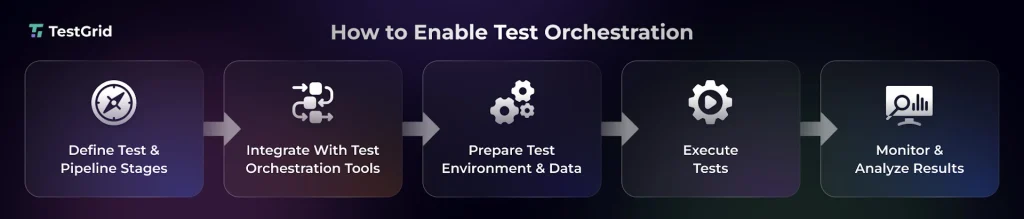
1. Plan your tests and define pipeline stages
Test orchestration needs intricate planning. You have to structure your pipeline with stages, where each stage should have a specific purpose. Usually, most test orchestration processes include stages like:
- Pre-build validation – here you normally perform unit tests and static code analysis
- Post-build testing – this includes smoke tests, integration tests, and API tests
- Staging validation – tests like E2E tests, UI, performance, and security tests happen here
- Pre-release checks – regression runs, UAT, and final sanity checks are done in this stage
Each of these stages should have properly mapped out inputs, outputs, dependencies, and pass or fail criteria. This planning is important to keep your pipeline structured and run tests in the proper sequence.
2. Integrate with test orchestration tools to trigger tests
Next, you need a system that can help you coordinate and execute the different stages automatically. Test orchestration tools work as the control plane, which connects your test suites, environments, and CI/CD pipelines and triggers tests on code commits, builds, or deployments.
These tools also manage sequencing, parallel runs, dependencies, and environment setup. Basically, they minimize manual intervention and ensure each stage runs at the right time, aggregate test results, and allow you to get faster feedback.
These are some of the most popular test orchestration tools:
- Jenkins – this is an open-source automation server that you can use to implement CI/CD pipelines. Jenkins monitors code changes in repositories and then triggers tests automatically based on changes
- GitHub Actions – it’s a native CI/CD tool built into GitHub, which helps you define workflows directly in your repositories. You can automatically run tests after pushes, pull requests, or releases
- Azure DevOps – this is a DevOps platform that brings source control, build automation, test execution, and release management together in one single space. You can enable end-to-end pipeline orchestration and execute tests across environments
- CircleCI – this cloud-based CI/CD platform is built for scalable pipeline execution and helps you trigger builds and tests for every new commit. With CircleCI, you can split tests across multiple executors and reduce execution time significantly
- Playwright – it’s a test automation framework that lets you run tests across browsers and devices. The platform offers you features like auto-waiting, parallel execution, and cross-browser testing. It also easily integrates with CI/CD tools
3. Prepare the test environment and data
After tool integrations, you will need a robust production-like testing setup and realistic test data. You can use containers or cloud instances to provision your test environments and configure dependencies like databases, APIs, and third-party services.
Test data orchestration and management tools can help you seed databases with known datasets, generate dynamic data when you need it, and isolate data to avoid parallel execution conflicts.
In this step, you’ll also need to version data, environment, and infrastructure configurations and reset state between executions to maintain consistency. This is important to prevent inconsistent data or environment drift.
Also Read: Test Data Management (TDM): Strategy, Techniques, Challenges, and Best Practices
4. Execute tests in sequence or in parallel
In this stage, your goal is to optimize execution so that you can run tests faster and release without delays.
Usually, for this, you have to split large test suites into smaller test groups and distribute them across different executors, containers, or machines.
Intelligent or AI-powered test orchestration can help you group tests that share state or dependencies and run them sequentially. And independent tests can be executed in parallel.
If you establish this stage correctly, you can reduce the execution time by hours and still maintain coverage.
5. Monitor and analyze results
Most test orchestration tools automatically capture logs, execution times, failure points, and resource utilization through dashboards. Based on the insights you get, you have to analyze patterns like recurring failures, flaky tests, or stages that are running slowly, and identify issues related to the system.
Some advanced orchestration setups also correlate test failures with code changes, test history, or environment conditions, so you can debug with precision.
Test Orchestration Metrics: How to Measure Success
We have categorized the important metrics into four key areas.
1. Execution Speed and Efficiency Metrics
These metrics help you check how quickly your tests run within the pipeline. This category involves tracking execution time, feedback cycles, parallelization effectiveness, and resource utilization to help you build more efficient delivery workflows.
| Metric | Description |
|---|---|
| Test execution time | Time it takes to run a specific test or suite from start to finish Test execution time = End time − Start time |
| Test cycle time | Total time your pipeline takes to complete an entire testing phase, including setup and execution Test cycle end time − Test cycle start time |
| Feedback loop time | It’s how quickly your teams get test results after triggering a build or commit Feedback loop time = Time of results − Time of code commit |
| Resource utilization | This tells you how efficiently your infrastructure (CPU, memory, environments) is used for test runs Resource utilization rate = (Resources used / Total available resources) x 100 |
2. Test Quality and Coverage Metrics
These numbers reflect test coverage across features and user flows, defects you find during execution, and how many defects you could catch and resolve. Quality metrics allow you to confirm that critical paths are thoroughly tested before release.
| Metric | Description |
|---|---|
| Test coverage | This helps you see how much of your app (code and requirements combined) is covered during testing Code coverage = (Lines of code executed by tests / Total lines of code) × 100 Requirements coverage = (Requirements with at least one test case / Total requirements) x 100 |
| Defect detection rate | This shows how many defects you caught during test execution Defect detection rate = (Defects found / Total tests executed) x 100 |
| Defect escape rate | This measures the defects that slipped during testing and were found later (usually in production) Defect escape rate = (Defects found in production / Total defects) x 100 |
Learn More: Defect Report in Software Testing: A Guide for Developers and QA
3. Reliability and Stability Metrics
When you want to assess the consistency and credibility of your test results, these metrics will help you do that. You can evaluate flaky tests, failure rates, and retry behavior, and ensure your test outcomes are dependable and not affected by unstable testing conditions.
| Metric | Description |
|---|---|
| Test failure rate | The percentage of tests that failed in a particular test run Test failure rate = (Failed tests / Total tests executed) x 100 |
| Flaky test rate | The number of tests that give inconsistent results (sometimes fail and sometimes pass) without actual code changes Flaky test rate = (Number of flaky test failures / Total test executions) x 100 |
| Retry rate | This shows you how many tests automatically re-run after a failure (e.g., to pass a flaky test failure) Retry rate = (Retried tests / Total tests executed) × 100 |
4. Process Improvement Metrics
The metrics under this category allow you to assess the overall performance of your test orchestration workflow over time. Based on the insights you get from analyzing these numbers, you can identify inefficiencies and refine your orchestration strategies.
| Metric | Description |
|---|---|
| MTTR (Mean Time to Repair) | This helps you calculate how long it takes on average to fix a bug once it’s been found MTTR = Total time to fix all defects / Number of fixed defects |
| DRE (Defect Removal Efficiency) | DRE shows you how well your orchestration process catches defects before your app goes live DRE = (Defects found during testing / Total defects) × 100 |
| Defect fix rate | This measures the pace at which defects are resolved Defect fix rate = Number of defects fixed / Time period |
Also Read: Software Testing Metrics: How to Track the Right Data Without Losing Focus
Common Test Orchestration Challenges and Solutions
1. Keeping test sequences and dependencies in sync: Maintaining correct test sequencing and the dependencies can get complex when your test suites grow. A change in one test, related to say an API or feature update, can affect all the downstream tests that rely on it. This way, even small updates can cause pipeline failures.
| Best practice Try to design independent tests wherever possible and use contract tests to verify shared interfaces like your APIs. This will help you prevent failures in dependent tests. You can also add checkpoints between stages to catch issues before they impact the entire pipeline. |
2. Debugging failures in complex pipelines: Root cause analysis can be difficult in test orchestration because it involves multiple stages, environments, or services. A failure can be a byproduct of issues with code, data, or infrastructure, and finding out the exact cause or originating point of the failure may require longer investigation time.
| Best practice You should implement centralized logging and traceability across different orchestration stages. Correlate test runs with environment and data states, and tag executions with unique IDs. This will help your team trace failures and quickly find the exact cause of them. |
3. Poor test orchestration planning: Test orchestration can become a maintenance burden if you don’t plan properly. Running redundant or irrelevant tests can lead to long execution hours and wasted resources. Moreover, without structure, your team may not have visibility into which tests to prioritize, resulting in incomplete coverage.
| Best practice Build a detailed test orchestration strategy with a clear purpose and success criteria. Outline your test workflows and then assign priority based on risk and impact. Document your test flow and regularly review to refine stages and maintain a lean pipeline. |
Also Read: How to Create a Winning Test Automation Strategy
AI-Powered Test Orchestration: Optimizing Continuous Delivery with CoTester
CoTester is an enterprise-grade AI agent for software testing that helps QA teams design end-to-end tests, execute them across environments, and self-heal tests at scale to reduce manual maintenance.
Here’s how CoTester can enhance your test orchestration workflow:
- Create tests automatically from user stories, scenario descriptions, or by uploading a URL
- Run tests across real devices and multiple browsers, and get live feedback, including execution logs and screenshots
- Identify and log bugs immediately during testing so you can debug faster
- Leverage AgentRx to autoheal locators after UI changes and prevent delays in testing
- Schedule execution before major releases or as part of regression runs, and keep your testing speed in pace with your delivery cycles
CoTester easily integrates with your CI/CD tools like Jenkins and Azure DevOps and gives you detailed results and debugging insights for continuous improvement.
To know more about CoTester and how it can facilitate an autonomous, context-aware orchestration, request a free trial today.
Frequently Asked Questions (FAQs)
How does test orchestration handle microservice architectures?
Test orchestration allows you to coordinate across distributed services in microservice architectures and enable service-level, contract, and end-to-end tests. Orchestration sequences service interactions, ensure correct execution order, and use techniques like service virtualization and environment scaling to simulate unstable services.
Do you need to replace your existing testing tools to implement orchestration?
Not really. Most modern test orchestration tools can seamlessly work with your existing testing stack and integrate with frameworks, tools, and scripts to enable a unified testing workflow. If you’re using test management, collaboration, or analytics tools, check whether the test orchestration tool you select can support them.
How do you handle flaky tests in an orchestrated setup?
You can choose test orchestration platforms that come with automated detection and isolation mechanisms to identify flaky tests. These systems can track failure patterns, detect inconsistent results across test runs, apply conditional retries, and tag flaky tests separately so that they don’t block your releases.
How do you balance test coverage and execution time in orchestrated pipelines?
Smart test prioritization is important for balancing test coverage and execution time. Orchestration pipelines can be configured to run high-risk tests first and execute the non-critical test suites later. You can also apply test impact analysis, tagging, and selective execution to cut out the unnecessary tests and speed up feedback.
How does test orchestration improve collaboration between teams?
Test orchestration helps you create a standardized and shared workflow that connects developers, QA, and DevOps teams and allows them to see how tests are structured, executed, and analyzed. You get centralized logs and metrics that allow cross-functional teams to debug issues collaboratively.