CoTester 2.0 is LIVE! Your Always-Available AI Teammate for Testing.

- What Is AI Testing?
- AI in Testing vs Testing AI Systems
- How AI Is Used in Quality Assurance
- AI Testing Tools for QA Teams
- Types of AI-Powered Testing in QA
- Key Use Cases of AI in Testing
- How to Use AI in Testing (Step-by-Step)
- AI Testing Strategy for QA Teams
- When (and When Not) to Adopt AI Testing
- Challenges, Risks, and Limitations of AI-Based Testing
- Common Myths and Misconceptions About AI Testing
- The Future of AI in Testing: 4 Trends to Watch in 2026
- AI Testing in Practice: TestGrid and CoTester
- Frequently Asked Questions (FAQs)
- 1. How do I evaluate AI testing tools without getting distracted by the marketing language?
- 2. Is AI testing the same as automation with smart scripts or frameworks?
- 3. What skills will testers need to use AI tools going forward?
- 4. Who’s accountable if the AI makes a wrong call in the test output?
- 5. How do we know what AI testing is helping with?
Artificial Intelligence (AI) is appearing more often in software testing conversations. Sometimes, it feels like hype. Other times, it points to fundamental changes in how teams build and release. Either way, it’s becoming impossible to ignore.
AI features might already be part of your testing stack, even if not labeled that way. Or maybe you’re being asked to evaluate what’s next. Either way, the shift is real: teams want faster cycles, clearer risk signals, and more meaningful test coverage.
Recent industry data reinforces this shift. According to the 2024 State of Testing report by PractiTest, 50% of software testing professionals expect GenAI to improve test automation efficiency, and 28% already report measurable productivity gains from AI-powered testing tools. Supporting this momentum, the AI-enabled testing market is projected to grow from USD 414.7 million in 2024 to USD 2.3 billion by 2032 (Fortune Business Insights).
That raises important questions about what AI can deliver and how well it fits into your workflows, architecture, and team practices.
This guide is here to help you step back from the noise. It looks at how AI is used in software testing today, what’s working in practice, and what still requires caution. It also explores how that changes the role of quality engineering moving forward. Let’s get started.
- One helps testers work faster by improving automation and coverage; the other validates the reliability, fairness, and reproducibility of AI-driven products themselves.
- From test case generation to risk-based prioritization and self-healing scripts, AI supports larger, more complex testing pipelines without increasing manual overhead.
- AI delivers value only when CI/CD pipelines, stable test suites, and clear ownership of QA are already in place. It amplifies good processes—it doesn’t fix broken ones.
- Tools are moving from scripted execution to adaptive decision-making—learning from code, test history, and user behavior to recommend what to run and when.
- Platforms like CoTester and TestGrid show that the future of testing is autonomous but accountable – AI agents that operate within secure environments while keeping teams in charge.
What Is AI Testing?
It refers to tools that use Machine Learning (ML) and related techniques to support and enhance software testing.
These include generating test cases, identifying flaky tests, auto-healing broken scripts, prioritizing tests, and flagging high-risk areas based on code changes, historical patterns, or user behavior.
Artificial Intelligence testing aims to improve test coverage, reduce manual effort, and surface insights that help teams test more effectively at scale.
AI in Testing vs Testing AI Systems
If you’re looking at how AI could support your QA process, it helps to separate two related but very different areas:
1. AI in testing
Here, AI supports your existing workflows, such as:
- Auto-healing selectors when the UI changes (Test maintenance)
- Spotting UI changes that matter to users, not just to pixels (Visual validation)
- Creating tests from plain English using Natural Language Processing (Test generation)
- Highlighting which tests to run based on past results, code changes, or user paths (Test intelligence)
2. Testing AI systems
In traditional software testing, you validate logic. If input A goes in, output B should come out. The system behaves predictably; you can write deterministic tests that pass or fail on exact matches. However, the rules change when testing a system that includes an ML model.
The same input might produce different outputs, depending on how the model was trained or tuned. There isn’t always a single correct answer, either. Some key areas to focus on are:
- Accuracy: How well does the model perform across typical and edge cases?
- Reproducibility: Can you get the same results in different environments?
- Fairness: Does it behave consistently across different user groups?
- Drift detection: Is the model degrading as data evolves?
How AI Is Used in Quality Assurance
There are two ways AI improves how you test software:
AI-assisted testing supports the human tester. It helps you make decisions faster, spot patterns, or reduce repetitive work. Think of it like an intelligent assistant who makes suggestions.
For example, a visual testing tool shows a screenshot comparison and says, “This button moved slightly. You might want to check it.” You decide what to do with that info. The AI doesn’t act unless you approve it.
AI-driven testing takes things a step further. AI does the work for you. You give it permission, and it acts automatically: generating, running, or maintaining tests. For instance, after a UI update, the AI automatically fixes broken test scripts by updating button names or selectors.
AI Testing Tools for QA Teams
AI testing tools help ramp up your software delivery management. They can generate test cases, execute tests, detect issues, and adapt to application changes with minimal manual effort.
By reducing repetitive work and improving test coverage, AI testing tools enable faster releases and more reliable software.
Some popular AI testing tools include:
- CoTester by TestGrid: AI agent for enterprise test automation with self-healing and CI/CD integration
- Mabl: AI-native testing platform for web and API automation
- Testim: AI-powered test automation with smart locators and reusable test components
- Testers.ai: Autonomous testing platform for web applications with AI-driven insights
- Sauce Labs: Cloud platform for cross-browser and real device testing with AI-assisted optimization
- Functionize: AI-driven, self-healing test automation platform for scalable cloud testing
Check out the complete list of AI testing tools
Types of AI-Powered Testing in QA
Below are the most common (and practical) types of AI testing in use today:
| Type | What It Does |
| AI-driven test case generation | Uses ML to analyze user stories, behavior logs, or historical test runs and automatically generate meaningful, high-coverage test cases; helps accelerate test creation and uncover scenarios humans might overlook |
| AI-based test data generation | Produces realistic, diverse, and context-aware test data without exposing sensitive production info; useful for testing complex workflows, edge cases, or compliance-sensitive systems |
| Self-healing and flaky test management | Detects and repairs broken locators or element changes automatically, reducing test maintenance; also, identifies unstable or flaky tests by learning from failure patterns |
| Visual testing with AI | Uses computer vision to compare UI layouts and components across browsers and devices; filters out trivial pixel shifts but flags visual regressions that affect user experience |
| Predictive and risk-based testing optimization | Leverages historical test data, commit histories, and usage analytics to predict high-risk areas and prioritize tests that matter most, speeding up cycles while improving coverage where it counts |
| NLP-based test automation | Converts plain-English instructions into executable test scripts; allows QA engineers and product owners define test logic in natural language, bridging the gap between requirements and automation |
| AI-driven test environment orchestration | Dynamically provisions, configures, and scales test environments based on project needs; predicts workload spikes and allocates resources intelligently, minimizing idle time and manual setup |
| Responsible AI testing | Focuses on fairness, bias detection, and consistency in AI-driven systems; ensures that models behave ethically, produce reproducible outcomes, and maintain trust across diverse user groups |
Key Use Cases of AI in Testing
Let’s explore how AI can be used in software testing:
1. Test Case Generation
Some tools use AI to create test cases from requirements, user stories, or system behavior.
For instance, you might feed in acceptance criteria or a product spec, and the tool will generate coverage suggestions or even runnable test scripts. This works best with human review, especially in systems with complex logic or strict compliance needs.
Also Read: How to Write Effective Test Cases
2. Intelligent Test Coverage Analysis Using AI
AI can analyze usage data, telemetry, or business rules to identify gaps in your test coverage. This can highlight untested edge cases or critical flows not represented in your test suite. The AI analysis is helpful for teams trying to shift from volume to value in how they measure coverage.
3. Test Maintenance
Test suites that constantly break slow everyone down.
AI can help reduce this overhead by auto-healing broken locators, identifying unused or redundant tests, or suggesting updates when the UI changes. This is especially useful in frontend-heavy apps where selectors change frequently, and manual updates are costly.
4. AI-Powered Visual Regression Testing
Computer vision and pattern recognition allow tools to detect significant visual differences. These tools ignore minor pixel shifts but flag layout breaks, missing elements, or inconsistent rendering across devices.
This is particularly valuable in consumer-facing apps where UI stability is as important as functional correctness.
5. Data prediction and prioritization
AI models can identify which areas of your codebase are historically fragile or high-risk based on commit history, defect data, or user behavior. Tests can then be prioritized or targeted accordingly. This way, you receive faster feedback and less noise in your pipeline.
6. Root cause analysis
When a test fails, the question is always: where and why? Some platforms now use AI to trace failures to likely cause code changes, configuration issues, and flaky infrastructure, so teams can skip the guesswork and go straight to resolution.
How to Use AI in Testing (Step-by-Step)
Getting started with AI in testing doesn’t have to feel overwhelming. Once you understand the flow, it becomes much easier to plug into your existing process without disrupting everything.
This step-by-step approach walks you through a practical AI testing workflow that most teams can adopt quickly:
1. Identify what to automate: Start by looking at your current test suite or QA process and ask: what are we running over and over again?
Open your regression suite or recent test cycles and list out tests that are executed in every release. You’ll usually find the same login flows, checkout journeys, form validations, or navigation paths being tested repeatedly. These are your starting points.
If you don’t have a formal suite yet, go to your product and map 3–5 critical user journeys (e.g., signup → onboarding → core action). These flows are your first candidates for AI-driven testing.
2. Choose an AI testing tool: Once you know what you want to automate, the next step is choosing the right tool for your use case. Different tools are built for different environments. For instance, if your product is primarily a web app, choose a tool that works well with browser automation.
If you rely heavily on APIs, prioritize tools that can generate and validate API calls. For mobile apps, make sure the tool supports real devices or device clouds.
Before committing, run a small pilot: connect the tool to a staging environment, plug it into your CI/CD (even a basic pipeline), and check how easily it integrates. If the setup feels heavy or unnatural, it’s a red flag.
3. Generate test cases: Instead of starting from scratch, feed the AI inputs you already have.
Take a user story or requirement like: “User should be able to reset password via email.” Paste that into the tool (or connect your Jira/Notion/GitHub). The AI will break it into steps – navigate to login, click “forgot password,” enter email, validate reset link, etc.
Review what it generates. You’ll usually need to tweak edge cases or add constraints (like invalid inputs or timeout scenarios).
4. Run and validate tests: Once your test cases are ready, execute them in your test environment. Run them across different browsers or devices if applicable. When failures show up, don’t just look at pass/fail. Dig into why it failed. Did the UI change? Did an element not load? Was it a real bug?
Most AI tools will group failures or highlight patterns. Use that to quickly separate actual defects from flaky behavior. Over time, this step becomes faster because the system learns what matters.
5. Improve continuously: Now you close the loop.
Every time a test fails due to a UI change (like a button ID changing or layout shifting), allow the AI to update or “heal” that test. Review the change once, approve it, and move on instead of manually fixing scripts every time.
Also, keep feeding new inputs into the system: new features, updated flows, edge cases from production bugs. This ensures your test suite evolves alongside your product instead of becoming outdated.
| Example: In a real AI testing workflow, you can connect CoTester to your requirements or backlog, have it generate test cases automatically, run those tests inside your CI/CD pipeline, and then let it detect UI changes (like updated locators or layouts). This allows you to review and fix updates while the system keeps your suite stable in the background. |
AI Testing Strategy for QA Teams
By the time you reach this stage, the real question is how to use it without creating more noise than value.
A strong AI testing strategy is about establishing control, prioritization, and trust. Without those, AI quickly turns into another layer of complexity. Here’s what you should do:
1. Run fewer tests, but choose them intentionally: Most QA processes are built around executing as many tests as possible. AI changes that model. Instead of asking “Did everything pass?”, you can start asking: “Did we run the tests that actually mattered for this release?”
AI enables selective testing based on:
- Recent code changes
- Historically fragile areas
- Real user behavior
This means fewer tests, faster feedback, and better signal quality. The strategy shift here is subtle but important. You’re no longer optimizing for coverage volume, but for decision relevance.
2. Set clear rules for when AI can (and can’t) self-heal: Traditionally, a stable test suite passes consistently. With AI in the mix, stability becomes more nuanced. A test that constantly “heals” itself might still be masking deeper issues, like unclear selectors, weak assertions, or changing product behavior.
Therefore, you need to decide:
- When to allow self-healing
- When to flag changes for review
- When to treat repeated fixes as a product or test design issue
In addition, you should introduce a new requirement: oversight. Whether it’s generating tests, updating flows, or prioritizing runs, you need decision-making checkpoints so you can validate what the system is doing.
3. Measure ROI based on signal quality, not just cost: Most teams try to justify AI testing by asking: “Are we saving time or cost?” That’s too narrow and often misleading. But the thing is, AI doesn’t always reduce effort immediately. In fact, early on, it can increase it due to setup, validation, and tuning.
The real ROI shows up in the quality of feedback your testing process produces.
Ask better questions:
- Are we spending less time investigating false failures?
- Are test results clearer and easier to act on?
- Are we catching issues earlier in the cycle?
If your team still reruns tests “just to be sure” or spends hours debugging noise, AI isn’t delivering value, regardless of how fast tests run.
When (and When Not) to Adopt AI Testing
Sure, Artificial Intelligence testing sounds promising. But that doesn’t mean it’ll deliver optimal results for every team or project. Before you bring AI into your QA stack, it’s worth looking back and looking at how well it aligns with your current workflow and goals.
It’s worth considering AI testing if:
- Your test suite is growing faster than your team can manage it
- You’re already practicing CI/CD and want faster feedback
- You have data, but need help making sense of it
- You’re working on high-variability interfaces
- You’re ready to shift some responsibility left
You might want to hold off if:
- There’s a pressure to automate everything, which isn’t ideal in the long run
- You don’t have a stable CI, a reliable test suite, or clear ownership of QA; AI is unlikely to fix that
- You work in regulated or mission-critical environments, which demand deterministic outcomes
- Your team isn’t ready to interpret what went wrong or why a decision was made if an AI testing tool fails or misfires
Challenges, Risks, and Limitations of AI-Based Testing
Like any evolving technology, AI in testing comes with trade-offs.
Here are some of them:
1. Requires a solid baseline: AI doesn’t replace test architecture. If your tests are already unstable or poorly scoped, adding AI won’t fix that. It might mask it by healing broken selectors or muting flaky tests. But you’ll eventually end up with different versions of the same problem.
2. Cost vs. value misalignment: Some AI-enabled tools carry a premium price. If the value they bring isn’t measured (test stability, faster runs, risk detection), it’s easy to overspend on features you don’t fully use.
Check out the hidden costs of ignoring AI testing in your QA strategy.
3. Limited visibility into AI decisions: Some tools decide which tests or what to run without telling you why. You dig through logs or rerun everything to double-check when something looks off. The lack of explainability slows things down for teams that rely on traceability.
4. False positives and missed defects: AI can be noisy. Visual tests could flag harmless font changes. Risk-based prioritization could skip a flow that just broke in production. Without careful tuning, you can chase either too many false positives or miss real issues—and both erode trust in the system.
5. Inconsistent results across environments: AI models are often trained on generalized data, not your product, codebase, or users. So, they struggle with your edge cases, legacy systems, or localized flows. What looks polished in a vendor walkthrough may not transfer cleaning to your stack, especially in edge-heavy or highly localized apps.
Common Myths and Misconceptions About AI Testing
As AI becomes more common in QA tools, so do the assumptions that come with it. Some are overly optimistic. Others just miss the point. Here’s what you must have come across:
1. AI can write all our tests.”
Some AI-driven testing tools auto-generate tests from user flows or plain-language inputs. That’s useful, but they don’t know your business logic, customer behavior, or risk tolerance. Generated tests still need guidance, review, and prioritization.
2. “AI testing will replace manual testing.”
It won’t. AI might help generate test cases or catch regressions faster. However, exploratory testing, UX reviews, edge case thinking, and critical judgment still belong to people.
3. “If a tool says it’s AI-powered, it must be better.”
“AI-powered” often means anything from fuzzy logic to actual ML models. Labeling it as a feature AI without offering accuracy metrics, explainability, or control is easy.
4. “We don’t need AI; we already have automation.”
One doesn’t replace the other. AI in automation speeds up what you’ve already defined. It tries to help with what you haven’t: test gaps, flaky results, and changing risks. AI offers different support, especially in large, fast-moving systems.
5. “Visual AI QA testing means I don’t need functional tests.”
You still do. Visual tools catch UI changes, layout issues, and rendering glitches. However, they don’t know whether the backend logic is correct or whether the business rules are working as intended. Both layers need coverage.
The Future of AI in Testing: 4 Trends to Watch in 2026
Here are five trends that are shaping where AI in testing is heading next:
1. From AI-powered features to embedded intelligence: Earlier, testing tools treated AI like an optional add-on. But now, it’s a part of the decision-making engine itself. Instead of assisting testers, it also guides which tests to run, how to interpret results, and where to focus effort.
What to watch: Tools that continuously learn from your repo history, test outcomes, and defect patterns.
2. Generative AI for test authoring: Generative AI in software testing speeds up the creation of tests from natural language, turning user stories, product specs, and even bug reports into runnable test scripts.
But experienced teams know speed isn’t everything. Without control and context, auto-generated tests become irrelevant or brittle.
What to watch: Guardrails, such as prompt libraries, review steps, and approval flows, are becoming essential to keeping quality high. Teams are also building prompt patterns, adding reviewer checkpoints, and treating GenAI like a junior tester, not a replacement.
3. Test intelligence is outpacing test execution: Running thousands of tests isn’t a badge of quality anymore, especially if most of them don’t tell you anything new. AI is helping teams filter noise, detect flaky behavior, and spotlight the handful of tests worth investigating.
Interestingly, ML algorithms can now predict up to 80% of likely failure points in large codebases before formal testing begins, transforming how QA teams anticipate and prevent risk.
What to watch: Tools that group failures by root cause, suppress known noise, and connect test results to business impact.
4. QA is being pulled into AI product validation: Traditional testing strategies fall short as more teams ship ML-powered features, like recommendation engines, chat interfaces, and generative tools. QA is being asked to validate not just functionality but also behavior:
- Is the output useful?
- Is it fair?
- Does it change over time?
QA’s role expands into model validation, data quality, and responsible AI. It requires closer collaboration with data scientists and product teams and a willingness to rethink what “pass/fail” looks like.
What to watch: Cross-functional practices that blend QA and ML workflows, especially around model accuracy, output consistency, and ethical behavior.
AI Testing in Practice: TestGrid and CoTester
As AI testing becomes more practical, tools like TestGrid offer integrated solutions that go beyond buzzwords and support testing at scale.

TestGrid is a cloud-based, end-to-end testing platform that supports web, mobile, and API testing. It also has built-in capabilities for cross-browser testing, visual validation, and AI-powered codeless automation.
It helps teams reduce infrastructure overhead, increase test coverage, and move faster—all without sacrificing quality.
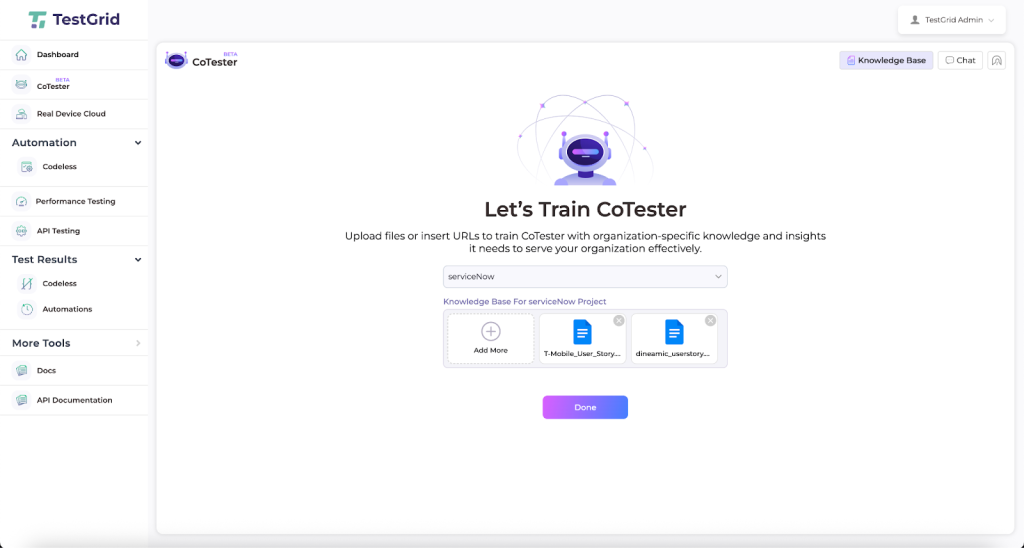
One of the platform’s most notable features is CoTester, an AI assistant purpose-built for software testing.
It combines QA fundamentals, SDLC best practices, and automation frameworks with advanced natural language understanding—so you can give it tasks conversationally, without rigid syntax or predefined commands.
Think of it as a specialized teammate for QA: always available, consistent, and adaptable to your workflow.
What CoTester Can Do
With CoTester, you get an agent that can:
- Converse naturally to start testing workflows with plain language prompts
- Train on your context by ingesting user stories (PDF, Word, CSV, PPT, etc.) or pasted URLs to instantly build high-quality test cases
- Manage your knowledge base by adding or removing files without overwriting prior data
- Generate sequential workflows that display each test step with clear editors and placeholders
- Support dynamic editing so you can refine test cases manually or via chat commands
- Keep your data secure since nothing leaves your organization’s instance; no cross-training, no leaks
Because it’s trained on testing-specific data and processes, CoTester can quickly onboard into your existing workflow without requiring major retraining or reconfiguration.
Why It Matters
For QA engineers, beginner automation testers, and agile teams, CoTester offers a faster, smarter, more secure way to test. It reduces the heavy lifting of test creation and execution, while still keeping you in control of refinements.
Whether you’re leading a QA team, mentoring automation testers, or building test infrastructure for a fast-moving product, it offers a practical example of what well-applied AI in software testing can look like today.
Book a demo to experience the benefits of TestGrid and CoTester yourself.
Frequently Asked Questions (FAQs)
1. How do I evaluate AI testing tools without getting distracted by the marketing language?
Focus on what the AI does, not what it claims. Ask: What decisions is the AI making? What signals is it learning from—code changes, user flows, test history? Can we trace or override those decisions? Avoid tools that can’t explain their behavior. If it feels like a black box, it probably is.
2. Is AI testing the same as automation with smart scripts or frameworks?
Not quite. Traditional automation runs what you write exactly as written. AI testing uses models that can adapt and make decisions, like generating new tests, prioritizing risk, or healing flaky tests. Think of automation as execution. AI adds evaluation and adjustment.
3. What skills will testers need to use AI tools going forward?
You don’t need ML expertise. But testers who understand things like model bias, data quality, or confidence thresholds will have an edge. The most valuable skills are curiosity, pattern recognition, and the judgment to challenge tool output when it doesn’t feel right.
4. Who’s accountable if the AI makes a wrong call in the test output?
Your team still owns the outcome. AI can assist or automate, but the testers and engineers are responsible for reviewing the results. That’s why explainability, visibility, and approval steps matter, especially in regulated or high-risk domains like banking and finance.
5. How do we know what AI testing is helping with?
Measure what matters: Is your team spending less time fixing broken tests? Are test cycles running faster without skipping critical checks? Are you catching more real issues and ignoring fewer false alarms? If the AI isn’t saving time, improving test accuracy, or making releases more predictable, it’s not doing its job.