CoTester 2.0 is LIVE! Your Always-Available AI Teammate for Testing.

- What Is Digital Assurance Testing?
- What Digital Assurance Testing Includes: Understand the Core Components
- How Is Digital Assurance Different from Traditional QA?
- A Guide to Plan Your Digital Assurance Testing Strategy
- Get Digital Assurance Testing Right with These Best Practices
- How CoTester Enables Digital Assurance Testing
- Frequently Asked Questions
Digital products like mobile apps, e-commerce platforms, project management tools, and cloud services are not monolithic anymore. They are built on distributed architectures. Plus, users today access these apps from multiple devices like smartphones, laptops, desktops, and tablets, and they even switch between the devices mid-journey.
These highly dynamic user paths that involve different services, networks, and device contexts can make testing a lot trickier.
That’s exactly why digital assurance testing is important. It helps you ensure that these interconnected experiences stay stable and consistent.
In this blog, we’ll learn about digital assurance testing, its components, process, metrics, and best practices.
Ship exceptional digital experiences with CoTester. Request a free trial.
What Is Digital Assurance Testing?
Digital assurance testing is a holistic quality testing method where you assess digital products like web, mobile, cloud, or IoT apps and validate their functionality as well as performance, usability, and data integrity.
This framework places the user at the center of the test strategy. You test how fast and seamless your app feels and ensure that users can navigate the product smoothly across every device, browser, page, network, and interaction point.
What Digital Assurance Testing Includes: Understand the Core Components
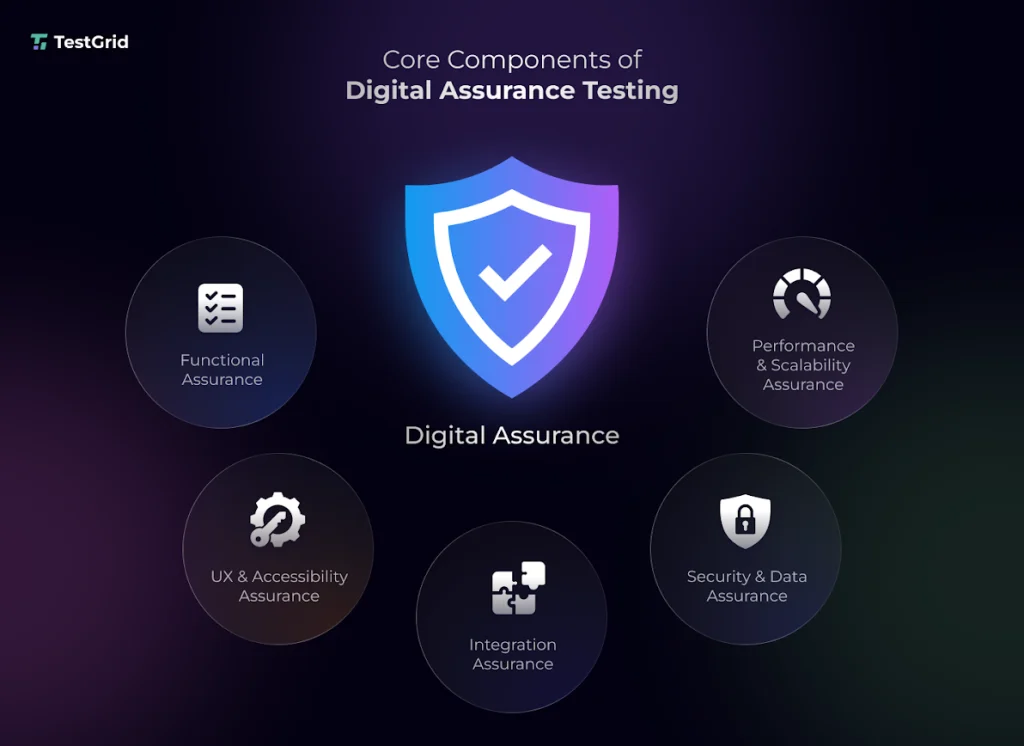
1. Functional assurance
This covers checking the critical user flows, features, functions, and system interactions and confirming they work as specified in your functional requirements. You assess the inputs, outputs, and data processing to ensure your apps or software systems produce the intended outcome without errors.
2. Performance and scalability assurance
Performance and scalability generally include examining how well your app holds up against stress or high traffic conditions. You see if the app can stay stable when users, data volume, or transaction frequency grow and ensure it doesn’t slow down, crash, or degrade when usage scales.
3. UX and accessibility assurance
Your app should function seamlessly, but it should also be intuitive and inclusive. For that, you have to evaluate the navigation, design clarity, user flows, and interface elements, check if interactions like tap, swipe, and scroll are effortless, and confirm features are accessible to people with disabilities.
In fact, a Clutch survey shows that nearly 94% of website users value easy navigation.
Also Read: 12 Best Accessibility Testing Tools in 2026 (WCAG, ADA & AI-Powered)
4. Security and data assurance
This prioritizes protecting your app and sensitive user information from security threats and data leaks. You find vulnerabilities like weak authentication, broken access controls, injection flaws, or insecure communication and verify that the data, both user and system, is encrypted, stored, and transmitted safely.
5. Integration assurance
This is another important component of digital assurance, which involves validating the data flow and dependencies between all the tools and systems your app integrates with, such as APIs, third-party services, databases, and microservices.
Learn More: Integration Testing: How to Do It Right in 2026
How Is Digital Assurance Different from Traditional QA?
Traditional and digital assurance testing both aim to ensure quality, but their process is quite different.
| Traditional QA | Digital assurance testing |
| You mainly test the features, find bugs, resolve them, and ensure the app is working as expected | This takes a much broader view of quality; this means you don’t just check functionality, you validate overall digital experience |
| Testing generally happens after development is complete or near the end of a sprint | Testing here usually starts early and happens continuously throughout the development lifecycle |
| Testing is done mostly in controlled or staging environments, which may not reflect real-world usage conditions | Testing scales across multiple devices, browsers, network configurations, and geographies, simulating real-world conditions |
| Ensuring your product is technically correct and meets the requirements is the top priority | Apart from technical correctness, you also see if the product meets business goals and creates flawless user experiences |
A Guide to Plan Your Digital Assurance Testing Strategy
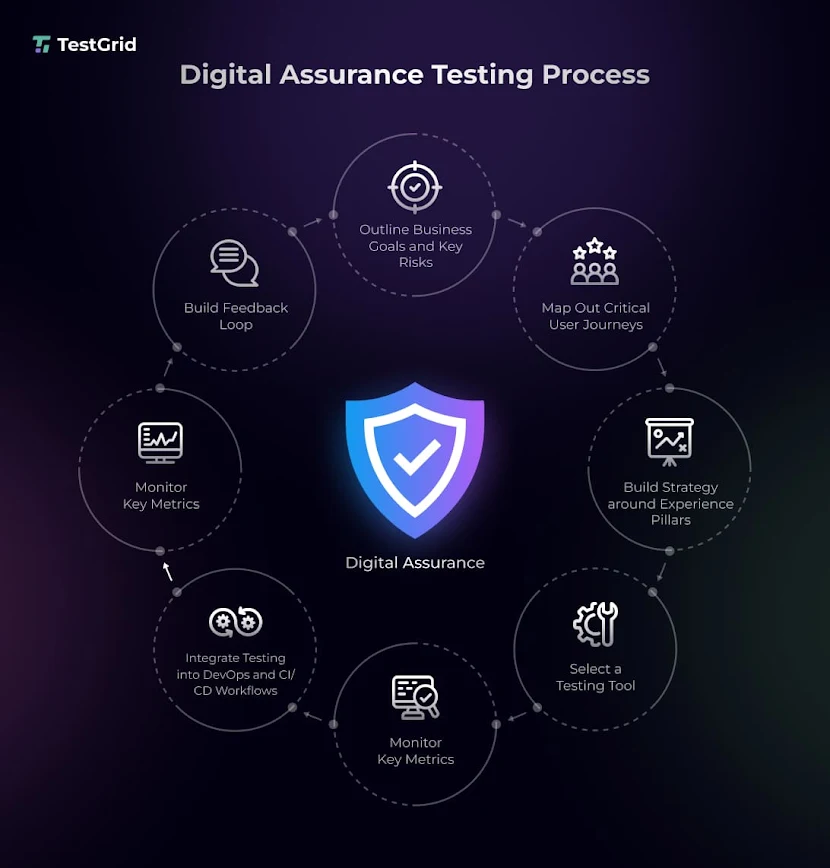
1. Outline your business goals and the key risk areas
Since the digital assurance testing process largely prioritizes business outcomes, you have to make sure your goals are precise and measurable. If you get this step wrong, your whole test execution will lose direction and deliver irrelevant insights.
Talk with the stakeholders like your product managers, business leaders, and marketing team, to understand what your app is trying to achieve, who your primary users are, and what success should ideally look like in terms of revenue, engagement, and retention.
Also, account for the risk areas, which will help you build more comprehensive tests that cover critical scenarios. This may include:
- Checkout or subscription flows that can affect revenue and conversions
- Features or functions that handle sensitive data like login or payment information
- APIs, third-party services, and dependencies that can potentially cause integration errors
- Authentication, authorization, and data handling layers, which are more vulnerable to security breaches or unauthorized access
- Data processing pipelines where incorrect data handling can lead to data loss or duplication
Learn More: How to Write Test Scenarios That Ensure App Success
2. Map out critical user journeys and digital touchpoints
The next step is to learn how your users actually move through the app. Chalk out the critical journeys like signing up to an account, making a purchase, or resetting the password, and identify all the touchpoints along the way, including landing pages, forms, search bars, browsers, and notifications.
This will help you picture the app from your user’s lens.
Also Read: User Stories in Testing: Convert Requirements to Test Cases
3. Build your strategy around ‘experience pillars’
Experience pillars are basically standards that your app must meet to satisfy a user. Your test strategy should revolve around pillars like performance, reliability, trust, and localization.
These pillars will work as guiding themes to help you ensure every aspect of the user experience is covered.
E.g., a checkout flow shouldn’t just be functional; it must also be fast and secure.
4. Pick out tools that fit your ecosystem
The tool you select for testing decides how effectively you’ll be able to test across systems, environments, and scenarios. But before you zero in on a tool, you have to check if it even fits your testing setup.
Ideally, a testing tool should:
- Integrate with the major CI/CD tools like Jenkins, Azure DevOps, and GitHub Actions
- Support API, UI, and end-to-end testing on devices and browsers
- Have built-in performance and load testing features so you can test scalability
- Easily connect with external tools, cloud platforms, and microservices
- Offer centralized reporting for faster debugging and data-driven release decisions
5. Plug testing into your DevOps and CI/CD pipelines
Integrating testing with your DevOps and CI/CD workflow will ensure that every code change is automatically tested for quality, performance, and security. This continuous testing approach helps you catch issues a lot faster, reduce manual effort, and match the speed of rapid deployments.
6. Track the right metrics
How would you know if your digital assurance testing is yielding accurate results if you don’t measure the outcomes? Metrics tell you what passed, what failed, and which areas need optimization.
These are some of the key metrics that you must monitor:
- Defect density to assess how many bugs exist relative to the size of your app
- Test coverage so you know how much of your code, features, and user journeys are tested
- Response times and latency for evaluating the app’s performance
- Error and failure rates to catch hidden defects and system instability
Also Read: Software Testing Metrics: How to Track the Right Data Without Losing Focus
7. Build a robust feedback loop
Lastly, establish a strong feedback loop that’ll help you get continuous insights from test execution, production monitoring, and real user behavior. This will allow your testers to refine test cases and adapt test data to changing user needs.
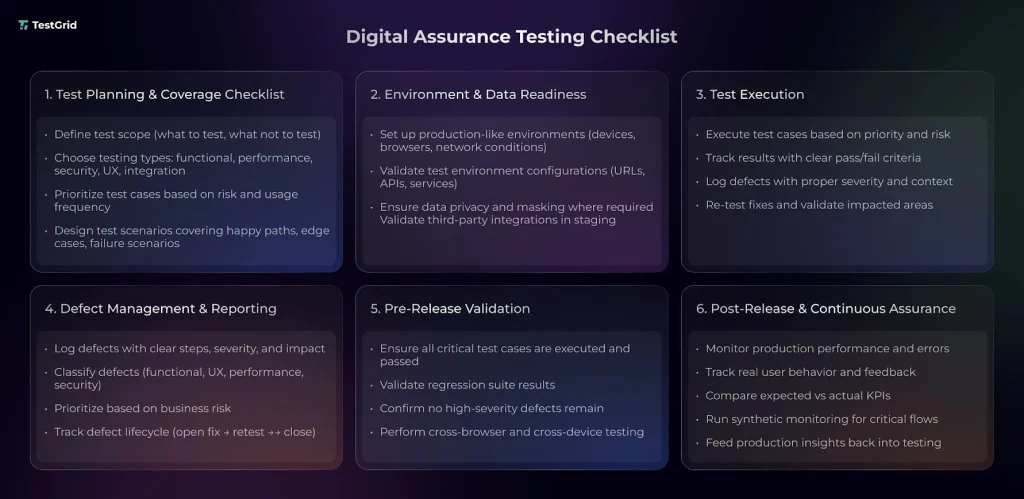
Digital assurance testing checklist
Get Digital Assurance Testing Right with These Best Practices
1. Start testing early so issues don’t get complex
Commence testing right from your design or requirement analysis phase. This moves your focus away from detecting bugs to preventing them. And as a result, you encounter fewer defects in the later stages of testing and avoid release delays.
| Pro tip You can integrate test cases like unit or API tests into your development workflow. This will ensure issues are caught as code is written and not after deployment. |
2. Combine automation with human judgment for better results
Leverage automation strategically. You can automate the repetitive and regression scenarios, but make sure that exploratory testing and UX validation are done by human testers because these areas demand real-world contextual understanding and intuition.
| Pro tip You can automate tests for the features that are most used and let your testers explore the complex and uncommon user journeys to assess usability. This way, you can maximize automation ROI as well as test coverage. |
3. Use data and analytics to guide testing
Let data and insights tell you where you need to focus testing. Follow insights from user behavior, production logs, defect history, and performance trends to identify the areas that are risky and involve critical user paths.
| Pro tip Review your analytics dashboards frequently and notice patterns like recurring failures, slow endpoints, and drop-offs, and create targeted test cases to address these issues. |
4. Prioritize testing the third-party dependencies
We often focus so much on testing the core functions of the app that we overlook how critical third-party dependencies are. Modern apps connect to authentication services, payment gateways, analytics tools, tracking systems, AI services and more. All these are interconnected, and hence testing them is important for consistent data exchange.
| Pro tip You can set up automated contract tests for these critical dependencies and include fallback or retry mechanisms to handle outages. |
These digital assurance testing best practices will help you plan what to test and how to test, and navigate easily through the complex, multi-layered digital systems.
How CoTester Enables Digital Assurance Testing
By now, you must have realized that successful digital assurance testing requires speed, intelligence, real-world testing environments, strong automation, continuous validation, robust infrastructure, and comprehensive reporting.
Cotester AI testing agent makes all these possible.
This enterprise-grade AI agent understands your product’s context, adapts to your testing workflows, and designs tests that closely align with your business goals. You can interact with CoTester in plain language and describe what you need to test using the chat interface.
Here’s a glimpse of how you can leverage CoTester to create, execute, and maintain tests.
- Share your user stories, requirement docs, or test plans in the form of Word, PDF, or CSV, and CoTester will create detailed test cases from the information
- Manually add or remove test steps as needed via the chat interface
- Execute the test cases on real Android or iOS devices, and browsers like Safari, Firefox, Edge, and Opera
- Find and log bugs automatically and get visibility into issues instantly
- Self-heal locators using AgentRx when your UI goes through changes; this helps you reduce false failures and continue testing with minimal interruptions
What makes CoTester ideal for digital assurance testing is its ability to adapt continuously. With every bit of feedback, the agent learns and reduces flakiness in your tests.
If you want to see how CoTester simplifies digital assurance testing, request a free trial today.
Frequently Asked Questions
1. How is digital assurance different from quality engineering?
Digital assurance testing is usually done to validate the business outcomes and user experience across the entire digital ecosystem, including the app, APIs, and integrations. Quality engineering is much broader and focuses on building quality practices like automation and CI/CD throughout your development lifecycle.
2. What kind of teams are involved in digital assurance testing?
Generally, in mature setups, cross-functional teams including QA engineers, developers, UX designers, product leads, security specialists, data analysts, and SREs participate in requirements planning, test design, execution, and result analysis.
3. How do you measure the success of digital assurance testing?
You can measure digital assurance testing success by tracking business and quality metrics like error rates, release stability, user satisfaction, and conversion rates, as well as performance benchmarks like defect leakage and latency.
4. What are the biggest challenges in implementing digital assurance testing?
Some major challenges you may encounter include testing multiple devices, platforms, and integrations, maintaining scalable automation, handling realistic and sensitive test data, collaborating across teams, and measuring quality across channels.
5. How to perform digital assurance testing for mobile apps?
First, identify the device combinations your target audience uses the most. This should include popular device models, battery states, screen sizes, resolutions, hardware dependencies, as well as network conditions. Then test performance on real devices and not just emulators. Lastly, monitor real user sessions after release to spot issues and improve experiences.