CoTester 2.0 is LIVE! Your Always-Available AI Teammate for Testing.
- What Is Test Data Generation?
- Why Is Test Data Generation Important?
- Types and Categories of Test Data
- How to Generate Test Data: Different Methods
- What Is AI Test Data Generation?
- How to Generate Test Data Using AI
- How to Generate Realistic and Safe Test Data
- Test Data Generation Tools
- Test Case Generation vs. Test Data Generation
- Test Data Generation Best Practices
- Final Thoughts
- Frequently Asked Questions
Capgemini’s World Quality Report shows that around 60% of organizations still encounter challenges in obtaining realistic test data that complies with privacy and security rules.
Even your well-designed test suite can give you a false sense of confidence if your test data isn’t relevant and doesn’t reflect real-world scenarios. You might feel like your app is working as expected, only to discover defects in production that your tests failed to catch.
That’s why systematic test data generation is important.
In this blog, we’ll walk you through the entire flow of creating good-quality test data, including data types, generation methods, and best practices.
Run data-driven tests across devices, browsers, and testing environments with TestGrid. Request a free trial.
TL;DR
- Test data generation is producing the inputs and records needed to execute test cases
- Different test data creation methods are manual generation, using no-code generators, programmatic generation via code, AI-powered generation, and constraint-based generation
- The types of test data include positive, negative, boundary, null, production, and large volume data
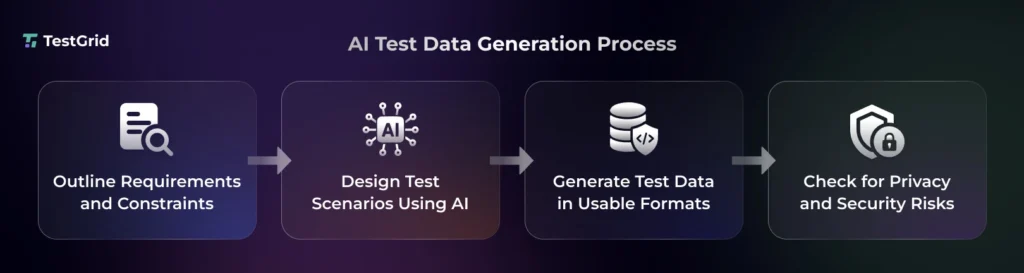
- To generate test data with AI, map out data structure, create test scenarios, generate data, and assess for security risks
- Some of the top tools for test data generation are Tonic.ai, Mockaroo, GenRocket, DATPROF, Datafaker, Faker, GoFakeIt, IBM Optim
What Is Test Data Generation?
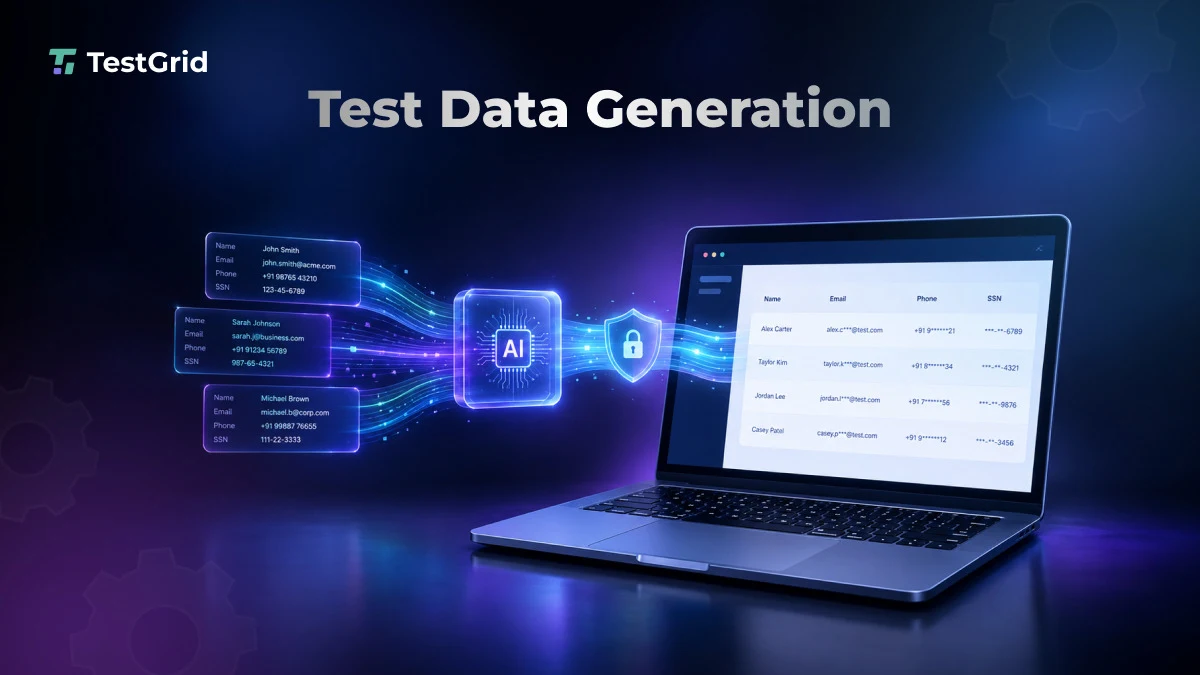
Test data generation is the process of creating or preparing data that tests need as inputs to evaluate application behavior. The practice can involve generating synthetic records, creating specific data states, or provisioning existing data to cover functional, negative, boundary, integration, and other test scenarios.
Your test data should ideally cover information like customer records, product details, transaction information, API payloads, and database records. This helps your QA team perform functional, performance, security, and reliability testing efficiently.
Why Is Test Data Generation Important?
Effective test data generation is critical because it lets your team replicate the exact conditions under which your apps are used. Accurate test data helps you uncover defects that appear only with specific combinations, data volumes, or real-world patterns.
It also allows you to run tests more consistently, investigate failures more accurately, and reduce delays caused by preparing data manually during the testing cycles.
Types and Categories of Test Data
Your test data can be categorized based on its purpose, characteristics, or source. Each of these categories helps you validate different aspects of your app, including expected behavior, edge cases, data handling, error management, and performance.
These are some of the main categories of test data:
- Valid or positive test data: Correct, well-formed inputs that satisfy the app’s business rules and constraints to verify expected functionality under normal conditions
- Invalid or negative test data: Incorrect, malformed, prohibited, or unexpected inputs to verify input validation, error handling, and the app’s ability to reject invalid requests
- Boundary values: Data at, just below, or just above the minimum and maximum values that are permitted by the app so you can uncover defects occurring at the edges of accepted ranges. Example: For a field accepting values from 1–100, test with 0, 1, 100, and 101
- Null and empty data: Missing values, null values, blank strings, empty fields, or missing records so you can check how the app handles absent information
- Synthetic data: Data which is artificially generated to reproduce the characteristics, patterns, relationships, or distributions of real-world data without risking actual customer records for testing. Example: fictional customer names, transaction records, insurance claims
- Production data: Real data you derive from your app’s production environment for assessing production-like distributions, relationships, and edge cases; this data is generally masked or anonymized to avoid security risks
- Large volume data: Massive datasets that have thousands, millions, or more records; it helps you check how the app performs when processing high data volumes and workloads
Also Read: What Is Test Data Management? A Complete Guide
How to Generate Test Data: Different Methods

1. Manual test data generation
Here, testers create and enter data themselves based on the test requirements, business rules, and test scenarios. This method gives you precise control over specific inputs and is practical for small, straightforward test cases. But it can also become time-consuming and susceptible to human errors when your data volume increases.
2. No-code online data generators
These are basically tools that help you create test data through a graphical interface without the need to write scripts. You can select fields, data types, formats, value ranges, and record counts, and then export the results as CSV or JSON. Data generators can be useful when you want to quickly generate repeatable datasets.
3. Programmatic generation via code
This technique involves using code or scripts to create datasets according to defined schemas, constraints, business rules, and value ranges. This method gives you more control and is more scalable than manual methods. It’s suitable for complex scenarios or large datasets.
For example, Python scripts can generate thousands of user records for automated tests.
4. AI-powered data generation
AI-powered test data generation tools apply machine learning and generative AI for designing test data. The tools analyze schemas, business rules, existing data patterns, or natural language requirements for generating varied and unexpected scenarios at scale.
Also Read: Generative AI in Software Testing
5. Production data masking
This is a test data provisioning method where you copy production data into a test environment and then replace sensitive values, such as names, emails, or payment details, with realistic but fictitious values. This enables you to protect confidential user information and also preserve the structure and characteristics of the original data for reliable testing.
6. Constraint-based data generation
This test data generation technique is about creating inputs that satisfy predefined conditions like data types, value ranges, relationships, and program conditions. Constraint solvers can identify values that satisfy these conditions and enable targeted generation for specific paths or test objectives, so you don’t have to rely on random inputs.
What Is AI Test Data Generation?
AI test data generation is the process of leveraging AI models to derive test inputs from requirements, schemas, existing datasets, app context, or other test artifacts. You can incorporate AI to:
- Interpret requirements to identify relevant data fields and scenarios
- Convert structured or unstructured source information into usable test inputs
- Create edge cases and negative scenarios that target boundary conditions, invalid inputs, and unexpected combinations
- Generate data variations at scale for different users, workflows, environments, and test scenarios
How it differs from traditional generation
Traditional test data generation methods are generally deterministic and explicitly defined. You specify the values, rules, constraints, or algorithms that determine what data to create.
AI-assisted testing methods, instead, interpret high-level inputs such as requirements to generate data and reduce manual effort.
The table below will help you better understand the difference between traditional and AI-based test data generation.
| Aspect | Traditional generation | AI-assisted generation |
|---|---|---|
| Input | Explicit rules, schemas, constraints, algorithms, or manually specified values | Natural-language requirements, schemas, examples, existing data patterns, or prompts |
| Data creation | Follows predefined and deterministic generation rules | Uses AI models to infer or generate values and scenarios |
| Flexibility to change | Changes generally require modifying rules or code | Can adapt test data based on changed prompts, requirements, or context |
| Coverage | Usually, testers define the scenarios and combinations to generate | Can suggest or generate additional variations and less obvious scenarios |
| Best suited for | Well-defined, repeatable datasets and strict business constraints | Accelerating data creation, exploring variations, and handling unstructured requirements |
How to Generate Test Data Using AI
1. Outline your data structure and constraints
For test data generation using AI, you first need to start by defining the data schema, including the fields, data types, required or optional values, formats, allowed ranges, uniqueness, and relationships between records. This will give your AI system a precise data generation contract.
2. Ask your AI system to build test scenarios
Then you have to design prompts asking the AI to identify scenarios that should be tested. This can cover normal flows, invalid inputs, missing data, and unusual combinations. When writing prompts, make sure to include the relevant requirements, acceptance criteria, schema, and business rules.
Learn More: Prompt Engineering for AI Testing
3. Generate the test data in a usable format
Ensure that the data you generate is in a format that’s compatible with your testing workflow, like JSON for API tests, CSV for bulk imports, or SQL for database seeding. When creating data, you need to be particularly specific about field names, data types, nesting, delimiters, and required values.
4. Review for privacy and security risks
It’s extremely critical to check if the data you created contains any real names, email addresses, phone numbers, authentication tokens, API keys, or passwords that could be linked back to real users.
At this point, you should also see how the AI system stores prompts and uploaded data, whether it uses the data for model training, and if it retains generated datasets. This will help you ensure that the tool aligns with your organization’s privacy, security, and data governance requirements.
How TestGrid Fits Into the AI Test Data Generation Process
While TestGrid isn’t a dedicated test data generation tool, it supports test data management as part of its broader testing platform and helps you use test data across automated testing workflows. TestGrid is an AI-native end-to-end software testing platform that allows you to:
- Use CoTester to generate test cases from user stories, acceptance criteria, application context, and testing requirements, including scenarios that cover different application behaviors.
- Leverage TestGrid’s test data management capabilities alongside your automated tests to manage the data required for different testing scenarios.
- Generate, execute, and maintain automated tests based on your requirements and application context with CoTester.
- Integrate TestGrid with CI/CD tools such as Jenkins, GitHub Actions, GitLab, and Azure DevOps to trigger automated test runs within your delivery workflows.
How to Generate Realistic and Safe Test Data
Test data should reflect the data distributions, field dependencies, referential relationships, and business rules that are relevant to your apps. Safe test data generation helps you minimize privacy risks. Therefore, to ensure your test data is both realistic as well as safe, here are some tips you can follow:
- Reproduce important patterns, like common transaction amounts or account types, rather than generating every value with equal probability
- Preserve the dependencies between fields, such as country and postal code formats or customer type and available account features
- In cases where synthetic data can’t resemble critical production characteristics, mask the production subsets
- Make sure to avoid datasets from being accidentally connected to production systems, services, accounts, or credentials
- When you need production-like statistical patterns, try using differentially private synthetic data
Also Read: Elevate DataOps Testing With Scalable Test Data Management
Test Data Generation Tools
We have listed the top test data generation tools available in 2026 along with their best use cases, output formats, compliance support, and pricing model. Have a look at the table to find the best option for your requirements.
| Tool | Best For | Tool Type | Output Formats | Compliance Safety | Pricing Model |
|---|---|---|---|---|---|
| Tonic.ai | Production-like synthetic data for testing complex schemas | Cloud-based web UI | CSV, JSON, JSONL, SQL, Parquet, XML, Avro, BSON, Iceberg | GDPR, HIPAA, CCPA, and PCI compliant | Paid; free tier available |
| Mockaroo | Quick, no-code generation of realistic test data | Web UI | CSV, JSON, SQL, Excel, XML, TXT/TSV | Synthetic data generation and masking | Paid; free tier available |
| GenRocket | Enterprise-scale synthetic test data | Enterprise platform | XML, JSON, CSV, SQL, Excel/XLS, Parquet, Avro, VSAM | GDPR, HIPAA, CCPA compliant | Paid |
| DATPROF | Secure synthetic and masked test data generation | Enterprise platform | CSV, JSON, XML, SQL, and custom file formats | Supports GDPR, PCI, and HIPAA compliance | Free |
| Datafaker | Java and Kotlin apps needing programmatic test data | Code library | CSV, JSON, SQL INSERT, YAML, XML, TOML, Java objects | Synthetic/fake data generation | Free (open-source) |
| GoFakeIt | Creating programmatic fake test data | Code library | JSON, CSV, XML | Synthetic data generation | Free (open-source) |
| Faker | Generating JavaScript/TypeScript test data | Code library | JSON, CSV, or SQL | Synthetic data generation | Free (open-source) |
| IBM Optim | Enterprise test data management and masking | Enterprise platform | CSV, XML, proprietary Optim extract/archive formats, and text output | Supports compliance policies including GDPR, HIPAA, SOX, and PCI-DSS | Paid |
Test Case Generation vs. Test Data Generation
Although test data and test cases serve different purposes, they’re complementary in software testing. In test case generation in software testing, you define what you want to test, how to test, and the expected results. Test data are the inputs that help you execute those tests.
The table below discusses the difference between test case and test data generation.
| Factor | Test case generation | Test data generation |
|---|---|---|
| Main difference | Defines test scenarios, steps, inputs, and expected results | Creates inputs, records, and states to execute tests |
| How they work | Helps validate whether the app behaves as expected by defining test scenarios and execution steps based on requirements and user stories | Acts as inputs and preconditions needed to run tests and validate expected results |
| Role of AI | AI can enable you to derive test cases from requirements, user stories, specifications, or code | AI can assist in realistic test data generation from requirements, schemas, specifications, constraints, or existing datasets |
| Example | Create a test case verifying that a user can successfully log into the account with valid credentials | Generate customer records with different account types and balances |
Learn More: AI Test Case Generation with CoTester
Test Data Generation Best Practices
1. Validate the data you generated
Check the test datasets for accuracy, consistency, completeness, duplicates, and suitability for the intended tests. If you are creating synthetic data, compare important distributions and relationships with a suitable reference dataset to ensure realistic data.
| Pro tip Set up automated checks for required fields, data types, allowed values, and key relationships, and make this validation a repeatable part of your data generation process so that new datasets are verified before your testers use them. |
2. Design for reproducibility
You need to generate test data in a way that lets you recreate the same dataset when a test fails. Record the seed, generator version, schema version, and data-generation configuration used to produce each dataset.
| Pro tip You can store the generation seed and configuration alongside the test results. This will help you rerun failed tests with the same data and make it easy for you to reproduce and diagnose failures. |
3. Keep the test data versioned with your app
Make sure you track modifications to fixtures, seed scripts, and generation definitions with code changes to keep your datasets aligned with schema and app updates. This will enable you to prevent data drift.
| Pro tip A good way to version test data is to tag it with the corresponding schema or app version, and then validate it against the current schema before using it for your automated tests. |
4. Remove obsolete test data
You must review your test datasets regularly and remove records and scenarios that don’t support active tests or your current app behavior. Outdated data can create confusion and increase unnecessary maintenance.
| Pro tip You can set an owner and a retention period for each dataset to automatically archive or delete the data that’s no longer needed for your tests, features, or app versions. |
Final Thoughts
Effective test data creation requires you to prepare the right data that helps you fulfil your test objectives and get the desired outcomes. But since most of the QA process is now automated, your team needs data that can be reused, refreshed, and aligned with the app’s complexity.
At the same time, you need to ensure your data generation practices comply with standards like GDPR, HIPAA, and PCI DSS to minimize privacy exposure.
Platforms like TestGrid help you bring test management and automated test execution together across devices, browsers, and enterprise testing environments.
TestGrid supports test data management, automated test execution, and integrations with your existing testing and CI/CD workflows. Request a free trial today to explore.
Frequently Asked Questions
How to leverage generative AI for test data generation?
You can apply generative AI to interpret functional and business requirements, schemas, and user scenarios and create structured test data based on that. Gen AI can also help you design realistic records, boundary values, and invalid inputs and assess the output for correctness, privacy, and coverage.
What is automated software test data generation?
Automated test data generation is the use of scripts, tools, algorithms, or AI to create and provision test inputs with minimal manual effort. Different techniques to automatically build test data can include random generation, symbolic execution, constraint solving, search-based methods, or program analysis.
How do you validate AI-generated test data?
You can verify AI-generated test data by validating it against data types, constraints, and relationships. You must also check if there are any duplicates, malformed values, privacy risks, and missing scenarios in the dataset.