 CoTester 2.0 is LIVE! Your Always-Available AI Teammate for Testing.
- Why Audio Testing for Chatbots Needs More Than Text-Based QA
- How Would You Identify the Chatbots That Need Audio Testing
- How QA Teams Can Map and Test the Chatbot Audio Pipeline
- 1. Trace your chatbot’s audio journey
- 2. Classify defects across the audio pipeline
- 3. Build a voice test data matrix
- 4. Test with real-world speech variations
- 5. Ensure spoken input triggers the correct chatbot intent
- 6. Examine multi-turn chatbot conversations
- 7. Test confidence thresholds before the chatbot proceeds
- How to Validate, Automate, and Scale Your Chatbot Audio Testing
- Test Chatbot Audio Where Users Actually Speak
- Frequently Asked Questions
Chatbot experiences have now changed from textual conversations to voice-driven interactions, and the reason is pretty obvious.
Voice-enabled chatbots help your users interact more naturally and hands-free, just like talking to a person, and get real-time assistance faster.
The global chatbot and voice market, valued at $10759.5 million in 2026, is expected to grow to $29046.99 million by 2035. AI chatbots are dominating here with nearly 60% of the market share.
Although voice-based chatbots are making it easy for customers to resolve queries, testing them poses a new set of hurdles for QA teams because of variables like speech patterns, accents, background noise, device behavior, and volatile network conditions.
In this blog, we’ll know how QA teams can approach end-to-end testing for voice-enabled chatbot experiences across devices and conversational workflows.

Analyze the audio quality of chatbots across user interactions with TestGrid. Request a free trial.
TL;DR
- Audio chatbot testing isn’t just about validating conversational flows; it requires QA teams to assess the complete voice interaction lifecycle
- Chatbots can fail even if their conversational logic works correctly because voice interactions depend heavily on devices, microphones, browsers, and network
- Different types of chatbots that need audio testing are web/mobile app chatbots, IVR-style chatbots, real-time voice agents, multimodal bots, and contact-center chatbots
- For effective testing, trace the chatbot’s audio journey, classify critical defects, build a voice test data matrix, test with realistic speech patterns, check multi-turn conversations, and test confidence thresholds
- To automate and scale chatbot audio testing, review voice outputs regularly, measure the latency, automate real-device testing, and enforce quality gates before release
Why Audio Testing for Chatbots Needs More Than Text-Based QA
1. Hardware and channel variability
Text input gives your chatbot a clean request. You type a sentence, the app receives it, and your tests check how the chatbot responds.
But with voice inputs, you have to check if the microphone activates, if the browser or app has permission to capture audio, and whether the audio signal is clear enough for speech recognition.
These factors can lead to clipped, muted, or delayed audio and cause chatbot failures.
Also Read: What Is Cross-Browser Compatibility?
2. Speech recognition may alter user intent
Voice-enabled chatbots primarily depend on the transcripts they receive to generate responses. So, if a speech-to-text converts your user’s words incorrectly, then the chatbot may end up processing a request that was not even made.
E.g., ‘block my card’ can become ‘unlock my card’. And ‘cancel my flight’ can become ‘change my flight ’.
Your QA team needs to assess transcript accuracy by first checking if the general sentence was captured correctly, and second, by thoroughly inspecting the critical items like names, dates, amounts, addresses, account numbers, OTPs, medicine names, airport codes, and booking IDs.
3. Unpredictable real-world speech conditions
Real users may interact with your chatbots from cars, homes, offices, hospitals, airports, call centers, shops, and public transport. They may speak quickly, repeat themselves, pause mid-sentence, or mix languages in the same query.
Now, these conditions (accents and pronunciation differences) can lead your chatbot to miss important information or respond to the wrong phrase. This is why your test data must reflect real scenarios like traffic noise, low volume, regional accents, and voice modulations.
4. Voice responses are harder to test than text
Since text responses are visible, your users can easily read them again, copy information, scan for details, and find mistakes. But with voice responses, factors like timing, pronunciation, pacing, and memory come into the picture.
Your testers have to verify if the chatbot can speak clearly, use the right pronunciation, keep the responses short so users can follow, and avoid cutting off important information.
You also have to check if the user can stop the chatbot and ask it to repeat information or switch to text if needed.
Read More: Accessibility Testing: A Complete Guide for Android & iOS
5. Voice errors in high-risk workflows
Voice errors, such as an incorrect transcript or low-confidence intent classification, can affect your payments, cancellations, account changes, appointments, claims, bookings, fraud reports, or identity verification.
Therefore, to avoid that, you need to assess how your chatbot behaves before it takes risky actions. You have to make sure it confirms critical details, asks for clarification when confidence is low, and routes your user to a safer path in case the request is unclear.
E.g., before cancelling a flight, your chatbot should repeat and confirm the passenger details, date, and destination.
Also Read: Audio Testing: How to Automate Functional Testing for Media Applications
How Would You Identify the Chatbots That Need Audio Testing
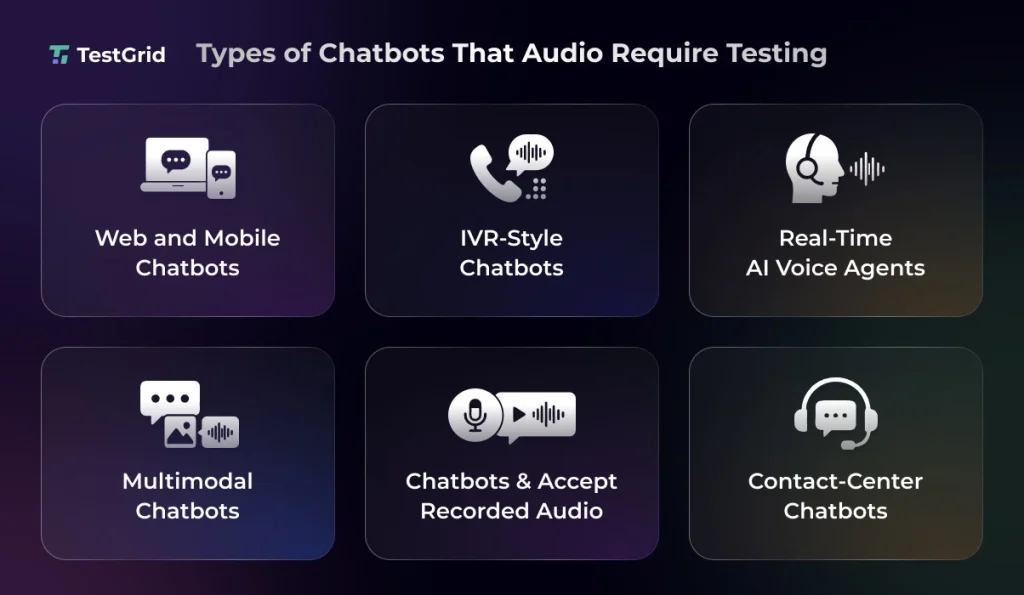
1. Voice-enabled chatbots for mobile and web apps
Chatbots in mobile and web apps need testing across the full user path (your user taps a microphone button, speaks a request, and receives a text or spoken response).
Since these chatbots depend on browser permissions, app permissions, device microphones, speech recognition, and intent detection, you need to check whether it can handle denied access properly, or if the mic prompt permission shows up at the right time.
Make sure you test the same voice request and verify transcription, intent, flow progression, and final response across browsers, device models, and operating systems.
2. IVR-style chatbots that handle customer calls
In IVR-style chatbots, the entire interaction with your user happens within a phone session, where the bot collects information, routes users, answers common questions, and transfers calls to human agents if needed.
Because phone audio may get compressed or noisy due to poor signal quality, you need to test audio capture, prompt timing, user silence, background noise, repeated inputs, and incorrect routing.
3. Real-time AI voice agents
AI voice agents have to work with open-ended speech, multi-turn context, spoken responses, and interruptions. So, your user might ask a question, correct a detail, change the task, give multiple requests in a single interaction, or barge in when the answer is too long.
Therefore, your tests need to verify that the chatbot is able to maintain conversational context and state across multiple turns.
Say, your user requests ‘book an appointment for Monday’ and then immediately adds ‘make it after 4’, your chatbot must connect the second input with the first one.
4. Multimodal chatbots
Multimodal chatbots usually combine voice, text, buttons, images, forms, docs, and visual prompts, which is why thoroughly testing them is very important.
If your user inputs a voice prompt to make a flight change and then taps on a date on screen, your chatbot must be able to correlate both inputs within the same booking flow.
Your tests for multimodal chatbots should ideally cover mode switching, state retention, partial inputs, and recovery from errors.
Also Read: Prompt Engineering for AI Testing
5. Chatbots that accept voice notes and recorded audio inputs
Some chatbots depend on recorded audio messages to generate a response rather than real-time speech. You’ll find them generally in messaging apps, support portals, healthcare intake flows, field service tools, and customer service channels.
Since audio here gets uploaded as a file which the chatbot processes, you have to test file uploads, format support, duration limits, compression effects, transcription accuracy, and retry actions.
You should ensure that the chatbot can function with short clips, long recordings, or noisy uploads, and still extract the correct information.
6. Contact-center chatbots
This category of chatbots mostly works in the background and supports human agents in solving customer queries.
They may assist via transcription, summarization, routing, suggested responses, compliance prompts, and after-call notes. So, errors here can affect both the customer and the human agent’s next steps.
Therefore, you should check speaker diarization, terminology, names, numbers, product references, complaint categories, and escalation signals to ensure that your chatbot accurately captures the call to help the agent solve customer queries efficiently.
Also Read: 11 Best AI Browsers in 2026 (Tested & Compared)
How QA Teams Can Map and Test the Chatbot Audio Pipeline
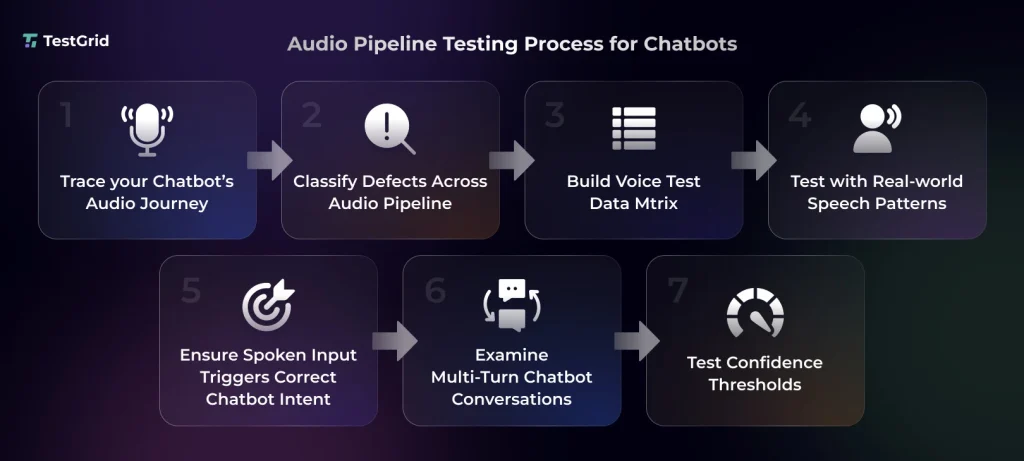
1. Trace your chatbot’s audio journey
The first thing you should do before you start writing test cases for the chatbot is to map the full path your user’s voice takes.
Usually, most user journeys in voice chatbots look something like:
- Your user activates their microphone
- The app or browser then requests permission, captures the audio, and sends the speech to the recognition layer
- The ASR service then converts the audio into a transcript
- Your chatbot uses this transcript to detect intent, call backend services, and generate a response
For each of these stages, your testers should define a testable expected outcome. Meaning, if the mic is blocked, then the chatbot should show an explicit recovery message. Or, if the transcript is incomplete, the chatbot must ask for clarification.
2. Classify defects across the audio pipeline
After you’ve mapped the audio journey, next, you need to classify the defects so you can triage faster. Broadly, there could be five classifications of defects:
- Capture defect – this happens when the chatbot couldn’t capture usable audio because of mic permission failure, clipped audio, or muted input
- Recognition defect – it occurs when the audio is captured but the transcript is wrong or incomplete
- Entity defect – here the transcript is mostly correct, but your chatbot collects wrong details (date, amount, account number, or airport code)
- Intent defect – this happens when your chatbot selects the wrong goal or cannot identify the intent
- Response defect – this defect occurs when the chatbot generates an incorrect response or omits required information
This classification helps you keep your QA, development, speech teams, and product owners aligned, and allows you to track recurring issues like device capture failures or entity extraction gaps.
3. Build a voice test data matrix
The next step is to design a voice test data matrix that will enable you to test chatbot audio scenarios against specific inputs and expected outputs.
For that, you will need to define the user utterance for each chatbot scenario. Then attach that to the audio source speaker profile, accent or language variant, acoustic environment, device, browser, and network profile. Here, you should also add expected responses and pass criteria.
4. Test with real-world speech variations
Challenge your chatbot with scenarios that resemble how your users actually speak rather than just depending on clean audio.
Include low volume, loud speech, fast speech, slow speech, distorted audio, silence, pauses, overlapping speech, and domain terms.
Also, apply conditions that match the chatbot’s industry. If you have a telecom support chatbot, you need to consider call-center noise and poor mobile signal conditions.
Your goal here is to find where exactly your chatbot’s behavior becomes unreliable and under what conditions.
5. Ensure spoken input triggers the correct chatbot intent
Confirm that your chatbot can map spoken phrases to the correct conversational action consistently.
Since your users don’t normally follow fixed sentence structures in voice interactions, you should test paraphrased commands (‘book a cab’ vs ‘get me a taxi’), filler words, and conversational speech patterns, and ensure that the chatbot can interpret the correct intent in all cases.
Also Read: AI Model Testing: How to Test AI Models
6. Examine multi-turn chatbot conversations
When users change topics, correct themselves, or ask follow-up questions in the middle of an interaction, the chatbot should maintain conversational continuity without losing context.
For multi-turn audio flows, fallback testing is important. Even if your chatbot cannot understand one turn, it should preserve relevant information that it collected earlier.
7. Test confidence thresholds before the chatbot proceeds
Set predefined ASR and intent-classification confidence thresholds and check how your chatbot behaves when the confidence is low.
You can test this by feeding ambiguous audio, partial commands, or code-switched language inputs and seeing if the chatbot proceeds or escalates the request to a human agent.
How to Validate, Automate, and Scale Your Chatbot Audio Testing
1. Review chatbot audio outputs and signal quality
For efficient audio output testing, you must include objective checks in addition to human listening.
Reference and recorded audio comparison can help you spot clipping, distortion, decoding errors, signal degradation, excessive noise, and audio artifacts.
This check can be particularly useful for chatbot voice prompts, spoken confirmations, alerts, disclaimers, and text-to-speech responses.
| Best practice You can maintain baseline reference audio files and assess your chatbot’s playback quality across multiple devices, formats, and network conditions to detect audio degradation promptly. |
2. Measure your chatbot’s voice latency
Measuring end-to-end latency in chatbots means checking how long the system usually takes to capture audio, convert speech to text, detect intent, call backend services, generate the answer, and play it back to the user.
Your users expect immediate responses. So, if there are long pauses, the user may have to repeat the request or assume that the chatbot failed.
| Best practice You should separate latency by stage. If your chatbot normally takes three seconds to respond, but it took six, you need to check if the delay happened because of speech recognition, the chatbot model, a backend API, text-to-speech generation, or playback. This way, you can diagnose and fix issues better. |
Also Read: Software Testing Metrics: How to Track the Right Data
3. Automate tests across real devices and usage conditions
Since audio chatbot behavior can change across device models, OS, browsers, and audio accessories, you must test on the same device and browser matrix that your users rely on.
Include the latest iOS and Android devices, recent OS versions, mobile browsers, desktop browsers, and audio devices like speakers and headphones.
| Best practice Build a regression test set with audio files for common intents, critical entities, accents, and high-risk workflows, and reuse that after changes to detect issues across different browsers and devices. |
4. Capture the right evidence for chatbot audio defects
For efficient defect resolution, you need to ensure that your testing system is capturing detailed evidence so your testers can identify what failed and where.
You should collect original audio files or input source, the transcript, confidence score, device, OS, or browser where the defect occurred, network profile, session recording, screenshot, and backend logs, where available.
| Best practice Try to standardize audio defect reporting with mandatory logs, transcripts, environment details, and session recordings. This will allow your team to reproduce issues consistently and convert confirmed defects into reusable regression test cases. |
5. Set up release gates for chatbot audio quality before production
Your audio chatbot has to meet quality gates before release. These gates should measure intent accuracy, task completion rate, fallback rate, correction rate, escalation rate, response latency, audio dropout rate, device coverage, and accessibility compliance.
| Best practice For high-risk workflows that affect money, identity, health, booking, or claims, use stricter thresholds. If you are testing audio chatbots in banking, payments, healthcare, or insurance domains, set lower acceptable latency limits, mandatory confirmation prompts, and reduced fallback tolerance. |
Test Chatbot Audio Where Users Actually Speak
Audio testing for chatbots has to cover the full voice journey: microphone access, speech recognition, Intent classification, response quality, latency, fallback handling, and release readiness.
A chatbot can pass in clean test conditions and still fail when users speak through low-quality mics, switch to Bluetooth, pause mid-sentence, or give critical commands in noisy environments.
TestGrid is an end-to-end testing platform that helps you validate those conditions directly on real iOS and Android devices.
You can stream microphone input into a device session to test interactive chatbot flows, or upload pre-recorded audio files to run repeatable regression tests with the same input across releases.
This helps your QA team check whether spoken commands are captured correctly, transcripts trigger the right chatbot intent, and voice responses behave as expected across device and OS combinations.
You can also use TestGrid Audio Testing to test chatbot audio across device models, OS versions, audio accessories, and network conditions, so your team can catch issues like muted input, delayed responses, routing failures, playback problems, and inconsistent behavior before users face them.
For QA teams building or validating voice-enabled chatbots, TestGrid gives you the real-device audio testing setup needed to test faster, reproduce defects better, and release chatbot experiences with higher confidence. Request a free trial with TestGrid today.
Frequently Asked Questions
What is audio testing for chatbots?
Audio testing for chatbots is the process of validating how a chatbot handles voice-based interactions. It covers microphone input, speech recognition, entity extraction, Intent classification, spoken responses, latency, noise handling, device behavior, and fallback paths.
Which types of chatbots need audio testing?
Any chatbot that accepts or produces audio needs audio testing. This can include voice-enabled mobile and web chatbots, IVR-style chatbots, AI voice agents, multimodal chatbots, chatbots that process voice notes, and contact-center chatbot workflows that use call audio.
How is audio chatbot testing different from regular chatbot testing?
Regular chatbot testing generally works with typed inputs, known messages, and visible text responses. Audio chatbot testing adds microphone behavior, browser permissions, automatic speech recognition (ASR) accuracy, entity capture from speech, spoken response quality, real-device behavior, and network-sensitive performance.
Can we automate chatbot audio testing?
Yes, you can automate chatbot audio testing with the help of reusable audio files, synthetic speech, expected transcript checks, entity validation, intent validation, chatbot response checks, audio quality and waveform comparison, and regression tests across devices and network profiles. However, manual testing can still be useful for checking pronunciation, pacing, barge-in behavior, and overall voice experience.
What metrics should QA teams track for chatbot audio testing?
You should track transcription accuracy, entity accuracy, intent accuracy, task completion rate, fallback rate, correction rate, escalation rate, average response latency, audio dropout rate, device coverage, network coverage, and accessibility compliance.


