 CoTester 2.0 is LIVE! Your Always-Available AI Teammate for Testing.
- What Is a Test Plan in Software Testing?
- Components of a Software Test Plan
- Types of Test Plans in Software Testing
- How to Create a Test Plan: Step-by-Step Process
- One Page Test Plan in Software Testing Planning
- Tools for Intelligent Test Planning with TestGrid
- Frequently Asked Questions (FAQs)
- What is test planning in software testing?
- What is the difference between a test plan and a test strategy?
- What are the key components of a test plan?
- Why is a test plan important in the SDLC?
- Who is responsible for creating a test plan in software testing?
- What types of testing should be included in a test plan?
- How do you write an effective test plan?
- What are common mistakes to avoid in test planning?
What if we say the quality of your product is determined even before testing begins?
How robust your software or app will be depends heavily on how well your test plan is created. If you rush the test planning stage, you risk overlooking critical scenarios, underestimating risks, and wasting resources on low-impact areas.
This can lead to incomplete test coverage and delayed releases. What you need, therefore, is a structured and methodical approach to creating a solid test plan. In fact, a study shows that more than 35% of organizations are already using AI tools for test planning.
In this blog, we’ll discuss all the important components of a software test plan, the process of creating one, and a practical example of a test plan template to get you started.
Simplify test planning and manage all your testing workflows in one place with TestGrid. Start your free trial.

TL;DR
- A software test plan is a formal document that outlines the strategy, objectives, resources, and schedule for testing a software product to ensure it meets its requirements
- A good test plan helps you ensure consistency, traceability, and efficiency
- The three different types of test plans are master, specific, and phase test plan
- The main components that your software test planning should include are your test objectives, testing methods, infrastructure, resources, risk mitigation strategies, defect management procedure, and entry and exit criteria
- For creating a robust test plan, start by evaluating the system or app you’ll test, determine what functions to test, identify assumptions and dependencies, design your test strategy, document the deliverables, and take approval
- AI-powered testing platforms enable you to leverage real-time insights to make your test plans data-driven and optimize test plan management
What Is a Test Plan in Software Testing?
A test plan in software testing is a document that outlines the scope, objectives, strategy, and resources required to test a software application effectively.
It helps connect your product and business goals with the testing process by defining structured test objectives, scenarios, coverage targets, and measurable success criteria.
A well-defined test plan allows teams to organize their efforts, allocate resources efficiently, and ensure complete test coverage. It also improves transparency across teams throughout the software lifecycle.
If a new team member joins or external stakeholders need to understand the QA process, clear documentation makes it easier to follow workflows, timelines, and expectations.
Components of a Software Test Plan
Now that you know what a test plan is in software testing, let’s look at its most critical components.
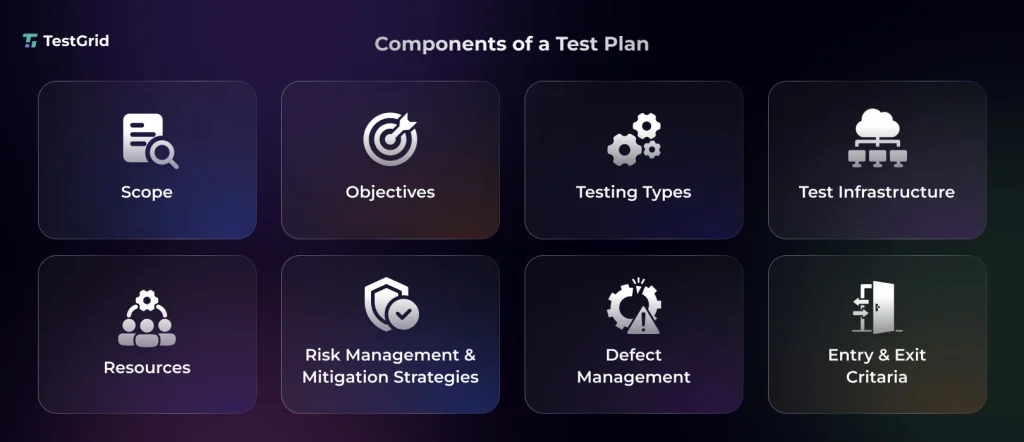
1. Test Scope and Objectives
Test scope is one of the primary elements of test planning in software testing, where you write down what modules, features, integrations, and environments you have to test.
And objectives define what you’re trying to achieve, like checking the critical functions for defects or ensuring your app’s performance meets the industry benchmarks.
You need to break these objectives down into testable parts and link them to your requirements. Also, add measurable criteria to your objectives, such as the defect rate, expected coverage percentage, or response time thresholds.
E.g., Say you have an e-commerce app. In the objectives, you would mention something like:
Ensure that a user can complete a purchase journey with accurate pricing, discounts, and order confirmation, with zero critical defects and a minimum 95% test pass rate.
Also Read: E-Commerce Testing: Ensuring Seamless Online Shopping Experiences
2. Testing Methods
Here, you basically jot down the different functional and non-functional tests you’ll be conducting to comprehensively analyze your app, including all the features, user workflows, and performance.
These are some of the critical tests you should include for your test planning in software testing:
| Test Types | Description |
|---|---|
| Functional testing | This helps you assess if your app is functioning according to the technical and business requirements |
| Regression testing | Here, you check whether the new code changes affected any existing functions or created new defects |
| Performance testing | This allows you to evaluate your app’s performance under load, stress, and changing user behavior |
| Exploratory testing | This is unscripted and involves examining the app to find unexpected issues or edge cases |
| System testing | You test the complete, integrated system to ensure that all components are working together seamlessly |
| User acceptance testing (UAT) | UAT is usually the final validation phase, where business users verify if the app is ready for production use |
Also Read: 30+ Key Software Testing Types Every QA Needs to Know
3. Test Infrastructure
Test Environment: Your test environment is fully set up where your testing happens. This can include the different hardware, software, integrations, and network configurations.
You cover the operating systems like Windows, Linux, macOS, browser combinations (Chrome, Firefox, Safari), device types (Android and iOS), as well as the backend dependencies like your databases and APIs.
Your goal here is to replicate the test environment as closely to the production conditions as possible.
Test data: Test data is actually the information about the user profiles, transactions, product catalogs, and edge-case inputs (e.g., invalid formats, large volumes, boundary values) you need for realistic testing.
In the test plan document, you mention the approaches and the test data management tools your team will use to create, manage, mask, anonymize, and refresh test data.
Testing tools: Next, in the software test plan, you clearly state the different automated tools you’ll need for testing and throughout the product development process. Some of the important tools most modern QA teams leverage are:
- CI/CD tools – these tools help you automate the process of building, testing, and deploying the code, and enable continuous testing
- Automation tools – this can include version control, test data management, defect tracking, and monitoring tools, which allow you to scale execution, manage test artifacts, and get real-time test insights
- Test management tools – these tools help you centralize test planning by maintaining test case repositories, monitoring test progress, and improving cross-functional collaboration
4. Resource Allocation
This is a very important part of your testing plan where you determine exactly what resources and how much you need for testing. Resources basically include the roles, infrastructure, datasets, time, and budget you require to design, execute, and monitor test activities across the development cycle.
Here’s how you usually define roles in a test plan:
- QA team/test engineers – responsible for test case planning, design, execution, and defect reporting
- Test managers – define the overall testing strategy, allocate resources across phases, and monitor risks, timelines, and quality metrics throughout the project
- Test leads– manage day-to-day testing activities, assign tasks to the QA team, and ensure execution stays aligned with the test schedule
- DevOps – state environment requirements and set up CI/CD integration for testing
- Business analysts – they support requirement validation and assist during UAT to ensure test coverage matches business expectations
- Project managers – oversee timelines, manage cross-team dependencies, and make sure the team successfully reaches project milestones
- Customers/end users – participate during user acceptance testing to check the real-world usability of the app
When creating the software testing test plan, make sure resource optimization is your priority. Meaning, always focus on the high-risk areas first, automate the repetitive tasks (e.g, regression tests), and run tests in parallel to save resources.
Also Read: Essential Non-Technical and Technical Skills Required for Software Testers
5. Risk Management and Mitigation
During test planning in software testing, you need to account for the things that can go wrong. For instance, a code change just before the release can lead to a high number of regressions or corrupted test data may create false positives in test results.
Your team needs to always be prepared with risk mitigation strategies and contingency plans. For that, understand the potential risks that can affect your release timelines and app quality, and then specify predefined fallback actions like switching environments, rolling back builds, or using alternate data sources in case the risk materializes.
Also, make sure to add the suspension criteria, i.e., conditions under which your team should pause testing to stop wasting resources on invalid tests. This can be an environment failure or a critical defect blocking execution.
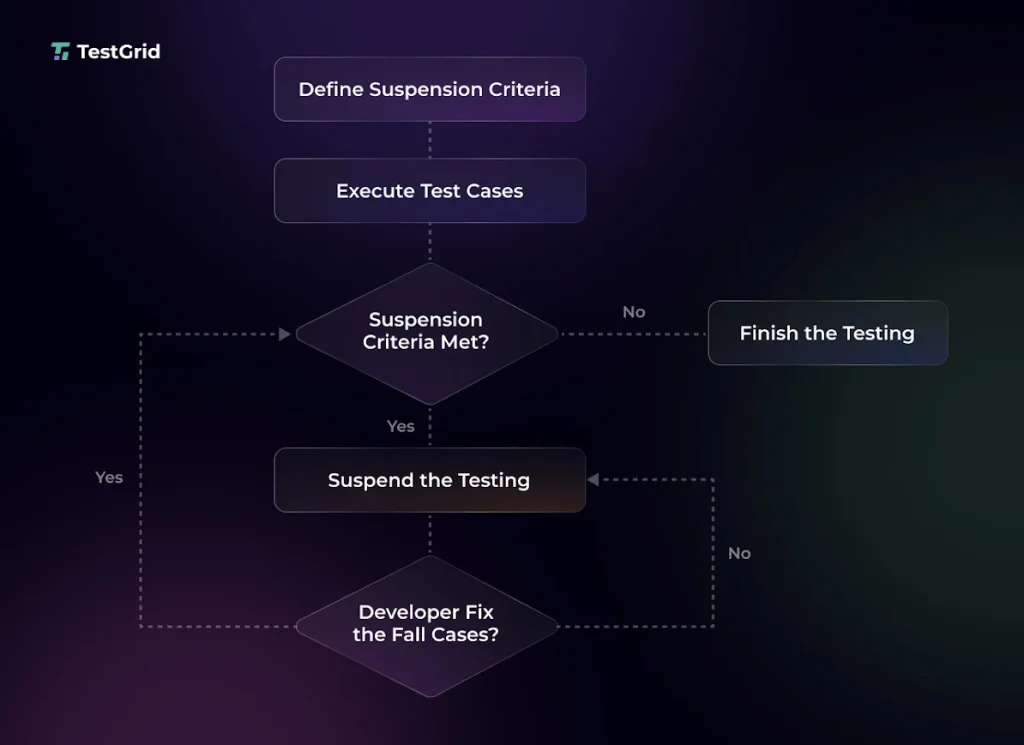
Source: testmuai
6. Defect Management
Defect management is about how you identify, track, and resolve bugs. Most software test plans outline a repeatable workflow for the discovery and closure of defects, so you can monitor issues consistently.
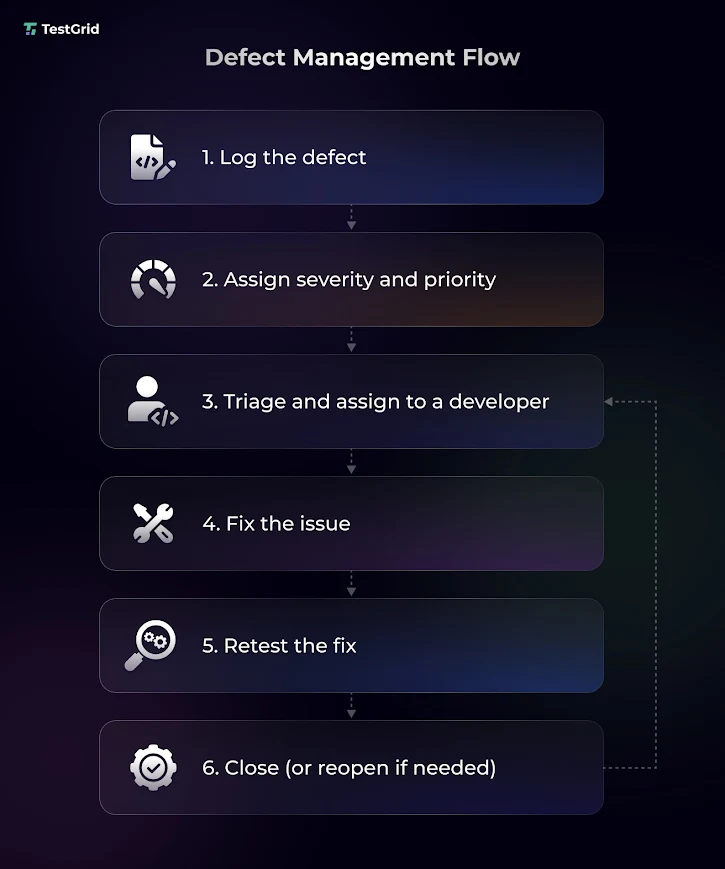
Testing teams normally use tools like JIRA, Bugzilla, or Mantis to log defects along with the environment where the defect was found, screenshots, and steps to reproduce.
Learn More: Defect Report in Software Testing: A Guide for Developers and QA
7. Entry and Exit Criteria
Entry criteria are the preconditions you should meet before you start testing, and exit criteria are the conditions that must be fulfilled to end your testing cycle.
These criteria actually are guardrails to ensure that you don’t begin the testing procedures too early (say, before the environment is stable) and finish it too soon (with unresolved defects).
In the entry criteria, list checks like:
- All the functional and non-functional requirements are reviewed, approved, and testable
- Test cases have been created
- Test infrastructure, configurations, and integrations are set up and ready for testing
- Test data is accessible
- Build is deployed and passes basic smoke checks
- Testing tools, repositories, and permissions are available
Exit criteria include completing all the test executions, meeting the target pass rate, and ensuring no critical defects or bugs are open or unresolved. This helps you confirm that the necessary conditions are fulfilled and that your app can now be released.
Also Read: Test Strategy vs Test Plan: Differences and Importance
Types of Test Plans in Software Testing

Master test plan: A master test plan gives you a comprehensive overview of the testing strategy, schedules, and quality goals across test levels. This doesn’t go into the details at the execution level. Rather, it includes multiple test plans and helps you coordinate activities like unit, integration, acceptance, and system testing.
Phase test plan: This focuses on a specific stage of your testing process, and consists of information such as testing schedules, benchmarks, specific activities, templates, and execution and management of tests for that particular stage.
Specific test plan: You design a specific test plan for a distinct type of testing (performance testing), feature (login), or component (payment module). You jot down the exact scenarios, tools, data, and configurations required for that focused area.
How to Create a Test Plan: Step-by-Step Process
1. Analyze the System Under Test
You have to thoroughly assess the system under test (SUT) or your app before you start the software test planning. This means you should evaluate the functional aspects, technical specs, and the architecture to get an idea of how different modules communicate.
At this point, also lay out the inputs (e.g., user actions, API requests, file uploads), outputs (including UI responses, database updates), user flows, and external integrations so you know exactly how your app behaves.
Other than this, evaluate what the app or software is built with.
- JavaScript-heavy web apps might need strong browser and device testing
- Java backends and Python apps typically involve API and integration testing
- C/C++ systems frequently require system-level and performance testing
2. Define Test Scope and Approach
Next, you need to decide which critical areas to cover when testing. Generally, you should include your app’s core features, user journeys, performance, third-party service integrations, and security.
Apply analytical test strategies to emphasize testing based on system behavior and user analytics. Make sure you prioritize risks based on business impact, check the workflows where usage frequency is high, and ensure your testing strategies align with user requirements.
After that, assess which testing techniques you’ll use. Like, for exploratory testing and UX validation, you should consider manual testing, and automated testing can be applied for verifying the functional areas.
Leveraging techniques like boundary value analysis or equivalence partitioning will help you focus on the edge cases and minimize redundant testing.
3. Identify Dependencies and Assumptions
Your software test planning should explicitly mention all the dependencies that your app relies on. These can be the external services, APIs, upstream or downstream systems, and shared environments. Some examples of these are authentication services, payment gateways, and data pipelines.
Moreover, do remember to document the important assumptions you make during your testing process, such as stable environments, available test data, or timely build delivery.
This step allows you to plan for the constraints or conditions that may affect your test execution.
4. Design the Test Strategy
The test design approach is how you convert your requirements into test scenarios and test cases. You determine steps to create the tests, which modules you should focus on, and how you’ll ensure maximum coverage.
You can perform domain-based testing here to divide input data into meaningful groups like valid, invalid, and boundary ranges. This will help you design fewer tests and still enhance coverage.
In this stage, you also frame the full process, including test data setup, execution cycles, defect logging, retesting, and reporting.
Learn More: How to Write Effective Test Cases
5. Plan Test Deliverables and Schedule
Now, after you’ve specified the testing process, write all the deliverables and map each to particular timelines, sprints, or release cycles.
These are some of the deliverables your software testing plans must have:
- Test artifacts like test cases, test scenarios, and test scripts
- Traceability matrices that link each test case to a requirement or user story
- Test data sets and data preparation reports
- Test execution reports (daily, weekly, monthly status)
- Defect logs and defect summary reports
- Sign-off or test closure report
- Audit or compliance documentation, if it’s applicable
Learn More: How to Ensure Trust in AI Testing: Transparency, Accuracy, and Auditability for Regulated Industries
6. Conduct Reviews and Finalize
The final step of how to write a test plan is to assess if your test plan is accurate and complete. For that, QA leads, developers, and product managers may check requirement coverage, clarity of test cases, feasibility of the approach, and risk alignment.
Peer reviews, formal inspections, and feedback help you catch gaps in your test plan before execution starts and reduce rework.
One Page Test Plan in Software Testing Planning
This sample test plan example is a condensed version of your traditional testing plan. Here we have captured all the critical details in a format that’s easy for you to scan and make informed testing decisions faster.
| Section | Details |
|---|---|
| Test plan title | E-commerce web app checkout and order management (mention platform or version) |
| Prepared by | Name of the person creating the test plan |
| Introduction | This test plan validates the end-to-end purchase flow, ensuring users can browse products, add items to the cart, complete checkout, and receive order confirmation with accurate pricing and discounts |
| Test scope | Product search, product detail page, cart management, checkout flow, payment gateway integration, order confirmation |
| Test items | UI flows – search, product page, cart, checkout APIs – product catalog API, payment API, order creation API |
| Test approach | Method – hybrid (manual and automation), Testing types – functional, regression, performance (checkout load), exploratory |
| Test environment | Browsers – Chrome, Firefox, Safari Devices – Desktop, iPhone 13, Samsung Galaxy S21 OS – Windows 11, macOS Ventura, Android 13, iOS 16 |
| Test data | User accounts (new user, returning user), Product catalog with varied pricing and discounts, Payment data (test cards), Edge cases (invalid coupons, out-of-stock items) |
| Entry and exit criteria | Entry – Stable staging build deployed, APIs functional, test data available. Exit – 100% critical test cases passed, no open high-severity defects, successful checkout validation across all target devices |
| Test schedule | Test design: 2 days Test execution: 5 days Regression cycle: 2 days Defect fix and retest: Ongoing during execution |
| Resources | 2 QA engineers (manual testing), 1 automation engineer (regression suite). Tools – Selenium, Postman, TestRail, CI pipeline (GitHub Actions) |
| Risk and mitigation | Risk – payment gateway downtime. Mitigation – use sandbox and mock APIs for fallback testing |
| Deliverables | Test cases and scenarios, Test execution reports (daily), Defect logs and summaries, Final test summary and sign-off report |
| Approvals | QA lead, product manager, engineering manager |
Tools for Intelligent Test Planning with TestGrid
Test planning used to be a manual process even a few years back. But now, with the help of AI, you can change that.
Modern testing tools are leveraging AI engines, machine learning, and data science to study historical datasets, defect patterns, and user behavior, and recommend to you the critical areas in your app that you should test first.
This means you don’t have to depend on assumptions anymore when you’re creating a software test plan. You can make data-backed planning decisions.
TestGrid is an AI-powered software testing platform with which you can bring intelligence into your test planning process.
- Minimize the time you spend on extensive spreadsheets and scattered documents; centralize and manage your test cases at scale with TestGrid
- Create complex test cases in minutes with codeless test authoring
- Leverage past data from parallel executions, defects, and execution trends to plan future tests better
- Track, report, and resolve issues within integrated workflows
- Monitor progress, coverage, and outcomes in real time via rich visual dashboards
Build focused and reliable test plans using TestGrid. Request a free trial today.
Frequently Asked Questions (FAQs)
What is test planning in software testing?
A test plan in software testing is a structured document where you define the scope, objectives, approach, resources, timelines, and schedule for testing your software app. This document functions like a roadmap, which helps your team understand what to test, which testing methods to apply, and who is responsible for conducting the tests.
What is the difference between a test plan and a test strategy?
A test strategy is a high-level testing blueprint that details the general approach, methodologies, direction, framework, and long-term guidelines used across projects. A test plan is specific to a particular project and includes test cases, test design approach, test data, execution steps, day-to-day tasks, and milestones.
What are the key components of a test plan?
The most important components of a test plan are the objectives and scope of testing, test environment details, resource allocation, testing tools, risk management, defect management, entry/exit criteria, and deliverables.
Why is a test plan important in the SDLC?
A test plan is critical in your software development life cycle because it gives a structure and direction to your testing process. When you share the test plan across your DevOps, QA, and business teams, everyone works with the same testing expectation and timeline. This helps you correctly estimate the hours and resources needed for testing, track progress, anticipate risk, and release without delays.
Who is responsible for creating a test plan in software testing?
Designing test plan contents is a collaborative effort. Normally, the test manager or test lead decides your overall testing approach, including the different test types, methods (automation or manual), and environment setup. And developers, business analysts, and project managers ensure that the test plan in software testing aligns with technical specifications and business goals.
What types of testing should be included in a test plan?
The types of testing your test plan software should include depend on your project needs. But some of the most critical ones for any software or app are unit, integration, regression, performance, UAT, and security testing.
How do you write an effective test plan?
For writing a comprehensive and effective test plan in software testing, first you need to understand the app you’re testing. Next, design your test strategy, including the data, environment, and tools you’ll require. Define your acceptance criteria. Add defect management strategies. Lastly, seek approval from your project or test managers and business leaders.
What are common mistakes to avoid in test planning?
Some mistakes QA teams might make while planning tests are setting unrealistic timelines, poorly allocating resources, overlooking proper risk analysis, ignoring stakeholder alignment, and not updating test plans when user behavior and test requirements change.


