CoTester 2.0 is LIVE! Your Always-Available AI Teammate for Testing.
- What is Software Testing?
- Where Software Testing Fits in the Software Development Lifecycle
- Critical Software Testing Basics Concepts Every Beginner Should Know
- Types of Software Testing Explained
- How Modern Software Testing Has Evolved
- The Software Testing Workflow from Requirements to Release
- Software Testing Best Practices for Beginners
- Common Software Testing Challenges and How to Overcome Them
- Where Software Testing Is Headed Next
- Frequently Asked Questions
- What is the difference between software testing, QA, and QC?
- How does software testing fit into the software development lifecycle?
- What is the difference between manual testing and automated testing?
- What is shift-left testing, and why is it important in Agile and DevOps?
- How is artificial intelligence transforming modern software testing?
- How do AI-powered software testing platforms improve testing efficiency?
- What skills should beginners learn to start a career in software testing?
Software failures happen when defects, performance issues, or unexpected behaviors go unnoticed before a release. And in many cases, the reason for this is poor testing practices.
Around 42% of global organizations report that poor software quality costs them $1 million or more annually.
It’s evident from the figure that testing is absolutely a non-negotiable part of delivering reliable, production-ready software. But for efficient testing, you have to understand the fundamental concepts and processes that underpin modern quality engineering.
In this blog, we’ll cover the software testing basics, including the key methodologies, best practices, and emerging trends.
Simplify end-to-end software testing with TestGrid. Request a free trial.

TL;DR
- Software testing basics encompass the core principles, testing types, techniques, test workflow, and best practices to verify software quality
- Some of the critical concepts of software testing basics include test strategy, test plan, test scenario, test case, test data, test environment, test execution, and defect reporting
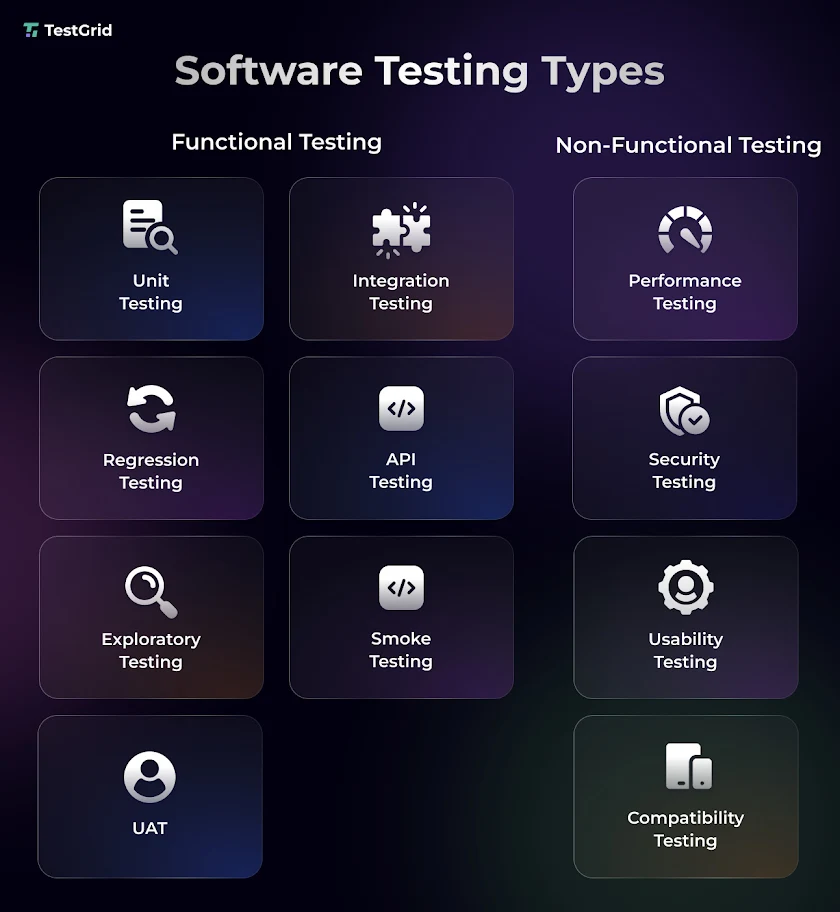
- The types of tests in software testing basics are typically bifurcated into functional and non-functional tests
- Unit, integration, regression, API, exploratory, smoke, and user acceptance testing are some of the functional testing types
- Non-functional testing includes performance, security, compatibility, and usability testing
- The software testing follows a structured workflow with stages like requirements analysis, test planning, test design, execution, defect analysis, and test closure
What is Software Testing?
Software testing is the process of evaluating a software application to verify if it meets specified functional and non-functional requirements and identifying defects that could affect its quality. It enables you to ensure the app’s functionality, reliability, performance, and security before deployment.
Also Read: Guide to Software Test Automation
Why Software Testing is Important
Software testing is critical because it helps you:
- Prevent costly production failures by resolving issues before release
- Confirm that new features align with business and user expectations
- Support compliance with industry, regulatory, and contractual requirements
- Minimize the downtime and operational disruptions after deployment
- Achieve customer trust by delivering a dependable product
Software testing vs Quality Assurance vs Quality Control
The terms software testing, quality assurance, and quality control may sound similar; however, these concepts of software testing basics have very distinct purposes and operations.
| Aspect | Software Testing | Quality Assurance | Quality Control |
|---|---|---|---|
| Main focus | Verify that the software app functions correctly | Prevent defects by improving development processes | Detect defects in the software app |
| Objective | Validate that the app meets specified requirements | Ensure quality is built into the development lifecycle | Confirm that the finished product meets quality standards |
| When it’s performed | Throughout development and before release | Throughout the entire SDLC | After development activities create a testable product |
| Core activities | Executing test cases, assessing features, identifying defects | Defining quality processes, standards, reviews, and process improvements | Testing, inspections, reviews, and defect verification |
| Responsibility | QA engineers, software testers, SDETs | QA managers, quality engineers, development and QA teams | Testers, QA engineers, and inspection teams |
Where Software Testing Fits in the Software Development Lifecycle
Another essential concept in software testing for beginners is understanding how testing integrates with the software development and testing lifecycle.
Software Development Lifecycle (SDLC)
SDLC is the end-to-end process of building and maintaining a software app, from requirements gathering to maintenance.
Software testing is integrated into this process so QA and development teams can verify that each development phase of the app meets technical, functional, and business expectations before moving to the next stage.
Software Testing Lifecycle (STLC)
STLC is the testing workflow that supports SDLC. It includes tasks like requirement analysis, test design, execution, defect management, and test closure for evaluating the developed app before releasing it to the users.
Critical Software Testing Basics Concepts Every Beginner Should Know
This introduction to software testing covers the essential concepts you’ll need before exploring testing types, workflows, and best practices.
1. Test Strategy, Test Plan, Test Scenario, and Test Case
These are the four main areas that provide you with a roadmap and the exact steps to test your app.
- A test strategy is a comprehensive document that outlines the development methodologies (test-driven development or behavior-driven development), test objectives, test types, quality standards, tools, environments, risk management, and your team’s responsibilities.
- A test plan is more project-specific and helps you decide how to execute tests for a particular release or app. Here, you include the test scope, schedule, resources, deliverables, testing environments, entry and exit criteria, and release timelines.
- Test scenarios are basically the description of a feature, workflow, or business process that you need to test.
- A test case is designed based on a test scenario and is a detailed set of instructions you use to verify whether a specific functionality works as expected. It includes prerequisites, test steps, input data, expected results, and pass/fail criteria.
2. Test Data and Test Environment
Another vital area of software testing basics is the test data. It consists of the input values (valid, invalid, boundary, missing, duplicate, or unexpected values) that help you create tests and assess if your app behaves as specified in the software testing requirements.
The test environment is the hardware, software, network, databases, configurations, and testing tools, and supporting components (operating systems, browsers, servers, APIs, databases, and third-party integrations) your team needs to run the tests.
Also Read: What Is Test Data Management? A Complete Guide
3. Test Execution, Defect Reporting, and Defect Lifecycle
Test execution in software testing basics is the process of running the manual and automated test cases and evaluating if the app or software works as intended. Testers here record the outcome of each test, compare actual results with expected results, and identify any deviations or unexpected behavior.
Defect reporting starts when you find a defect during test execution. In the report, you mention details such as the defect description, steps to reproduce, severity, priority, screenshots, logs, and the affected environment.
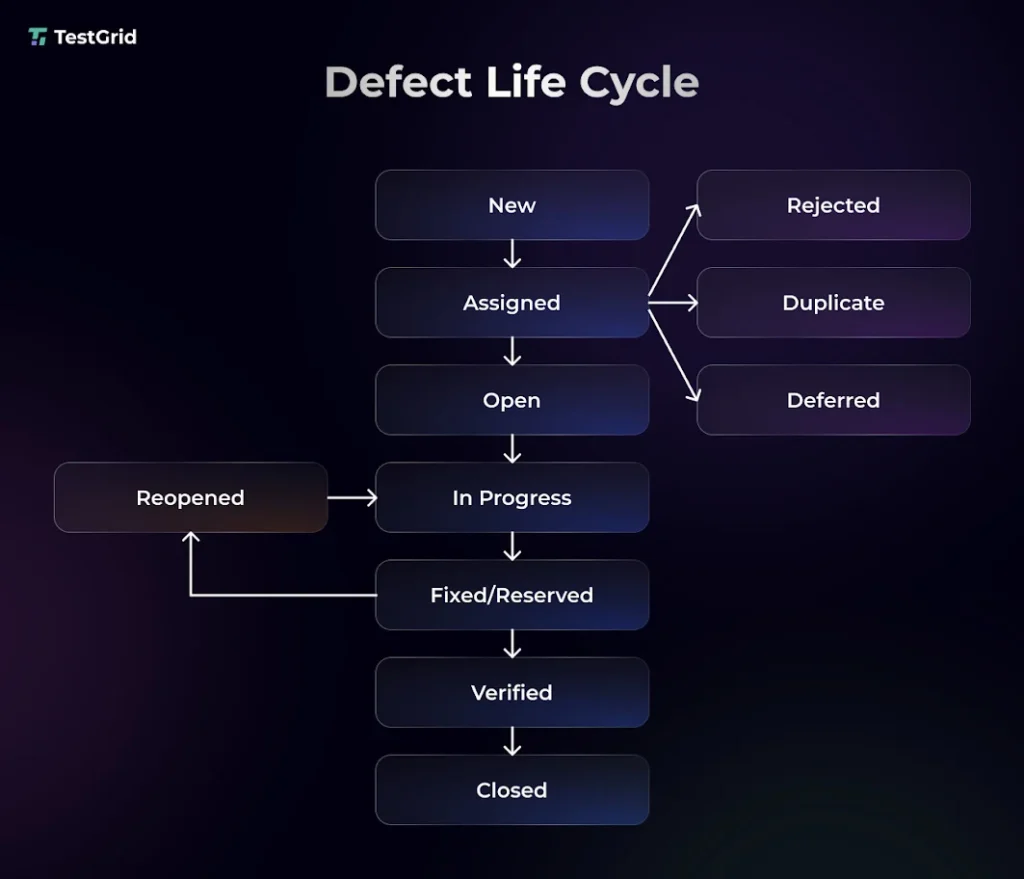
A defect generally moves through a defect lifecycle and moves through stages like new, assigned, in progress, fixed, retest, and closed.
Types of Software Testing Explained
Although there are many different types of tests you can perform, there are some of the most important ones you have to know in software testing basics.
Functional Testing
Functional testing, a core part of the basics of software testing, helps you verify if a software app, including its features, workflows, inputs, outputs, and business rules, works as per its specified functional requirements. The important types of functional testing are:
a. Unit testing: Unit testing verifies individual units of your app, such as functions, methods, or classes, in isolation to confirm that each component behaves as expected before integration. This enables you to detect defects early before assembling the full system.
b. Integration testing: Integration testing is done to check that multiple software components, modules, or services interact correctly after they’re combined. You examine the interfaces, data flow, API communication, and dependencies between integrated components to identify defects that may not be visible when you test components individually.
c. Regression testing: Regression testing allows you to check that the recent code changes, such as new features, enhancements, bug fixes, or configuration updates, haven’t unintentionally affected any existing functionality of your app.
d. API testing: API testing involves validating API requests, responses, data exchange, error handling, authentication, and integration between the different components of your app, and ensuring reliable communication between clients and backend services.
e. Exploratory testing: Exploratory testing is a type of manual testing technique where you learn about the app, design test ideas, and use your knowledge, experience, and observations to explore the app, assess usability, and identify unexpected defects or edge cases that predefined test cases may not cover.
f. Smoke testing: Smoke testing is usually performed on a new app build to examine whether it’s stable enough for more detailed testing. If your smoke test fails, then the build is typically rejected until you’ve resolved the major issues. This is done to prevent wasting test efforts on an unstable app.
g. User acceptance testing: User acceptance testing is the last phase of functional testing where your end users or business stakeholders test the app to see whether it meets business requirements and is ready for production use.
Non-functional testing
Non-functional testing in software testing basics focuses more on the quality attributes of your app, such as performance, scalability, security, usability, reliability, compatibility, and accessibility.
a. Performance testing: This testing helps you analyze how your app performs under different traffic loads, concurrency, and system resources. For this, you measure metrics like response time, latency, error rate, throughput, and resource utilization to detect performance gaps and capacity limitations.
b. Security testing: With security testing, you inspect your app’s ability to protect data, systems, and users from unauthorized access and cyber threats. This test includes verifying security controls such as authentication, authorization, encryption, input validation, and session management.
c. Usability testing: Usability testing enables you to prioritize areas like interface design, navigation, and accessibility to check how easily real users can learn, navigate, and interact with your app and accomplish specific tasks. This test is critical to ensure ease of use and user satisfaction.
d. Compatibility testing: Your users access the app from different operating systems, browsers, devices, screen sizes, hardware configurations, and network environments. Compatibility testing lets you spot compatibility issues that could affect performance, layout, or feature availability and verify if the app operates consistently across different device and browser configurations.
Also Read: 30 Key Software Testing Types Every QA Needs to Know
How Modern Software Testing Has Evolved
Software testing has evolved to keep pace with faster development cycles and increasingly complex applications. What began as testing after development has progressed to continuous testing within CI/CD pipelines and, more recently, AI-powered automation that helps teams detect defects earlier, reduce maintenance effort, and accelerate software delivery.
Why was Traditional Testing not enough?
Traditional testing generally involved performing tests after a product or app was developed. But this led to certain issues.
- Defects got detected late and increased the cost and effort of fixing them at a later stage
- Often, defects accumulated across development phases and made root cause analysis hard
- Delayed feedback deferred release timelines
- Testing after frequent code changes or feature updates became difficult
Shift to Continuous Testing and CI/CD Pipelines
Therefore, for faster defect detection and delivery, teams adopted CI/CD pipelines, shift-left testing, and shift-right testing, which allowed them to automatically run tests throughout the development lifecycle and detect defects early as well as after deployment.
AI-powered and Autonomous Testing
When apps started getting more dynamic and distributed, even maintaining test automation at scale became challenging. Frequent UI updates, changing element locators, microservices-based or cloud-native architectures, and asynchronous workflows caused test failures and increased maintenance efforts.
AI-powered and autonomous testing was built to help teams address this problem by intelligently generating test cases, prioritizing test execution, detecting app changes, and identifying high-risk areas for testing.
Many platforms today are integrating AI testing to enable development and testing teams to prioritize test execution based on code changes, repair failed tests, optimize regression suites, and analyze test failures more efficiently.
In fact, the global AI-enabled testing market size is expected to grow from $1.21 billion in 2026 to $4.64 billion by 2034.
TestGrid is an AI-powered end-to-end software testing platform that lets you test web, mobile, API, cross-browser, performance, visual, and accessibility scenarios from a unified environment.
CoTester is an AI software testing agent by TestGrid with which you can generate test cases from requirements, execute tests, detect defects, adapt to UI changes through self-healing automation, and get assistance for debugging, all while retaining control of your entire testing cycle.
Platforms like TestGrid are helping QA teams overcome testing challenges such as brittle automation, slow test creation, and increasing app complexity without replacing human oversight.
The Software Testing Workflow from Requirements to Release
Now, we come to probably the most important section of the software testing basics: the testing cycle from start to finish.

1. Requirement Analysis
Normally, the first phase of any software testing workflow starts with the testers reviewing the functional, non-functional, and business requirements to understand the expected behavior of the app. This stage helps you identify the testable requirements, assess potential risks, and determine the scope, objectives, and test approach.
2. Test Planning
A test plan is basically a blueprint you use to convert your test objectives into an actionable execution strategy. In this phase of the testing cycle, your team maps out test priorities, estimates effort, allocates resources, selects testing techniques and tools, defines test environments, and prepares the test data.
3. Test Design
Next, you design your test scenarios and test cases based on the app requirements and acceptance criteria.
You identify the conditions to validate, emphasize critical flows ( user registration, login, and checkout), and apply test design techniques (equivalence partitioning, boundary value analysis, and decision table testing) to ensure you create tests that enable you to achieve comprehensive coverage.
4. Test Execution
Test execution is the phase where you run the designed tests in the configured test environment and track execution progress, compare outcomes against acceptance criteria, collect execution evidence such as logs and screenshots, and document deviations from expected behavior.
5. Defect Tracking and Validation
After the execution, in case you find any defects, you monitor their status, verify that fixes address the reported problem without creating new issues, assess the impact of changes on related functionality, and update the defect records accordingly.
Learn More: Best Bug Tracking Software in 2026
6. Reporting and Test Closure
This stage marks the end of the testing cycle. You consolidate the test results and check if test objectives are met. Here, you prepare test summary reports that capture execution metrics, defect trends, coverage, unresolved risks, and overall quality status.
You also document any important findings that can be useful for future test runs and obtain stakeholder sign-off for release.
Software Testing Best Practices for Beginners
1. Write effective test cases
The test cases you create should be clear, concise, and focused on validating a single requirement, module, or expected behavior. Make sure you include expected results, realistic preconditions, and representative test data so that your testers can execute the tests and obtain reproducible outcomes without ambiguity.
| Pro tip Design test cases to be independent of one another. This makes them easier to maintain, execute in any order, and reuse across regression suites as your app updates. |
2. Decide what to automate
Not every test needs to be automated. Pick out the stable, repetitive, high-volume tests (like regression tests) that you need to execute more frequently. Keep the exploratory and usability tests manual because human judgment is critical here.
| Pro tip First, assess your tests’ execution frequency, maintenance effort, and business impact. Then build your automation suite incrementally by starting with high-impact, repeatable tests. Expand coverage as features or workflows become more stable. |
3. Maintain reliable test suites
Regularly review and refine your test suite to remove obsolete, duplicate, and low-value tests. This will help you minimize test suite bloat and make the test suites easier to maintain.
| Pro tip Update your tests when requirements change and analyze test failures to distinguish product defects from unstable tests. Eliminating the flaky tests will reduce the time your team has to spend on investigating false failures. |
Common Software Testing Challenges and How to Overcome Them
As we come to the end of this software testing tutorial. We need to talk about how your team can manage testing challenging, evolving requirements, quality test data, and efficient defect workflows to keep the quality assurance cycle on track.
| Challenge | Solution |
|---|---|
| Changing requirements can invalidate your existing test cases and create gaps in test coverage | Maintain requirement traceability between user stories, acceptance criteria, and test artifacts, and update affected tests as requirements change |
| Inconsistent test data may lead to unreliable test results and make defects hard to reproduce | Use dedicated datasets for different scenarios, refresh test data regularly, and rely on masked or synthetic data when production data can’t be used safely |
| Poor defect prioritization can delay fixes for issues with high business and user impact | Prioritize defects based on both severity and business impact so critical issues are resolved first without delaying the release unnecessarily |
| Limited visibility into your testing progress can make release readiness difficult to assess | Leverage centralized dashboards and regular status reports to share execution progress, test coverage, defect trends, and release risks with stakeholders |
Where Software Testing Is Headed Next
While manual testing and test automation are still critical for software testing, development teams are shifting to intelligent, risk-based quality decisions.
We can expect autonomous testing platforms to further reduce manual intervention by orchestrating end-to-end testing workflows; however, humans will still be responsible for reviewing AI-generated decisions and governing release quality.
At the same time, testing AI-powered apps will become a specialized discipline, which will require collaborative efforts from developers, testers, operations, and business teams to validate model behavior, prompts, bias, robustness, and security.
The organizations that’ll lead the software delivery space will be the ones who build intelligent, adaptive quality engineering workflows. TestGrid is designed to help teams make that transition with confidence.
Request a free trial today to learn more about the platform.
Frequently Asked Questions
What is the difference between software testing, QA, and QC?
Software testing is the activity of executing and evaluating a software app to identify defects and verify that it meets specified requirements. QA (quality assurance) is about preventing defects by improving development and testing processes. QC (quality control) focuses on detecting defects in the finished product.
How does software testing fit into the software development lifecycle?
Software testing is integrated throughout the SDLC to verify that each stage of development meets quality and functional standards. Testing usually starts with reviewing requirements and design, continues through unit, integration, system, and acceptance testing, and ends with release validation and post-release monitoring to ensure the app works reliably in production.
What is the difference between manual testing and automated testing?
Manual testing is performed by human testers without automation scripts, whereas automated testing uses software tools to execute predefined tests. Manual testing is better suited for exploratory, usability, and ad hoc testing. Automated testing is ideal for repetitive, regression, and high-volume test scenarios.
What is shift-left testing, and why is it important in Agile and DevOps?
Shift-left testing is basically the practice of moving testing activities earlier in your development lifecycle so you can spot defects before they get costly to fix. In Agile and DevOps, it supports continuous testing, enables you to get faster feedback, reduces rework, and helps your team deliver high-quality software.
How is artificial intelligence transforming modern software testing?
Artificial intelligence is helping teams automate tasks such as test case generation, test maintenance, defect analysis, and test execution. This enables you to accelerate testing, reduce repetitive manual effort, improve test coverage, and identify potential issues earlier, and allows your testers to focus more on strategy and risk assessment.
How do AI-powered software testing platforms improve testing efficiency?
AI-powered software testing platforms reduce repetitive testing effort by speeding up test creation, optimizing test execution, and simplifying maintenance. Platforms like TestGrid provide you with end-to-end testing capabilities including autonomous testing, continuous execution, defect detection, self-healing automation, and robust reporting across web, mobile, and API apps.
What skills should beginners learn to start a career in software testing?
Beginners should ideally begin with learning software testing fundamentals, test case design, defect reporting, SDLC and STLC concepts, and basic testing techniques. And as they progress, they should also develop skills in test automation, API testing, SQL, version control, CI/CD, and AI-assisted testing tools to stay aligned with modern QA practices.