CoTester 2.0 is LIVE! Your Always-Available AI Teammate for Testing.
- Why Testing AI Applications Requires a Different Approach
- Types of AI Models Used in AI Applications
- Key Strategies for Testing AI Applications
- Key Areas to Test in AI Applications
- How to Test AI Applications: Step-by-Step Process
- Best Tools for Testing AI Applications in 2026
- Best Practices for Testing AI Applications
- CoTester – AI Software Testing Agent for Trustworthy AI Applications
- Frequently Asked Questions (FAQs)
The growth of artificial intelligence apps is hard to ignore. Almost every app that you use today has some level of AI integration, whether it’s a chatbot, an AI-powered search, a recommendation engine, or a voice assistant.
As AI adoption accelerates, ensuring these systems are tested for accuracy, reliability, and security has become essential. Testing AI applications involves evaluating how models behave, the quality of their outputs, and how consistently they perform across different scenarios.
The global AI applications market is expected to reach $26,362.4 million by 2030, expanding at a CAGR of 38.7% from 2025. Yet, despite this rapid growth, an IBM report shows that 13% of organizations have faced breaches in AI models or applications.
This guide will help businesses and professionals understand how to effectively test AI systems, covering strategies, tools, challenges, and best practices to ensure trustworthy AI adoption.
TL;DR
- AI models like deep learning models, machine learning models, generative AI, computer vision, LLMs, and agentic AI are used in AI apps
- These models may produce inconsistent or unpredictable responses, which is why testing AI applications thoroughly is critical
- Some AI application testing strategies include red teaming, data validation, model assessment, end-to-end testing, continuous testing, and integration testing
- Your AI application testing process should validate context handling, usability, regressions, goal alignment, bias, fairness, and safety in AI models
- To start testing AI applications, first define objectives, determine success criteria, create test data, execute different tests, monitor results, and improve AI outputs
- Some of the top tools for testing AI applications are CoTester, QA Wolf, Testim, Mabl, and Functionize
Why Testing AI Applications Requires a Different Approach
Testing AI applications is quite different from how you test traditional software apps.
Traditional apps normally follow predefined rules and give consistent outputs. But AI apps are non-deterministic, which means they can generate different results for the same input. The performance of AI models depends largely on training data. So, poor-quality data directly affects responses.
Apart from this, since AI decisions can be black-box in nature, they raise concerns about ethics and explainability. These complexities make testing AI applications a lot trickier.
Properly testing AI helps you:
- Improve the reliability of responses so your users can get outputs that they can trust and depend on
- Maintain transparency by making the model’s behavior easy to explain
- Reduce the risk of non-compliance by allowing you to detect data privacy violations and biased predictions
- Lower costly production failures that can potentially affect user experience
Also Read: AI Testing: What It Is, What It Isn’t, and Why It Matters
Types of AI Models Used in AI Applications
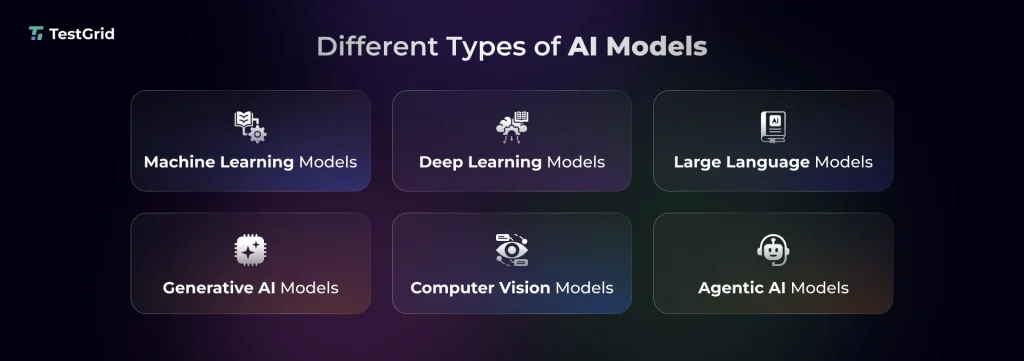
1. Machine learning (ML) models
Machine learning models can learn patterns from structured or unstructured data, assess your problem, and then apply techniques like classification, regression, or clustering to make predictions or decisions. You’ll see these models used commonly in spam filters, fraud detection systems, recommendation engines, and risk scoring tools.
The more you expose these models to diverse data, the better they get at generating contextual and accurate responses.
Associated risks
- Data and concept drift can reduce model accuracy when real-world data evolves over time
- Problems like overfitting or underfitting may lead to poor performance when the model faces unseen data
2. Deep learning models
Deep learning models are a more advanced branch of machine learning. Basically, these models leverage multi-layered neural networks to process complex data like images, text, or audio. Voice assistants, facial recognition, and translation systems are built with these AI models.
Associated risks
- Black-box behavior is a big concern linked to deep learning models; it can make it hard for you to understand how the AI is making decisions
- Sensitivity to even minor input changes can result in unstable or unexpected outputs
3. Large language models (LLMs)
Most modern chatbots, content generation tools, coding assistants, and search experiences are powered by LLMs. These models are trained on large sets of text data in order to interact in human-like language. Other than predicting outcomes, they also generate responses based on context. Many systems also use techniques like retrieval-augmented generation to improve factual accuracy.
Associated risks
- Hallucinations can often produce factually incorrect responses
- Bias in training data may give skewed or inconsistent outcomes
Learn More: Why Small Language Models Are the Quiet Game-Changers in AI
4. Generative AI models
Gen AI models help you create content like text, audio, images, video, and code via natural language prompts. You’ll find these models in chatbots, image generators, and AI writing assistants.
Associated risks
- Outputs generated by these models don’t have clear right or wrong answers; this can create difficulty in evaluation, since quality and relevance are subjective
- Testing generative AI applications can be hard because responses may vary even across similar inputs
Also Read: How to Use Generative AI in Software Testing
5. Computer vision models
Computer vision allows your AI app to see and understand visual data from images and videos. You would see the use of these models in medical imaging, autonomous driving, and quality inspection. They mainly extract patterns like edges, shapes, and textures to do tasks such as image classification, object detection, and segmentation.
Associated risks
- Elements like lighting, blur, or noise in actual usage conditions may cause performance issues
- Occlusion or partial visibility can result in incorrect object detection
6. Agentic AI models
Agentic AI models are capable of doing a lot more than generating responses. They plan, decide, and take action autonomously based on a specific goal. E.g., you can assign a travel AI agent to book a flight, and it’ll compare options, book the ticket, and send you the confirmation.
Another strong feature of AI agents is that they can communicate with other systems and tools to execute tasks and adapt in real time. You can find AI agents in software testing platforms, customer support automation, and cybersecurity systems.
Associated risks
- Goal misalignment can lead the agent to interpret the wrong objectives and take unintended actions
- Security vulnerabilities like data leakage and unauthorized access can happen without proper guardrails in place
Also Read: What is agentic AI in testing?
Key Strategies for Testing AI Applications
1. Data validation: How accurate and precise your AI app’s response is depends largely on the data that you use to train your AI models. So before you start training, check the quality, completeness, and relevance of the data. Meaning, you should include real user inputs, missing values, incorrect labels, duplicates, and distribution imbalances so the model is equipped to handle production scenarios.
2. Red teaming: Red teaming, also often called adversarial testing, is a form of security testing where you think like an attacker and simulate misleading queries, edge-case inputs, and adversarial scenarios like prompt injection to uncover security vulnerabilities or unsafe outputs.
This method is particularly important if you’re operating in areas like healthcare, finance, and government.
3. Model evaluation: This is one of the AI testing strategies where you assess how your AI apps function during training as well as in real use. Model drift is a critical concept to consider when you’re evaluating AI models. Often, over time, changes in data patterns can cause AI performance and output to degrade gradually. That’s why you should reevaluate and retrain models with fresh data to keep them relevant.
Learn more: AI Model Testing: Methods, Challenges, and How to Test AI Models
4. End-to-end AI workflow testing: In E2E testing, you check the entire system, which includes verifying data flows from input to output across pipelines, APIs, preprocessing steps, and AI models. Your goal here is to ensure that when all the components of your app come together, they can work seamlessly in live environments.
5. Continuous testing: Because of changing user behavior, emerging risks, and model drift, continuous testing of AI apps is non-negotiable. For this, you should rerun tests, track performance metrics, and evaluate outputs in production regularly. You also need to set up feedback mechanisms and automated retraining triggers so you can detect and address data anomalies and unexpected behavior promptly.
6. Human-in-the-loop (HITL) validation: Incorporating human judgment in your testing process is critical because aspects like tone, relevance, safety, and contextual accuracy in AI responses can only be analyzed properly by human testers.
Reviewers here usually assess the outputs, flag issues, and then give feedback that can help you improve the future performance of your apps.
If your AI app uses generative AI, then human assessment is very important because subjective quality matters the most here.
7. Integration testing AI systems: AI apps connect with APIs, databases, data pipelines, and third-party services, and therefore, you need to test the integration points between these components. This testing strategy for AI applications basically covers checking if data is passing correctly through the workflows, as well as assessing error handling, data format mismatches, and system compatibility across environments.
Key Areas to Test in AI Applications
1. Regression: Since small changes can also shift your AI model’s behavior, after retraining, data changes, feature updates, or pipeline tweaks, it’s important to run regression tests to ensure no existing functionality was affected. You must check outputs, performance metrics, and edge case scenarios, and track deviations in predictions or responses.
2. Context-handling: Your AI app should be able to understand and adapt to its surrounding environment, like location, user behavior, session history, or time, and respond in a way that aligns with the user’s intent.
Say, if your user says ‘search running shoes’ and then adds ‘show only Nike shoes’, the AI model should correctly link the second request’s context to the original query.
The focus of testing context handling ability is to check if the model can maintain continuity in conversations and avoid contradictions.
3. Usability: Usability of AI apps isn’t just about how intuitive the UI design is. You also assess the clarity of responses, ease of correction, and how easily your users can navigate the system. Since responses can, at times, be unpredictable, you should check if users can understand the outputs and easily recover from errors.
Also Read: Usability Testing: Definition, Types, Process, Cost, Tools & Benefits
4. Bias and fairness: Models should treat all users equally, regardless of age, race, gender, or geography. But even well-trained data can have hidden biases and imbalances. You need to test if outputs across demographics and scenarios are skewed or possess discriminatory behavior. And for that, you have to monitor fairness metrics like demographic parity, equalized odds, and proxy attributes.
5. Goal alignment: Autonomous or agent-based AI apps generally make decisions over multiple steps, and there’s a possibility that the model strays away from the intended objective. These are some ways you can actually assess if your AI app is successful in fulfilling a goal:
- Measure the task success rate to verify that the AI model achieves your expected outcome
- Collect feedback from your users so you can understand if AI is giving responses that align with what they’re looking for
- Design multi-step flows and track whether the model can follow the correct steps, avoid unnecessary steps, and reach the goal
Learn More: What Is Autonomous Testing? Benefits, Tools & Best Practices
How to Test AI Applications: Step-by-Step Process

1. Define test objective and success metrics
The first step of testing AI applications is to outline what exactly it is that you want to test. Say you want to assess if your AI app can show relevant results when a user searches for a product. So, you define an objective like ‘ensure the model can suggest relevant products based on user query and behavior.’
The next part is to map out success metrics that’ll help you check that the model can meet the objective. You can monitor accuracy, precision/recall, extraction accuracy, latency, or task completion rate as benchmarks for success.
2. Prepare test data
When you’re designing input data for testing, your focus should be on including normal cases (clean data), edge cases, and rare scenarios. This means you need to use long queries, boundary values, and noisy inputs.
In this stage, you should also do a detailed audit to identify if there are any mislabeled entries, missing values, imbalanced classes, or unrepresentative sampling that can potentially lead to biased responses. Methods like data rebalancing or augmentation can help you improve representation.
3. Perform multi-level testing
Now, you need to thoroughly test your AI app, find issues, and resolve them before release. You can use different types of tests, but some of the most critical ones are:
- Unit testing – this will help you spot issues like incorrect data preprocessing, broken feature transformations, and errors in individual functions
- Model testing – problems like low accuracy, bias, overfitting, or unstable predictions can be caught here
- System testing – this will allow you to detect latency, failure handling gaps, and inconsistent outputs
Pro tip: You can implement test automation for unit and system testing and manually explore the edge cases and model behavior for comprehensive coverage.
4. Deploy and monitor
Deployment doesn’t mean your testing process is complete. In fact, after deployment, you must monitor how your app is performing in the production environment. For that, evaluate latency, error rates, and data drift in real time.
Make sure you set up alerts and automated feedback loops to detect anomalies and performance degradation early.
5. Keep refining and improving
Your AI app needs regular updates to stay relevant. So, you have to fine-tune prompts, enhance features, expand test coverage, and analyze failure patterns to ensure the model can adapt to changing data, produce fewer errors, and improve responses over time.
Best Tools for Testing AI Applications in 2026
Now that you know how to test AI systems, these are some tools that’ll help you carry out the process.
1. CoTester AI Testing Agent: CoTester is an AI testing agent designed to help QA teams generate tests from user stories, execute them in real testing environments, and identify issues faster with live execution feedback. As part of the growing category of AI testing tools, CoTester uses self-healing test automation to reduce manual maintenance and improve test reliability as applications evolve. The platform also supports AI workflow testing by adapting to UI changes and validating complex enterprise testing scenarios more consistently.
2. QA Wolf: QAWolf is an AI testing platform for web and mobile apps that helps you make sure features that use Gen AI return consistent and precise results and understand when your prompt model or agent caused a regression. With QA Wolf, you can perform model, model consistency, and invariance testing.
3. Mabl: Mabl’s agentic tester works like an intelligent co-pilot and assists you in test creation, execution, analysis, and maintenance. You can plan E2E tests, autonomously triage all failures, and get insights and recommendations directly into your Jira tickets. Mabl interacts with your app like a real user and enables you to design realistic tests.
4. Testim: Testim lets you automatically build tests using natural language prompts. All you need to do is describe what you want to test, and the custom agent workers take care of the rest. You can run tests based on changes, map tests to changes, identify defects, and speed up root cause analysis with error aggregation and comparison screenshots.
5. Functionize: Functionize is an AI testing platform that is powered by specialized AI agents who can think, adapt, and act. These intelligent agents can help you create high-coverage tests, self-heal to reduce maintenance, keep your team and stakeholders in the loop about execution progress, and diagnose issues early in the development cycle.
While these tools are primarily designed to simplify AI application testing, similar advances are also changing how teams approach mobile app testing. From smarter test creation to faster issue detection, AI can help QA teams handle the growing complexity of mobile applications. You can learn more about AI-driven mobile app testing and tools shaping this space.
Best Practices for Testing AI Applications
1. Design for explainability: Explanability helps you understand the reasoning behind your AI model’s decision. This factor is actually very important for debugging, compliance, and trust because it enables your team and stakeholders to know why the model made a decision. Moreover, transparent audit trails are necessary for meeting regulatory requirements.
| Pro tip You can apply techniques such as feature importance, SHAP, or LIME, which will allow you to explain how inputs affect your model’s decisions and improve traceability. |
2. Focus on probabilistic validation rather than binary pass/fail: Since AI systems are inherently probabilistic, you cannot just mark outputs as ‘pass’ or ‘fail’. You have to evaluate them using statistical measures, confidence levels, and acceptable performance scores.
| Pro tip You should assess metrics like precision, recall, and confidence scores, and set acceptable thresholds like ‘90% accuracy within a confidence range’ so your testers aren’t confused about what success means. |
Also Learn: Software Testing Metrics: How to Track the Right Data Without Losing Focus
3. Collaborate with developers and data scientists: For comprehensive testing of your AI apps, testers, developers, and data scientists need to work together. Data scientists can assist you in understanding model behavior, assumptions, and limitations. Developers can contribute to reproducing and fixing issues. This collaboration enables you to design better test cases and analyze results accurately.
| Pro tip You can create shared documentation for datasets, model versions, and assumptions to avoid misalignment and quickly trace if an issue came from data, code, or the AI model. |
CoTester – AI Software Testing Agent for Trustworthy AI Applications
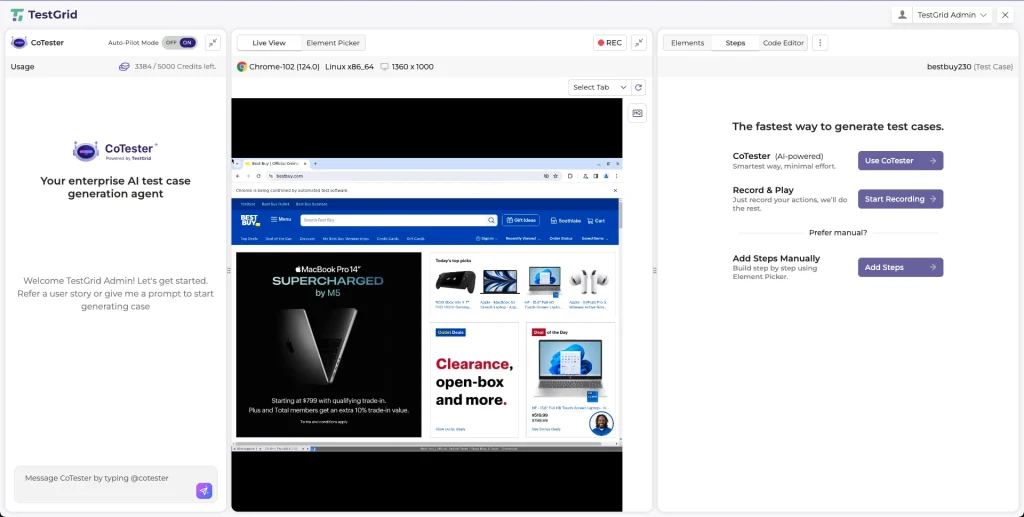
CoTester by TestGrid is an enterprise‑grade AI software testing agent, designed to help businesses validate and manage AI systems with confidence.
Many businesses are now building autonomous AI apps to enable their users to complete tasks faster and more efficiently.
But this also means developers have to ensure these AI systems can operate within safe and expected boundaries. And for that, you need AI app testing platforms that let you generate comprehensive reports, maintain audit trails, enforce guardrails, and oversee every action.
CoTester gives you detailed execution logs along with screenshots, asks for your team’s approval before taking an action, allows you to securely parameterize test data, customize how and when tests run, and keeps you in the loop at all times.
So, no matter how complex your AI app is, this agent will help you accelerate testing, ensure consistent performance, and expand coverage, all without compromising control.
Request a free trial of CoTester and start testing your AI apps with confidence from day one.
Frequently Asked Questions (FAQs)
How do you ensure reproducibility in AI testing?
You need to fix random seeds, version datasets and models, and control environments like libraries and dependencies to get consistent results and ensure reproducibility. You can log experiments and configurations to recreate exact setups and verify results.
What are some challenges of testing AI apps?
Challenges that you may face when testing AI apps include data quality issues, model drift, difficulty in maintaining explainability, handling edge cases, addressing security vulnerabilities, and validating large datasets.
How do you test fallback mechanisms in AI apps?
You can simulate scenarios like low-confidence outputs, API errors, or invalid inputs to check if the model can switch to safer alternatives, such as cached responses or human escalation.
How can you test AI apps for scalability?
Scalability means checking that your app can maintain high performance when the load, data volume, or number of users increases. So, to test this, you can run load and stress tests, measure throughput and latency, and track resource usage to check if the system can scale without excessive resource consumption.