CoTester 2.0 is LIVE! Your Always-Available AI Teammate for Testing.
- What Is a Mobile Testing Strategy?
- Different Types of Mobile Testing
- Mobile Test Pyramid Overview
- What to Select For Mobile Testing Strategy – Real Devices, Emulators, or Simulators?
- How Can You Build a Comprehensive Device Coverage Strategy?
- Design Your Mobile Test Automation Strategy
- Mobile Testing Checklist
- Operationalize Your Mobile App Testing Strategy with TestGrid
- Frequently Asked Questions (FAQs)
A slow app launch, a missed defect, or an unresponsive navigation can negatively influence your customer retention, app ratings, and revenue. We already know how critical mobile app testing is.
But here’s the problem: every year, new device models enter the market and OS updates roll out. On top of this, the mobile app market is continuously expanding and is projected to grow at a CAGR of 14.3% from 2024 to 2030.
Testing apps across multiple device-OS combinations, keeping pace with release cycles, and still maintaining quality can be tough.
That’s why you need a proper mobile testing strategy. In this guide, we’ll show you the detailed steps to build one and how to optimize your app quality.
Test native, cross-platform, and hybrid mobile apps with TestGrid. Request a free trial.

TL;DR
- A mobile testing strategy is a systematic approach for planning, organizing, and executing mobile app testing to ensure quality, performance, security, and compatibility before every release
- The different mobile testing approaches include functional, performance, security, UI/UX, accessibility, and compatibility testing
- A mobile test pyramid helps you decide how to prioritize tests and allocate resources efficiently
- A device coverage matrix allows you to identify and test your app on the most-used device models and OS versions
- To design a mobile application testing strategy, determine areas to focus your automation efforts, include the critical user journeys, implement CI/CD integration, simulate real-world conditions, and monitor important metrics
What Is a Mobile Testing Strategy?
A mobile testing strategy is a structured plan you design to determine how mobile apps will be evaluated before release.
The strategy is a critical element of your test documentation and covers the test objectives, scope, environments, device coverage, testing methodologies, automation approach, execution priorities, and quality criteria, which enable your team to allocate test resources efficiently, reduce risks early, and deliver reliable mobile apps.
Why Mobile Apps Need a Testing Strategy
- Device fragmentation: Mobile apps should function consistently across hundreds of device models with different screen sizes, resolutions, and manufacturer customizations
- OS fragmentation: Multiple operating system versions remain active simultaneously, which requires you to check app behavior across supported Android and iOS releases
- Hardware variations: Differences in processors, memory, cameras, sensors, GPUs, and biometric capabilities can affect app performance
- Connectivity fluctuations: Your users frequently switching between Wi-Fi, 4G, 5G, and unstable networks make testing more complex
Also Read: Mobile App Testing: A Comprehensive Guide
Different Types of Mobile Testing
Before we see how to create a mobile testing strategy, you should first decide which testing types you need to assess your app’s functional and non-functional areas.

1. Functional Testing in Mobile Apps
Functional testing is an important mobile app testing strategy that helps you verify that every feature of your mobile app behaves according to its functional requirements across the supported devices and platforms.
Here, you mainly test the core user workflows such as authentication, navigation, data input, transactions, notifications, offline behavior, and permission handling.
2. Compatibility Testing Across Devices
You need to ensure that your mobile app works smoothly on multiple device models, operating systems, screen sizes, manufacturers, hardware configurations, and network conditions.
A mobile app compatibility strategy allows you to check that and detect compatibility issues caused by device fragmentation (e.g., UI rendering inconsistencies, layout breaks, device-specific crashes, hardware integration failures).
3. UI/UX Testing for Mobile Experience
Mobile UI testing is another essential mobile application testing strategy that helps you assess interface elements, layouts, touch targets, gestures, navigation flows, typography, and responsiveness to ensure your app adapts correctly to varying screen sizes, orientations, and resolutions.
Your goal in mobile UX testing is to confirm that the app is usable and delivers consistent and intuitive user experiences.
Learn More: Usability Testing: Definition, Types, Process, Cost, Tools & Benefits
4. Accessibility Testing for Inclusivity
Accessibility testing is done to check if people with disabilities can easily use a mobile app. For that, you must validate support for screen readers, keyboard navigation, color contrast, scalable text, touch target sizes, focus order, and accessibility labels.
Other than this, make sure your app complies with accessibility standards like WCAG.
5. Performance Testing for Mobile Apps
Mobile apps receive high traffic, particularly during peak business hours and seasonal demand. Therefore, mobile performance testing is critical.
You should test the app under varying workloads and levels of concurrency, and measure key metrics such as app launch time, response time, resource utilization, battery consumption, memory usage, and CPU usage to identify performance issues.
6. Security Testing in Mobile Applications
Mobile security testing is critical for mobile apps, especially those in regulated industries like banking and healthcare, because they usually process confidential information such as login credentials, PII, biometric data, and financial details.
This mobile device testing strategy allows you to assess authentication, authorization, data encryption, secure API communication, session management, and data storage, and spot security gaps before they are exploited by attackers.
Also Read: 30+ Key Software Testing Types Every QA Needs to Know in 2026
Mobile Test Pyramid Overview
Unit Tests
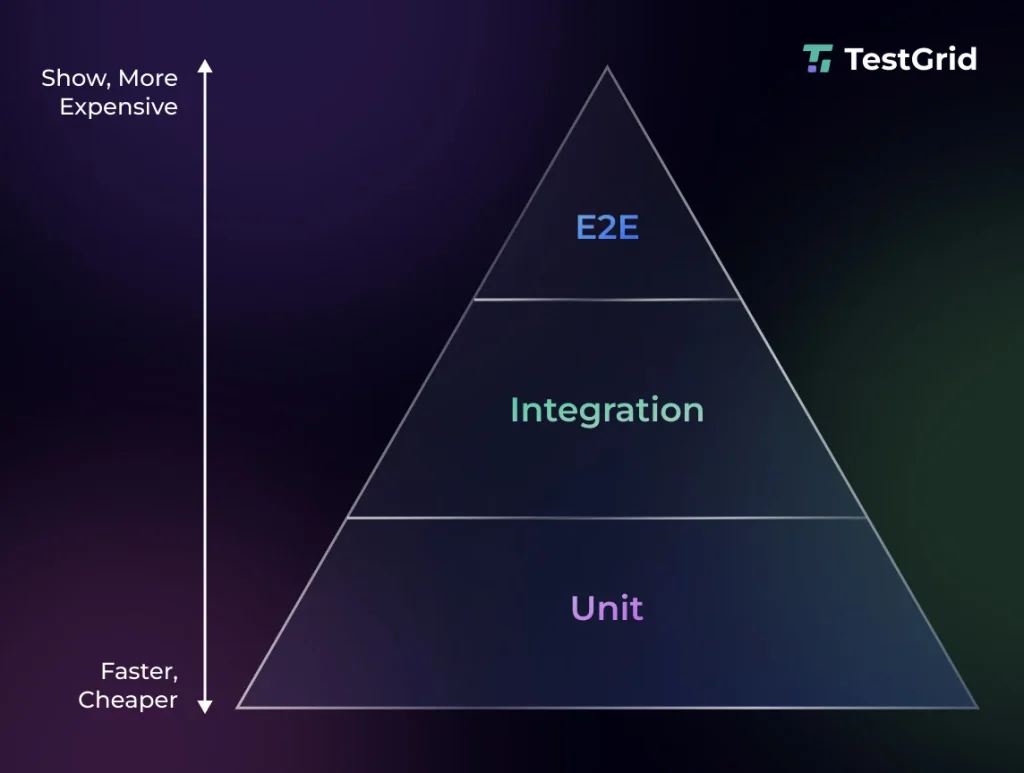
Since unit tests help you verify the smallest units of your app like individual functions, classes, or methods, you can execute them quickly, receive immediate feedback, and detect and resolve defects before they get too complex.
Unit tests are inexpensive to write and maintain, so they should make up the largest portion of your mobile test suite.
Integration Tests
Integration tests are performed to assess if multiple components of your app can work together seamlessly. You check the interactions between modules, databases, APIs, SDKs, repositories, and platform services.
Although they are slower than unit tests, they generally execute faster, require less maintenance, and cost less to run than end-to-end tests.
End-to-Ends
E2E tests are done to evaluate complete user workflows as well as the app’s user interface, backend services, databases, APIs, and external integrations.
These tests give you the highest level of confidence because they mimic real user interactions and help you detect failures due to service dependencies, configuration problems, authentication flows, and network communication.
But E2E tests are also the most expensive layer of the test pyramid, which is why you should use them only for the most critical user journeys and features that can affect users and your revenue.
Reducing Bug Costs with Testing
The mobile test pyramid is designed to detect defects as early as possible in the development cycle, when they are easier and less expensive to fix. Emphasizing a large suite of unit tests, supported by integration tests and a smaller number of end-to-end tests, can help you reduce debugging effort, defect cost, rework, and release delays.
What to Select For Mobile Testing Strategy – Real Devices, Emulators, or Simulators?
Whether you’re performing native app testing or examining cross-platform apps, the test infrastructure and environment you choose affect mobile test planning and how accurately you’ll be able to simulate real user behavior.
- Emulators help you replicate both the hardware and software of Android devices, which makes them useful for functional validation during development.
- Simulators let you recreate only the operating system environment without mimicking device hardware.
Whereas mobile app testing on real devices allows you to assess your app on actual hardware and enables accurate assessment of performance, network behavior, and user experience under production conditions.
This comprehensive table differentiates the three environments in a detailed way so you can pick the one that best fits your mobile testing workflow.
| Criteria | Emulators | Simulators | Real Devices |
|---|---|---|---|
| Best suited for | Early development, debugging, UI testing, functional testing | Early iOS development, UI validation, functional testing, layout testing | Pre-release validation, performance testing, compatibility testing, usability testing, hardware feature validation |
| Performance accuracy | Moderate; approximates device behavior but depends on host machine resources | Moderate; may not represent actual mobile performance | Highest; reflects real-world device performance |
| Hardware testing | Partial support for simulated hardware features | Limited support for hardware-dependent features and interactions | Support for camera, GPS, biometrics, Bluetooth, NFC, sensors, battery, cellular connectivity |
| Maintenance effort | Minimal | Minimal | Higher because of device inventory, OS updates, and hardware management |
| Cost | Low cost | Low cost | Comparatively higher cost than emulators/simulators due to device procurement and cloud subscription |
Pro tip: You can leverage emulators and simulators to accelerate development and get fast feedback during early testing. Test major releases on real devices to find hardware-specific, performance, and compatibility issues.
Learn More: Emulator vs Simulator vs Real Device
How Can You Build a Comprehensive Device Coverage Strategy?
1. Create a Device Matrix from Usage Data
Design a device coverage matrix with the help of information such as device models, screen resolutions, OS distribution, manufacturers, and geographic usage patterns from your analytics platform.
You need to prioritize the combinations that represent the majority of your users. Your device coverage matrix when creating an iOS and Android app testing strategy can look something like:
| Device Category | Device Model | OS Version | User Share |
|---|---|---|---|
| Flagship Android | Samsung Galaxy S25 | Android 16 | 18% |
| Flagship Android | Google Pixel 10 | Android 16 | 12% |
| Mid-range Android | Samsung Galaxy A56 | Android 15 | 16% |
| iPhone | iPhone 17 | iOS 26 | 14% |
| iPhone | iPhone 14 | iOS 24 | 5% |
You can easily pull up this data from analytics platforms like Google Analytics or Mixpanel.
2. Testing Across Form Factors
Form factors are basically different physical characteristics (e.g., foldables, varying screen sizes, aspect ratios) of a mobile device that influence how your app is displayed and used by your users.
Since form factors can affect screen resolution, UI layout, navigation patterns, orientation behavior, multi-window support, and user interactions, you need to validate your app across all these scenarios.
For instance, your app may look perfect on a 6.5-inch smartphone, but display stretched or improperly scaled layouts on foldable devices.
3. Defining Coverage Tiers
Testing every possible device model, operating system version, and hardware configuration is not practical as this would need significant time, resources, and cost.
That’s why you need to group devices into coverage tiers based on user adoption and business impact. This will help you allocate testing effort where it delivers the most value and also maintain reasonable mobile test coverage.
Leverage mobile usage analytics from platforms like Firebase Analytics, as well as production data, to divide devices into:
- Tier 1: Your most-used devices and OS combinations; run full regression, performance, and release validation tests on every build
- Tier 2: Moderately used devices; execute smoke tests and critical user journey validation
- Tier 3: Low-usage or legacy devices; perform targeted or exploratory testing before major releases or updates
Also Read: Types of Mobile Testing With Real-life Examples
4. Updating Device Matrix
For the mobile testing process, review your device coverage matrix periodically to detect shifts in device models, OS adoption, screen sizes, and regional usage patterns.
You should add newly released devices based on their market share, remove the obsolete ones, and include the latest OS versions. An up-to-date matrix helps you ensure your testing strategy reflects real customer usage and device trends.
Learn More: Mobile App Testing Tools & Automation Frameworks for Android & iOS
Design Your Mobile Test Automation Strategy
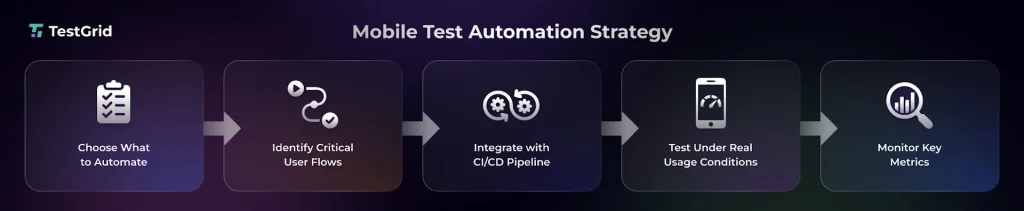
1. Decide what to automate and what remains manual
Although mobile automation testing is critical to speed up your QA process, reduce manual effort, and support continuous validation, human judgment is important for usability and user experience validation.
This table will help you decide what needs automation and which areas should be manually tested.
| Automate | Keep manual |
|---|---|
| Stable, deterministic user flows (login, registration, checkout, search) | Exploratory testing for unknown defects and edge cases |
| Smoke, sanity, regression, and integration test suites | Usability and intuitive navigation assessment |
| API interactions, backend validations, and database verification | Complex gesture interactions or hardware-dependent scenarios that need human observation |
| Data-driven validation across multiple input combinations | Visual consistency and design aesthetics |
2. Identify the important user journeys
The next step in mobile application testing strategy is to map out the critical user journeys before you automate your test workflows. This will include the scenarios which a high impact on your app’s functionality, user experience, and business outcomes.
Some examples are:
- Account recovery, OTP validation, biometric re-enrollment, and successful account restoration
- Profile management, personal information updates, notification preferences, privacy settings
- Plan upgrades, renewals, cancellations, payment method updates, and billing history
- Push notifications, in-app messages, and reminder alerts
Also Read: User Stories in Testing: Convert Requirements to Test Cases
3. CI/CD Integration for Mobile Testing
Connect with CI/CD tools like Jenkins, GitHub Actions, CircleCI, or Azure DevOps so that your tests execute whenever there are code changes.
You can configure automated tests based on type. Like, run unit tests and smoke tests on every commit, execute regression suites before releases, and schedule compatibility tests at regular intervals.
4. Testing Under Real-World Conditions
You need to execute your tests under the conditions that resemble how users access your app in production.
This means you need to simulate different network conditions (e.g., Wi-Fi, 4G, 5G, low-bandwidth, and unstable connections), varying battery levels, device orientations, and background or foreground app states.
Cover real user interruptions as well, like incoming calls, notifications, app switching, permission prompts, and network loss, to verify that the app can maintain data integrity.
5. Tracking Mobile Testing Metrics
Configure mobile testing frameworks and CI/CD pipeline to automatically capture execution artifacts, including device logs, screenshots, videos, crash reports, and performance traces for every test run.
Then, monitor metrics such as test pass/fail rate, execution time, test flakiness, defect detection rate, crash frequency, automation coverage, and mean time to resolution (MTTR).
This will help you improve your mobile app quality strategy by identifying the unstable tests and coverage gaps.
Mobile Testing Checklist
Here’s a quick checklist on how to build a mobile testing strategy, which covers the critical activities you should complete before implementation.
| Items | Components to include |
|---|---|
| Test objectives | Quality goals, testing priorities, business expectations, release frequency, success criteria |
| Test scope | Platforms (Android, iOS), app modules, supported devices, integrations, APIs, app features |
| Target user analysis | Target audience, regions, device preferences, operating system distribution |
| Critical user journeys | High-impact workflows such as user registration, login, payments, search, checkout, notifications, and account management |
| Test environment | Real devices, emulators, simulators, device clouds, and staging environments |
| Test data | Valid and invalid data sets, different user roles, synthetic or masked production data |
| Test types | Functional, compatibility, UI/UX, accessibility, performance, security, localization, installation, upgrade, recovery, and regression testing |
| Performance benchmarks | Measurable targets for startup time, response time, resource utilization, battery consumption, memory usage, and application stability under expected user loads |
| Quality metrics | Test coverage, automation coverage, defect density, defect leakage, crash-free sessions, flaky test rate, execution success rate |
Operationalize Your Mobile App Testing Strategy with TestGrid
TestGrid is an AI-powered, end-to-end testing platform that provides manual, automated, and codeless capabilities for mobile application testing. You can integrate automated test execution into CI/CD workflows using tools such as Jenkins, Azure DevOps, GitHub Actions, and GitLab.
Across the TestGrid platform, you can perform functional, API, performance, visual, and compatibility testing. You can also validate biometric authentication and test applications in managed, VPN-enabled mobile environments.
Its Real Device Cloud lets you execute tests on physical Android and iOS devices across different operating-system versions, hardware profiles, screen sizes, and network conditions. Here’s an overview of TestGrid’s mobile testing capabilities:
- Create executable test flows in plain English or BDD using codeless automation
- Use AI-assisted auto-healing to update test scripts when locators, labels, attributes, or interface layouts change
- Simulate load scenarios and monitor KPIs such as response time and error rate
- Test application behavior under 2G, 3G, 4G, unstable Wi-Fi, and airplane mode conditions
- Reproduce interactions such as taps, swipes, scrolling, biometric authentication, camera input, and orientation changes
- Monitor CPU usage, memory consumption, battery impact, network activity, and UI response times
- Review execution logs, screenshots, video recordings, crash reports, and error details after test runs
TestGrid also supports debugging workflows through Appium Inspector, ADB commands, browser DevTools, Charles Proxy, network capture, HAR files, logs, screenshots, video playback, and crash reports.
Some browser-specific tools apply primarily to mobile-web and browser testing sessions. To evaluate TestGrid’s mobile testing and automation capabilities, request a free trial.
Frequently Asked Questions (FAQs)
What should a mobile testing strategy include?
A good strategy covers scope, device/OS coverage, environments, automation plan, test data, risk assessment, testing types, real-device validation, CI/CD integration, quality metrics, and regular updates.
How can I plan a mobile apps testing strategy?
Plan by defining objectives, mapping critical features and user paths, selecting target devices, preparing test data/infrastructure, adding real-device testing, setting up defect tracking, and establishing release quality gates.
What mistakes should teams avoid in mobile app testing strategy?
Avoid depending only on emulators, testing every device, automating unstable workflows, ignoring real-world conditions, and failing to update the strategy as devices and user behavior evolve.
What does a mobile app release testing strategy involve?
It’s a validation plan before deployment that combines functional, performance, security, compatibility, usability, and regression testing across devices, OS versions, and networks to ensure stability.
What are the best practices for mobile testing?
Best practices include version-controlled test assets, production-like test data, standardized environments, monitoring flaky tests, and reviewing incidents to improve coverage.