CoTester 2.0 is LIVE! Your Always-Available AI Teammate for Testing.
- What Is 508 Compliance Testing in Software Testing?
- How to Perform Section 508 Compliance Testing
- What Should Section 508 Compliance Testing Cover?
- Section 508 vs. WCAG: What Is the Difference?
- The 508 Compliance Testing Approaches You Should Apply
- 508 Compliance Testing Checklist
- Support Accessible and Section 508-Conformant Digital Experiences with TestGrid
- Frequently Asked Questions (FAQs)
Even though we’ve come a long way in building intuitive online experiences, there’s still a big gap in digital accessibility. WebAIM found over 56 million accessibility errors across the top one million home pages it assessed, with an average of 56.1 issues per page.
Not just this, even federal agencies and organizations fall short of meeting accessibility requirements. As per the 2025 Governmentwide Section 508 Assessment, fewer than half of agencies’ most used ICT assets were fully conformant with Section 508.
The concern isn’t just about being non-compliant. Inaccessible digital solutions can make it difficult or even impossible for people with disabilities to access essential information and services.
In this blog, we’ll learn why Section 508 compliance is important, how it works, and an actionable checklist for evaluating accessibility.
Build inclusive websites and applications with TestGrid. Request a free trial.
What Is 508 Compliance Testing in Software Testing?
508 compliance testing is the process of evaluating websites, apps, software, electronic documents, and other Information and Communication Technology (ICT) and verifying that they meet the accessibility requirements of Section 508 of the Rehabilitation Act of 1973.
This testing helps you identify barriers that may prevent people with disabilities from interacting with digital content, and enables you to deliver technology that’s accessible, compliant, and usable with assistive technologies.
508 compliance testing also supports broader accessibility efforts alongside regulations such as the Americans with Disabilities Act (ADA).
How to Perform Section 508 Compliance Testing

1. Assess your accessibility requirements
Understand what type of digital content you’re testing, whether it’s websites, web apps, documents, or multimedia. Then determine which Section 508 provisions apply to each asset based on its functionality.
For example, if your app includes videos, then as per Section 508, you’ll need to ensure it has synchronized captions for spoken content to help users with hearing impairments access the information.
2. Outline the scope of testing
Map out what your Section 508 compliance testing will involve. This can include user-facing components, such as web pages, downloadable documents, embedded media, third-party integrations, and supported browsers or devices.
At the same time, you must also specify user roles, features, and functional workflows you will evaluate. A detailed test scope is critical to prevent coverage gaps.
Also Read: Test Plan in Software Testing: Steps, Components and Types
3. Run accessibility scans
Perform quick accessibility scans with the help of accessibility scanners or Section 508 compliance testing tools to analyze the user interface elements as well as source code to find defects. Your scans must include checks for:
- Incorrect heading structure, unspecified document language attributes, and other semantic markup issues
- Form controls without accessible instructions or properly associated error messages
- Insufficient color contrast between text and background elements that reduces readability
- Missing accessible names, invalid ARIA roles, or incorrect ARIA attribute implementation
4. Test with assistive technologies
Next, check the compatibility of your app with assistive technologies like screen readers, screen magnifiers, speech recognition software, and keyboard-only navigation, and verify if interface elements, status updates, controls, and user interactions can be interpreted accurately and remain fully functional throughout user journeys.
Learn More: User Stories in Testing
5. Document issues and verify compliance
If you find any defects or accessibility violations, prioritize them as per severity and user impact. After resolution, retest the affected components to confirm the issues are resolved.
Lastly, record the results by preparing an Accessibility Conformance Report (ACR) using a Voluntary Product Accessibility Template (VPAT).
This report should summarize the product’s level of conformance with the applicable Section 508 requirements and WCAG 2.0 Level A and Level AA success criteria.
Also Read: Mobile Accessibility Testing: A Complete Guide for Android and iOS
What Should Section 508 Compliance Testing Cover?
1. Website accessibility
Every page of your website should follow a semantic structure with proper headings, landmarks, descriptive links, consistent navigation, and accessible tables. Ensuring this is important to satisfy WCAG 2.0 Level AA requirements.
2. Documents and PDF accessibility
You need to test PDFs, Word documents, spreadsheets, and presentations and ensure a logical reading order, heading hierarchy, functional hyperlinks, OCR for scanned files, and correctly tagged document structure.
3. Forms and interactive elements
The forms must have associated labels, clear instructions, accessible validation messages, descriptive error identification, logical focus sequence, and compatibility with assistive technologies so your users can easily enter data.
4. Multimedia content
Check all the images and videos on your website and make sure they have synchronized captions, accurate transcripts, audio descriptions for visual information, accessible media controls, and playback functionality.
5. Images and alt text
Confirm that the meaningful images, particularly charts and diagrams, have precise alternative text that accurately describes them. This allows screen readers to convey the purpose of an image to users with low vision.
6. Color contrast and visual accessibility
Verify if the normal text on your website or app maintains a minimum 4.5:1 contrast ratio and large text at least 3:1. It’s important for text to have sufficient contrast against its background so that it’s readable for users with color blindness.
7. Keyboard accessibility and navigation
The interactive components should be fully operable using only a keyboard. Ensure that the UI elements have visible keyboard focus indicators, no keyboard traps, and efficient navigation across all interface elements.
8. Compatibility with screen readers
Test with screen readers (e.g., JAWS, NVDA, and VoiceOver) to verify accurate announcement of headings, lists, buttons, links, form fields, dynamic content, and page updates. Your app should provide meaningful labels, roles, and states to enable users to understand and interact with the content seamlessly.
Learn More: Accessibility Testing Tools in 2026
Section 508 vs. WCAG: What Is the Difference?
Although Section 508 and WCAG are closely related, they serve different purposes. This table shows you the detailed differences between the two.
| Aspect | Section 508 Compliance | WCAG Compliance |
| Definition | A U.S. federal legal requirement that mandates accessible ICT for people with disabilities | An internationally recognized set of accessibility guidelines published by the W3C to make web content more accessible |
| Scope | Covers websites, software, documents, hardware, and telecommunications | Websites, web apps, digital documents, and online content |
| Purpose | Ensures accessible ICT in the federal sector | Provides technical requirements for accessible digital experiences |
| Developed by | U.S. Access Board under the Rehabilitation Act of 1973 | World Wide Web Consortium (W3C) through the Web Accessibility Initiative (WAI) |
| Accessibility requirements | Requires compliance with applicable Section 508 provisions and WCAG 2.0 Level A and AA | Defines testable accessibility requirements under the POUR principles at Levels A, AA, and AAA |
Also Read: Accessibility Testing: Types, Process, Challenges, and Solutions
The 508 Compliance Testing Approaches You Should Apply
1. Manual testing
Manual compliance testing helps you review semantic HTML, accessible names, focus management, reading order, and error handling against Section 508 standards.
Here, you also check compatibility with screen readers, keyboard-only navigation, dynamic content updates, context, and overall usability of the website or apps from your user’s perspective.
Many US federal agencies use the Department of Homeland Security (DHS) Trusted Tester methodology for standardized manual Section 508 compliance testing.
2. Automated testing
For automated compliance testing, testers normally leverage accessibility scanning tools to detect common violations across your websites, apps, and digital content.
Automated testing helps you precisely spot issues like missing alt text, insufficient color contrast, incorrect heading hierarchy, empty links, ARIA implementation errors, and unlabeled form controls.
Also Read: Guide to Software Test Automation: Frameworks, Tools, and Best Practices
3. Hybrid testing
This is basically the combination of manual and automated compliance testing applied for a more comprehensive accessibility validation.
In hybrid testing, you use automated tools to identify code-level issues such as incomplete labels, contrast failures, and structural errors, along with accessibility specialists manually assessing keyboard operability, navigation flow, and user experience.
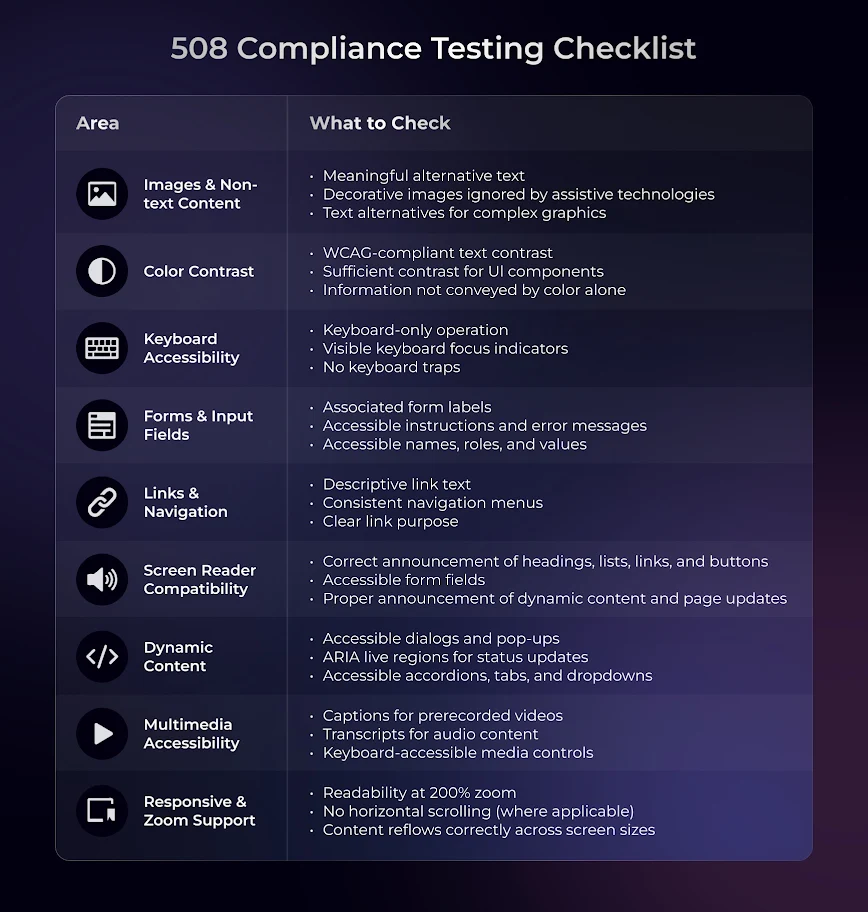
508 Compliance Testing Checklist
This checklist below serves as a quick reference for you to detect accessibility issues before release.
Support Accessible and Section 508-Conformant Digital Experiences with TestGrid
TestGrid is an AI-powered end-to-end testing platform that helps you evaluate the accessibility of websites and web applications across browsers, operating systems, devices, and user interactions.
TestGrid’s accessibility testing capabilities support checks aligned with WCAG 2.2 Levels A and AA. You can identify issues such as missing alt attributes on images and icons, insufficient text contrast, unclear focus indicators, broken keyboard navigation, and missing labels on form fields or buttons.
You can run automated accessibility scans, validate ARIA roles, labels, landmarks, and relationships, and conduct manual checks involving keyboard navigation and screen readers.
TestGrid provides detailed reports that classify issues by severity, explain what each issue affects, reference the relevant WCAG guidelines, and provide HTML snippets and remediation guidance.
By incorporating these checks into your development and CI/CD workflows, you can identify accessibility issues earlier and support ongoing WCAG and Section 508 conformance efforts. Automated testing should be combined with manual accessibility reviews to assess requirements that need human judgment.
Request a free trial to see how TestGrid supports your accessibility testing goals.
Frequently Asked Questions (FAQs)
Why is 508 compliance software testing important?
Section 508 compliance testing is important because it helps organizations identify accessibility barriers before digital products are deployed and reduces legal, financial, and operational risks. It allows you to meet procurement requirements, improve digital inclusion, and ensure technology remains usable by people with diverse accessibility needs.
What are the best practices for effective accessibility 508 compliance testing?
Some effective best practices include defining accessibility requirements early, adopting an accessibility-by-design approach, integrating testing throughout the SDLC, evaluating accessibility across multiple platforms and devices, and involving users with disabilities when possible for usability testing.
Who should comply with Section 508?
Section 508 compliance is mandatory for U.S. federal agencies whenever they develop, procure, maintain, or use electronic and information technology (EIT). It also applies to contractors, technology vendors, and other organizations that develop, supply, or maintain ICT for U.S. federal agencies under federal contracts.
What are the best 508 compliance testing tools, free and paid?
Some of the leading Section 508 compliance testing software tools include TestGrid, Accessibility Insights, axe DevTools, WAVE, Google Lighthouse, ARC Toolkit, IBM Equal Access Accessibility Checker, Siteimprove, Deque WorldSpace, and BrowserStack Accessibility Testing.