CoTester 2.0 is LIVE! Your Always-Available AI Teammate for Testing.
- What Is Testing Documentation?
- Why Testing Documentation Is Important in QA
- Who Is Responsible for Creating and Managing Test Documentation?
- Types of Test Documentation (QA Document List)
- Testing Documentation Across Different Testing Phases
- Manual Testing Documentation vs Automated Testing Documentation
- Common Challenges in Maintaining Test Documentation
- Best Practices for Writing Effective Testing Documentation
- How to Keep Testing Documentation Up to Date with TestGrid
- Frequently Asked Questions (FAQs)
Test setups today change almost every few weeks. Say you modify a business requirement. Now you have to update the corresponding test cases, test scripts, test data, traceability matrix, and defect priorities.
And you need to keep a record of all the changes; otherwise, you may end up testing with outdated data, miss critical edge cases, and get unreliable results.
Testing documentation helps you systematically capture and keep these updates aligned. It acts as a central record of your test strategy, execution, and outcomes, ensuring your entire QA process stays structured and traceable.
In this blog, we’ll learn about the different components of test documentation, how to create it, and what the best practices are to effectively manage it.
Automate your testing workflows and keep your documentation in sync using TestGrid. Request a free trial.
TL;DR
- Test documentation is the structured set of documents that define, guide, and capture the software testing process and its outcomes across the SDLC
- Testing documentation can be prepared and used by developers, QA engineers, test managers, business analysts, and product owners
- It helps maintain traceability between requirements, test cases, and defects, ensuring complete coverage and reliable results
- Manual testing documents focus on instructions that humans can read and follow, while automated testing documentation focuses on scripts and configurations that tools can execute
- Different test document types include software requirements specification, test plan, test strategy, test script, test data, execution logs, defect report, and test summary report
- For efficiently organizing testing documentation, use standardized templates and naming conventions, maintain version control, and leverage different automation tools to manage executions, track defects, and analyze results
What Is Testing Documentation?
Testing documentation is the collective record of your test strategy, processes, objectives, metrics, and results, which helps you plan, validate, and measure the quality of your app throughout the software development lifecycle (SDLC).
This documentation is what connects your development, testing, and business teams by serving as a standardized repository of the requirements, data, infrastructure, and reports that were used and produced during testing.
Why Testing Documentation Is Important in QA
Testing documentation helps you keep your QA process consistent as requirements, test cases, and environments change.
It ensures every requirement is properly covered, tested with the right data, and validated against expected results.
With clear documentation, your team doesn’t rely on assumptions. Everyone can refer to the same test plans, cases, and reports to understand what’s been tested and what hasn’t.
It also improves traceability by linking requirements, test cases, and defects, making it easier to spot gaps and assess the impact of changes.
As your test suite grows, documentation helps you scale testing, reuse assets, and maintain control over complex test scenarios.
Who Is Responsible for Creating and Managing Test Documentation?
1. Developer: Developers usually refer to software testing documentation for creating unit tests, basic test cases, and supporting notes that’ll help them to verify the individual components of your app. They also might use test plans and requirements docs to check if the code aligns with the expected functionality.
2. QA Engineer: Your QA engineers or testers are the primary contributors and users of testing documentation. Basically, they are the ones responsible for maintaining proper docs throughout the software testing lifecycle. They help you in creating test plans, test cases, test scenarios, traceability matrices, and defect reports.
This documentation allows them to ensure complete coverage, enable traceability across tests, and resolve defects promptly.
3. Business analyst and product owner: Generally, business analysts or product owners don’t directly participate in writing test scripts, but they play an important part in shaping your test documentation. They help you design the requirements, user stories, and acceptance criteria, and based on this information, your testers build tests.
Other than this, they can also review your test plans and test reports to verify if your app actually meets the business’s goals.
4. Test lead or test manager: Test leads and managers usually oversee the full testing process, which is why they’re responsible for managing test strategies, test plans, resource plans, and risk assessments.
After testing, they assess the test reports, metrics, and defect summaries to keep track of the test progress and quality of your app. With the help of test documentation, they ensure releases stay on schedule.
5. Stakeholder: Stakeholders could be your business heads, product managers, clients, and leadership teams who make release decisions based on your software test documentation. They evaluate the test reports, test summaries, acceptance criteria, and dashboards, and then decide if your app is ready for release.
Also Read: Business Acceptance Testing: Process, Benefits, and Examples
Types of Test Documentation (QA Document List)
1. Requirement Documents
A. Software requirements specification (SRS): A software requirements specification mentions what your app is supposed to do. You include the functional and non-functional requirements, your app’s features, APIs, integrations, data requirements, constraints, and user expectations.
Basically, everything your developers and testers will need to build and test the app is mentioned in the SRS.
2. Planning and Strategy Documents
B. Test plan: A test plan details how you will be carrying out the tests for your app. Here you write down the scope, objectives, testing methods (manual or automated), timelines, entry criteria, and exit criteria, test deliverables (e.g., test cases, reports), and the potential risks.
This is a complete blueprint that your QA team depends on to understand which features or functions to test and how.
C. Test strategy: Although this might sound similar to a test plan, a testing strategy is normally used by cross-functional teams, not just the testers.
It outlines the information about testing levels, test environment management, tools (CI/CD, collaboration, reporting, and test management), standards followed (e.g., IEEE 829), test data, and testing types such as unit testing, integration testing, smoke testing, and system testing.
Learn More: Test Strategy vs Test Plan: Differences and Importance
3. Design and Execution Documents
D. Test case: A test case is a structured set of steps and conditions that you need to follow to check a specific feature or function of your app. You write all the preconditions, test steps, input data, and expected results to ensure consistency in execution.
Here’s an example:
Test Case – Login with valid credentials
| Precondition | User is registered |
|---|---|
| Steps | Enter a valid email and passwordClick ‘Login’ |
| Test Data | user@example.comcorrect password |
| Expected Result | User is successfully logged in and redirected to the dashboard |
You can also reuse test cases for regression testing so that you don’t have to start outlining test details from scratch every time.
E. Test script
A test script is actually the coded version of your test case. You convert the manual test steps into instructions, which helps you automate test execution.
In the script, you include the data you’ll use for testing, the commands for interacting with your app, and the assertions to verify your expected outcome. QA teams mainly leverage test scripts to run repetitive tests and reduce the overall testing time by minimizing manual execution.
F. Test data: Test data is the input value you need to execute test cases and check your app’s behavior. Here, you add the valid, invalid, edge-case, and boundary data sets. This data helps you simulate real-world scenarios for critical tests like performance testing and user acceptance testing (UAT).
4. Traceability and Tracking Documents
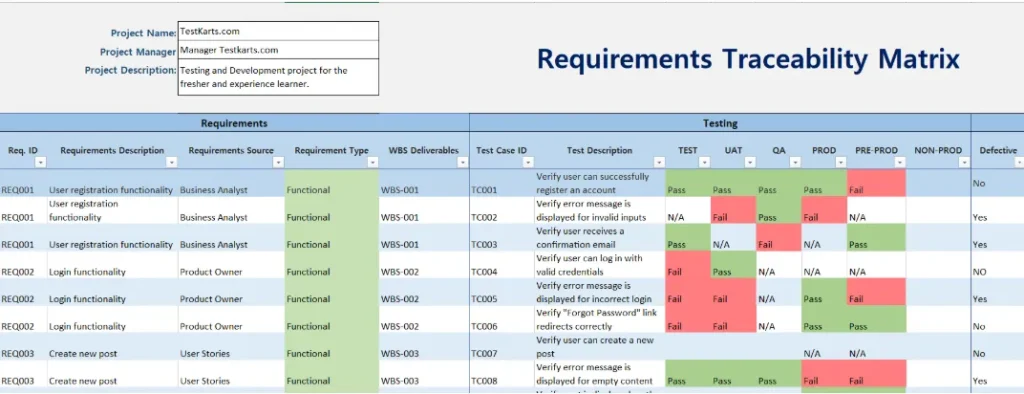
G. Requirements traceability matrix: A requirements traceability matrix (RTM) helps you map each requirement to its corresponding test cases, test results, and defects, which in turn allows you to ensure every requirement is verified and identify the areas that were affected because of a requirement change.
An RTM generally has requirement IDs, test case IDs, test descriptions, test execution status, defect IDs, and severity.
This is an example of what an RTM looks like.
Source: Testkarts
H. Test log: Test log is a record of your test execution details, like the test case ID, execution date and time, tester name, status, environment details, and observations or issues identified during execution. This document helps your team monitor testing progress in real time, troubleshoot failures, and maintain accountability and evidence of the testing process.
5. Defect and Reporting Documents
I. Defect report or bug report: This report includes all the issues you find during the test execution, along with their description, steps to reproduce, expected vs actual results, severity, priority, environment where the defect was found, and screenshots or logs. This document is very critical because it enables your developers to reproduce and resolve the issue.
Also Read: Defect Report in Software Testing
J. Test summary report: A test summary report gives you an overview of the test coverage, execution results, defect metrics, and pass or fail rates. This document allows your stakeholders to get an idea about the app’s quality and decide if it’s stable for release.
K. Test closure report: With this report, you wrap up your testing cycle. The test closure report contains information like test scope coverage, deviations from the test plans, unresolved issues, and important lessons learned (like what worked and what could be improved in future cycles).
Testing Documentation Across Different Testing Phases
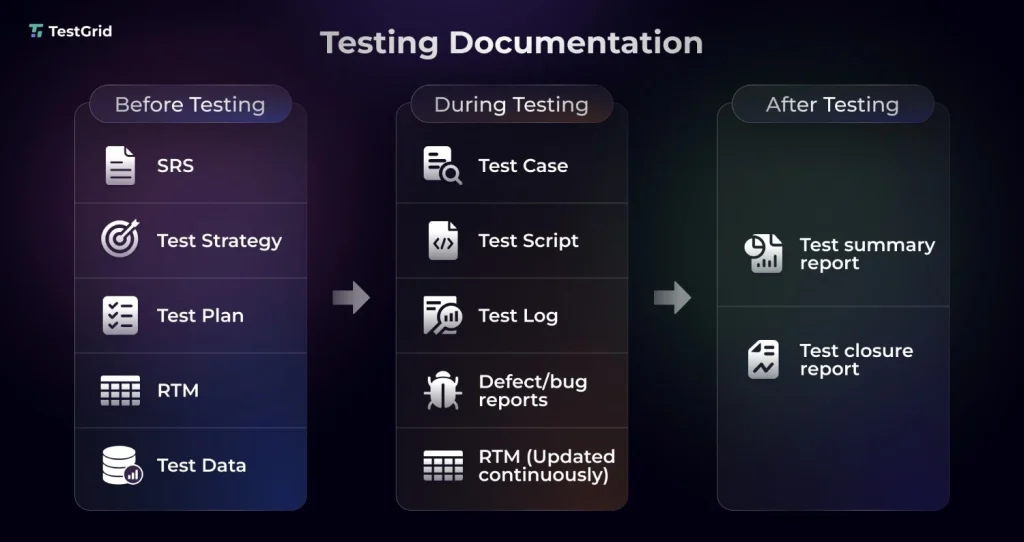
We have thoroughly talked about all the testing documents and why they’re important.
Here’s a quick overview of the documents that are used in different stages of STLC.
Manual Testing Documentation vs Automated Testing Documentation
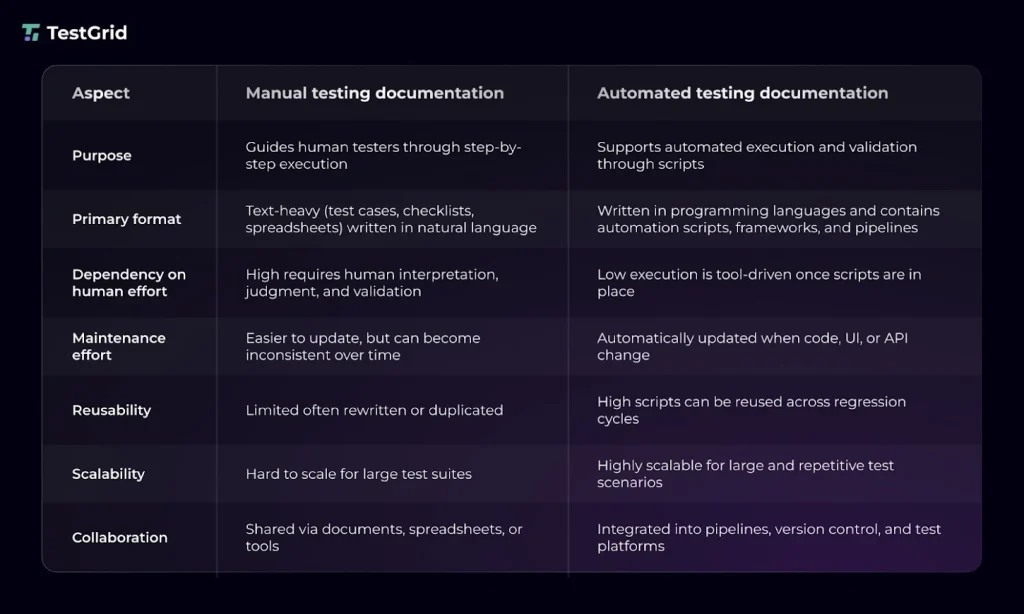
Manual testing documents are more descriptive. Testers write test cases with detailed instructions, including the prerequisites, steps, and notes about bugs or defects found. Even for exploratory testing, you have to document the usability issues, unexpected behavior, context, and human-observable insights.
Testing documentation in automated testing focuses more on test scripts, technical infrastructure, and execution logs. Here, you don’t manually note down test results, recordings, or screenshots. There are tools to generate tests, log execution results with evidence, and create robust dashboards.
This table will make the difference between the two a lot clearer.
Common Challenges in Maintaining Test Documentation
Testing documentation is extremely essential, no matter what development methodology or lifecycle models you follow. For example, Agile and Scrum setups generally favor lightweight and modular docs, while Waterfall or V-Model prioritize detailed planning.
Every modern QA team needs to have extensive documentation because it can be very difficult to manage large-scale test suites otherwise.
Software testing documentation helps you:
- Communicate better with your team and share a common understanding of the testing activities
- Document all critical test scenarios and ensure all workflows and features of your app are verified
- Spot defects early and enhance coverage through detailed test results and bug reports
Also Read: Test Artifacts: Types, Examples, and Best Practices
Best Practices for Writing Effective Testing Documentation
1. Make it structured and keep it clean: Make sure your documentation is easy to read, maintain, and scale. For that, try to use consistent formats for your test cases, plans, and reports, along with distinct headings and naming conventions.
| Pro tip You can create standardized templates with predefined fields like test ID, description, preconditions, steps, and expected results, and pair them with the naming conventions to improve searchability and traceability. |
Learn More: Test Case Template: Examples & Formats
2. Update and version control all the documents regularly: Your testing documentation needs updates as your app changes and grows. When you add more features, fix bugs, or revise scope, your requirements, test cases, and plan should show the latest state. Version control is very important here because it’ll help you track these changes and maintain a history for future testing reference.
| Pro tip Leverage version control systems like Git or integrated test management tools like TestRail to capture revisions automatically. Also, make sure you maintain version logs with timestamps, authors, and change summaries. This will help you simplify audits and rollbacks. |
3. Leverage the correct tools: For creating and managing software test documentation efficiently, you’ll need automated tools which will help you centralize your test assets, enable real-time collaboration, and generate rich reports about test coverage and defect trends.
| Pro tip Select CI/CD tools like Azure DevOps to connect documentation with test execution, Jira to track defects, Confluence to organize and share testing documentation, and test management tools like Zephyr, Xray, and qTest to manage test cases and executions. |
How to Keep Testing Documentation Up to Date with TestGrid
If your test requirements and apps change frequently, you already know how hard it can be to update every document after every modification. You need a smart way to manage all your test documents with minimal manual effort.
TestGrid can help you with that.
This is an AI-powered testing platform that allows you to automatically generate tests, update them dynamically when code changes, detect defects early in the testing cycle, and reuse tests with different datasets.
You can get real-time logs for all your executions, along with detailed reports via dashboards for in-depth analysis of the test results.
Moreover, TestGrid supports integrations with the major CI/CD automation, test management, and collaboration tools, including Jenkins, Azure DevOps, Travis CI, Slack, and Teams. You get everything you need to create, update, and maintain your testing documents in a single, unified workspace.
Request a free trial of TestGrid to know more.
Frequently Asked Questions (FAQs)
What documents are prepared before testing begins?
Usually, before you start testing, you should prepare documents like software requirements specification, test strategy, test plan, and traceability matrix so you know exactly what to test, the resources you need, target coverage, and expected results.
How do you maintain test documentation in agile projects?
Test documentation in agile projects is iterative and closely linked with development. You update the test cases, acceptance criteria, and test results within each sprint. The goal is to focus on ‘just enough’ to avoid duplication and adapt to changing requirements quickly.
What are the risks of poor or incomplete test documentation?
Poor documentation can create gaps like untested requirements, missed edge case scenarios, or limited traceability. And you understand the effect of these only in the later stages when a particular feature breaks down, or compliance checks fail.
Is it possible to automate maintaining test documentation?
Yes. Although core documents like SRS and test strategy still need human input, you can use test automation, test management, and reporting tools to automatically generate test cases, manage test data, update execution results, and log defects in real time.
How can distributed or remote teams manage test documentation effectively?
Centralizing the test documentation in a shared, cloud repository helps distributed teams collaborate, consistently update documents, and ensure everyone on the team works with the latest information. Tools like Azure DevOps and Confluence support this.