CoTester 2.0 is LIVE! Your Always-Available AI Teammate for Testing.
- What is AI in DevOps?
- How AI Integrates Across the DevOps Lifecycle
- AI-Driven Test Automation and Quality Engineering in DevOps
- How AI Helps Teams Manage Operations with Efficiency
- How to Measure the Impact of AI in DevOps
- Challenges and Risks of Implementing AI in DevOps
- Best Practices for Using AI in DevOps
- Future Trends in AI for DevOps
- AI Agents in End-to-End DevOps Pipelines
- Frequently Asked Questions (FAQs)
- What is AI in DevOps, and how is it transforming modern DevOps workflows?
- How can DevOps teams use AI to improve CI/CD pipelines and release reliability?
- What are the top generative AI use cases in DevOps environments?
- What are the key benefits of using AI tools in DevOps for testing and quality engineering?
- How do AI tools support DevOps testing, monitoring, and incident management?
- How does machine learning integrate with DevOps for predictive analytics and automation?
- How can a DevOps team take advantage of AI to improve developer productivity and workflows?
- What role do AI agents play in DevOps automation and infrastructure management?
DevOps is not a new idea. Engineering teams have been using this approach for years to facilitate better collaboration between development and operations, automate delivery workflows, and release apps faster. But as systems grow more complex and release cycles get shorter, traditional DevOps practices are hitting their limits.
But businesses across industries are now adopting intelligent and adaptive AI frameworks to make their operations even more productive. And DevOps isn’t far behind either. The market for AI in DevOps is aiming to cross $20 billion by 2032 from just $2.9 billion in 2023.
Teams are not investing in AI because it’s trendy. They’re, in fact, looking for better ways to handle scale, complexity, and constant changes with efficiency. From intelligently prioritizing test cases and predicting pipeline failures to automating incident response, AI is giving DevOps teams the ability to do more with less manual effort.
In this blog, you’ll learn exactly how AI integrates across every phase of the DevOps lifecycle, which use cases deliver the most value, and how your team can take advantage of AI to refine software development, quality engineering, and operations strategically.
Request a Free Trial with CoTester, the first enterprise-grade AI agent for software testing.
TL;DR
- AI in DevOps enhances software delivery through intelligent automation, frictionless CI/CD, and proactive monitoring
- AI assists testing teams with smart test automation, continuous and cross-platform testing, and automated regression tests
- Benefits of AI in DevOps include resource optimization, improved resource management through intelligent auto-scaling and auto-provisioning, more effective issue resolution, and stronger collaboration between development and operations teams.
- In CI/CD workflows, AI supports smarter test selection, build optimization, and risk-aware release decisions
- Challenges such as data quality, explainability, integration, and skills gaps must be addressed to realize AI’s full potential in DevOps
- Measuring AI’s impact needs tracking metrics like deployment frequency, change failure rate, and lead time for changes
What is AI in DevOps?
AI in DevOps is the use of artificial intelligence (AI) and machine learning (ML) within DevOps practices to improve software development, CI/CD pipelines, testing, infrastructure management, and IT operations.
By analyzing data from code repositories, build systems, logs, and observability tools, AI enables intelligent automation, predictive analytics, anomaly detection, and faster incident resolution across the software delivery lifecycle.
Types of AI Used in DevOps
There are several types of AI used in DevOps, including:
- Machine learning (ML) analyzes historical and real-time data to forecast failures, optimize pipelines, and automate decision-making across the delivery lifecycle.
- Natural language processing (NLP) powers intelligent log summarization, incident reporting, documentation generation, and conversational interfaces within DevOps workflows.
- Computer vision: Used in UI testing and visual regression detection to automatically identify layout changes, broken components, or rendering issues across platforms.
- Chatbots and virtual assistants: Help DevOps teams manage alerts, trigger pipeline actions, and access operational insights directly through conversational interfaces.
How AI in DevOps Is Different from Traditional DevOps
Traditionally, DevOps followed predefined rules, static scripts, and manual analysis to design and deploy apps, resolve production issues, and maintain systems. But this practice needed heavy manual effort, delayed issue detection, slowed recovery, and limited scalability.
Integration of AI technologies like machine learning, natural language processing (NLP), computer vision, copilots, and virtual assistants is helping DevOps teams in better decision-making, resource optimization, and collaboration.
How? Let’s find out.
How AI Integrates Across the DevOps Lifecycle
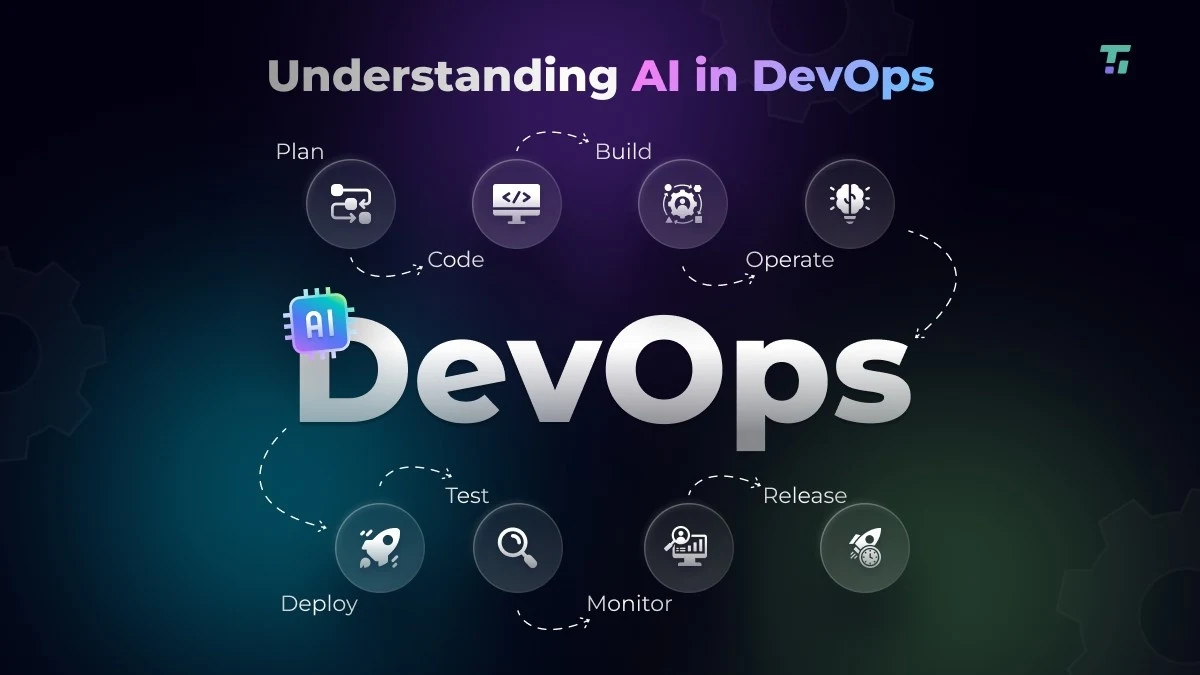
1. DevOps Lifecycle Phases: The DevOps lifecycle is a continuous loop with several phases, with each building upon the previous one to create high-quality applications. Embedding AI in every phase of the cycle helps you spot issues early, ship faster, and reduce manual effort.
| DevOps phase | What AI does |
|---|---|
| Plan | Analyzes historical delivery data, backlog trends, and incident patterns to help you improve sprint planning and create more realistic roadmaps |
| Code | Assists developers with intelligent code suggestions, automated code review, and vulnerability detection to optimize code quality |
| Build | Identifies slow or frequently failing build steps, reuses artifacts more effectively, flags risky dependency updates, and reorders tasks for faster execution |
| Test | Helps you generate test cases automatically for features, prioritize high-risk scenarios, detect test flakiness, and adapt tests as screens and locators change |
| Release | Supports release decisions by assessing risk based on test results, change impact, and past failures, and helps you choose safer release windows |
| Deploy | Enables intelligent deployment strategies, such as canary releases and blue-green deployments; allows you to automatically pause deployments when anomalies are detected |
| Operate | Coorelates logs, metrics, and traces to find issues early in the cycle, automate resolution, and reduce manual intervention during incidents |
| Monitor | Continuously monitors apps and networks to predict potential outages and provide actionable insights to improve performance |
2. AI in CI/CD Pipeline Integration: You can incorporate AI directly into pipeline orchestration and the delivery layer to assess signals from code commits continuously, builds, tests, and deployments. This will help you optimize job sequencing and reduce unnecessary runs. AI can also detect misconfigurations and failures during test executions and automatically re-run tests and trigger remediation actions.
Also Read: CI/CD Test Automation: Key Strategies, Tools, and Challenges
3. Infrastructure Automation: AI can smartly analyze your workload patterns and usage trends to dynamically adapt infrastructure.
Here’s how DevOps and AI automate infrastructure management:
- Auto-scaling: AI can predict traffic and service load fluctuations and automatically scale resources up or down in real time, ensuring performance stability
- Auto-provisioning: AI helps you in selecting optimal resource specifications as per your app requirements, environment context, and past performance outcomes, and avoids over-provisioning
- Configuration adjustments: Based on runtime behavior, AI can optimize infrastructure configurations such as memory limits, thread pools, or container settings
Learn More: What is Test Infrastructure and Why is it Important?
4. AI-Powered Code Suggestions and Automated Code Reviews: AI can give you recommendations on code completion, refactoring, and API usage depending on your project context and standards. It can also review code changes, identify security vulnerabilities, and style violations. This helps you write cleaner and more efficient code.
AI and ML models can also help developers find the right people to review their code and merge requests. By analyzing contribution history, domain expertise, and workload, AI automatically suggests the most suitable reviewers. This helps developers receive faster and higher-quality reviews while reducing context switching across teams.
AI-Driven Test Automation and Quality Engineering in DevOps
1. AI-powered Test Automation: Rather than testing with rigid scripts that hardly adapt as your app grows over time, AI-powered testing systems learn from code changes and app behavior to enhance test creation, execution, and maintenance throughout the testing cycle.
With AI in DevOps testing, you can automatically:
- Generate test cases from requirements, user stories, API specs, and UI mockups
- Prioritize test cases based on critical user flows, enable parallel testing, and adjust test suites to pipeline constraints
- Detect UI updates, heal broken tests, and reduce failures
- Automatically log bugs, spot failure patterns, and pinpoint root causes
Also Read: Guide to Software Test Automation: Frameworks, Tools, and Best Practices
2. Continuous and Cross-Browser Testing: Based on real usage data, AI can help you determine which device, browser, or platform combinations are critical and reduce redundant executions. You can continuously test the high-impact user flows and risky paths across test environments and expand test coverage.
Learn More: Guide to Cross-Browser Testing: Definition, Process, Challenges & Tools
3. Automated Regression Runs: After you make the code changes, AI automatically maps them to impacted features and selects only relevant regressions to run, which helps you avoid full-suite executions and save compute resources. You can also focus on regression tests by business criticality or usage frequency.
4. Test Optimization: AI testing in the DevOps pipeline allows you to optimize your tests with:
- Smart grouping, where you can group tests according to dependencies, execution time, and resource needs for efficient parallel execution
- Test impact analysis, which helps you identify and execute the tests affected by recent code updates
How AI Helps Teams Manage Operations with Efficiency
With the help of AI systems, DevOps teams can significantly minimize downtime and ensure more stable and scalable operations.
Let’s look at how.
1. Incident Management
AI’s role in DevOps incident management includes monitoring logs, metrics, traces of your app, services, and pipelines to identify and prioritize incidents by impact. AI even detects early warning signals, automates alert triage, correlates related events, and then recommends corrective actions. This way, you can minimize alert fatigue and ensure faster response to incidents.
2. Anomaly detection
Rather than relying on static thresholds, AI models flag unusual spikes, drops, or latency in resource usage and traffic in real time so you can spot issues early, lower false alerts, and stop minor deviations from becoming issues in production.
3. Root Cause Analysis
For every issue, AI systems can intelligently identify patterns, isolate the probable source of failure, and give you actionable insights. This, in turn, helps you speed up the troubleshooting time and reduce the guesswork of finding the underlying cause.
4. Security and Vulnerability Management
AI can also play a critical role in enhancing the security posture of your DevOps environment. By automating threat detection and response, AI continuously monitors your systems for potential risks and provides real-time alerts when security issues arise.
AI can also summarize identified vulnerabilities and suggest actionable mitigation steps. This helps developers and security analysts remediate vulnerabilities faster and more efficiently, and uplevels their skills so they can write more secure code in the future. Additionally, AI can identify potential vulnerabilities before they can be exploited, reducing the risk of security breaches in production environments.
How to Measure the Impact of AI in DevOps
Indicators related to release velocity, deployment reliability, and developer productivity help DevOps teams objectively evaluate how AI capabilities enhance the software development lifecycle and delivery.
Here are some key performance metrics you must track.
| Metric | What it measures |
|---|---|
| Deployment frequency | How often code changes are deployed to production assesses the team’s ability to release updates consistently |
| Change failure rate | Percentage of deployments that cause failures or require fixes after production |
| Lead time for changes | Length of time taken between when a code is committed and when it’s deployed to production |
| Defect density (bug rate) | Tracks bugs per 1000 lines of code; highlights issues like insufficient testing or rushed cycles |
| Rollback rate | Percentage of deployments reverted because of errors or failures |
| Mean time to recovery (MTTR) | Average time required to recover from service interruptions or failures |
Also Read: Software Testing Metrics: How to Track the Right Data Without Losing Focus
Challenges and Risks of Implementing AI in DevOps
1. Data quality and bias issues: A major pain point of using AI in DevOps is bad quality data and hidden bias. AI systems mostly depend on past defects, logs, and test results to make decisions and complete tasks. And if this data is outdated, noisy, or skewed toward a specific environment, it can lead to unreliable predictions and misleading insights.
| Best practice Train AI models on clean, relevant, and diverse datasets. For this, verify data sources, remove duplicates, cover multiple scenarios, including boundary and edge cases, and retrain models as and when your apps update. |
Also Read: Test Data Management: Strategy, Techniques, Challenges, and Best Practices for Modern QA
2. Explanability of AI decisions: Since AI insights are often used for making release decisions, defect detection, and issue resolution, the lack of explainability can become a challenge. If your team cannot get clear visibility into why AI flagged a risk or triggered an alert, it can be tough for them to debug or troubleshoot issues. Plus, black-box AI decisions can raise audit and compliance concerns.
| Best practice Establish clear governance frameworks stating that AI systems should provide transparent reasoning, confidence scores, and traceable inputs for every decision. Also, make sure human developers and testers have the final authority in critical actions. |
3. Integration challenges: Because of fragmented systems, inconsistent data formats, and interconnected workflows, integrating AI with your existing DevOps toolchain can be hard. Many teams use legacy tools and custom pipelines, which makes integration even more difficult without affecting established processes.
| Best practice Start small and iterate. Apply AI to a single use case, like test prioritization or anomaly detection. Measure outcomes, refine models, and then gradually expand adoption as your team gains confidence. |
4. Skills and expertise: Limited knowledge of machine learning in DevOps, data preparation, model behavior, MLOps, and AI limitations can result in slow implementation of AI in DevOps, poor model usage, and misinterpretation of AI outputs.
| Best practice The best way to overcome this challenge is to upskill DevOps, QA, and data teams on core AI principles, data quality requirements, model bias, and related concepts through continuous, cross-functional training. |
Best Practices for Using AI in DevOps
1. Start small and iterate: When implementing AI in DevOps, it is often best to start small and iterate. Begin by identifying specific areas where AI can provide the most benefit, such as test prioritization or anomaly detection, and then gradually expand AI adoption as you learn more about its effectiveness and limitations.
2. Involve the right stakeholders: It is essential to involve stakeholders from across the organization when implementing AI in DevOps. This includes developers, IT operations staff, and business leaders who can provide valuable insights and feedback on how AI is being used and its impact on the organization.
3. Maintain transparency and accountability: Transparency and accountability are essential when using AI in DevOps. Ensure that all stakeholders understand how AI tools are being used, the data sources they rely on, and any potential biases or limitations associated with their use. Establish clear lines of responsibility and oversight for AI-driven processes to maintain trust and confidence in the system.
4. Incorporate human oversight: AI can automate many tasks in DevOps; it is important to have human oversight to ensure that AI is making intelligent decisions. Critical actions such as release approvals, security decisions, and incident escalations should still require human review and final authority to ensure optimum outcomes.
5. Ensure data quality and security: When using AI in DevOps, it is important to ensure that the data being used is of high quality and secure. Implement data governance policies, verify data sources, remove duplicates, and use secure data storage solutions to ensure your AI models are trained on clean, reliable, and diverse datasets.
Future Trends in AI for DevOps
As AI DevOps is maturing, modern engineering teams are looking for smarter ways to automate decisions and streamline cycles. Advanced AI-driven concepts that enable this include:
1. Generative and agentic AI
Generative models help you accelerate writing code snippets, tests, pipeline scripts, documentation, and config templates. Agentic AI orchestrates multi-step test plans, executes them, and coordinates tasks across tools.
The combination of both facilitates efficient use of AI in DevOps and developer workflow by intelligently reasoning with context, taking guided steps, and refining responses over time.
Also Read: Agentic AI vs Generative AI: Head-to-Head Comparison
2. Data-driven DevOps
Instead of using assumptions and static rules to make decisions, data-driven DevOps leverages insights from operational data to help you decide what code changes to ship, where to focus your tests, and how to allocate resources efficiently.
3. Predictive analytics
AI DevOps tools constantly assess historical data, app behavior, failure patterns, and critical user flows to anticipate issues and catch and fix them before they show up in production. With predictive analytics, you can also take preventive actions like adjusting compute capacity before traffic spikes, addressing risky changes before release, and scheduling maintenance.
4. AIOps
AIOps is the term used for artificial intelligence for IT operations. This approach applies AI, machine learning, and advanced analytics to automate the identification and resolution of IT issues.
By integrating AIOps in your DevOps processes, you can:
- Make data-driven decisions by automating data analysis, trend identification, and insights
- Analyze performance data and get suggestions to improve resource allocation
- Integrate into CI/CD pipelines and track deployment activities, state of the deployed app, and roll back changes when anomalies are detected
- Check for compliance violations and real-time security threats
AI Agents in End-to-End DevOps Pipelines
We bring to you a dedicated AI-powered DevOps agent that can surface issues and risks across build, tests, and deployments early in the development cycle. This agent helps your CI pipelines move faster than manual review.
The agent mainly examines code changes, test execution behavior, environment context, dependency updates, and historical risk patterns to provide actionable insights aligned with how you build and test your apps.
You can activate the DevOps agents at critical points in your delivery cycles, including:
- During CI execution
- After test runs
- During security reviews
- Before the release promotion
- For continuous monitoring
Moreover, this AI agent in DevOps is built with enterprise governance and control at its core. It doesn’t autonomously block builds, apply fixes, or make release decisions.
Speaking of agents, CoTester by TestGrid is another agent that applies AI directly to testing workflows by generating test cases from real requirements, adapting tests as applications change, and surfacing risk signals early in CI pipelines.
You use it to keep testing aligned with how your system actually behaves, not how scripts were written months ago.
By keeping tests traceable to requirements, executable across environments, and governed through approvals, CoTester supports faster delivery while preserving control, auditability, and engineering accountability across the DevOps lifecycle.
To see how this agent works inside your DevOps workflows, request a Free Trial Today.
Frequently Asked Questions (FAQs)
What is AI in DevOps, and how is it transforming modern DevOps workflows?
DevOps with AI means bringing together DevOps and artificial intelligence by applying machine learning and data-driven intelligence across software delivery and operations processes. AI transforms modern DevOps by automating data analysis, anomaly detection, continuous testing, and feedback to improve overall delivery speed and app quality.
How can DevOps teams use AI to improve CI/CD pipelines and release reliability?
DevOps teams can use AI to optimize builds, prioritize tests, identify issues, assess risks, and improve pipeline efficiency. AI insights help enable safer deployment strategies, prevent faulty changes from reaching production, and ensure reliable releases.
What are the top generative AI use cases in DevOps environments?
You can use generative AI in DevOps for code generation, automated test creation from requirements, summarizing logs and incidents, pipeline configuration, and intelligent recommendations for troubleshooting or issue resolution.
What are the key benefits of using AI tools in DevOps for testing and quality engineering?
AI can help you expand test coverage, reduce test maintenance, and shorten testing and feedback cycles by assisting in faster test generation, risk-based test prioritization, early defect detection, and adaptive test execution.
How do AI tools support DevOps testing, monitoring, and incident management?
AI tools for DevOps teams help them automatically build and execute tests across environments, correlate test results, system signals, and runtime behavior to derive actionable insights, and resolve incidents by identifying root causes and triggering automated remediation.
How does machine learning integrate with DevOps for predictive analytics and automation?
Machine learning analyzes past and real-time data to forecast failures, performance degradation, and risks across apps, APIs, pipeline, and infrastructure. These predictive insights further help you automate risk assessment, optimize deployments, and enable continuous feedback.
How can a DevOps team take advantage of AI to improve developer productivity and workflows?
DevOps teams can use AI in developer workflows for auto-generating docs or runbooks and copilots for automated code completion and code reviews. AI also helps with reducing context switching and handling repetitive tasks so developers can focus more on writing and improving code.
What role do AI agents play in DevOps automation and infrastructure management?
AI agents work as autonomous assistants in DevOps automation to help you monitor systems, optimize infrastructure and security configurations, provision infrastructure, perform self-healing actions, and coordinate tools across the CI/CD pipeline.