
Reading and Auto-Entering OTP on iOS Using Appium in TestGrid
Overview
One-Time Password (OTP) validation is a common requirement in secure mobile applications. TestGrid supports OTP-based authentication flows using custom scripts, allowing automation to read OTP messages from the device and automatically enter them into the required field.
This guide explains how to:
- Read OTP messages from an iOS device
- Extract a 6-digit OTP securely
- Switch application context (Messages → Safari)
- Auto-enter the OTP during test execution on TestGrid Real iOS Devices
Use Case
This approach is useful when:
- OTP is delivered via SMS or in-app messages
- Manual intervention must be avoided during automation
- Secure login or transaction validation is required
- Running end-to-end authentication flows in CI/CD pipelines
High-Level Flow
- Read message elements from the iOS Messages UI
- Scan message text and extract the OTP using regex
- Validate OTP availability
- Switch to Safari (or target application)
- Enter OTP into the required input field
try {
                    java.util.List<WebElement> messages = driver.findElements(By.xpath("//XCUIElementTypeOther[1]/XCUIElementTypeCollectionView[1]/XCUIElementTypeCell/XCUIElementTypeOther[1]"));
                    for (WebElement message : messages) {
                        String messageText = message.getText();
                        System.out.println("Message Found: " + messageText);
                        java.util.regex.Pattern otpPattern = java.util.regex.Pattern.compile("\\b\\d{6}\\b");
                        java.util.regex.Matcher matcher = otpPattern.matcher(messageText);
                        if (matcher.find()) {
                            var_otp = matcher.group();
                            System.out.println("Extracted OTP: " + var_otp);
                            break;
                        }
                    }
                    if (var_otp == null) {
                        System.err.println("OTP found in messages.");
                        return;
                    }

// Switch to your required Application

    System.out.println("Switching to Safari and entering OTP...");
                    Thread.sleep(5000);
                    WebElement searchBar = driver.findElement(By.xpath("//XCUIElementTypeTextField[@name='TabBarItemTitle']"));
                    searchBar.click();
                } catch (Exception e) {
                    System.err.println("⚠ Error: " + e.getMessage());
                }
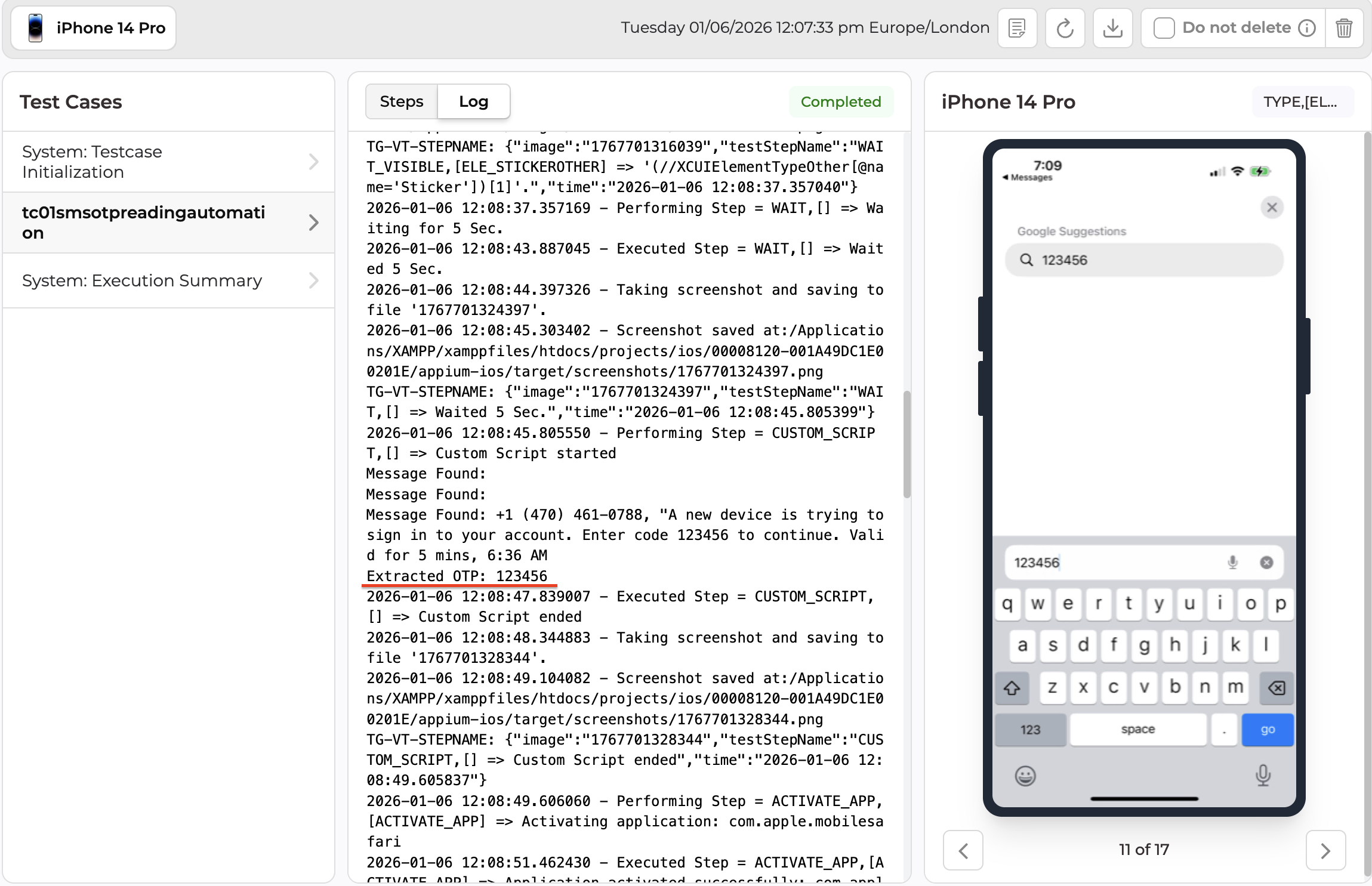
For Reference : https://testgrid.io/docs/document/using-custom-expressions-in-scriptless-test-cases-with-java-selenium-appium/
Security and Compliance Considerations
- OTPs are extracted dynamically and not stored
- No sensitive data is logged persistently
- Execution follows TestGrid enterprise security standards
- Suitable for SOC2, ISO, and internal compliance requirements
Conclusion
By leveraging TestGrid custom scripting, teams can fully automate OTP-based authentication flows on real iOS devices. This approach eliminates manual intervention, improves test reliability, and enables secure, scalable automation suitable for enterprise-grade applications.