
Integrating Selenium Custom Scripts with Codeless Automation
Selenium Custom Scripts
- Open an existing test case or open a new test case in the codeless generator.
- Select custom expression and add your Java snippet code there.
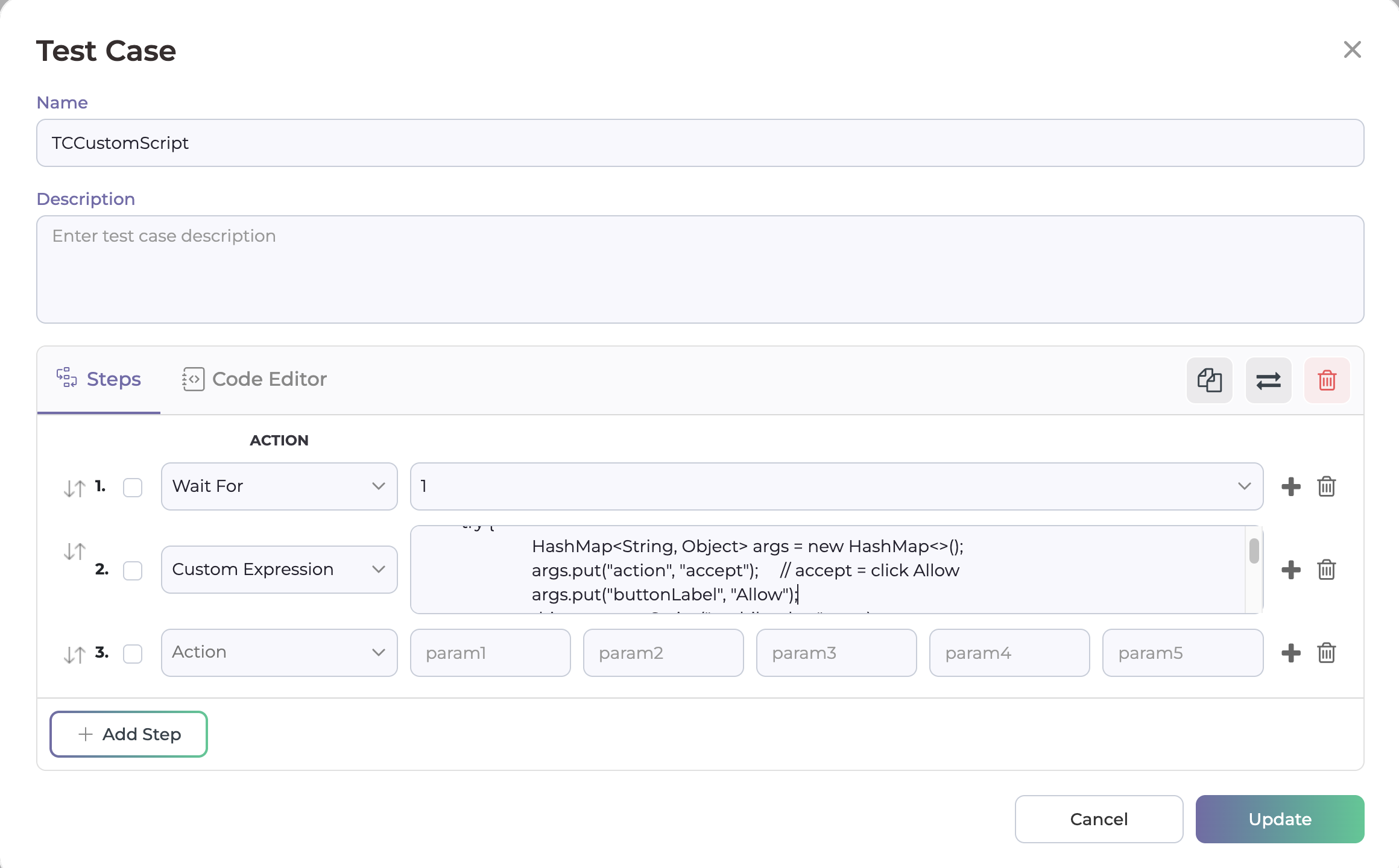
Selenium Custom Script
- For the Web, we can write custom scripts in Java using the TestNG framework.
- We can use the “driver” object to access all methods of the WebDriver class.
- Following are some examples:
Sample 1
driver.manage().timeouts().implicitlyWait(Duration.ofSeconds(10));
        driver.get("http://www.dhtmlgoodies.com/scripts/drag-drop-custom/demo-drag-drop-3.html");

        WebElement Oslo = driver.findElement(By.xpath("(//div[@id='box1'])[1]"));
        WebElement US = driver.findElement(By.xpath("//div[normalize-space(text())='United States']"));

        Actions Drag = new Actions(driver);
        Drag.dragAndDrop(Oslo, US).perform();

        Thread.sleep(1000);
Sample 2
driver.get("https://testautomationpractice.blogspot.com/");

       WebElement DatePicker1 = driver.findElement(By.xpath("//p[normalize-space()='Date Picker 1:']"));

       // Use JavaScriptExecutor to scroll to the element
       JavascriptExecutor js = (JavascriptExecutor) driver;
       js.executeScript("arguments[0].scrollIntoView(true);", DatePicker1);

       driver.findElement(By.xpath("//input[@id='txtDate']")).click();

       WebElement Year = driver.findElement(By.xpath("//select[@class='ui-datepicker-year']"));
       Select YearDropdown = new Select(Year);
       YearDropdown.selectByValue("2015");

       WebElement Month = driver.findElement(By.xpath("//select[@aria-label='Select month']"));
       Select MonthDropdown = new Select(Month);
       MonthDropdown.selectByValue("4");

       Thread.sleep(1000);

       driver.findElement(By.xpath("//a[normalize-space()='17']")).click();

       WebElement Date = driver.findElement(By.cssSelector("input[name='SelectedDate']"));

       String PickedDate = Date.getAttribute("value");
       String ExpectedDate = "17/05/2015";

       if (PickedDate.equals(ExpectedDate)) {
           System.out.println("The Date " + PickedDate + " is selected correctly");
       } else {
           System.out.println("Selected date is incorrect: " + PickedDate);
       }
       Thread.sleep(1000);
       driver.quit();
Sample 3
java.text.SimpleDateFormat formatter = new java.text.SimpleDateFormat("MM/dd/yyyy");
 try {
   java.util.Date date = formatter.parse(var_PaidToDate.trim());
   java.util.Calendar c = java.util.Calendar.getInstance();
   c.setTime(date);
   c.add(java.util.Calendar.YEAR,1);
   java.util.Date onePlusDate = c.getTime();
   var_OneYearPlusPaidToDate = formatter.format(onePlusDate);

 } catch (ParseException e) {
  System.out.println("Conversion from String to Date Failed. Please check PaidToDate format.");
}
Sample 4
WebElement premimumAmountweb = driver.findElement(By.xpath("//span[@id='outerForm:grid:0:appliedAmountOut2']"));

  String premimumAmounttext  =premimumAmountweb.getText().trim();
  writeToCSV("Member Identifier", var_MemberIdentifier);
  writeToCSV("PAGE #: DATA TYPE", "SRP445 Applied Amount");
  writeToCSV("GIAS DATA",premimumAmounttext);
  writeToCSV("PDF DATA", var_AmounttoAppliedPDF);
  writeToCSV("RESULT", (premimumAmounttext.equals(var_AmounttoAppliedPDF)) ? "PASS" :
"FAIL");
Sample 5
JavascriptExecutor js = (JavascriptExecutor) driver;
         js.executeScript("document.querySelector('div.x282').scrollTop = 500000;")