
QuantumGrid Guide
1. About the QuantumGrid
Every QuantumGrid run needs one hub URL, one tg:userToken, and either platformName (app) or browserName (browser) — everything else in this guide makes those runs faster, more stable and easier to debug.
This guide is for every team running automated tests on TestGrid QuantumGrid. It builds on the TestGrid QuantumGrid Automation Guide with proven Appium (Android/iOS) and Selenium practices.
- First-time users: prerequisites, required capabilities and a smoke test to get the first session running.
- Automation engineers: capability sets, platform best practices, retries and framework setup.
- Leads and CI owners: parallel sizing, queue settings and the troubleshooting table.
How to read it: Sections 2–5 are mandatory before a first run. Sections 6–8 are per platform. Sections 9–11 cover app install, parallel/E2E flows and retries. Section 12 is per framework. Section 13 is the troubleshooting table. Section 14 is the one-page checklist.
Conventions: appium: = standard Appium capability (behaves exactly as in open-source Appium, because QuantumGrid is a gateway). tg: = QuantumGrid-specific capability. Capabilities marked REQUIRED must be present or the session is rejected or misrouted.
2. Prerequisites before the first run
Most “real-time” failures we see are setup gaps, not test bugs — complete this list once per project and once per CI pipeline.
Access and identity
- TG User Token copied from the Real Device Cloud page in the TestGrid UI.
- Token stored as a secret / environment variable (TG_USER_TOKEN), never committed to the repo.
- Correct {domain} confirmed (e.g. demo.testgrid.io or the client’s private domain).
- Hub URL built exactly as https://{domain}/quantumgrid/wd/hub — no trailing slash, no node URL.
- Dashboard reachable: https://{domain}/quantumgrid/ui/.
Network
- Outbound HTTPS (443) from laptops and CI agents to {domain} allowed through firewall / proxy.
- Corporate proxy configured in the client (JVM -Dhttps.proxyHost, HTTPS_PROXY for Python/Node) if required.
- App build URLs (appium:app) reachable from the TestGrid side, not only from the client network.
- For staging / local environments: tunnel plan agreed (tg:tunnel, tg:tunnelreset).
Devices and grid configuration (confirm with grid admin)
- Device pool checked on the dashboard: platforms, OS versions, real vs virtual.
- Per-device concurrency limit known (set by admin, not by capabilities).
- Tags created for the device groups you will route to; combined tags created if you need AND logic.
- Protocol: W3C (default). Legacy JSON Wire only if explicitly enabled per device.
App builds
- Android: APK hosted on a URL (TG app upload API or a reachable artifact store).
- iOS: IPA re-signed through POST /api/resign-build; the returned path used as appium:app.
- Help doc: https://testgrid.io/docs/tg-api-documentation-help/#doc-app-resign-build
- Known appPackage / appActivity (Android) and bundleId (iOS) for installed-app launches and prechecks.
- Build is the right flavour: debuggable/test build, correct environment endpoint, no SSL pinning that blocks the tunnel.
Client tooling
- Selenium 4.x client (W3C only) and a current Appium client: Java client 8+/9.x, Appium-Python-Client 3+/4+, WebdriverIO 8+/9.x.
- Client HTTP read timeout set higher than tg:queueTimeout (see Section 12) — otherwise the client gives up while the session is still queued.
- Teardown that always calls driver.quit() (finally / @After / afterEach hook).
Smoke test
- One session with only the minimum capabilities passes before adding filters, app installs or parallelism. If the minimal run fails, the issue is token, URL or network — not the test.
3. Single hub URL: how a session is routed
All Android, iOS and browser tests point at one URL — https://{domain}/quantumgrid/wd/hub — and QuantumGrid picks the device, so clients never manage node URLs or device lists.
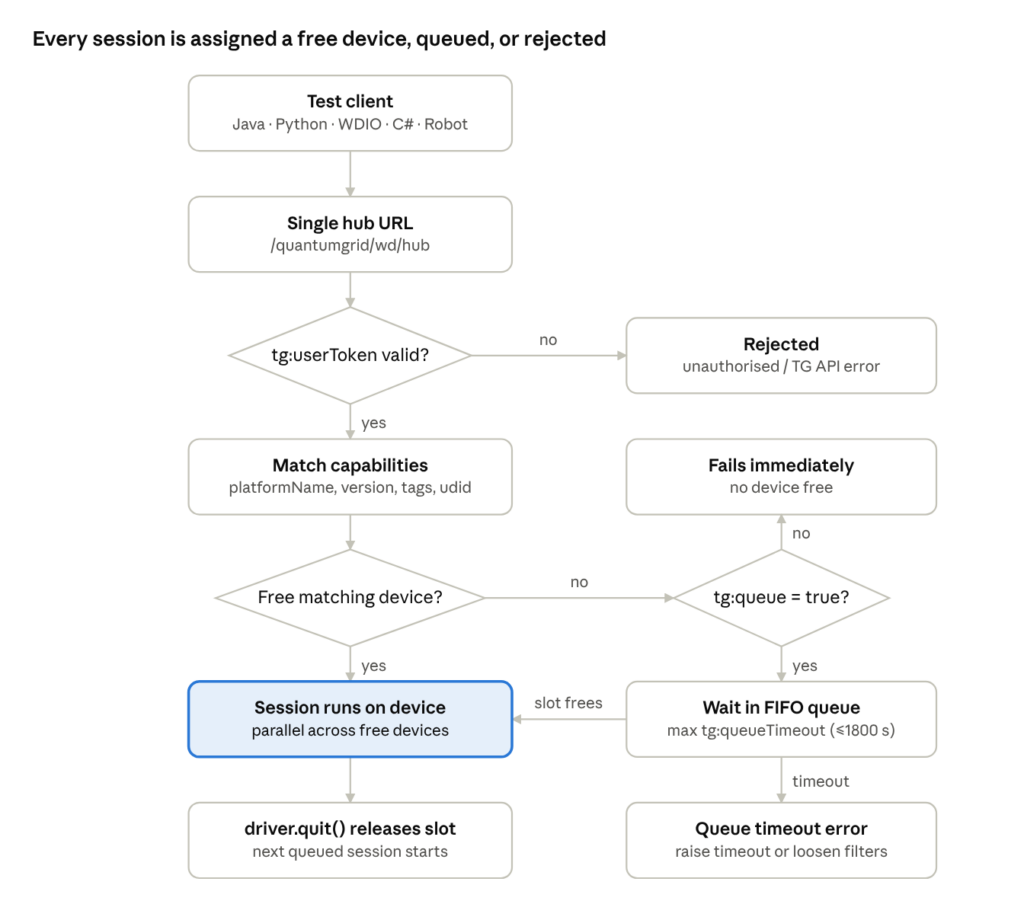
QuantumGrid session routing · auth, match, queue, release
The token is checked first, then capabilities are matched against free devices; busy grids queue the session (FIFO) unless tg:queue=false, and only driver.quit() frees the slot for the next one.
- Auto-assign (no udid): any free device matching platformName / platformVersion / tg:tags / platformTarget — fastest start.
- Pinned (appium:udid for apps, tg:udid for browsers): waits for that one device, subject to the same queue rules.
- Concurrency per device is set by the grid admin; sessions targeting the same device share that limit.
- Do not call individual Appium node URLs — they bypass auth, matching, queueing and the dashboard.
4. Required capabilities
Rule of thumb: App test = platformName + tg:userToken. Browser test = browserName + tg:userToken. Everything else is optional — but appium:automationName should be treated as required in enterprise suites.
| Capability | Android app | iOS app | Mobile browser | Value | Why it matters |
|---|---|---|---|---|---|
| tg:userToken | REQUIRED | REQUIRED | REQUIRED | Token from env var | Session rejected without it (unauthorised / TG API error). |
| platformName | REQUIRED | REQUIRED | Do not rely on it | Android / iOS | Drives automatic device matching for app sessions. |
| browserName | — | — | REQUIRED | chrome | Routes to a browser session instead of an app session. |
| appium:automationName | Strongly recommended | REQUIRED | — | UiAutomator2 / XCUITest | Selects the Appium driver; omitting it on iOS fails the session. |
| appium:app or appPackage +appActivity / bundleId | Needed to test an app | Needed to test an app | — | APK URL / re-signed IPA URL / installed IDs | Without one, the session opens on the home screen. |
Minimal, validated payloads
{"platformName":"Android","appium:automationName":"UiAutomator2","appium:app":"<APK_URL>","tg:userToken":"<TOKEN>"}
{"platformName":"iOS","appium:automationName":"XCUITest","appium:app":"<RESIGNED_IPA_URL>","tg:userToken":"<TOKEN>"}
{"browserName":"chrome","tg:userToken":"<TOKEN>"}
Naming rules that cause most “capability ignored” issues
- Names are case-sensitive and must match exactly: tg:userToken, not tg:usertoken or userToken.
- In W3C clients every non-standard capability needs a vendor prefix: appium: for Appium, tg: for QuantumGrid. Only platformName, browserName, browserVersion, acceptInsecureCerts, pageLoadStrategy, timeouts, proxy, unhandledPromptBehavior and setWindowRect are unprefixed.
- platformTarget is documented without a prefix — send it exactly as shown in the TestGrid guide.
- Use alwaysMatch (or the client’s options object). firstMatch also works but adds no value for a single hub.
Note – new QuantumGrid version: The appium: prefix is now optional. You can send Appium capabilities with or without it (for example automationName or appium:automationName), and TestGrid QuantumGrid maps them to the correct driver automatically. Existing scripts that already use the prefix keep working unchanged. The tg: prefix is still required for QuantumGrid capabilities such as tg:userToken.
5. Additional capabilities: what to add and why
Add only the capabilities that solve a real problem — every extra filter shrinks the matching device pool and lengthens queue time.
5.1 QuantumGrid (tg:) capabilities
| Capability | Default | Recommended value | Purpose / when to use |
|---|---|---|---|
| tg:projectName | none | Team or app name | Groups runs on the dashboard; essential for multi-team grids. |
| tg:testName | none | Unique per run, e.g. Login_Android_${BUILD}_${thread} | Finds one session among many parallel runs. |
| tg:queue | true | true in CI, false for quick checks | false fails immediately when no device is free. |
| tg:queueTimeout | 120 s | 600–1800 s in CI (max 1800) | Prevents queue timeouts during busy windows. |
| tg:tags | or | and, or, only, not | Routes the session to devices matching the specified tag(s). When multiple tags are provided, an OR condition is applied by default; AND, NOT, and ONLY operators can also be applied to refine tag matching. |
| tg:udid | none | Only when a device must be fixed | Pins browser sessions to one device. |
| tg:tunnel | false | true for local/staging targets | Reaches sites/APIs not exposed to the internet. |
| tg:tunnelreset | false | true for E2E suites using the tunnel | Resets the tunnel before session end for clean state. |
| platformTarget | any | Real or Virtual | Real for release sign-off; Virtual for fast, cheap smoke runs. |
| tg:sessionTimeout | none | maximum duration (in seconds) | Defines the maximum duration (in seconds) a session can remain idle before it is automatically terminated if no new commands are received. Supported only for Chrome browser sessions. |
| tg:screenResolution | none | e.g.,“1600×1200” | Define the screen resolution for the Chrome browser session, provided as a width x height value (e.g., “1600×1200”). Applicable only for Chrome sessions; useful for testing responsive layouts or maintaining consistent rendering across runs. |
|
tg:priority
|
FIFO | high or low | Defines the priority of the session in the execution queue. Accepted values are “high” and “low”. Sessions with high priority are processed before low priority sessions. For sessions with the same priority, FIFO (First In, First Out) order is followed. If no priority is specified, the session is assigned low priority by default. All users can view queued sessions. |
| tg:wifi | none | true or false | For turning on the wifi |
| tg:airplaneMode | none | true or false | For turning on the airplane mode |
5.2 Device-selection capabilities
| Capability | Example | Use when | Watch out |
|---|---|---|---|
| appium:platformVersion | “14”, “18.0” | OS-specific behaviour | Too exact (e.g. 14.0.1) can match nothing. |
| appium:deviceName | “iPhone 15” | A model matters (screen, notch, chipset) | Narrows the pool; combine sparingly. |
| appium:udid | “RZCW312KWNJ” | App session pinned to one device | Session waits if that device is busy. |
5.3 Stability and speed capabilities (standard Appium)
| Capability | Platform | Suggested value | Purpose |
|---|---|---|---|
| appium:newCommandTimeout | Both | 300 (seconds) | Stops idle-session drops during long waits, breakpoints or slow backends. |
| appium:noReset | Both | true for regression, chained E2E | Keeps app data; skips reinstall. |
| appium:fullReset | Both | true for first-install / onboarding tests | Uninstall + reinstall for a clean state (slower). |
| appium:autoLaunch | Both | false when you precheck install state | Install only; you call activateApp yourself. |
| appium:printPageSourceOnFindFailure | Both | true in CI | Dumps page source on lookup failure for faster triage. |
| appium:autoGrantPermissions | Android | true | Grants runtime permissions at install. |
| appium:appWaitActivity | Android | e.g. *.SplashActivity,*.MainActivity | Avoids “activity never started” when a splash screen redirects. |
| appium:appWaitDuration | Android | 30000 (ms) | More time for slow app cold starts. |
| appium:uiautomator2ServerLaunchTimeout | Android | 60000–120000 (ms) | Fewer “instrumentation not running” errors on busy devices. |
| appium:uiautomator2ServerInstallTimeout | Android | 60000–120000 (ms) | Slow UiAutomator2 server installs. |
| appium:androidInstallTimeout | Android | 180000 (ms) | Large APK installs (UiAutomator2 driver name). |
| appium:adbExecTimeout | Android | 60000 (ms) | Slow ADB responses on loaded hosts. |
| appium:disableWindowAnimation | Android | true | Fewer flaky taps during transitions. |
| appium:autoAcceptAlerts / appium:autoDismissAlerts | iOS | one of them true | Handles location, camera and notification pop-ups. |
| appium:wdaLaunchTimeout | iOS | 120000 (ms) | More time for WebDriverAgent to start. |
| appium:wdaConnectionTimeout | iOS | 60000 (ms) | More time to connect to WDA. |
| appium:wdaStartupRetries / appium:wdaStartupRetryInterval | iOS | 2–4 / 10000 (ms) | Built-in retry when WDA fails to start. |
| appium:waitForQuiescence | iOS | false for apps with constant animation | Avoids hangs waiting for the app to go idle. |
| appium:appPushTimeout | iOS | 180000 (ms) | Large IPA installs (XCUITest driver name). |
| appium:language / appium:locale | Both | e.g. en / en_US | Locale-stable text assertions. |
Note on install timeouts: the TestGrid guide lists appium:appInstallTimeout. Upstream drivers use appium:androidInstallTimeout (UiAutomator2) and appium:appPushTimeout (XCUITest). Send the driver-specific name; confirm with TestGrid support whether appInstallTimeout is also mapped on your grid.
5.4 Browser capabilities (standard W3C / Chrome)
| Capability | Suggested value | Purpose |
|---|---|---|
| pageLoadStrategy | normal (or eager for heavy SPAs) | Controls when get() returns. |
| timeouts | {“implicit”:0,”pageLoad”:60000,”script”:30000} | Predictable timeouts; prefer explicit waits over implicit. |
| acceptInsecureCerts | true for staging with self-signed certs | Avoids SSL interstitials on test environments. |
| unhandledPromptBehavior | dismiss and notify | Stray alerts fail clearly instead of blocking. |
| goog:chromeOptions | {“args”:[“–disable-popup-blocking”]} | Chrome-specific switches when needed. |
6. Android (Appium UiAutomator2) best practices
On Android, most instability comes from slow cold starts, permission dialogs and fragile locators — set the driver up for them rather than adding sleeps.
Session setup
- Always send appium:automationName = UiAutomator2; don’t let the server guess.
- Filter by major OS version (“14”), not a patch version, unless the bug is patch-specific.
- Use appium:appWaitActivity when the launch activity is a splash or deep-link router.
- Add appium:autoGrantPermissions = true so runtime permission dialogs never block the first screen.
- Set appium:disableWindowAnimation = true for steadier taps and swipes.
Locators (most stable first)
- accessibility id (content-desc) — ask developers to add it to key elements.
- id (resource-id) — use the full com.app:id/name form.
- -android uiautomator (new UiSelector().text(“Login”), UiScrollable for scroll-to).
- XPath only as a last resort — slow on large screens and breaks on layout changes.
Waits and sync
- Use explicit waits (WebDriverWait / wait_for) on the element you need; keep implicit wait low or zero when using explicit waits, never both high.
- If waits are slow on screens with constant animation, lower the UiAutomator2 waitForIdleTimeout setting via driver.setSetting(…).
App lifecycle
- Regression: noReset = true with an installed app (appPackage + appActivity) — fastest.
- Onboarding / upgrade tests: fullReset = true or installApp an older build first, then the new one.
- Recover from a crash inside a test with terminateApp(pkg) then activateApp(pkg) instead of creating a new session.
- Use driver.queryAppState(pkg) before acting: 1 = not running, 3 = background, 4 = foreground.
Hybrid / WebView
- Ensure the debug build enables WebView debugging, list contexts with getContextHandles(), then switch to WEBVIEW_<package>.
- Switch back to NATIVE_APP before native gestures.
Gestures
- Prefer W3C Actions or the UiAutomator2 mobile commands (mobile: swipeGesture, mobile: scrollGesture, mobile: clickGesture) over deprecated TouchAction.
7. iOS (Appium XCUITest) best practices
On iOS, the two biggest failure sources are an IPA that was not re-signed and WebDriverAgent (WDA) start-up time — solve both before tuning anything else.
Session setup
- platformName = iOS and appium:automationName = XCUITest are both mandatory.
- Always re-sign the IPA with POST https://{domain}/api/resign-build and use the returned path as appium:app. Re-sign every new build; a path from an old build installs the old app.
- Give WDA room: wdaLaunchTimeout = 120000, wdaConnectionTimeout = 60000, plus wdaStartupRetries = 2–4 for busy shared devices.
- Handle system alerts with autoAcceptAlerts = true (or autoDismissAlerts when the test expects “Don’t Allow”). Don’t enable both.
- Set waitForQuiescence = false for apps with spinners, video or Lottie animations that never go idle.
Install and launch
- First install via re-signed appium:app; regressions afterwards via appium:bundleId + noReset = true (no reinstall per session).
- autoLaunch = false + activateApp(bundleId) gives you a controlled start point (see Section 9).
Locators (most stable first)
- accessibility id (accessibilityIdentifier set by developers).
- -ios predicate string (e.g. type == ‘XCUIElementTypeButton’ AND name == ‘Login’).
- -ios class chain for hierarchies.
- XPath last — much slower on iOS than on Android.
Waits and performance
- Explicit waits on the target element; implicitlyWait(30s) from the base guide is acceptable only if you do not mix in explicit waits.
- Large screens are slow to snapshot: lower snapshotMaxDepth through settings only if you see timeouts on page source.
Lifecycle and alerts mid-test
- Handle in-app alerts with mobile: alert (action: accept / dismiss) rather than tapping coordinates.
- Recover from a hang with terminateApp + activateApp; check state with queryAppState.
Real vs virtual
- Simulators (platformTarget = Virtual) are fast for UI logic but miss push notifications, camera, biometrics and real performance — keep release sign-off on Real.
8. Selenium and mobile browser best practices
Browser sessions are routed by browserName, pinned with tg:udid (never appium:udid), and should use explicit waits only.
Session setup
- Use the browser options class (ChromeOptions) and add tg: capabilities with setCapability — no DesiredCapabilities with Selenium 4.
- browserName = chrome is the documented value; confirm with TestGrid before using safari on iOS.
- Do not set platformName to steer a browser session; use tg:tags, platformTarget or tg:udid instead.
- For staging sites: tg:tunnel = true and acceptInsecureCerts = true if certificates are self-signed.
Synchronisation
- Explicit waits (ExpectedConditions.visibilityOf, elementToBeClickable) for every interaction that follows navigation or an XHR.
- Do not combine a high implicit wait with explicit waits — waits multiply and failures take minutes.
- Use pageLoadStrategy = eager only when you then wait for the specific element you need.
Locators
- Prefer data-testid / id / stable CSS; avoid absolute XPath and text that changes with locale.
- Page Object Model with locators in one place per page.
Mobile web specifics
- Test the responsive layout the user actually sees; do not resize windows on real phones.
- Handle cookie banners and consent dialogs in a shared helper at the start of each test.
- Clear state by deleting cookies / local storage in setup rather than relying on a fresh device.
Hygiene
- One driver per test thread; driver.quit() (not close()) in teardown to release the device slot.
- Capture screenshot + current URL + browser console logs on failure before quitting.
9. App install precheck and launch strategies
Pick one install strategy per suite and precheck the app state at the start of every test — it removes most “app not found” and “wrong build” failures.
| Strategy | Capabilities | Speed | Use for |
|---|---|---|---|
| Fresh install every session | appium:app + fullReset=true | Slowest | Onboarding, first-launch, upgrade tests |
| Install once, reuse | appium:app + noReset=true | Fast after first run | Daily regression on a new build |
| Pre-installed app | appPackage+appActivity (Android) / bundleId (iOS) + noReset=true | Fastest | Large regression packs; app installed via TG app-install API |
| Install, launch later | appium:app + autoLaunch=false | Fast | Tests that need to set state (deep link, permissions) before launch |
Precheck flow (recommended at test start)
- Start the session with autoLaunch=false.
- isAppInstalled(appId) — if false, installApp(<APK/IPA URL>) (or fail with a clear message if installs must come from the pipeline).
- queryAppState(appId) — if not 4 (foreground), terminateApp(appId) then activateApp(appId).
- Wait for a known home/login element as the “app ready” signal.
- Optionally verify the build version (Android getPackageInfo via mobile: shell is often disabled — use an in-app “About” label or a version API instead).
// Java – precheck helper (works for Android package or iOS bundleId)
public void ensureAppReady(AppiumDriver driver, String appId, String appUrl, By readyLocator) {
    InteractsWithApps apps = (InteractsWithApps) driver;
    if (!apps.isAppInstalled(appId)) {
        apps.installApp(appUrl);
    }
    if (apps.queryAppState(appId) != ApplicationState.RUNNING_IN_FOREGROUND) {
        apps.terminateApp(appId);
        apps.activateApp(appId);
    }
    new WebDriverWait(driver, Duration.ofSeconds(45))
        .until(ExpectedConditions.visibilityOfElementLocated(readyLocator));
}
# Python – same precheck
from appium.webdriver.common.applicationstate import ApplicationState

def ensure_app_ready(driver, app_id, app_url, ready_locator, timeout=45):
    if not driver.is_app_installed(app_id):
        driver.install_app(app_url)
    if driver.query_app_state(app_id) != ApplicationState.RUNNING_IN_FOREGROUND:
        driver.terminate_app(app_id)
        driver.activate_app(app_id)
    WebDriverWait(driver, timeout).until(EC.visibility_of_element_located(ready_locator))
Rules
- iOS install URLs must always be re-signed paths.
- Don’t mix noReset=true and fullReset=true.
- When you rely on a pre-installed app, keep the app installed on every device in the tag/pool you route to — otherwise auto-assign can land on a device without it.
10. Parallel vs sequential runs and E2E flows
Run independent tests in parallel with auto-assign; run dependent E2E steps sequentially inside one session (or one pinned device) — never split a stateful flow across random devices.
| Aspect | Parallel | Sequential / E2E |
|---|---|---|
| Goal | Throughput across many devices | One user journey across steps with shared state |
| Device selection | platformName + platformVersion / tg:tags (auto-assign) | Same session, or appium:udid / tg:udid pin when the flow spans sessions |
| App state | Independent; noReset per test as needed | noReset=true so login/cart survives between steps |
| Queue settings | tg:queueTimeout 600–1800 | Long newCommandTimeout (300+) so the session isn’t dropped between steps |
| Naming | Unique tg:testName per thread | One tg:testName per journey, step names in logs |
Parallel rules
- Thread count ≤ devices that match your filters × per-device concurrency. More threads only add queue time.
- One driver per thread (ThreadLocal<AppiumDriver> in Java, function-scoped fixtures in pytest, one session per worker in WDIO). Never a static/shared driver.
- Keep test data isolated per thread (separate user accounts) to avoid server-side collisions.
- Spread across OS versions with tags or platformVersion instead of pinning each thread to a udid.
- Raise tg:queueTimeout as the parallel count grows; the queue is FIFO.
Sequential / E2E rules
- Prefer one long session for a journey (login → search → cart → payment) with steps as methods called in order.
- If the framework creates a new session per test, pin the device and use noReset=true so state carries over; order tests explicitly (TestNG priority / dependsOnMethods, pytest-order, WDIO specs grouping).
- Checkpoint after each critical step (screenshot + log) so a failure shows which step broke.
- If a step fails, mark the dependent steps as skipped instead of letting them fail on a wrong screen.
- Use tg:tunnel + tg:tunnelreset for journeys that hit internal APIs.
TestNG example
<suite name=”Regression” parallel=”methods” thread-count=”6″>
<test name=”Android”> <classes><class name=”tests.LoginTests”/></classes> </test>
</suite>
11. Retry mechanisms: session, step and test level
Retry only transient infrastructure errors, at most 1–2 times, and log every retry — blind retries hide real defects and double queue load.
| Level | Retries | Never retries | Tooling |
|---|---|---|---|
| Session creation | Network blips, HTTP 5xx, WDA / UiAutomator2 start-up failures | Invalid token, unknown capability, queue timeout with tg:queue=false | Wrapper around new Driver(…) with back-off |
| Step | Stale element, element not yet clickable, transient overlay | Assertion failures | Explicit waits, small retry helper |
| App | Crash, frozen screen, wrong screen after background | Missing app (fix the install) | terminateApp + activateApp + precheck |
| Test | Flaky infra failure after the above | Product defects | TestNG IRetryAnalyzer, pytest-rerunfailures, WDIO specFileRetries, Surefire rerunFailingTestsCount |
Session-creation retry (Java)
public AppiumDriver createWithRetry(URL hub, Capabilities caps) {
    int attempts = 3;
    for (int i = 1; i <= attempts; i++) {
        try {
            return new AppiumDriver(hub, caps);
        } catch (SessionNotCreatedException e) {
            String msg = String.valueOf(e.getMessage()).toLowerCase();
            if (msg.contains("token") || msg.contains("unauthor") || i == attempts) throw e; // don't retry auth
            log.warn("Session attempt {} failed: {}", i, e.getMessage());
            sleep(Duration.ofSeconds(15L * i)); // linear back-off
        }
    }
    throw new IllegalStateException("unreachable");
}
Step retry helper (Python)
def retry_step(action, attempts=3, delay=2,
              retry_on=(StaleElementReferenceException, ElementClickInterceptedException)):
    for i in range(1, attempts + 1):
        try:
            return action()
        except retry_on:
            if i == attempts:
                raise
            time.sleep(delay)

retry_step(lambda: driver.find_element(AppiumBy.ACCESSIBILITY_ID, "Login").click())
App-level recovery
- On an unexpected screen: capture screenshot + page source, terminateApp, activateApp, re-run the precheck (Section 9), then retry the step once.
- If the session itself is dead (NoSuchSessionException, newCommandTimeout exceeded), don’t retry the step — fail the test and let test-level retry create a new session.
Test-level retry
- TestNG: implement IRetryAnalyzer with max 1–2 retries; quit and recreate the driver per attempt.
- pytest: pytest –reruns 1 –reruns-delay 10 (pytest-rerunfailures).
- WebdriverIO: specFileRetries: 1, specFileRetriesDelay: 10, and Mocha retries: 1.
- Report retried-then-passed tests as flaky in the dashboard/report so they get fixed, not hidden.
12. Framework-specific must-knows
Capabilities are identical in every language; what differs is how the client builds the W3C payload and how long its HTTP call waits — set the client read timeout above tg:queueTimeout in every framework.
| Framework | Client version | Must-know |
|---|---|---|
| Java (Appium) | java-client 8+/9.x, Selenium 4 | Use UiAutomator2Options / XCUITestOptions; new IOSDriver(url, caps) without generics; raise read timeout via ClientConfig. |
| Java (Selenium) | Selenium 4.x | ChromeOptions + setCapability(“tg:userToken”, …) → RemoteWebDriver. |
| Python | Appium-Python-Client 3+/4+, Selenium 4.10+ | desired_capabilities= is removed; use options.load_capabilities({…}). Set ClientConfig(timeout=…) or RemoteConnection timeout. |
| WebdriverIO / JS / TS | WDIO 8+/9.x | hostname without https://, protocol: ‘https’, port: 443, path: ‘/quantumgrid/wd/hub’; set connectionRetryTimeout > queue time, connectionRetryCount: 1. |
| C# | Appium.WebDriver 5+, Selenium 4 | AppiumOptions + AddAdditionalAppiumOption(“tg:userToken”, …); pass a TimeSpan command timeout to the driver constructor. |
| Robot Framework | AppiumLibrary / SeleniumLibrary latest | Open Application ${HUB} platformName=Android tg:userToken=%{TG_USER_TOKEN}; always Close All Applications in Suite Teardown. |
| Ruby | appium_lib / selenium-webdriver 4 | Put caps under caps: with prefixed keys; server_url = hub URL. |
| Raw W3C / Postman / Tosca | — | POST /session with {“capabilities”:{“alwaysMatch”:{…}}}; DELETE /session/{id} at the end. |
Java – Appium with long read timeout
UiAutomator2Options options = new UiAutomator2Options()
    .setPlatformVersion("14")
    .setApp(System.getenv("APK_URL"))
    .setNewCommandTimeout(Duration.ofSeconds(300))
    .amend("tg:userToken", System.getenv("TG_USER_TOKEN"))
    .amend("tg:projectName", "MyProject")
    .amend("tg:testName", "Login_" + Thread.currentThread().getId())
    .amend("tg:queueTimeout", 1200);

AppiumClientConfig cfg = AppiumClientConfig.defaultConfig()
    .baseUrl(new URL("https://" + DOMAIN + "/quantumgrid/wd/hub"))
    .readTimeout(Duration.ofMinutes(25)); // > tg:queueTimeout
AndroidDriver driver = new AndroidDriver(cfg, options);
Python – Appium with long read timeout
from selenium.webdriver.remote.client_config import ClientConfig
from appium.webdriver.appium_connection import AppiumConnection

hub = f"https://{DOMAIN}/quantumgrid/wd/hub"
cfg = ClientConfig(remote_server_addr=hub, timeout=1500)  # seconds, > tg:queueTimeout
driver = webdriver.Remote(command_executor=AppiumConnection(client_config=cfg), options=options)
WebdriverIO – wdio.conf.js essentials
exports.config = {
  protocol: 'https', hostname: process.env.TG_DOMAIN, port: 443, path: '/quantumgrid/wd/hub',
  maxInstances: 5,                    // <= matching devices
  connectionRetryTimeout: 1500000,    // ms, > tg:queueTimeout
  connectionRetryCount: 1,
  specFileRetries: 1,
  capabilities: [{
    platformName: 'Android',
    'appium:automationName': 'UiAutomator2',
    'appium:app': process.env.APK_URL,
    'tg:userToken': process.env.TG_USER_TOKEN,
    'tg:queueTimeout': 1200,
  }],
};
Before any run, in any framework
- Token read from env/secret store; hub URL and domain from config, not hard-coded per test.
- One shared base-capabilities file; per-test overrides only (testName, platformVersion).
- Driver created in setup, quit() in teardown that runs even on failure.
- Failure hook captures screenshot, page source, and the session id (to find it on the dashboard).
- Client and Selenium/Appium library versions pinned in pom.xml / requirements.txt / package.json.
- Exact method names (AppiumClientConfig, ClientConfig) vary by client minor version — check against the version you pin.
13. Common client errors and correct approaches
Check the session in this order — token, URL, capabilities, device availability, then the test — because most apparent test failures come from one of the first four.
| Symptom | Likely cause | Correct approach |
|---|---|---|
| Unauthorised / TG API error / session rejected | Missing or wrong tg:userToken, wrong capability name, expired token | Re-copy token from Real Device Cloud; name exactly tg:userToken; read from env var. |
| 404 / connection refused at session start | Hub URL wrong (missing /wd/hub, node URL, trailing slash, http) | Use https://{domain}/quantumgrid/wd/hub only. |
| Capability silently ignored | Missing appium: prefix, typo, wrong case | Prefix all non-W3C caps; compare against Section 4. |
| Instant fail “no device free” | tg:queue=false and all devices busy | Use tg:queue=true in CI, or retry later. |
| Queue timeout error | Wait exceeded tg:queueTimeout (default 120 s) | Raise to 600–1800, reduce thread count, loosen filters. |
| Client times out while TG queue still waiting | Client HTTP read timeout shorter than queue time | Raise client read timeout above tg:queueTimeout (Section 12). |
| No matching device | Over-specific udid + platformVersion + tags | Remove filters one by one; check the dashboard pool. |
| Browser test on wrong device | appium:udid used for a browser session | Use tg:udid for browser sessions. |
| Tag routing returns unexpected devices | Multiple tags = OR | Ask admin for one combined tag. |
| iOS app fails to install | IPA not re-signed, or old re-signed path | Re-sign each build via /api/resign-build; use the new path. |
| iOS “Unable to launch WebDriverAgent” | Slow WDA start on a busy device | wdaLaunchTimeout=120000, wdaConnectionTimeout=60000, wdaStartupRetries=3, session retry. |
| Android “instrumentation process is not running” | UiAutomator2 server crashed or slow to start | Raise uiautomator2ServerLaunchTimeout; retry session creation once. |
| App install timeout | Large build | androidInstallTimeout / appPushTimeout 180000; pre-install via TG app-install API. |
| App opens on the wrong screen / splash never ends | Launch activity redirects | appWaitActivity with all expected activities; precheck flow (Section 9). |
| Permission or system pop-up blocks the test | Alerts not handled | autoGrantPermissions (Android), autoAcceptAlerts (iOS). |
| NoSuchElementException intermittently | No explicit wait, fragile XPath | Explicit waits + accessibility ids; printPageSourceOnFindFailure=true. |
| StaleElementReferenceException | Element re-rendered after lookup | Re-find inside the action; step retry helper (Section 11). |
| Session dies mid-test (NoSuchSessionException) | newCommandTimeout exceeded during long waits/debug | appium:newCommandTimeout=300 or more. |
| Devices stay busy after runs | driver.quit() not called (crash, Ctrl+C, missing finally) | quit() in finally/teardown; JVM/Node shutdown hook as a safety net. |
| Local / staging site not reachable | Tunnel off | tg:tunnel=true (+ tg:tunnelreset=true for E2E). |
| Parallel tests interfere with each other | Static/shared driver, shared test accounts | ThreadLocal driver, per-thread test data. |
| Can’t find the run on the dashboard | No names sent | tg:projectName + unique tg:testName; log the session id. |
14. Pre-run checklist, golden templates and quick reference
Review this list before every new suite or CI pipeline goes live.
Pre-run checklist
- Hub URL is https://{domain}/quantumgrid/wd/hub; token comes from a secret.
- Required caps present: tg:userToken + platformName (+ automationName) or browserName.
- iOS build re-signed for this build number.
- Filters are as broad as the test allows (no unnecessary udid/version/tag combos).
- tg:queueTimeout sized for the parallel count; client read timeout above it.
- tg:projectName + unique tg:testName set.
- Thread count ≤ matching devices × allowed concurrency.
- App precheck + explicit waits in place; no fixed sleeps.
- Retries capped at 1–2 and reported as flaky.
- driver.quit() guaranteed in teardown.
- Tunnel enabled for non-public targets.
Golden templates (enterprise defaults)
Android:
{
  "platformName": "Android",
  "appium:automationName": "UiAutomator2",
  "appium:platformVersion": "14",
  "appium:app": "<APK_URL>",
  "appium:autoGrantPermissions": true,
  "appium:newCommandTimeout": 300,
  "appium:uiautomator2ServerLaunchTimeout": 90000,
  "appium:androidInstallTimeout": 180000,
  "appium:disableWindowAnimation": true,
  "appium:printPageSourceOnFindFailure": true,
  "tg:userToken": "<FROM_ENV>",
  "tg:projectName": "<PROJECT>",
  "tg:testName": "<UNIQUE_RUN_NAME>",
  "tg:queueTimeout": 1200
}
iOS:
{
  "platformName": "iOS",
  "appium:automationName": "XCUITest",
  "appium:app": "<RESIGNED_IPA_URL>",
  "appium:autoLaunch": false,
  "appium:autoAcceptAlerts": true,
  "appium:newCommandTimeout": 300,
  "appium:wdaLaunchTimeout": 120000,
  "appium:wdaConnectionTimeout": 60000,
  "appium:wdaStartupRetries": 3,
  "appium:appPushTimeout": 180000,
  "appium:printPageSourceOnFindFailure": true,
  "tg:userToken": "<FROM_ENV>",
  "tg:projectName": "<PROJECT>",
  "tg:testName": "<UNIQUE_RUN_NAME>",
  "tg:queueTimeout": 1800
}
Chrome:
{
  "browserName": "chrome",
  "pageLoadStrategy": "normal",
  "acceptInsecureCerts": true,
  "timeouts": {"implicit": 0, "pageLoad": 60000, "script": 30000},
  "tg:userToken": "<FROM_ENV>",
  "tg:projectName": "<PROJECT>",
  "tg:testName": "<UNIQUE_RUN_NAME>",
  "tg:queueTimeout": 600,
  "tg:tunnel": false
}
Quick reference
| Need | Use |
|---|---|
| Any free Android / iOS device | platformName only |
| Specific OS | appium:platformVersion |
| One device, app session | appium:udid |
| One device, browser session | tg:udid |
| Real or virtual only | platformTarget = Real / Virtual |
| Device group | tg:tags (OR); combined tag for AND |
| Fail fast | tg:queue=false |
| Wait longer | tg:queueTimeout up to 1800 |
| Local / staging target | tg:tunnel=true, tg:tunnelreset=true |
| Monitor runs | https://{domain}/quantumgrid/ |
Related TestGrid links: Browser cloud help · App upload API · App install API