
Connecting to QuantumGrid – Hub URL & Session Configuration
To connect your Appium or Selenium tests to QuantumGrid, you first need to obtain the Hub URL from the TestGrid platform.
- Log in to your TestGrid account.
- Navigate to Real Device Cloud.
- Locate the device or browser you want to use.
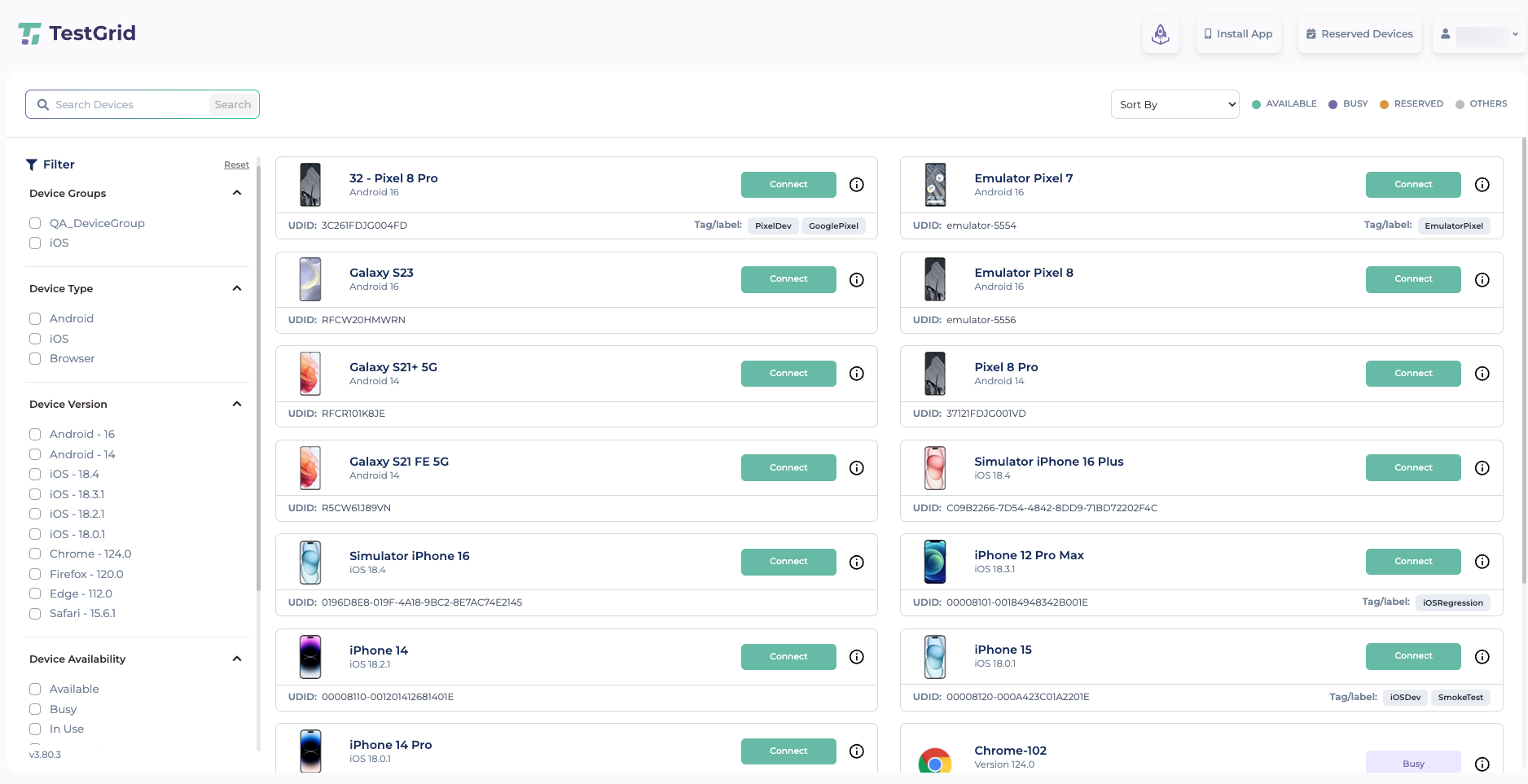
4) Click the Information (ⓘ) icon next to the device.
5) Open the Device Capabilities tab to view the supported capabilities for the selected device.
Copy the Quantum Grid URL from the device information window.
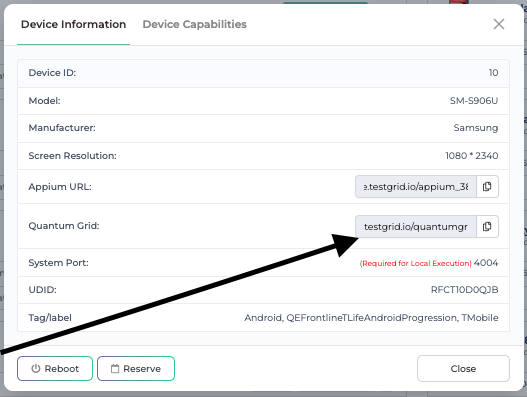
Use the copied URL and required capabilities when creating your Appium or Selenium session.Start every session against the QuantumGrid hub.
https://{domain}.testgrid.io/quantumgrid/wd/hub
Sample capability for Android/Ios
DesiredCapabilities capabilities = new DesiredCapabilities();
capabilities.setCapability("appium:platformName", "iOS/Android");
capabilities.setCapability("appium:automationName", "XCUITest/UiAutomator2");
capabilities.setCapability("appium:deviceName", "<DEVICE_NAME>");
capabilities.setCapability("appium:platformVersion", "<IOS_VERSION>");
capabilities.setCapability("appium:udid", "<DEVICE_UDID>"); // Optional
capabilities.setCapability("tg:userToken", "<USER_TOKEN>");

capabilities.setCapability("tg:queue", true);
capabilities.setCapability("tg:queueTimeout", 1800);
capabilities.setCapability("tg:priority", "low"); // high

// Real device: Real
// Simulator: Virtual
capabilities.setCapability("platformTarget", "<Real_OR_Virtual>");

// Optional: specific tagged devices
// capabilities.setCapability("tg:tags", "<DEVICE_TAG>");
// capabilities.setCapability("tg:tag_condition", "or");

IOSDriver/AndroidDriver driver = new IOSDriver/AndroidDriver(
    new URL("https://<DOMAIN>.testgrid.io/quantumgrid/wd/hub"),
    capabilities
);
Sample Capability for Web
DesiredCapabilities capabilities = new DesiredCapabilities();


capabilities.setCapability("browserName", "chrome/firefox/edge");
capabilities.setCapability("tg:udid", "204");//optional if want to target perticular device
capabilities.setCapability("tg:userToken", "user tooken");
capabilities.setCapability("tg:queue", true);
capabilities.setCapability("tg:queueTimeout", 1800);
capabilities.setCapability("tg:priority", "low");
capabilities.setCapability("tg:tunnel",true);
capabilities.setCapability("tg:sessionTimeout", 60);
capabilities.setCapability("tg:screenResolution", "resolution");//1600x1200
driver = new RemoteWebDriver(
        new URL("https://<DOMAIN>.testgrid.io/quantumgrid/wd/hub
"),
        capabilities
);
Use the same base URL for all tests. Do not point different tests to individual Appium node URLs unless your team instructs you to do so.
Session Configuration
QuantumGrid uses capabilities to identify the required device and route the session accordingly.
The capability names should match the values configured in your Appium or Selenium test script (for example, W3C alwaysMatch / firstMatch capabilities).
Supported Capabilities
| Capability | Description | Default |
|---|---|---|
| appium: platformName or browserName | Specifies the target platform. Use appium:platformName with value “android” or “ios” for mobile. Use browserName with value “chrome” for browser. | Required |
| appium:platformVersion | Specifies the OS version for automatic device allocation. | Optional |
| appium:udid | Routes the session to a specific device. | Optional |
| tg:userToken | User authentication token. | Required |
| tg:tags | Routes the session to devices matching the specified tag(s). When multiple tags are provided, an OR condition is applied by default; AND, NOT, and ONLY operators can also be applied to refine tag matching.
|
Optional |
| tg:queue | Controls whether the session enters the queue if no slot is available. Set to false to fail immediately instead of waiting. | true |
| tg:queueTimeout | Maximum time (in seconds) the session may wait in the queue before timing out. Minimum: 1 second, Maximum: 1800 seconds (30 minutes). | 120 |
| tg:priority | Defines the priority of the session in the execution queue. Accepted values are “high” and “low”. Sessions with high priority are processed before low priority sessions. For sessions with the same priority, FIFO (First In, First Out) order is followed. If no priority is specified, the session is assigned low priority by default. All users can view queued sessions. | low |
| tg:tunnel | Enables TestGrid Tunnel for the browser to access applications hosted in a local, private, or internal network environment. Set the value to true to route traffic through the configured tunnel and access locally hosted websites and services during test execution.
To enable TestGrid Tunnel for devices, refer to the TestGrid Tunnel API. |
false |
| platformTarget | Defines whether to run on a real physical device or a virtual device. Accepted values: “Real” or “Virtual” (for Emulators/Simulators). | Optional |
| tg:sessionTimeout | Defines the maximum duration (in seconds) a session can remain idle before it is automatically terminated if no new commands are received. Supported only for Chrome browser sessions. | Optional |
| tg:screenResolution | Define the screen resolution for the Chrome browser session, provided as a width x height value (e.g., “1600×1200”). Applicable only for Chrome sessions; useful for testing responsive layouts or maintaining consistent rendering across runs. | Optional |
Session Behavior:
- Automatic Device Allocation
- If only
appium:platformNameand/orappium:platformVersionare configured (withoutappium:udid), QuantumGrid automatically selects an available device that matches the requested capabilities.
- If only
- Specific Device Allocation
-
-
- If
appium:udidis configured, QuantumGrid routes the session to that specific device, subject to availability and queue rulesSample Code
- If
-
-
import all.main.BaseClass;
import io.appium.java_client.AppiumDriver;
import io.appium.java_client.android.AndroidDriver;
import io.appium.java_client.ios.IOSDriver;
import org.openqa.selenium.By;
import org.openqa.selenium.ScreenOrientation;
import org.openqa.selenium.WebElement;
import org.openqa.selenium.remote.DesiredCapabilities;
import org.testng.Assert;
import org.testng.annotations.Test;

import java.net.URL;


public class AutomationTestingiOSTMobileSingleURLSimulator extends BaseClass {


    AppiumDriver driver;


    @Test

    public void iOSApp1Visual() {

        String USER_TOKEN = "User_Token";
        String HUB_URL = "https://{domain}.testgrid.io/quantumgrid/wd/hub";

        String platformName = "ios";
        String userToken = USER_TOKEN;
        String projectName = "Test1";
        String deviceID = "";

        try {


            DesiredCapabilities capabilities = new DesiredCapabilities();
            capabilities.setCapability("tg:userToken", userToken);
            capabilities.setCapability("tg:projectName", projectName);
             capabilities.setCapability("tags", "{TMobile}");
            //capabilities.setCapability("appium:app","https://{domain}.testgrid.io/app_build/resigned/6a201dac81e42/SampleCounterApp.ipa");
            capabilities.setCapability("appium:bundleId", "com.apple.mobilesafari");
            capabilities.setCapability("appium:platformName", platformName);
            capabilities.setCapability("tg:queueTimeout","1800");
            capabilities.setCapability("platformTarget", "Virtual");
            capabilities.setCapability("tg:sessionTimeout", 60);
            driver = new IOSDriver(new URL(HUB_URL), capabilities);
            System.out.println("Session started");

            reportTestcaseStarted(driver,"SampleSimulator_TC2");

            int i = 0;
            while (i < 4) {
                waitForSeconds(5);
//                System.out.println("--------------------------------------------------------------------------");
//                System.out.println(driver.getPageSource());
                driver.getPageSource();
                i++;
            }


            reportTestcasePassed(driver,"Passed");
            quitDriver();


        } catch (Exception e) {

            System.out.println("Something Went Wrong on Device Id " + deviceID);
            System.out.println(e.getMessage());
            e.printStackTrace();
            try {
                reportTestcaseFailed(driver,"Failed");
                quitDriver();
            } catch (Exception e1) {
                System.out.println(e1.getMessage());
                e.printStackTrace();
            }
            Assert.assertTrue(false,"Test Failed");
        }

    }


    public void quitDriver() {
        driver.quit();

        System.out.println("Driver Quit called successfully.");
    }


    public void waitForSeconds(int seconds) {
        try {
            Thread.sleep(seconds * 1000);
        } catch (InterruptedException e) {
            System.out.println(e);
            e.printStackTrace();
            throw new RuntimeException(e);
        }
    }
}
- This sample code routes your Selenium session through the QuantumGrid hub for Chrome-based execution.
import all.main.BaseClass;
import all.main.CurlPrinter;
import com.jayway.jsonpath.JsonPath;
import com.jayway.jsonpath.ReadContext;
import okhttp3.*;
import org.openqa.selenium.By;
import org.openqa.selenium.WebDriver;
import org.openqa.selenium.remote.DesiredCapabilities;
import org.openqa.selenium.remote.HttpCommandExecutor;
import org.openqa.selenium.remote.RemoteWebDriver;
import org.openqa.selenium.remote.http.ClientConfig;
import org.testng.Assert;
import org.testng.annotations.Test;

import java.net.URI;
import java.net.URL;
import java.time.Duration;
import java.util.Date;
import java.util.concurrent.TimeUnit;

import static java.time.LocalTime.now;


public class AutomationTestingWebSingleURL extends BaseClass
{

    WebDriver driver;

    @Test
    @org.testng.annotations.Parameters(value = {"browserType", "userToken", "serverDomain"})
    public void WebApp(String browserType, String userToken, String serverDomain)
    {
        String USER_TOKEN = userToken;
        String HOST_NAME = serverDomain;
        String BROWSER_TYPE = browserType;
        String Quantum_URL = "<Quantum_URL>";

        try {
                try {
                    DesiredCapabilities capabilities = new DesiredCapabilities();
                    capabilities.setCapability("tg:screenResolution", "1600x1200");
                    capabilities.setCapability("tg:sessionTimeout", 60);
                    capabilities.setCapability("tg:tunnel", true);
                    capabilities.setCapability("tg:udid", "<chromeUDID>");
                    capabilities.setCapability("tg:userToken", USER_TOKEN);
                    capabilities.setCapability("browserName", "chrome");

                    ClientConfig config = ClientConfig.defaultConfig()
                            .baseUri(URI.create(Quantum_URL))
                            .readTimeout(Duration.ofMinutes(30))
                            .connectionTimeout(Duration.ofSeconds(300));

                    driver = new RemoteWebDriver(new HttpCommandExecutor(config), capabilities);

                    driver.manage().window().maximize();

                    System.out.println("session started");

                    reportTestcaseStarted(driver, "WebApp1ScreenResolution");


                    System.out.println("Click Forgot Password link");

                    pageLoadStart(driver, "LoadTMobileWebsite");
                    driver.get("https://www.Google.com/");

                    waitForSeconds2(30);
                    String title = driver.getTitle();

                    System.out.println("The page title is : " + title);

                    driver.manage().timeouts().implicitlyWait(10, TimeUnit.SECONDS);
                    System.out.println("Success");
                    Thread.sleep(1000);


                    reportTestcasePassed(driver, "Success");

                    System.out.println("Driver Quit called successfully.");
                    System.out.println("Test Ended at" + now());
                } catch (Exception e)
                {
                    System.out.println(e.getMessage());
                    e.printStackTrace();
                    try {
                        reportTestcaseFailed(driver, "Failed");
                        System.out.println("Driver Quit called successfully.");
                    } catch (Exception e1) {
                        Assert.assertTrue(false, e.getMessage());
                        System.out.println(e1.getMessage());
                        e.printStackTrace();
                    }
                }
                quitDriver();

        } catch (Exception e) {
            System.out.println("Something Went Wrong on Device Id " + deviceID);
            System.out.println(e.getMessage());
            e.printStackTrace();
            try {
                reportTestcaseFailed(driver, "Failed");
                quitDriver();
                Assert.assertTrue(false, "Something Went Wrong on Device Id " + deviceID);

            } catch (Exception e1) {
                System.out.println(e1.getMessage());
                e.printStackTrace();
                Assert.assertTrue(false, "Something Went Wrong on Device Id " + deviceID);
            }
        }
    }

    public void quitDriver()
    {
        driver.quit();
        System.out.println("Driver Quit called successfully.");
    }

    public void waitForSeconds(int seconds) {
        try
        {
            Thread.sleep(seconds * 1000);
        }
        catch (InterruptedException e)
        {
            System.out.println(e);
            e.printStackTrace();
            throw new RuntimeException(e);
        }
  }
}